
1. ఉత్పత్తి ముగిసిందిview
The Canon RS-60E3 Remote Switch is a wired accessory designed to provide convenient remote shutter release functionality for compatible Canon EOS cameras. This device replicates the functions of your camera's shutter button, allowing for stable, hands-free operation and reducing camera shake, which is crucial for long exposures and macro photography.
Its compact design and simple plug-in attachment make it an essential tool for various photographic scenarios.

Figure 1: Canon RS-60E3 Remote Switch with its cable and 2.5mm jack.
2. సెటప్
- Locate the Remote Control Terminal: Identify the remote control terminal on your compatible Canon EOS camera. This is typically a 2.5mm jack, often located on the side of the camera body.
- రిమోట్ స్విచ్ను కనెక్ట్ చేయండి: Insert the 2.5mm jack of the RS-60E3 Remote Switch firmly into the camera's remote control terminal.
- సురక్షిత కనెక్షన్: Ensure the connection is secure. A loose connection may prevent the remote switch from functioning correctly.
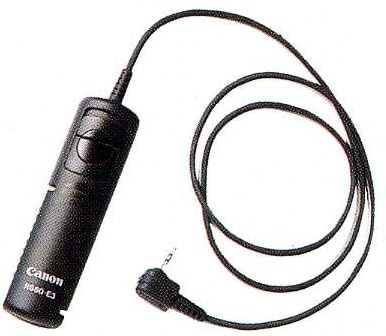
మూర్తి 2: క్లోజ్-అప్ view of the RS-60E3's 2.5mm connector for camera attachment.
3. ఆపరేటింగ్ సూచనలు
The RS-60E3 Remote Switch provides full control over your camera's shutter release, mimicking the functionality of the camera's built-in shutter button.
- Half-Press for Focus: Gently press the shutter button on the remote switch halfway down to activate your camera's autofocus system. The camera will focus on your subject.
- Full-Press for Shutter: Once focused, press the shutter button fully down to release the shutter and capture an image.
- Bulb Mode / Continuous Shooting (Running Lock): For extended exposures (Bulb mode) or continuous shooting, press the shutter button fully down and then slide it forward into the 'RUNNING LOCK' position. This will keep the shutter open or trigger continuous shots according to your camera's settings. To stop, slide the button back to its original position.
వీడియో 1: ఉత్పత్తి ముగిసిందిview demonstrating the Canon RS-60E3 Remote Switch's features and operation.
4. నిర్వహణ
- శుభ్రపరచడం: Use a soft, dry cloth to clean the remote switch. Avoid using liquid cleaners or solvents.
- నిల్వ: Store the remote switch in a cool, dry place away from direct sunlight and extreme temperatures. Neatly coil the cable to prevent tangling or damage.
- నిర్వహణ: Avoid dropping the device or subjecting it to strong impacts. Do not pull on the cable forcefully.
5. ట్రబుల్షూటింగ్
- రిమోట్ స్పందించడం లేదు:
- Ensure the 2.5mm jack is fully and securely inserted into the camera's remote control terminal.
- Verify that your camera is powered on and in a compatible shooting mode.
- Check your camera's settings to ensure external remote control is enabled, if applicable.
- అడపాదడపా కనెక్షన్:
- Inspect the cable and connector for any visible signs of damage, such as bends, cuts, or corrosion.
- Try re-inserting the jack firmly.
6. స్పెసిఫికేషన్లు
| బ్రాండ్: | కానన్ |
| మోడల్ పేరు: | RS-60E3 Remote Switch |
| మోడల్ సంఖ్య: | 2469A002AA |
| కనెక్టివిటీ టెక్నాలజీ: | వైర్డు |
| కేబుల్ పొడవు: | సుమారు 2 అడుగులు (0.6 మీటర్లు) |
| వస్తువు బరువు: | 0.05 పౌండ్లు (సుమారు 23 గ్రాములు) |
| అంశం కొలతలు (L x W x H): | 5.9"L x 0.8"W x 0.2"H (approx. 15cm x 2cm x 0.5cm) |
| అనుకూల పరికరాలు: | Canon EOS Rebel, EOS Elan, EOS IX series cameras (e.g., Rebel 2000, Rebel X/XS, Rebel G, Elan II, Elan IIe, EOS IX) |
| తయారీదారు: | Canon Cameras US |
7. పెట్టెలో ఏముంది
- 1x Canon RS-60E3 Remote Switch
8. వారంటీ మరియు మద్దతు
The product warranty typically covers manufacturing defects. Please note that the warranty does not cover misuse of the product.
For detailed warranty information, product registration, or technical assistance, please refer to the official Canon website or contact Canon customer service directly. You may also consult your camera's user manual for specific instructions regarding remote control accessories.


