
1. పరిచయం
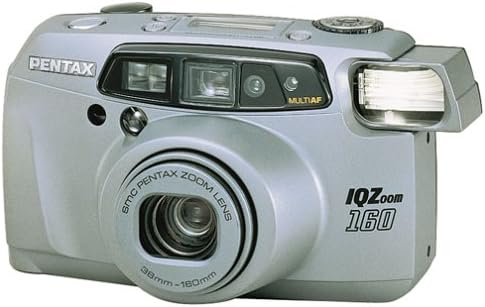
The Pentax IQ Zoom 160 is a compact 35mm film camera designed for ease of use and versatility. It features a powerful 38-160mm zoom lens, an advanced autofocus system, and various shooting modes to capture a wide range of photographic situations. This manual provides detailed instructions for the proper operation and care of your camera.

మూర్తి 1: ముందు view of the Pentax IQ Zoom 160 camera, showing the lens, flash, and viewఫైండర్.
ముఖ్య లక్షణాలు:
- 38-160mm power zoom lens for versatile framing.
- Five-point passive autofocus system for precise focusing.
- Six-segment multipattern metering system for optimal exposure.
- Automatic backlight compensation.
- Actual-image zoom viewfinder with diopter adjustment.
- వైడ్-యాంగిల్ షాట్ల కోసం పనోరమా మోడ్.
- Multiexposure mode for creative effects.
- Self-timer function.
- Easy-to-read LCD instruction panel with automatic illumination.
2. సెటప్
2.1. బ్యాటరీ ఇన్స్టాలేషన్
The Pentax IQ Zoom 160 requires one 3V Lithium battery, type CR123A or SF123A. Ensure the battery is inserted with the correct polarity as indicated inside the battery compartment.
- కెమెరా దిగువన బ్యాటరీ కంపార్ట్మెంట్ కవర్ను గుర్తించండి.
- Slide or twist the cover latch to open the compartment.
- Insert one CR123A/SF123A battery, matching the (+) and (-) terminals with the indicators.
- బ్యాటరీ కంపార్ట్మెంట్ కవర్ సరిగ్గా అమర్చబడే వరకు దాన్ని సురక్షితంగా మూసివేయండి.
చిత్రం 2: దిగువ view of the camera, showing the battery compartment and tripod mount.
2.2. ఫిల్మ్ లోడ్ అవుతోంది
The camera uses standard 35mm film rolls. Always load film in subdued light to prevent accidental exposure.
- Open the camera back by sliding the film door release latch (usually on the side or top of the camera).
- ఎడమ వైపున ఉన్న ఫిల్మ్ చాంబర్లో కొత్త 35mm ఫిల్మ్ కార్ట్రిడ్జ్ను ఉంచండి.
- ఫిల్మ్ లీడర్ను కుడి వైపున ఉన్న ఫిల్మ్ టేక్-అప్ స్పూల్కి అడ్డంగా లాగండి, అది స్పూల్ దంతాలకు అతుక్కుపోయేలా చూసుకోండి.
- Close the camera back firmly until it latches. The camera will automatically advance the film to the first frame. The exposure counter on the LCD panel will display "1".

చిత్రం 3: వెనుక view of the camera, showing the viewfinder and film door release.
3. కెమెరాను ఆపరేట్ చేయడం
3.1. పవర్ ఆన్/ఆఫ్ మరియు మోడ్ ఎంపిక
The user-friendly mode dial allows you to turn the camera on and off, and select various shooting modes.

మూర్తి 4: టాప్ view of the camera, highlighting the mode dial and LCD instruction panel.
- పవర్ ఆన్: Rotate the mode dial from "OFF" to any desired shooting mode (e.g., Auto). The lens will extend.
- పవర్ ఆఫ్: Rotate the mode dial to "OFF". The lens will retract.
- Mode Dial Settings: The dial typically includes modes such as Auto, Red-eye Reduction, Flash Off, Self-timer, and Multiexposure. Refer to the icons on the dial for specific functions.
3.2. Taking Pictures
- Aim the Camera: ద్వారా చూడండి viewమీ విషయాన్ని కనుగొని ఫ్రేమ్ చేయండి.
- జూమ్: Use the zoom buttons (usually marked 'W' for Wide and 'T' for Telephoto) to adjust the focal length of the 38-160mm lens.
- దృష్టి: Lightly press the shutter button halfway down. The camera's five-point passive autofocus system will focus on the subject. A focus indicator in the viewఫైండర్ దృష్టిని నిర్ధారిస్తుంది.
- షూట్: చిత్రాన్ని తీయడానికి షట్టర్ బటన్ను పూర్తిగా క్రిందికి నొక్కండి.
3.3. ఫ్లాష్ మోడ్లు
The built-in flash provides illumination in low-light conditions. The camera features automatic backlight compensation, firing the flash when necessary to properly expose the subject.
- ఆటోమేటిక్ ఫ్లాష్: The camera automatically determines if flash is needed.
- రెడ్-ఐ తగ్గింపు: Fires a pre-flash before the main flash to reduce red-eye effect.
- ఫ్లాష్ ఆఫ్: Prevents the flash from firing, useful in situations where flash is prohibited or undesirable.
3.4. Special Shooting Functions
- పనోరమా మోడ్: Switch to panorama mode via the mode dial or a dedicated button. The viewfinder will adjust to show the panorama framing area. This mode allows for wider aspect ratio images.
- నేనే-టైమర్: Activate the self-timer (typically 10 seconds) using the mode dial or a dedicated button. The camera will delay taking the picture, allowing the photographer to be included in the shot.
- Multiexposure Mode: This creative mode allows you to combine two or more exposures onto a single frame of film. Consult the LCD instruction panel for guidance on activating and using this feature.
3.5 Viewfinder and LCD Panel
The actual-image zoom viewఫైండర్ స్పష్టంగా అందిస్తుంది view of your subject and includes a diopter adjustment for users with varying eyesight. The large LCD instruction panel displays essential camera settings and indicators, such as exposure counter, battery exhaustion warning, flash status, and selected mode. It automatically lights up for visibility in any lighting condition.
4. నిర్వహణ
4.1. కెమెరాను శుభ్రపరచడం
- లెన్స్: Use a soft, lint-free cloth or a lens brush to gently remove dust. For smudges, use a specialized lens cleaning solution and cloth. Avoid touching the lens surface with your fingers.
- కెమెరా బాడీ: కెమెరా బాడీని మృదువైన, పొడి వస్త్రంతో తుడవండి. మొండి ధూళి కోసం, కొద్దిగా dampen నీటితో వస్త్రం. ద్రావకాలు లేదా రాపిడి క్లీనర్లను ఉపయోగించవద్దు.
- Viewఫైండర్: Use a soft brush or air blower to remove dust from the viewఫైండర్ ఐపీస్.
4.2. నిల్వ
- When not in use for extended periods, remove the battery to prevent leakage.
- Store the camera in a cool, dry place, away from direct sunlight, high humidity, and extreme temperatures.
- Use a camera bag or case to protect the camera from dust and physical damage.
5. ట్రబుల్షూటింగ్
| సమస్య | పరిష్కారం | |
|---|---|---|
| కెమెరా పవర్ ఆన్ అవ్వదు. | డెడ్ లేదా తప్పుగా చొప్పించిన బ్యాటరీ. | Replace battery with a fresh CR123A/SF123A, ensuring correct polarity. |
| సినిమా ముందుకు సాగదు. | Film not properly loaded or end of roll. | Re-load film, ensuring the leader catches the take-up spool. Check if the film counter shows 'S' or 'E'. |
| చిత్రాలు అస్పష్టంగా ఉన్నాయి. | Camera shake, subject too close, or focus error. | Hold camera steady, ensure subject is within focusing range, or use a tripod. Ensure focus confirmation appears before shooting. |
| ఫ్లాష్ వెలగదు. | Flash is set to "Flash Off" mode or battery is low. | Check flash mode setting. Replace battery if low. |
| ఫోటోలలో రెడ్-ఐ. | Flash fired directly at subject's eyes. | Use Red-eye Reduction flash mode. Increase ambient lighting if possible. |
6. స్పెసిఫికేషన్లు
| జనరల్ | |
|---|---|
| బ్రాండ్ | పెంటాక్స్ |
| మోడల్ పేరు | IQ Zoom 160 |
| మోడల్ సంఖ్య | 10124 |
| ఫారమ్ ఫ్యాక్టర్ | కాంపాక్ట్ |
| వస్తువు బరువు | 16 ఔన్సులు |
| ఎన్క్లోజర్ మెటీరియల్ | ప్లాస్టిక్ |
| లెన్స్ | |
| లెన్స్ రకం | జూమ్ చేయండి |
| కనిష్ట ఫోకల్ లెంగ్త్ | 38 మిల్లీమీటర్లు |
| గరిష్ట ఫోకల్ పొడవు | 160 మిల్లీమీటర్లు |
| కనిష్ట ఎపర్చరు | 4.5 |
| ఎపర్చరు మోడ్లు | 4.5-12 |
| Exposure & Focus | |
| ఎక్స్పోజర్ నియంత్రణ | ఆటోమేటిక్ |
| మీటరింగ్ పద్ధతులు | Spot, Multi-pattern |
| కనీస షట్టర్ వేగం | 1/400 సెకన్లు |
| గరిష్ట షట్టర్ వేగం | 2 సెకన్లు |
| ఆటో ఫోకస్ టెక్నాలజీ | కాంట్రాస్ట్ డిటెక్షన్, మల్టీ ఏరియా, సెన్సార్ |
| ఆటో ఫోకస్ పాయింట్లు | 5 |
| ఫోకస్ మోడ్ | Single-Servo AF (AF-S) |
| వైట్ బ్యాలెన్స్ సెట్టింగ్లు | ఆటో |
| విస్తరించిన ISO కనిష్ట | 100 |
| ఫ్లాష్ | |
| కెమెరా ఫ్లాష్ | అంతర్నిర్మిత |
| ఫ్లాష్ మోడ్లు | Automatic, Red Eye Reduction |
| ఫ్లాష్ సమకాలీకరణ వేగం | 1/400 సెకన్లు |
| ఇతర ఫీచర్లు | |
| Viewకనుగొనేవాడు | ఆప్టికల్ |
| ప్రదర్శన రకం | LCD |
| సెల్ఫ్ టైమర్ | 10 సెకన్లు |
| షూటింగ్ మోడ్లు | Automatic, Panorama, Multiexposure, Self-timer |
| ప్రత్యేక ఫీచర్ | పనోరమా |
| బ్యాటరీ రకం | 3V Lithium CR123A/SF123A |
| నీటి నిరోధక స్థాయి | వాటర్ రెసిస్టెంట్ కాదు |
| ఇమేజ్ స్టెబిలైజేషన్ ఉంది | నం |
7. వారంటీ మరియు మద్దతు
For specific warranty information, please refer to the documentation included with your purchase or visit the official Pentax website. For technical support or service inquiries, please contact Pentax customer service directly.
You can often find additional support resources, FAQs, and contact information on the manufacturer's official webసైట్.