
1. పరిచయం
Thank you for choosing the Solac A-018-G2 Portable Bagless Vacuum Cleaner. This manual provides essential information for the safe and efficient use of your appliance. Please read these instructions carefully before operating the vacuum cleaner and retain them for future reference.
The Solac A-018-G2 is designed for effective cleaning of various surfaces, including carpets and hard floors, offering portability and convenience with its bagless design.
2. ముఖ్యమైన భద్రతా సూచనలు
అగ్ని ప్రమాదాలు, విద్యుత్ షాక్ లేదా గాయం ప్రమాదాన్ని తగ్గించడానికి విద్యుత్ ఉపకరణాలను ఉపయోగిస్తున్నప్పుడు ఎల్లప్పుడూ ప్రాథమిక భద్రతా జాగ్రత్తలను అనుసరించండి.
- వాల్యూమ్ నిర్ధారించుకోండిtage indicated on the vacuum cleaner matches your local mains voltagఇ కనెక్ట్ చేయడానికి ముందు.
- తడి ఉపరితలాలపై లేదా ద్రవాలను తీయడానికి వాక్యూమ్ క్లీనర్ను ఉపయోగించవద్దు.
- సిగరెట్లు, అగ్గిపుల్లలు లేదా వేడి బూడిద వంటి కాలుతున్న లేదా ధూమపానం చేసే వస్తువులను తీసుకోవద్దు.
- జుట్టు, వదులుగా ఉండే దుస్తులు, వేళ్లు మరియు శరీరంలోని అన్ని భాగాలను ఓపెనింగ్స్ మరియు కదిలే భాగాలకు దూరంగా ఉంచండి.
- ఉపయోగంలో లేనప్పుడు మరియు శుభ్రం చేయడానికి లేదా సర్వీసింగ్ చేయడానికి ముందు అవుట్లెట్ నుండి అన్ప్లగ్ చేయండి.
- దెబ్బతిన్న త్రాడు లేదా ప్లగ్తో వాక్యూమ్ క్లీనర్ను ఆపరేట్ చేయవద్దు.
- ఈ ఉపకరణం గృహ వినియోగం కోసం మాత్రమే.
3. ఉత్పత్తి ముగిసిందిview మరియు భాగాలు
Familiarize yourself with the main unit and its accessories.
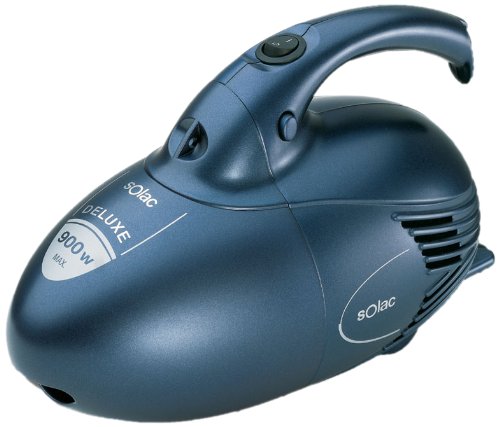
మూర్తి 3.1: The compact main unit of the Solac A-018-G2 vacuum cleaner, featuring its portable design.
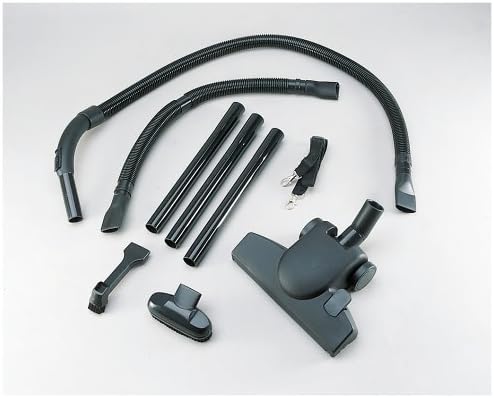
మూర్తి 3.2: Included accessories for the Solac A-018-G2, featuring flexible hoses, extension wands, a floor nozzle, a crevice tool, a brush tool, and a shoulder strap for versatile cleaning.
భాగాలు:
- ప్రధాన వాక్యూమ్ యూనిట్
- Flexible Hoses (various lengths)
- పొడిగింపు వాండ్లు
- అంతస్తు నాజిల్
- చీలిక సాధనం
- బ్రష్ సాధనం
- భుజం పట్టీ
- పవర్ కార్డ్
4. సెటప్ మరియు అసెంబ్లీ
Follow these steps to assemble your Solac A-018-G2 vacuum cleaner for first use:
- గొట్టాన్ని అటాచ్ చేయండి: Insert one end of the flexible hose firmly into the suction inlet on the main vacuum unit until it clicks into place.
- Connect Extension Wands (Optional): For extended reach, connect the extension wands to the free end of the flexible hose. Ensure they are securely fitted.
- క్లీనింగ్ టూల్ అటాచ్ చేయండి: Select the appropriate cleaning tool (floor nozzle, crevice tool, or brush tool) and attach it to the end of the extension wand or directly to the hose if not using wands.
- Attach Shoulder Strap (Optional): For portable use, attach the shoulder strap to the designated points on the main unit.
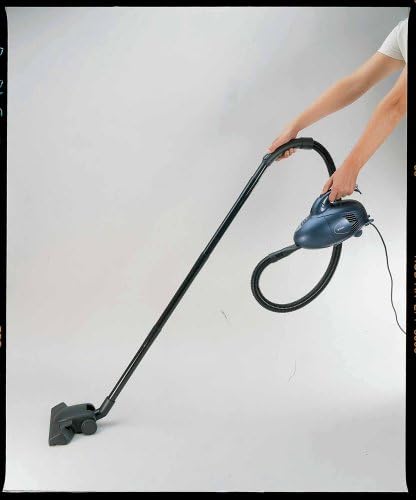
మూర్తి 4.1: Demonstration of the Solac A-018-G2 vacuum cleaner assembled with extension wands and floor nozzle, ready for use.
5. ఆపరేటింగ్ సూచనలు
- పవర్ కనెక్షన్: Plug the power cord into a suitable 220-volt electrical outlet.
- పవర్ ఆన్/ఆఫ్: Locate the power switch on the main unit and press it to turn the vacuum cleaner ON. Press it again to turn OFF.
- శుభ్రపరచడం: Guide the chosen cleaning tool over the surface to be cleaned. The powerful suction will collect dust and debris into the bagless dust container.
- పోర్టబుల్ ఉపయోగం: For handheld cleaning or reaching high areas, use the shoulder strap to carry the main unit, or detach extension wands for a more compact setup.
- ఉపయోగం తర్వాత: వాక్యూమ్ క్లీనర్ను ఆపివేసి, పవర్ అవుట్లెట్ నుండి దాన్ని తీసివేయండి.
6. నిర్వహణ మరియు శుభ్రపరచడం
క్రమం తప్పకుండా నిర్వహణ సరైన పనితీరును నిర్ధారిస్తుంది మరియు మీ వాక్యూమ్ క్లీనర్ యొక్క జీవితాన్ని పొడిగిస్తుంది.
డస్ట్ కంటైనర్ను ఖాళీ చేయడం:
- వాక్యూమ్ క్లీనర్ అన్ప్లగ్ చేయబడిందని నిర్ధారించుకోండి.
- ప్రధాన యూనిట్లో డస్ట్ కంటైనర్ విడుదల బటన్ లేదా లాచ్ను గుర్తించండి.
- Remove the dust container and empty its contents into a waste bin.
- డస్ట్ కంటైనర్ దాని స్థానంలో క్లిక్ అయ్యే వరకు సురక్షితంగా తిరిగి అటాచ్ చేయండి.
ఫిల్టర్ శుభ్రపరచడం:
The Solac A-018-G2 features a bagless design with a washable filter. Clean the filter regularly to maintain suction power.
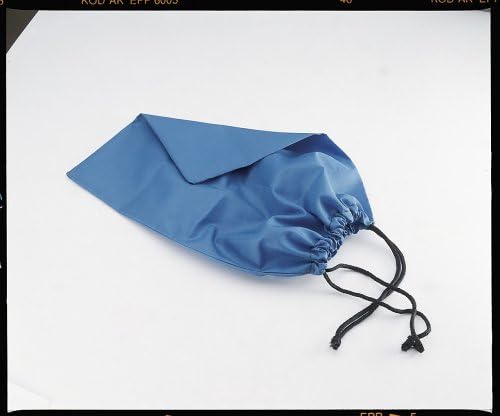
మూర్తి 6.1: A blue fabric component, likely part of the filter system or a protective cover for the filter, which requires regular cleaning.
- వాక్యూమ్ క్లీనర్ను అన్ప్లగ్ చేయండి.
- పైన వివరించిన విధంగా దుమ్ము డబ్బాను తొలగించండి.
- Carefully remove the filter assembly from the dust container.
- వదులుగా ఉన్న దుమ్మును తొలగించడానికి చెత్త డబ్బాపై ఫిల్టర్ను సున్నితంగా తట్టండి.
- If heavily soiled, rinse the filter under cold running water. Do not use detergents.
- ఫిల్టర్ను తిరిగి చొప్పించే ముందు కనీసం 24 గంటలు గాలిలో పూర్తిగా ఆరనివ్వండి. హెయిర్ డ్రయ్యర్ లేదా ఇతర తాపన పరికరాలను ఉపయోగించవద్దు.
- Reassemble the filter and dust container, then attach them back to the main unit.
శుభ్రపరిచే ఉపకరణాలు:
Wipe down hoses, wands, and nozzles with a damp cloth as needed. Ensure all parts are dry before storage.
7. ట్రబుల్షూటింగ్
| సమస్య | సాధ్యమైన కారణం | పరిష్కారం |
|---|---|---|
| వాక్యూమ్ క్లీనర్ ఆన్ చేయదు. | విద్యుత్ సరఫరా లేదు. | ప్లగ్ అవుట్లెట్లోకి సురక్షితంగా చొప్పించబడిందో లేదో తనిఖీ చేయండి. మరొక ఉపకరణంతో అవుట్లెట్ను పరీక్షించండి. |
| తక్కువ చూషణ శక్తి. | Dust container is full. Filter is clogged. Hose or attachment is blocked. | Empty the dust container. Clean or replace the filter. Check hoses and attachments for blockages and remove them. |
| ఆపరేషన్ సమయంలో అసాధారణ శబ్దం. | గొట్టం లేదా నాజిల్లో అడ్డుపడటం. మోటారు సమస్య. | Turn off and unplug the unit. Check for and remove any blockages. If the noise persists, contact customer support. |
If you encounter problems not listed here, or if the suggested solutions do not resolve the issue, please contact Solac customer support.
8. స్పెసిఫికేషన్లు
- బ్రాండ్: సోలాక్
- మోడల్ సంఖ్య: A018G2
- మోడల్ పేరు: a018
- ప్రత్యేక ఫీచర్: Portable, Bagless
- ఉపరితల సిఫార్సు: Carpet, Hard floor
- వాల్యూమ్tage: 220 వోల్ట్లు
- వాట్tagఇ/పవర్: 900 వాట్స్
- వస్తువు బరువు: 3.31 పౌండ్లు (సుమారు 1.5 కిలోలు)
- ఫారమ్ ఫ్యాక్టర్: హ్యాండ్హెల్డ్
- శబ్దం స్థాయి: 79 డెసిబెల్స్
- తయారీదారు: Taurus ES
9. వారంటీ మరియు కస్టమర్ మద్దతు
For information regarding your product's warranty, please refer to the warranty card included with your purchase or visit the official Solac website. For technical assistance, spare parts, or any other inquiries, please contact Solac customer support through their official channels.