
పరిచయం
Welcome to your Sharper Image Travel Soother 20 Radio/Alarm Clock. This manual provides detailed instructions for the proper setup, operation, and maintenance of your device. Please read this manual thoroughly before use and retain it for future reference.
భద్రతా సమాచారం
- యూనిట్ను తీవ్రమైన ఉష్ణోగ్రతలు, ప్రత్యక్ష సూర్యకాంతి లేదా అధిక తేమకు గురిచేయవద్దు.
- యూనిట్ను పడవేయడం లేదా బలమైన ప్రభావాలకు గురిచేయడం మానుకోండి.
- యూనిట్ను విడదీయవద్దు. అన్ని సర్వీసింగ్లను అర్హత కలిగిన సిబ్బందికి సూచించండి.
- Use only the specified power adapter (DC 6V) or batteries (4x AA 1.5V).
- యూనిట్ను నీరు లేదా ఇతర ద్రవాలకు దూరంగా ఉంచండి.
ప్యాకేజీ విషయాలు
- Sharper Image Travel Soother 20 Unit
- వినియోగదారు మాన్యువల్
ఉత్పత్తి ముగిసిందిview
Familiarize yourself with the various parts of your Travel Soother 20 unit.
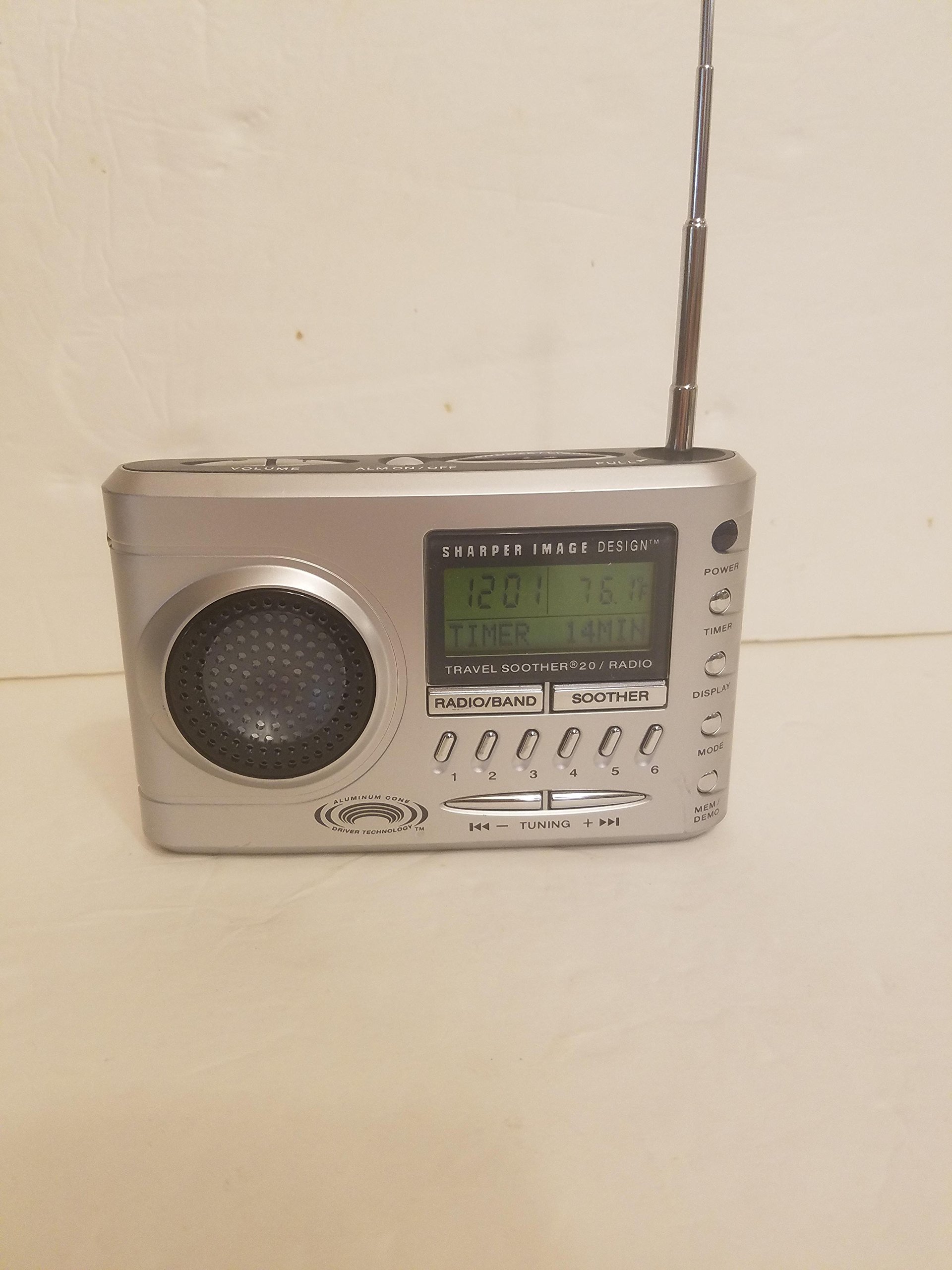
చిత్రం: ముందు భాగం view of the Sharper Image Travel Soother 20 Radio/Alarm Clock. This shows the display, speakers, and control buttons.
The back panel of the unit features the battery compartment, power input, and regulatory information. Specifically, it indicates the model number SI621, requires a DC 6V adapter, and uses four AA 1.5V batteries.
సెటప్
పరికరాన్ని శక్తివంతం చేస్తోంది
Your Travel Soother 20 can be powered by either batteries or an AC adapter.
- బ్యాటరీ ఇన్స్టాలేషన్: Open the battery compartment on the back of the unit. Insert four (4) AA 1.5V batteries, ensuring correct polarity (+/-). Close the compartment securely.
- AC అడాప్టర్ కనెక్షన్: Connect a DC 6V power adapter (not always included) to the DC IN jack on the back of the unit. Plug the adapter into a standard wall outlet.
Note: When both batteries and AC adapter are connected, the unit will primarily draw power from the AC adapter.
సమయాన్ని సెట్ చేస్తోంది
- నొక్కండి మరియు పట్టుకోండి టైమ్ సెట్ బటన్.
- పట్టుకొని ఉండగా టైమ్ సెట్, ఉపయోగించండి గంట మరియు నిమిషం ప్రస్తుత సమయాన్ని సర్దుబాటు చేయడానికి బటన్లు.
- విడుదల చేయండి టైమ్ సెట్ నిర్ధారించడానికి బటన్.
ఆపరేటింగ్ సూచనలు
రేడియో ఆపరేషన్
- నొక్కండి రేడియో రేడియోను ఆన్ చేయడానికి బటన్.
- నొక్కండి AM/FM to select the desired band.
- ఉపయోగించండి ట్యూన్ +/- స్టేషన్కు మాన్యువల్గా ట్యూన్ చేయడానికి బటన్లు లేదా అందుబాటులో ఉన్న తదుపరి స్టేషన్ కోసం ఆటో-స్కాన్ చేయడానికి నొక్కి పట్టుకోండి.
- ప్రీసెట్ను సేవ్ చేయడానికి: కావలసిన స్టేషన్కు ట్యూన్ చేసి, ఆపై నొక్కి పట్టుకోండి a ప్రీసెట్ button (e.g., 1-5) until the display flashes.
- ప్రీసెట్ను రీకాల్ చేయడానికి: సంబంధిత ప్రీసెట్ బటన్.
అలారం గడియారం విధులు
- అలారం సెట్ చేయడం: నొక్కండి మరియు పట్టుకోండి అలారం సెట్ button. While holding, use the గంట మరియు నిమిషం buttons to set the alarm time. Release to confirm.
- యాక్టివేట్ చేయడం/డియాక్టివేట్ చేయడం అలారం: నొక్కండి అలారం ఆన్ / ఆఫ్ button to toggle the alarm. An alarm icon will appear on the display when active.
- తాత్కాలికంగా ఆపివేయి ఫంక్షన్: అలారం మోగినప్పుడు, నొక్కండి స్నూజ్ button to temporarily silence it for a few minutes.
- అలారం ఆపడం: కాకుండా ఏదైనా ఇతర బటన్ను నొక్కండి స్నూజ్ to stop the alarm for the day. It will reactivate the next day if still enabled.
Sound Soother Functions
- నొక్కండి SOOTHER button to activate the sound soother.
- నొక్కండి SOOTHER button repeatedly to cycle through available sound options (e.g., Rain, Thunderstorm, Summer Night, City).
- ఉపయోగించండి వాల్యూమ్ +/- ధ్వని స్థాయిని సర్దుబాటు చేయడానికి బటన్లు.
- నొక్కండి SOOTHER button until the display shows 'OFF' to deactivate.
నిర్వహణ
- శుభ్రపరచడం: మెత్తటి, పొడి గుడ్డతో యూనిట్ను తుడవండి. రాపిడి క్లీనర్లు లేదా ద్రావకాలను ఉపయోగించవద్దు.
- బ్యాటరీ భర్తీ: Replace all four AA batteries simultaneously when the display dims or the unit malfunctions on battery power. Do not mix old and new batteries.
- నిల్వ: యూనిట్ను ఎక్కువ కాలం నిల్వ ఉంచినట్లయితే, లీకేజీని నివారించడానికి బ్యాటరీలను తీసివేయండి.
ట్రబుల్షూటింగ్
| సమస్య | పరిష్కారం |
|---|---|
| యూనిట్ పవర్ ఆన్ చేయదు. | Check battery installation and polarity. Ensure AC adapter is securely connected and the outlet is functional. |
| పేలవమైన రేడియో రిసెప్షన్. | Extend the antenna fully. Reposition the unit for better signal. Try tuning manually. |
| అలారం మోగడం లేదు. | Ensure the alarm is activated (alarm icon visible). Verify alarm time is set correctly. Check volume level. |
| Sound soother not working. | Ensure the sound soother is turned on and a sound is selected. Check volume level. |
స్పెసిఫికేషన్లు
- మోడల్: SI621
- పవర్ ఇన్పుట్: DC 6V (adapter, not always included)
- బ్యాటరీ: 4x AA 1.5V (UM-3)
- ప్యాకేజీ కొలతలు: 6.4 x 6.3 x 3.7 అంగుళాలు
- వస్తువు బరువు: 15.7 ఔన్సులు
- ASIN: B00013891I
- మొదటి తేదీ అందుబాటులో ఉంది: ఫిబ్రవరి 26, 2010
FCC వర్తింపు ప్రకటన
ఈ పరికరం FCC నియమాలలో పార్ట్ 15కి అనుగుణంగా ఉంటుంది. ఆపరేషన్ క్రింది రెండు షరతులకు లోబడి ఉంటుంది: (1) ఈ పరికరం హానికరమైన జోక్యానికి కారణం కాకపోవచ్చు మరియు (2) ఈ పరికరం ఏదైనా జోక్యం చేసుకుంటే తప్పనిసరిగా అంగీకరించాలి, అవాంఛనీయ ఆపరేషన్ కారణం.
వారంటీ మరియు మద్దతు
For warranty information or technical support, please refer to the original product packaging or contact Sharper Image customer service. Keep your purchase receipt as proof of purchase.