
పరిచయం
This manual provides detailed instructions for the safe and effective use of your Pentax Optio S4i 4MP Digital Camera. Please read this manual thoroughly before using the camera and keep it in a safe place for future reference. The Pentax Optio S4i is a compact digital camera featuring a 4-megapixel sensor, 3x optical zoom, and a 1.8-inch LCD monitor, designed for capturing high-quality still images and video.
సెటప్
1. బ్యాటరీ సంస్థాపన మరియు ఛార్జింగ్
The Pentax Optio S4i uses a rechargeable Lithium-Ion battery. Ensure the battery is fully charged before first use.
- కెమెరా దిగువన ఉన్న బ్యాటరీ కంపార్ట్మెంట్ కవర్ను తెరవండి.
- Insert the Lithium-Ion battery with the correct orientation, matching the polarity indicators.
- బ్యాటరీ కంపార్ట్మెంట్ కవర్ను సురక్షితంగా మూసివేయండి.
- Connect the camera to the provided charger or use the external charger to recharge the battery. The charging indicator will show the charging status.

మూర్తి 1: దిగువన view of the camera, illustrating the battery and SD card compartment. This is where the Lithium-Ion battery is inserted and secured.
2. మెమరీ కార్డ్ సంస్థాపన
The camera has 10 MB of built-in memory. For extended storage, an optional Secure Digital (SD) memory card is recommended.
- కెమెరా దిగువన ఉన్న బ్యాటరీ/మెమొరీ కార్డ్ కంపార్ట్మెంట్ కవర్ను తెరవండి.
- Insert the SD card into the designated slot until it clicks into place. Ensure the card is inserted in the correct direction.
- కంపార్ట్మెంట్ కవర్ను సురక్షితంగా మూసివేయండి.
3. ప్రారంభ పవర్ ఆన్
To power on the camera, press the ON/OFF button located on the top panel.

మూర్తి 2: టాప్ view of the camera, highlighting the ON/OFF button. Press this button to power the camera on or off.
ఆపరేటింగ్ సూచనలు
1. స్టిల్ చిత్రాలు తీయడం
The camera features a 4-megapixel sensor and a 3x optical zoom lens for capturing detailed images.
- Turn on the camera. The lens will extend.
- Select your desired shooting mode using the MODE button on the rear panel. The camera offers 21 shooting modes, including automatic exposure control.
- 1.8-అంగుళాల LCD మానిటర్ ఉపయోగించి మీ షాట్ను ఫ్రేమ్ చేయండి.
- Use the zoom lever to adjust the 3x optical zoom. The 4x digital zoom can further extend the magnification up to 12x combined.
- ఫోకస్ చేయడానికి షట్టర్ బటన్ను సగం వరకు నొక్కండి, ఆపై చిత్రాన్ని సంగ్రహించడానికి పూర్తిగా నొక్కండి.

మూర్తి 3: ముందు view of the Pentax Optio S4i with its 3x optical zoom lens extended, ready for capturing images.
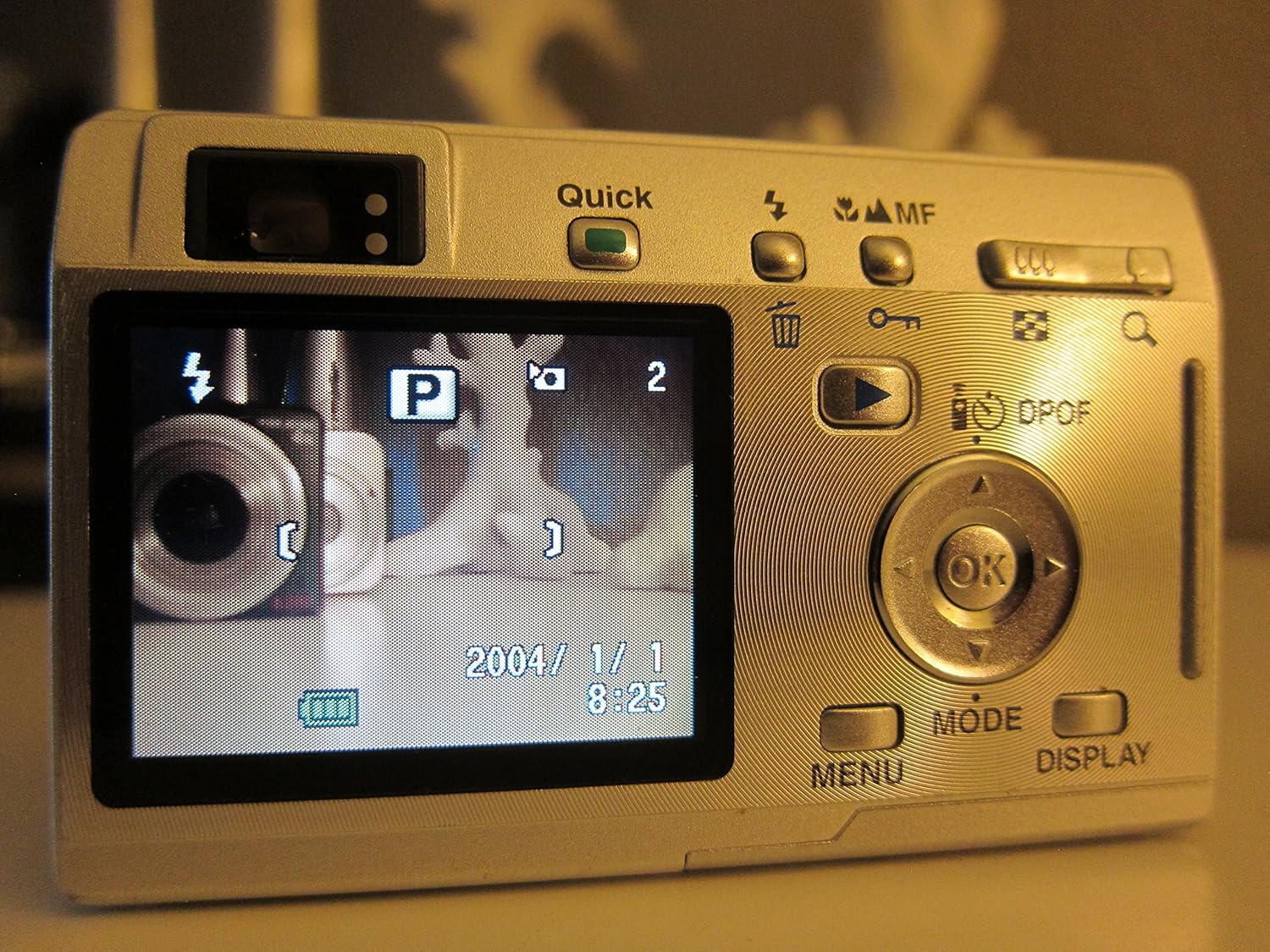
మూర్తి 4: వెనుక view of the camera displaying the LCD screen in shooting mode, with various controls visible for mode selection and navigation.
2. వీడియోలను రికార్డ్ చేయడం
The camera supports movie mode with sound, capturing video at 320 x 240 resolution at 15 frames per second.
- Switch to movie mode using the MODE button.
- రికార్డింగ్ ప్రారంభించడానికి షట్టర్ బటన్ను నొక్కండి.
- రికార్డింగ్ ఆపివేయడానికి షట్టర్ బటన్ను మళ్లీ నొక్కండి.
3. ప్లేబ్యాక్ మోడ్
View your captured photos and videos on the 1.8-inch LCD screen.
- Press the Playback button (often indicated by a triangle icon) to enter playback mode.
- Use the directional pad to navigate through your images and videos.
- OK బటన్ను నొక్కండి view details or play videos.

మూర్తి 5: వెనుక view of the camera with the LCD screen displaying an image in playback mode, showing navigation controls.
4. కంప్యూటర్కు కనెక్ట్ చేస్తోంది
Transfer your images and videos to a computer using the USB connection.
- కెమెరా పవర్ ఆఫ్ చేయబడిందని నిర్ధారించుకోండి.
- Connect the camera to your computer using a compatible USB cable.
- Power on the camera. It should be recognized as a removable storage device.
- బదిలీ చేయండి files as you would from any other external drive.
నిర్వహణ
1. కెమెరాను శుభ్రపరచడం
- కెమెరా బాడీని శుభ్రం చేయడానికి మృదువైన, పొడి వస్త్రాన్ని ఉపయోగించండి.
- లెన్స్ మరియు LCD స్క్రీన్ కోసం, ప్రత్యేకమైన లెన్స్ క్లీనింగ్ క్లాత్ మరియు ద్రావణాన్ని ఉపయోగించండి. రాపిడి పదార్థాలను నివారించండి.
- Do not use organic solvents such as alcohol or paint thinner.
2. బ్యాటరీ సంరక్షణ
- కెమెరాను ఎక్కువ కాలం ఉపయోగించకపోతే బ్యాటరీని తీసివేయండి.
- చల్లని, పొడి ప్రదేశంలో బ్యాటరీలను నిల్వ చేయండి.
- బ్యాటరీలను తీవ్రమైన ఉష్ణోగ్రతలకు గురిచేయకుండా ఉండండి.
3. నిల్వ
- కెమెరాను పొడి, దుమ్ము లేని వాతావరణంలో నిల్వ చేయండి.
- గీతలు మరియు నష్టాన్ని నివారించడానికి రక్షణ కేసును ఉపయోగించండి.
ట్రబుల్షూటింగ్
- కెమెరా పవర్ ఆన్ చేయదు: బ్యాటరీ పూర్తిగా ఛార్జ్ అయిందని మరియు సరిగ్గా చొప్పించబడిందని నిర్ధారించుకోండి.
- చిత్రాలు అస్పష్టంగా ఉన్నాయి: Check that the lens is clean. Ensure the camera has focused correctly before taking the shot. Use appropriate shooting modes for different lighting conditions.
- మెమరీ కార్డ్ లోపం: Reinsert the memory card. If the issue persists, try a different compatible SD card. Ensure the card is not locked.
- Slow shot-to-shot performance: This camera may exhibit slower performance between shots, especially in certain modes or with larger image sizes. This is normal operation.
- కంప్యూటర్కు కనెక్ట్ చేయడం సాధ్యం కాలేదు: Verify the USB cable connection. Ensure the camera is powered on after connecting. Try a different USB port or cable.
స్పెసిఫికేషన్లు
| ఫీచర్ | స్పెసిఫికేషన్ |
|---|---|
| మోడల్ పేరు | Optio S4i |
| ఫోటో సెన్సార్ రిజల్యూషన్ | 4 ఎంపీ |
| ఆప్టికల్ జూమ్ | 3x |
| డిజిటల్ జూమ్ | 4x (12x combined) |
| స్క్రీన్ పరిమాణం | 1.8 అంగుళాలు |
| సెన్సార్ రకం | సిసిడి (1/2.5-అంగుళాలు) |
| చిత్రం స్థిరీకరణ | డిజిటల్, ఆప్టికల్ |
| మద్దతు ఇచ్చారు File ఫార్మాట్ | JPEG, రా |
| వీడియో రిజల్యూషన్ | 320 x 240, 15 fps, audio |
| కనీస షట్టర్ వేగం | 4 సెకన్లు |
| గరిష్ట షట్టర్ వేగం | 1/2000 సెకన్లు |
| విస్తరించిన ISO పరిధి | 50 - 400 |
| నిల్వ మీడియా | SD/MMC card, 10 MB Internal |
| బ్యాటరీ రకం | Lithium Ion (rechargeable) |
| కనెక్టివిటీ | USB |
| వస్తువు బరువు | 0.26 పౌండ్లు |
వారంటీ మరియు మద్దతు
For information regarding warranty coverage, technical support, or service, please refer to the official Pentax website or contact your local Pentax dealer. Specific warranty terms may vary by region and purchase date.
You can visit the official Pentax store for more information: పెంటాక్స్ స్టోర్