
1. పరిచయం
Thank you for choosing the TFA Dostmann Digital Weather Station 35.1065. This device provides accurate indoor temperature, humidity, time, date, and a weather trend forecast. Please read this manual carefully before using the device to ensure proper operation and to prevent damage.
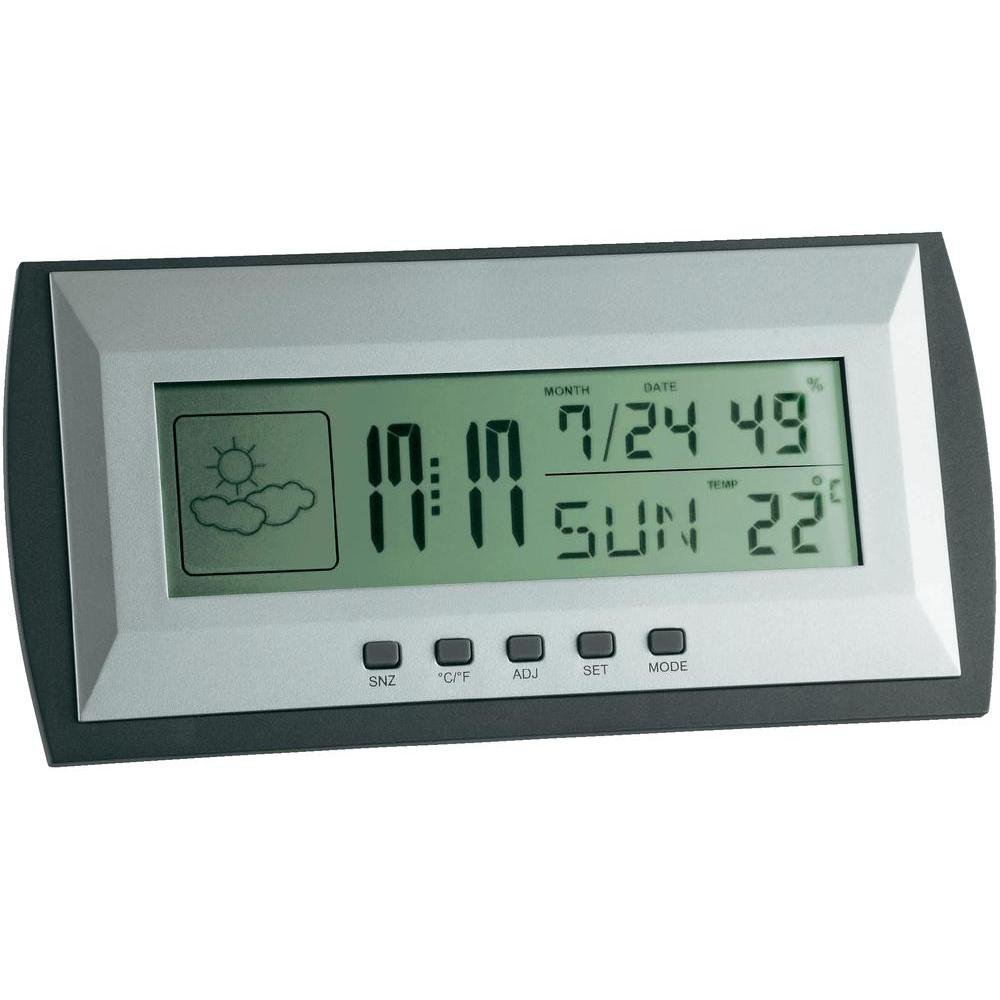
Figure 1: TFA Dostmann Digital Weather Station 35.1065 on a wooden desk. This image shows the weather station displaying time, date, and weather information in a typical home or office setting.
2. భద్రతా సమాచారం
- భవిష్యత్తు సూచన కోసం ఈ మాన్యువల్ని ఉంచండి.
- పరికరాన్ని విపరీతమైన ఉష్ణోగ్రతలు, వైబ్రేషన్లు లేదా షాక్లకు గురి చేయవద్దు.
- ప్రత్యక్ష సూర్యకాంతి మరియు తేమను నివారించండి.
- పరికరాన్ని నీటిలో ముంచవద్దు.
- పరికరాన్ని మీరే రిపేర్ చేయడానికి లేదా సవరించడానికి ప్రయత్నించవద్దు. సేవ కోసం అర్హత కలిగిన సిబ్బందిని సంప్రదించండి.
- స్థానిక నిబంధనల ప్రకారం ఉపయోగించిన బ్యాటరీలను పారవేయండి.
3. సెటప్
3.1 ప్యాకేజీ విషయాలు
అన్ని అంశాలు ఉన్నాయని నిర్ధారించుకోండి:
- TFA Dostmann Digital Weather Station 35.1065
- 2 x AA బ్యాటరీలు
- వినియోగదారు మాన్యువల్ (ఈ పత్రం)
3.2 బ్యాటరీ ఇన్స్టాలేషన్
- Locate the battery compartment cover on the back of the weather station.
- కవర్ని స్లైడ్ చేయండి.
- Insert two (2) AA batteries, observing the correct polarity (+ and - markings).
- బ్యాటరీ కంపార్ట్మెంట్ కవర్ను సురక్షితంగా మూసివేయండి.
పరికరం స్వయంచాలకంగా ఆన్ అవుతుంది మరియు ప్రారంభ రీడింగ్లను ప్రదర్శిస్తుంది.
3.3 Initial Settings (Time, Date, Temperature Unit)
Upon first power-on or after battery replacement, you may need to set the time, date, and preferred temperature unit.
- నొక్కండి మరియు పట్టుకోండి సెట్ button for a few seconds to enter setting mode. The digit to be set will flash.
- ఉపయోగించండి ADJ button to adjust the flashing value (e.g., hour, minute, year, month, day).
- నొక్కండి సెట్ సెట్టింగ్ను నిర్ధారించి, తదుపరి పరామితికి తరలించడానికి మళ్ళీ బటన్ను నొక్కండి.
- Repeat steps 2 and 3 until all desired settings (time, date) are configured.
- సెల్సియస్ (°C) మరియు ఫారెన్హీట్ (°F) మధ్య మారడానికి, ° C / ° F. బటన్.
4. వాతావరణ కేంద్రాన్ని నిర్వహించడం
4.1 ప్రదర్శన ముగిసిందిview
The LCD display shows various information:
- సమయం: ప్రస్తుత సమయం 12-గంటల లేదా 24-గంటల ఆకృతిలో.
- తేదీ: Current month, day, and day of the week.
- ఉష్ణోగ్రత: Indoor temperature, displayed in °C or °F.
- తేమ: ఇండోర్ తేమ శాతంtage.
- వాతావరణ సూచన చిహ్నం: Indicates a trend forecast (e.g., sunny, cloudy, rainy). This is a prediction based on atmospheric pressure changes and may not always reflect actual weather.
4.2 బటన్ విధులు
- SNZ (తాత్కాలికంగా ఆపివేయి): Activates the snooze function for the alarm.
- °C/°F: సెల్సియస్ మరియు ఫారెన్హీట్ ఉష్ణోగ్రత డిస్ప్లే మధ్య టోగుల్ చేస్తుంది.
- ADJ (సర్దుబాటు): Used to adjust values during setting mode.
- సెట్: Enters and confirms settings.
- DIRECTIONS: Switches between different display modes (e.g., time, alarm time).
4.3 అలారం సెట్ చేస్తోంది
- నొక్కండి మోడ్ button repeatedly until the alarm time is displayed.
- నొక్కండి మరియు పట్టుకోండి సెట్ బటన్. అలారం గంట ఫ్లాష్ అవుతుంది.
- ఉపయోగించండి ADJ కావలసిన అలారం గంటను సెట్ చేయడానికి బటన్.
- నొక్కండి సెట్ నిర్ధారించి నిమిషాలకు తరలించడానికి.
- ఉపయోగించండి ADJ కావలసిన అలారం నిమిషాలను సెట్ చేయడానికి.
- నొక్కండి సెట్ అలారం సెట్టింగ్ని నిర్ధారించడానికి మరియు నిష్క్రమించడానికి.
- అలారంను యాక్టివేట్/డియాక్టివేట్ చేయడానికి, నొక్కండి ADJ button while the alarm time is displayed. An alarm icon will appear/disappear.
5. నిర్వహణ
5.1 శుభ్రపరచడం
పరికరాన్ని మృదువైన, డితో శుభ్రం చేయండిamp cloth. Do not use abrasive cleaners or solvents. Ensure no water enters the device.
5.2 బ్యాటరీ భర్తీ
When the display becomes dim or the device stops functioning, replace the batteries. Follow the steps in Section 3.2. Always replace both batteries at the same time with new AA batteries.
5.3 నిల్వ
If the device will not be used for an extended period, remove the batteries to prevent leakage and damage. Store in a cool, dry place.
6. ట్రబుల్షూటింగ్
| సమస్య | సాధ్యమైన కారణం | పరిష్కారం |
|---|---|---|
| No display or dim display. | బ్యాటరీలు తక్కువగా ఉన్నాయి లేదా తప్పుగా ఇన్స్టాల్ చేయబడ్డాయి. | బ్యాటరీలను కొత్త వాటితో భర్తీ చేయండి, సరైన ధ్రువణతను నిర్ధారించండి. |
| తప్పు సమయం/తేదీ. | సమయం/తేదీ సరిగ్గా సెట్ చేయబడలేదు. | Refer to Section 3.3 to set the time and date. |
| సరికాని ఉష్ణోగ్రత/తేమ రీడింగ్లు. | Device placed near heat sources, vents, or in direct sunlight. | Relocate the weather station to a stable indoor environment away from extreme temperature fluctuations. Allow time for readings to stabilize. |
| Weather forecast icon seems incorrect. | Weather forecast is a trend prediction based on atmospheric pressure, not a real-time forecast. | Understand that the icon indicates a general trend over the next 12-24 hours, not current conditions. |
7. స్పెసిఫికేషన్లు

Figure 2: TFA Dostmann Digital Weather Station 35.1065 with dimensions. This image provides a detailed view of the device, including its width (18 cm), height (9 cm), and depth (3.81 cm).
- బ్రాండ్: TFA దోస్ట్మాన్
- మోడల్: 35.1065
- శక్తి మూలం: Battery-powered (2 x AA batteries, included)
- మెటీరియల్: ప్లాస్టిక్
- ప్రత్యేక లక్షణాలు: Trend forecast
- ప్రదర్శన రకం: LCD
- అంశం కొలతలు (D x W x H): 3.8 cm x 18 cm x 9 cm
- వస్తువు బరువు: 164 గ్రాములు
- చేర్చబడిన భాగాలు: Weather station, batteries, user manual
- సిఫార్సు చేయబడిన ఉపయోగం: ఇంటి నుంచి పని
- నిర్దిష్ట ఉపయోగాలు: Date, Humidity, Temperature, Time
- మూలం దేశం: చైనా
8. వారంటీ మరియు మద్దతు
For warranty information, please refer to the documentation provided at the time of purchase or visit the official TFA Dostmann website. For technical support or further assistance, please contact TFA Dostmann customer service through their official channels.
Official TFA Dostmann Webసైట్: www.tfa-dostmann.de