
DSC BV300DP
DSC BV-300DP Digital Bravo 300 PIR Motion Detector User Manual
Model: BV-300DP
1. పరిచయం
This manual provides comprehensive instructions for the installation, operation, and maintenance of the DSC BV-300DP Digital Bravo 300 PIR Motion Detector. This device is designed to detect human infrared energy, offering reliable motion detection for security systems.

Image 1: DSC BV-300DP Digital Bravo 300 PIR Motion Detector. This image shows the compact, white casing of the motion detector, designed for discreet wall mounting.
2. భద్రతా సమాచారం
- సంస్థాపన మరియు ఆపరేషన్ ముందు అన్ని సూచనలను జాగ్రత్తగా చదవండి.
- స్థానిక విద్యుత్ కోడ్లకు అనుగుణంగా అర్హత కలిగిన సిబ్బంది ద్వారా సంస్థాపన నిర్వహించబడాలి.
- Disconnect power before servicing the device.
- పరికరాన్ని తీవ్రమైన ఉష్ణోగ్రతలు, తేమ లేదా ప్రత్యక్ష సూర్యకాంతికి బహిర్గతం చేయవద్దు.
- ఈ పరికరం ఇండోర్ ఉపయోగం కోసం మాత్రమే ఉద్దేశించబడింది.
3. ప్యాకేజీ విషయాలు
ఇన్స్టాలేషన్ ప్రారంభించే ముందు అన్ని భాగాలు ఉన్నాయని నిర్ధారించుకోండి:
- DSC BV-300DP Digital Bravo 300 PIR Motion Detector unit
- మౌంటు హార్డ్వేర్ (స్క్రూలు, యాంకర్లు)
- సూచనల మాన్యువల్ (ఈ పత్రం)
4. సెటప్ మరియు ఇన్స్టాలేషన్
4.1 మౌంటు స్థానం
Choose a mounting location that provides optimal coverage and avoids false alarms. Consider the following:
- Mount the detector on a solid wall, typically 7.5 feet (2.3 meters) high.
- Avoid aiming the detector directly at heat sources (heaters, direct sunlight, air vents) or moving objects (curtains, pets).
- Ensure the detection pattern covers the desired area without obstructions.
4.2 Wiring the Detector
The BV-300DP requires a wired connection to your security system. Refer to your security panel's manual for specific wiring zone connections. Typical connections include:
- Power (V+ and V-): Connect to a regulated 12V DC power supply from the security panel.
- Alarm Output (NC/COM): Connect to a normally closed (NC) zone on your security panel.
- Tamper Switch (TAMP): Connect to a tamper zone if your panel supports it, to detect unauthorized opening of the detector casing.
చిత్రం 2: అంతర్గత view of the DSC BV-300DP Motion Detector. This image displays the circuit board and clearly labeled wiring terminals for power, alarm, and tampకనెక్షన్లు.
4.3 Coverage Pattern and Settings
The BV-300DP offers different detection patterns based on its sensitivity settings. The device features patented Multi-Level Signal Processing (MLSP) for accurate detection.

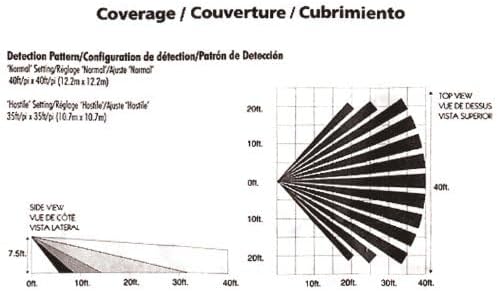
Image 3: Detection Coverage Patterns. This diagram illustrates the top and side views of the detection range for both 'Normal' (40ft x 40ft) and 'Hostile' (35ft x 35ft) sensitivity settings. The side view shows vertical beam shaping for pet immunity.
The detector includes a jumper for sensitivity adjustment, allowing configuration for 'Normal' or 'Hostile' environments. The 'Hostile' setting typically provides a slightly reduced but more focused coverage (e.g., 35ft x 35ft) to minimize false alarms in challenging conditions, while 'Normal' offers broader coverage (e.g., 40ft x 40ft).
పెంపుడు రోగనిరోధక శక్తి: The Vertical Beam Shaping (VBS) feature provides pet immunity for animals up to 60 lbs (27 kg), reducing false alarms caused by pets moving within the protected area.
5. ఆపరేటింగ్ సూచనలు
Once properly installed and powered, the DSC BV-300DP operates automatically as part of your security system. When the system is armed, the detector monitors its coverage area for infrared energy changes indicative of human movement.
- గుర్తింపు: Upon detecting motion, the detector's alarm output will activate, signaling the security panel.
- LED సూచిక: A built-in LED typically illuminates during detection, aiding in walk-testing and troubleshooting.
- Digital Signal Analysis: The detector uses digital signal analysis for consistent detection and digital temperature compensation for improved performance across various temperatures.
6. నిర్వహణ
To ensure optimal performance of your motion detector, perform the following maintenance tasks:
- శుభ్రపరచడం: Periodically wipe the detector's lens and casinదుమ్ము మరియు చెత్తను తొలగించడానికి మృదువైన, పొడి గుడ్డతో జి. రాపిడి క్లీనర్లు లేదా ద్రావకాలను ఉపయోగించవద్దు.
- నడక పరీక్ష: Conduct a walk test annually or after any system changes to confirm the detector's coverage and functionality. Walk through the protected area to ensure the LED indicator illuminates and the alarm is triggered.
- విద్యుత్ సరఫరా: Ensure a stable 12V DC power supply is maintained.
7. ట్రబుల్షూటింగ్
| సమస్య | సాధ్యమైన కారణం | పరిష్కారం |
|---|---|---|
| డిటెక్షన్ లేదు |
|
|
| తప్పుడు అలారాలు |
|
|
| Tamper హెచ్చరిక |
|
|
8. స్పెసిఫికేషన్లు
| ఫీచర్ | వివరాలు |
|---|---|
| మోడల్ | BV-300DP |
| బ్రాండ్ | డీఎస్సీ |
| డిటెక్షన్ టెక్నాలజీ | Digital Passive Infrared (PIR) |
| Coverage (Normal) | Up to 40ft x 40ft (12.2m x 12.2m) |
| Coverage (Hostile) | Up to 35ft x 35ft (10.7m x 10.7m) |
| పెంపుడు జంతువు రోగనిరోధక శక్తి | Up to 60 lbs (27 kg) via Vertical Beam Shaping (VBS) |
| శక్తి మూలం | Corded Electric (typically 12V DC from security panel) |
| మౌంటు రకం | వాల్ మౌంట్ |
| రంగు | తెలుపు |
| ఉత్పత్తి కొలతలు | 3.46 x 14 x 9 inches (approximate, based on packaging) |
| వస్తువు బరువు | 2.39 ఔన్సులు |
| అనుకూల పరికరాలు | Security System, Smart Home Hub, Lighting Control |
9. వారంటీ సమాచారం
DSC products typically come with a limited manufacturer's warranty. Please refer to the warranty card included with your product or visit the official DSC webవివరణాత్మక వారంటీ నిబంధనలు మరియు షరతుల కోసం సైట్ను చూడండి. వారంటీ క్లెయిమ్ల కోసం మీ కొనుగోలు రుజువును ఉంచండి.
10. సాంకేతిక మద్దతు
For technical assistance, troubleshooting beyond this manual, or product inquiries, please contact DSC customer support. Contact information can typically be found on the manufacturer's webసైట్ లేదా ఉత్పత్తి ప్యాకేజింగ్.
Note: Always consult a qualified security professional for complex installations or system integrations.
Ask a question about this manual
Ask about setup, troubleshooting, compatibility, parts, safety, or missing instructions. Manuals+ will review the question and use this page’s manual context to help answer it.