
పరిచయం
This manual provides instructions for the proper use and maintenance of your Presto 04213 Digital Timer. This electronic timer is designed for various timing needs, featuring both countdown and stopwatch functions. It includes an easy-to-read LCD display, an audible alarm, and a memory function for convenience.
ప్యాకేజీ విషయాలు
- Presto 04213 Digital Timer
- 1 AAA బ్యాటరీ (చేర్చబడింది)
సెటప్
బ్యాటరీ సంస్థాపన
- Locate the battery compartment on the back of the timer. This is typically covered by the clip/easel stand.
- Gently open the clip/easel stand to access the battery compartment.
- ఒక AAA బ్యాటరీని చొప్పించండి, పాజిటివ్ (+) మరియు నెగటివ్ (-) టెర్మినల్స్ కంపార్ట్మెంట్ లోపల ఉన్న మార్కింగ్లతో సరిగ్గా సమలేఖనం చేయబడ్డాయని నిర్ధారించుకోండి.
- Close the battery compartment securely. The timer display should now be active.

చిత్రం: వెనుకకు view of the timer with the easel stand deployed, revealing the battery compartment and a separate AAA battery.
ప్లేస్మెంట్ ఎంపికలు
The Presto 04213 Digital Timer offers versatile placement options:
- అయస్కాంత అటాచ్మెంట్: A magnet on the back allows the timer to be attached to metallic surfaces like refrigerators or ovens.
- Easel Stand: The integrated clip can be extended to form an easel stand for tabletop use.
- క్లిప్: The clip can also be used to attach the timer to clothing or other objects.
ఆపరేటింగ్ సూచనలు
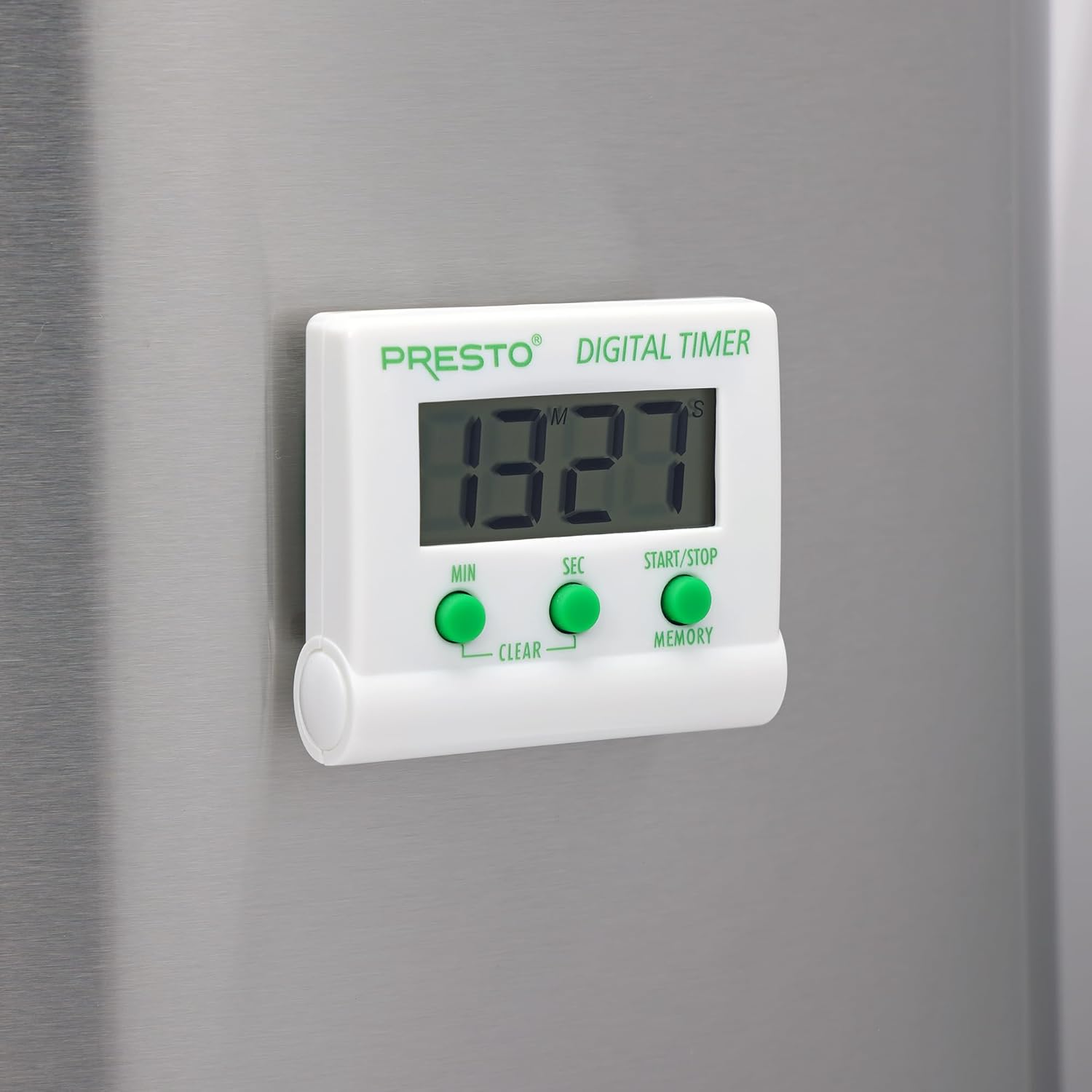
చిత్రం: ముందు భాగం view of the Presto Digital Timer, displaying the time and showing the MIN, SEC, and START/STOP/MEMORY buttons.
కౌంట్డౌన్ టైమర్ని సెట్ చేస్తోంది
- నొక్కండి MIN button to set the desired minutes (up to 99).
- నొక్కండి SEC button to set the desired seconds (up to 59).
- To clear the current time setting, press both MIN మరియు SEC ఏకకాలంలో బటన్లు.
- నొక్కండి START/STOP కౌంట్డౌన్ ప్రారంభించడానికి బటన్.
- When the time reaches zero, an alarm will sound. Press START/STOP అలారంను నిశ్శబ్దం చేయడానికి.
Using the Stopwatch Function (Count-Up)
- Ensure the timer display is set to "00:00". If not, press both MIN మరియు SEC buttons to clear it.
- నొక్కండి START/STOP లెక్కింపు ప్రారంభించడానికి బటన్.
- నొక్కండి START/STOP మళ్ళీ స్టాప్వాచ్ని పాజ్ చేయడానికి.
- పునఃప్రారంభించడానికి, నొక్కండి START/STOP. To reset to "00:00", press both MIN మరియు SEC buttons while the stopwatch is paused.
మెమరీ ఫంక్షన్
The timer automatically stores the last countdown setting. After the alarm sounds and is silenced, or if the timer is stopped before reaching zero, pressing the మెమరీ button will recall the last set countdown time for quick reuse.
ఫీచర్లు
- Counts down from any time up to 99 minutes and 59 seconds.
- Functions as a stopwatch (counts up).
- Easy-to-read digital display shows minutes and seconds.
- Audible alarm signals when countdown is complete.
- Memory feature stores the last countdown setting.
- Versatile design with a convenient clip, easel stand, and magnet for various mounting options.
- Operates on one AAA battery.
నిర్వహణ
క్లీనింగ్
To clean the timer, carefully wipe it with a slightly damp cloth. Do not immerse the timer in water or use abrasive cleaners, as this can damage the electronic components.
బ్యాటరీ భర్తీ
When the display becomes dim or the timer stops functioning, replace the AAA battery following the installation steps in the "Setup" section.
ట్రబుల్షూటింగ్
- టైమర్ ఆన్ కావడం లేదు: Ensure the AAA battery is correctly installed with proper polarity and is not depleted. Replace the battery if necessary.
- డిస్ప్లే మసకగా లేదా ఖాళీగా ఉంది: This indicates a low battery. Replace the AAA battery.
- అలారం మోగడం లేదు: Check if the timer reached zero. Ensure there are no obstructions to the speaker.
- స్పందించని బటన్లు: Ensure the timer is clean and free from debris around the buttons. If the issue persists after battery replacement, contact customer support.
స్పెసిఫికేషన్లు
| మోడల్ సంఖ్య | 04213 |
| బ్రాండ్ | ప్రెస్టో |
| మెటీరియల్ | ప్లాస్టిక్ |
| కొలతలు (D x W x H) | 0.5" x 2.25" x 2.5" |
| వస్తువు బరువు | 2.88 ఔన్సులు |
| శక్తి మూలం | 1 AAA బ్యాటరీ |
| Max Countdown | 99 నిమిషాల 59 సెకన్లు |
| రంగు | తెలుపు |

Image: The Presto Digital Timer with its dimensions (2.5" H, 2.25" W, 0.5" D) clearly indicated.
వారంటీ మరియు మద్దతు
వారంటీ సమాచారం
This Presto 04213 Digital Timer comes with a 1-సంవత్సరం పరిమిత వారంటీ from the date of purchase. This warranty covers defects in materials and workmanship under normal use. It does not cover damage resulting from misuse, accident, alteration, or unauthorized repair.
కస్టమర్ మద్దతు
For warranty claims, technical assistance, or any questions regarding your Presto Digital Timer, please contact Presto customer service. Refer to the official Presto webఅత్యంత తాజా సంప్రదింపు సమాచారం కోసం సైట్ లేదా ఉత్పత్తి ప్యాకేజింగ్.
మీరు కూడా సందర్శించవచ్చు Presto Store on Amazon అదనపు ఉత్పత్తి సమాచారం మరియు మద్దతు వనరుల కోసం.