
1. పరిచయం
Thank you for choosing the Domo DO9089W Digital Kitchen Scale. This manual provides essential information for the safe and efficient operation, maintenance, and troubleshooting of your new kitchen scale. Please read these instructions carefully before first use and keep them for future reference.
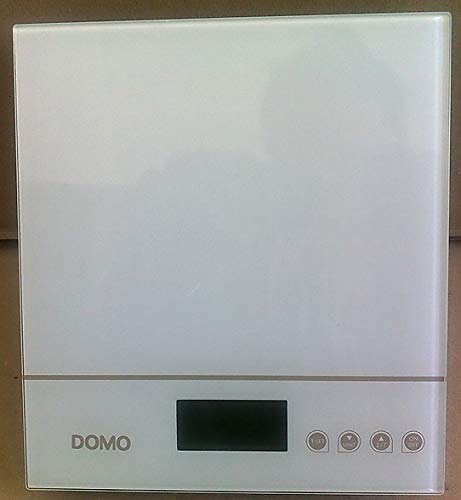
మూర్తి 1: Domo DO9089W Digital Kitchen Scale. This image shows the compact design of the scale with its glass weighing platform and LCD display.
2. భద్రతా సూచనలు
- స్కేల్ను నీటిలో లేదా ఇతర ద్రవాలలో ముంచవద్దు.
- ప్రకటనతో స్కేల్ను శుభ్రం చేయండిamp వస్త్రం మాత్రమే. రాపిడి క్లీనర్లను ఉపయోగించవద్దు.
- Place the scale on a firm, flat, and stable surface for accurate measurements.
- స్కేల్పై గరిష్ట సామర్థ్యం 5 కిలోలకు మించి ఓవర్లోడ్ చేయవద్దు.
- స్కేల్ను తీవ్రమైన ఉష్ణోగ్రతలు, ప్రత్యక్ష సూర్యకాంతి మరియు అధిక తేమ నుండి దూరంగా ఉంచండి.
- ఈ ఉపకరణం గృహ వినియోగం కోసం మాత్రమే.
3. ప్యాకేజీ విషయాలు
ప్యాకేజీలో అన్ని అంశాలు ఉన్నాయని నిర్ధారించుకోండి:
- 1 x Domo DO9089W Digital Kitchen Scale
- 1 x యూజర్ మాన్యువల్ (ఈ పత్రం)
- Batteries (may or may not be included, check packaging)
4. సెటప్
4.1. బ్యాటరీ ఇన్స్టాలేషన్
- స్కేల్ యొక్క దిగువ భాగంలో బ్యాటరీ కంపార్ట్మెంట్ను గుర్తించండి.
- బ్యాటరీ కంపార్ట్మెంట్ కవర్ తెరవండి.
- Insert the required 3V batteries (typically 2x CR2032, check compartment for exact type and polarity). Ensure correct polarity (+/-).
- బ్యాటరీ కంపార్ట్మెంట్ కవర్ను సురక్షితంగా మూసివేయండి.
4.2. ప్లేస్మెంట్
Place the scale on a hard, flat, and level surface. Uneven surfaces can affect weighing accuracy.
5. ఆపరేటింగ్ సూచనలు
5.1. పవర్ ఆన్/ఆఫ్
- ఆన్ చేయడానికి: నొక్కండి ఆన్/ఆఫ్ button. The LCD display will show '0g' or '0lb'.
- ఆఫ్ చేయడానికి: నొక్కి పట్టుకోండి ఆన్/ఆఫ్ button for a few seconds, or the scale will automatically shut off after a period of inactivity.
5.2. బరువు వస్తువులు
- Ensure the scale is on and displays '0g' or '0lb'.
- Place the item to be weighed directly onto the glass weighing platform.
- The weight will be displayed on the large LCD screen.
5.3. టారే ఫంక్షన్ (జీరోయింగ్)
The tare function allows you to weigh multiple ingredients in the same container or to subtract the weight of a container.
- బరువు వేసే వేదికపై ఖాళీ పాత్రను ఉంచండి. డిస్ప్లే దాని బరువును చూపుతుంది.
- నొక్కండి తారే button (often labeled 'T' or integrated with the ON/OFF button). The display will reset to '0g'.
- Add the ingredient to the container. The display will show only the weight of the ingredient.
- Repeat the tare process for additional ingredients.
5.4. యూనిట్ మార్పిడి
To switch between weighing units (e.g., grams, pounds, ounces), press the యూనిట్ or మోడ్ button (if available). The current unit will be indicated on the LCD display.
5.5. ఆటోమేటిక్ షట్-ఆఫ్
The scale is equipped with an automatic shut-off feature to conserve battery life. It will turn off after a period of inactivity, typically around 60-120 seconds.
6. నిర్వహణ మరియు శుభ్రపరచడం
- స్కేల్ను కొద్దిగా డితో తుడవండిamp వస్త్రం. రసాయన లేదా రాపిడి శుభ్రపరిచే ఏజెంట్లను ఉపయోగించవద్దు.
- Do not allow water to enter the interior of the scale.
- లీకేజీని నివారించడానికి స్కేల్ను ఎక్కువ కాలం ఉపయోగించకపోతే బ్యాటరీలను తీసివేయండి.
7. ట్రబుల్షూటింగ్
| సమస్య | సాధ్యమైన కారణం | పరిష్కారం |
|---|---|---|
| స్కేల్ ఆన్ చేయబడదు | డెడ్ లేదా తప్పుగా ఇన్స్టాల్ చేయబడిన బ్యాటరీలు. | బ్యాటరీలను కొత్త వాటితో భర్తీ చేయండి, సరైన ధ్రువణతను నిర్ధారించండి. |
| Inaccurate readings / Cannot zero | Scale on an uneven surface; Overloaded; Internal error. | Place scale on a flat, stable surface. Ensure weight is within 5 kg limit. Try removing batteries for 10 seconds and reinserting. |
| డిస్ప్లే 'Error' లేదా 'O-Ld' ని చూపిస్తుంది | స్కేల్ ఓవర్లోడ్ అయింది. | Remove items from the scale immediately. Do not exceed 5 kg. |
| Buttons unresponsive or sensitive | Moisture or debris on buttons; Software glitch. | Ensure buttons are clean and dry. Remove batteries for a few seconds to reset the scale. |
8. స్పెసిఫికేషన్లు
| ఫీచర్ | స్పెసిఫికేషన్ |
|---|---|
| మోడల్ సంఖ్య | DO9089W |
| బ్రాండ్ | DOMO |
| గరిష్ట సామర్థ్యం | 5 కిలోలు |
| ఖచ్చితత్వం | 1 గ్రా |
| ప్రదర్శన రకం | LCD |
| మెటీరియల్ | గాజు బరువు వేదిక |
| కొలతలు (L x W x H) | 18 x 18 x 4 సెం.మీ |
| బరువు | సుమారు 762 గ్రా |
| శక్తి మూలం | 3V batteries (type may vary, check compartment) |
| ఆటోమేటిక్ షట్-ఆఫ్ | అవును |
9. వారంటీ మరియు మద్దతు
ఈ ఉత్పత్తి a తో వస్తుంది 24 నెలల వారంటీ for the appliance itself. For items equipped with batteries, the batteries are guaranteed for 6 months. This warranty covers manufacturing defects under normal use. It does not cover damage resulting from misuse, accidents, unauthorized modifications, or normal wear and tear.
For warranty claims or technical support, please contact your retailer or the DOMO customer service department. Please have your proof of purchase and model number (DO9089W) ready.