
పరిచయం
This manual provides essential instructions for the safe installation, operation, and maintenance of your Reflecta CrystalLine Motor Projection Screen. Please read this manual thoroughly before installation and retain it for future reference. This motorized projection screen is designed for high-quality image display in various environments.
భద్రతా సూచనలు
- Ensure the screen is securely mounted to a sturdy wall or ceiling structure capable of supporting its weight (26 kg).
- All electrical connections must be performed by a qualified electrician and comply with local electrical codes.
- Do not operate the screen if the power cord or plug is damaged.
- Keep hands and objects clear of the screen during operation to prevent injury or damage.
- Do not attempt to disassemble or repair the motor or control unit yourself. Contact qualified service personnel.
- ఈ ఉత్పత్తి ఇండోర్ ఉపయోగం కోసం మాత్రమే ఉద్దేశించబడింది.
ప్యాకేజీ విషయాలు
దయచేసి ఇన్స్టాలేషన్తో కొనసాగే ముందు అన్ని భాగాలు ఉన్నాయని మరియు దెబ్బతినకుండా ఉన్నాయని ధృవీకరించండి:
- Reflecta CrystalLine Motor Projection Screen (Model 87674)
- రిమోట్ కంట్రోల్
- కంట్రోల్ బాక్స్
- పవర్ కేబుల్
- మౌంటింగ్ హార్డ్వేర్ (స్క్రూలు, యాంకర్లు - నిర్దిష్ట రకాలు మారవచ్చు)
- వినియోగదారు మాన్యువల్ (ఈ పత్రం)
సెటప్
1. Mounting the Screen
The Reflecta CrystalLine Motor Projection Screen is designed for both wall and ceiling mounting. Choose a location that provides optimal viewing for your audience and ensures the screen is level when fully extended.
- Identify suitable mounting points on your wall or ceiling. These points must be structurally sound to support the screen's weight.
- Using the provided mounting hardware, securely attach the screen casing. Ensure all fasteners are tightened appropriately.
- Verify the screen is level and firmly attached before proceeding.
2. ఎలక్ట్రికల్ కనెక్షన్
Connect the screen's power cable to a standard electrical outlet. Ensure the power supply matches the screen's requirements.
ఆపరేటింగ్ సూచనలు
The screen can be operated using the included remote control or the manual button on the control box.
రిమోట్ కంట్రోల్ ఉపయోగించడం
The remote control allows for convenient operation of the screen from a distance.
- పైకి బాణం బటన్: Press to raise the projection screen.
- స్క్వేర్ బటన్: Press to stop the screen at any desired position.
- క్రిందికి బాణం బటన్: Press to lower the projection screen.
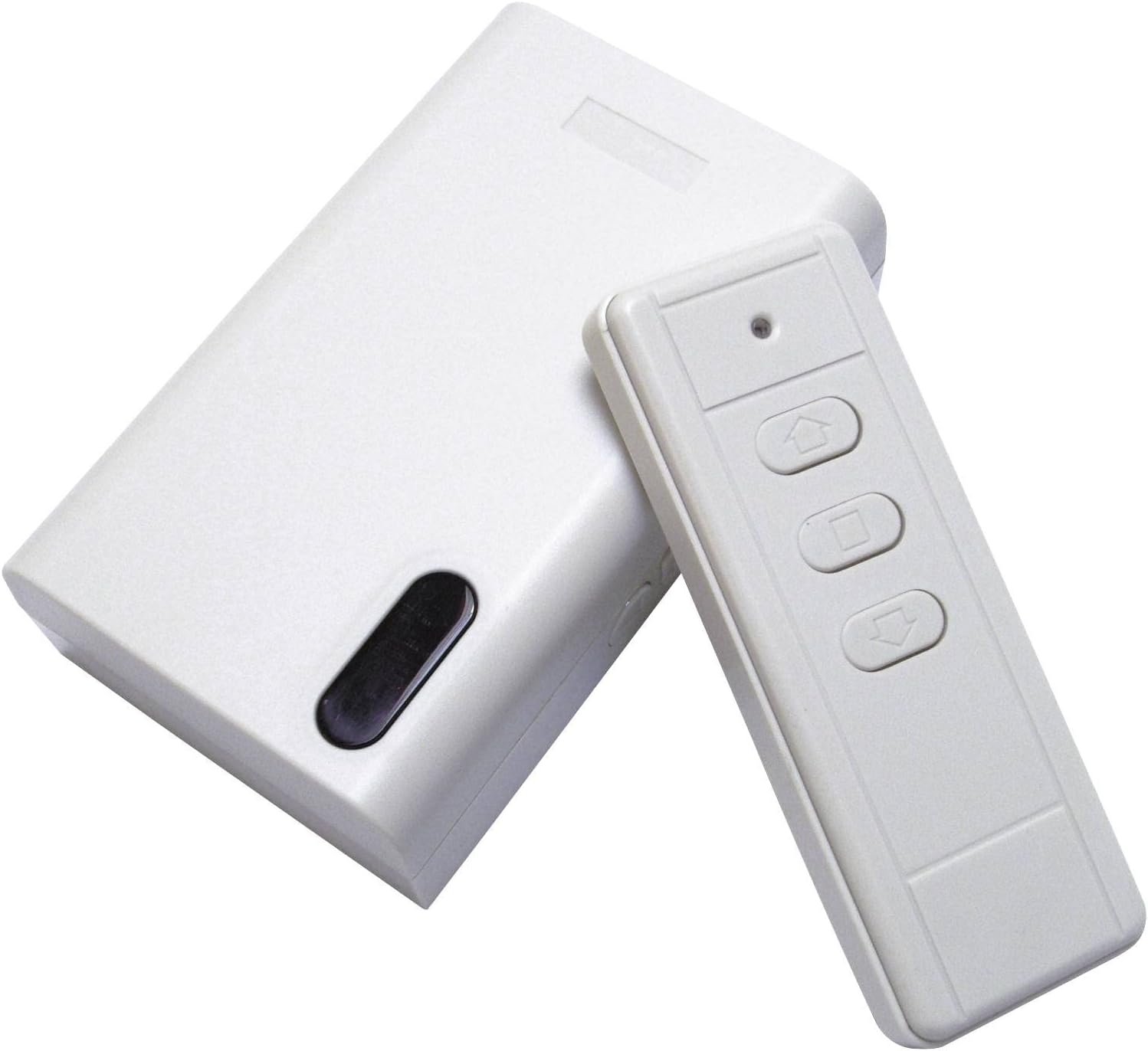
This image displays the white control box and the accompanying white remote control. The remote features three buttons: an up arrow for raising the screen, a square button for stopping the screen, and a down arrow for lowering the screen. The control box has a black oval-shaped button, likely for manual operation or pairing.
మాన్యువల్ ఆపరేషన్
In case the remote control is unavailable or not functioning, the screen can be operated manually using the button on the control box.
- Locate the black oval button on the control box.
- Pressing this button will cycle through the screen's states: down, stop, up, stop.
నిర్వహణ
Regular maintenance ensures the longevity and optimal performance of your projection screen.
- స్క్రీన్ ఉపరితలం: Gently wipe the screen surface with a soft, damp cloth. Do not use abrasive cleaners or solvents, as these can damage the matte finish.
- Casing: Clean the screen casinపొడి లేదా కొద్దిగా d తో గ్రాamp గుడ్డ.
- మోటార్: The motor is maintenance-free. Do not lubricate or attempt to open the motor housing.
- నిల్వ: When not in use for extended periods, ensure the screen is fully retracted into its casinదుమ్ము మరియు నష్టం నుండి ఉపరితలాన్ని రక్షించడానికి గ్రా.
ట్రబుల్షూటింగ్
If you encounter issues with your projection screen, refer to the following common problems and solutions:
- Screen does not move:
- Check if the power cable is securely connected to a live outlet.
- రిమోట్ కంట్రోల్ బ్యాటరీలు అయిపోకుండా చూసుకోండి.
- Try operating the screen using the manual button on the control box.
- రిమోట్ కంట్రోల్ స్పందించడం లేదు:
- రిమోట్ కంట్రోల్లో బ్యాటరీలను భర్తీ చేయండి.
- రిమోట్ మరియు కంట్రోల్ బాక్స్ మధ్య ఎటువంటి అడ్డంకులు లేవని నిర్ధారించుకోండి.
- If the remote requires pairing, refer to specific pairing instructions (not provided in current data).
- Screen stops intermittently:
- Check for any physical obstructions preventing smooth movement.
- Ensure the screen is not overloaded or experiencing excessive tension.
స్పెసిఫికేషన్లు
| ఫీచర్ | స్పెసిఫికేషన్ |
|---|---|
| మోడల్ సంఖ్య | 87674 |
| బ్రాండ్ | ప్రతిబింబం |
| ఉత్పత్తి రకం | మోటారు ప్రొజెక్షన్ స్క్రీన్ |
| చిత్రం వెడల్పు | 292 సెం.మీ |
| చిత్రం ఎత్తు | 292 సెం.మీ |
| కారక నిష్పత్తి | 1:1 |
| లాభం | 1.1x |
| Viewing యాంగిల్ | 120° |
| Screen Surface Material | Fabric (Matte Finish) |
| మౌంటు రకం | వాల్ లేదా సీలింగ్ మౌంటు |
| ఆపరేటింగ్ మోడ్ | Automatic (Motorized) |
| రంగు | నలుపు/తెలుపు |
| వస్తువు బరువు | 26000 గ్రాములు (26 కిలోలు) |
| ASIN | B0030IT3S4 |
వారంటీ సమాచారం
This Reflecta product is covered by a manufacturer's warranty against defects in materials and workmanship. The specific terms and duration of the warranty may vary by region. Please retain your proof of purchase for warranty claims. For detailed warranty information, refer to the documentation provided with your purchase or contact Reflecta customer support.
మద్దతు
If you require further assistance or have questions not covered in this manual, please contact Reflecta customer support. Contact details can typically be found on the Reflecta official webసైట్ లేదా మీ ఉత్పత్తి ప్యాకేజింగ్లో.
When contacting support, please have your product model number (87674) and ASIN (B0030IT3S4) ready.