
పరిచయం
The 3M Pocket Projector MP180 is a compact and versatile multimedia projector designed for portability and ease of use. It integrates advanced connectivity features such as Wi-Fi and Bluetooth, allowing for seamless content access and sharing. This manual provides essential information for setting up, operating, maintaining, and troubleshooting your MP180 projector.
ప్యాకేజీ విషయాలు
- 3M Pocket Projector MP180 Unit
- పవర్ అడాప్టర్
- VGA కేబుల్
- USB కేబుల్
- సాఫ్ట్ క్యారీయింగ్ పర్సు
- త్వరిత ప్రారంభ గైడ్
ఉత్పత్తి ముగిసిందిview

మూర్తి 1: ముందు view of the 3M Pocket Projector MP180, highlighting its intuitive touch-screen interface and compact design. The screen displays icons for various functions including web browsing, video playback, music, photos, documents, and system settings.

మూర్తి 2: కోణీయ view of the MP180, showcasing the projection lens at the front and the integrated ventilation grilles designed for efficient heat dissipation during operation.

మూర్తి 3: The MP180 held in an adult's hand, illustrating its highly portable and compact form factor, making it easy to carry for presentations or entertainment on the go.
సెటప్
1 బ్యాటరీని ఛార్జ్ చేస్తోంది
Before first use, fully charge the projector's internal battery. Connect the power adapter to the projector's charging port and then to a power outlet. The charging indicator light will illuminate. A full charge typically takes approximately 2-3 hours.
2. పవర్ చేయడం ఆన్/ఆఫ్
- పవర్ ఆన్ చేయడానికి, స్క్రీన్ వెలిగే వరకు పవర్ బటన్ను నొక్కి పట్టుకోండి.
- పవర్ ఆఫ్ చేయడానికి, షట్డౌన్ ప్రాంప్ట్ కనిపించే వరకు పవర్ బటన్ను నొక్కి పట్టుకోండి, ఆపై నిర్ధారించండి.
3. దృష్టిని సర్దుబాటు చేయడం
Locate the focus wheel near the projection lens. Rotate the wheel until the projected image appears sharp and clear on your desired surface.
4. ప్రొజెక్టర్ను ఉంచడం
Place the projector on a stable, flat surface. For optimal image quality, ensure the projection surface is smooth and light-colored. The MP180 can project images from 10 inches up to 80 inches diagonally, depending on the distance from the surface.
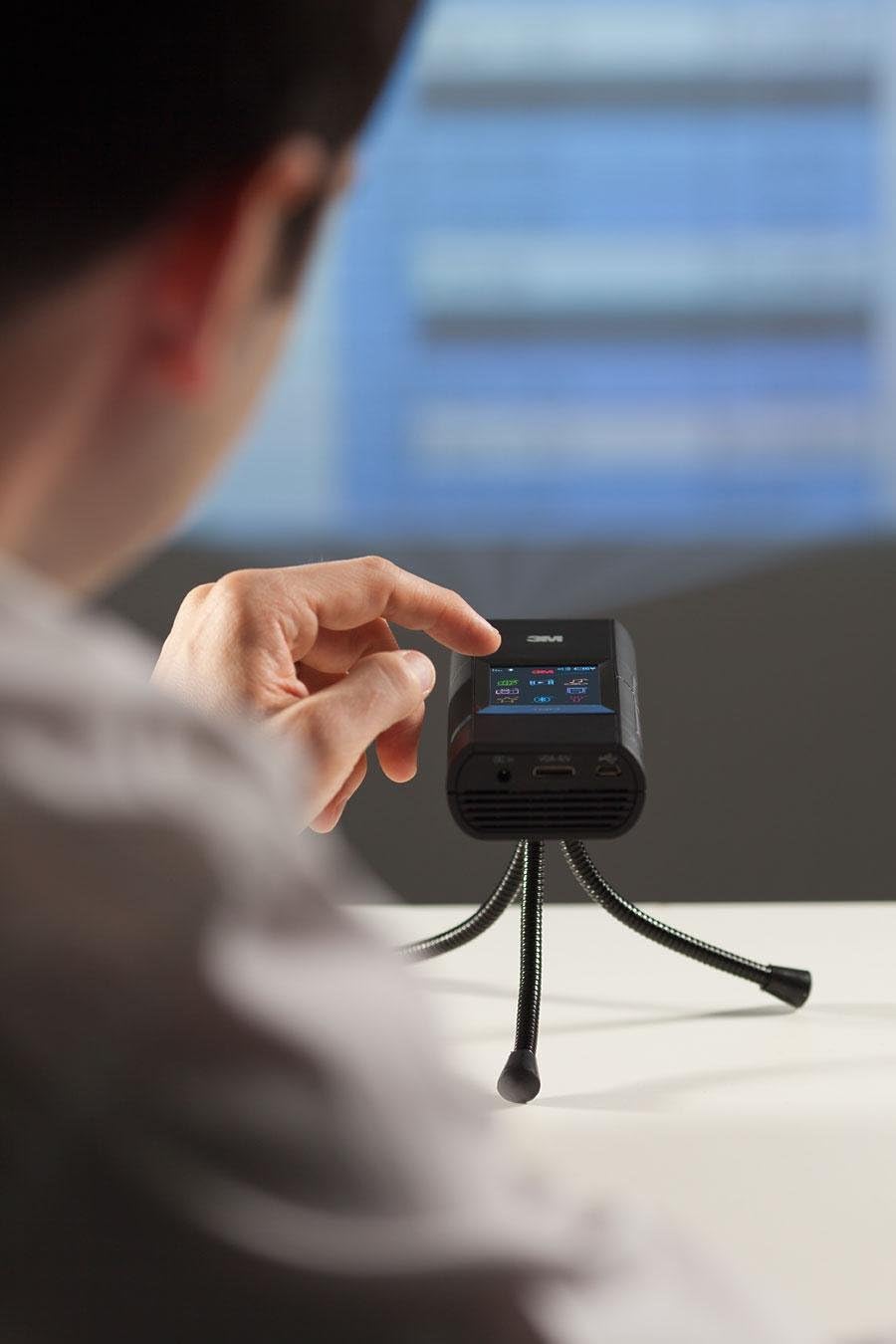
మూర్తి 4: A user adjusting the MP180 while it is mounted on a small tripod, demonstrating its use in a presentation or viewing setup. The projector is capable of displaying content on various surfaces.
ఆపరేటింగ్ సూచనలు
1. ఇంటర్ఫేస్ను నావిగేట్ చేయడం
The MP180 features a built-in touch-screen display. Use your finger or the included stylus to navigate through menus and select options. The main screen provides access to various applications and settings.
2. Wi-Fiకి కనెక్ట్ చేస్తోంది
- ప్రధాన మెను నుండి, ఎంచుకోండి సెట్టింగ్లు చిహ్నం.
- ఎంచుకోండి నెట్వర్క్ సెట్టింగ్లు or Wi-Fi.
- జాబితా నుండి మీకు కావలసిన Wi-Fi నెట్వర్క్ను ఎంచుకోండి.
- Enter the network password using the on-screen keyboard.
- Confirm to connect.
Once connected, you can use the built-in web browser or download files directly to the projector.
3. బ్లూటూత్ ఉపయోగించడం
The MP180 supports Bluetooth connectivity for pairing with compatible devices such as external speakers or headphones. Access Bluetooth settings from the main menu to pair new devices.
4. Playing Media and Documents
ప్రొజెక్టర్ వివిధ మద్దతు ఇస్తుంది file formats, including common business tools like MS Word, MS Excel, MS PowerPoint, and Adobe PDF. It also plays music, audio, and picture files.
- అంతర్గత మెమరీ: The MP180 has 4GB of internal storage.
- మైక్రో SD కార్డ్: Insert a microSD card (up to 16GB) into the designated slot to expand storage.
- USB కనెక్షన్: Connect the projector to a computer via USB to transfer files.
Navigate to the respective application (e.g., Documents, Photos, Videos) on the touch screen to browse and open your files.
5. External Connectivity
The MP180 can connect to external devices via its Display Port (VGA cable included). This allows you to project content from laptops or other compatible sources.
నిర్వహణ
1. లెన్స్ శుభ్రపరచడం
Use a soft, lint-free cloth specifically designed for optical lenses to gently wipe the projector lens. Avoid using abrasive materials or chemical cleaners, which can damage the lens coating.
2. యూనిట్ శుభ్రపరచడం
ప్రొజెక్టర్ బయటి భాగాన్ని మృదువైన, పొడి గుడ్డతో తుడవండి. లిక్విడ్ క్లీనర్లు లేదా స్ప్రేలను నేరుగా యూనిట్పై ఉపయోగించవద్దు.
3. నిల్వ
When not in use, store the projector in its soft carrying pouch in a cool, dry place, away from direct sunlight and extreme temperatures.
4. బ్యాటరీ సంరక్షణ
To prolong battery life, avoid fully discharging the battery frequently. If storing for an extended period, charge the battery to approximately 50% before storage.
ట్రబుల్షూటింగ్
| సమస్య | సాధ్యమైన కారణం | పరిష్కారం |
|---|---|---|
| చిత్రం ఏదీ ప్రొజెక్ట్ చేయబడలేదు | Projector not powered on; Lens cap on; Input source not selected; Focus not adjusted. | Ensure power is on; Remove lens cap; Select correct input source; Adjust focus wheel. |
| చిత్రం అస్పష్టంగా ఉంది | Focus not adjusted; Projector too far/close to surface. | Adjust the focus wheel; Reposition the projector for optimal distance. |
| శబ్దం లేదు | Volume too low; Muted; External speakers not connected/paired. | Increase volume; Unmute; Ensure Bluetooth speakers are paired or wired speakers are connected correctly. |
| Wi-Fi కనెక్షన్ సమస్యలు | Incorrect password; Out of range; Network interference. | Verify password; Move closer to Wi-Fi router; Restart projector and router. |
| Projector shuts down unexpectedly | Low battery; Overheating. | Charge the battery; Ensure ventilation ports are clear and allow the unit to cool down. |
స్పెసిఫికేషన్లు
- మోడల్: 3M పాకెట్ ప్రొజెక్టర్ MP180
- ప్రదర్శన సాంకేతికత: LCOS
- స్థానిక రిజల్యూషన్: SVGA (800 x 600)
- గరిష్ట రిజల్యూషన్: 800 x 600
- కాంతి మూలం: LED
- LED లైఫ్: సుమారు 20,000 గంటలు
- కనెక్టివిటీ: Wireless (Wi-Fi, Bluetooth), Display Port (VGA compatible)
- అంతర్గత మెమరీ: 4GB
- విస్తరించదగిన మెమరీ: మైక్రో SD కార్డ్ స్లాట్ (16GB వరకు)
- ప్రొజెక్షన్ పరిమాణం: 10" to 80" (diagonal)
- కారక నిష్పత్తి: 4:3 (native)
- బ్యాటరీ లైఫ్: Up to 2 hours (approximate, depending on usage)
- కొలతలు (L x W x H): 5.94 x 4.05 x 1.3 అంగుళాలు (15.09 x 10.29 x 3.3 సెం.మీ.)
- బరువు: 11.8 ఔన్సులు (334.5 గ్రాములు)
వారంటీ సమాచారం
3M warrants this product against defects in material and workmanship for a period of one (1) year from the original date of purchase. This warranty does not cover damage caused by misuse, accident, unauthorized modification, or normal wear and tear. For warranty service, please retain your proof of purchase and contact 3M customer support.
మద్దతు
For technical assistance, product inquiries, or service requests, please visit the official 3M website or contact 3M customer support:
- Webసైట్: www.3m.com
- కస్టమర్ సేవ: Refer to your region-specific 3M contact information available on their webసైట్.
Please have your product model number (MP180) and serial number ready when contacting support.