
పరిచయం
Thank you for choosing the Classic Cantabile DP-400F RH Digital Piano. This instrument combines the authentic feel of an acoustic piano with the versatility of modern digital technology. Featuring 88 weighted keys, 559 sounds, 64-note polyphony, and comprehensive connectivity options including MIDI and USB, the DP-400F RH is designed for musicians of all levels. This manual provides essential information for safe and effective use, setup, operation, and maintenance of your digital piano.
ముఖ్యమైన భద్రతా సూచనలు
- విద్యుత్ సరఫరా: పేర్కొన్న పవర్ అడాప్టర్ను మాత్రమే ఉపయోగించండి. వాల్యూమ్ను నిర్ధారించుకోండిtagఇ మీ స్థానిక విద్యుత్ సరఫరాతో సరిపోలుతుంది.
- నీరు మరియు తేమ: Do not expose the instrument to rain, moisture, or excessive humidity. Do not place containers with liquids on the instrument.
- వెంటిలేషన్: సరైన వెంటిలేషన్ ఉండేలా చూసుకోండి. వెంటిలేషన్ ఓపెనింగ్లను బ్లాక్ చేయవద్దు.
- ఉష్ణ మూలాలు: Keep the instrument away from heat sources such as radiators, heat registers, stoves, or other apparatus that produce heat.
- శుభ్రపరచడం: Clean only with a dry cloth. Avoid using liquid cleaners or solvents.
- ప్లేస్మెంట్: Place the instrument on a stable, level surface to prevent tipping.
- సర్వీసింగ్: ఈ ఉత్పత్తిని మీరే సేవ చేయడానికి ప్రయత్నించవద్దు. అర్హత కలిగిన సేవా సిబ్బందికి అన్ని సర్వీసులను చూడండి.
ప్యాకేజీ విషయాలు
క్రింద జాబితా చేయబడిన అన్ని వస్తువులు మీ ప్యాకేజీలో చేర్చబడ్డాయో లేదో తనిఖీ చేయండి:
- Classic Cantabile DP-400F RH Digital Piano Unit
- 3-పెడల్ యూనిట్
- పవర్ అడాప్టర్
- మ్యూజిక్ రెస్ట్
- వినియోగదారు మాన్యువల్ (ఈ పత్రం)
సెటప్
1. అసెంబ్లీ
The Classic Cantabile DP-400F RH requires some assembly. Follow these general steps:
- పెట్టె నుండి అన్ని భాగాలను జాగ్రత్తగా అన్ప్యాక్ చేయండి.
- Attach the side panels to the main keyboard unit using the provided screws.
- Secure the back panel.
- Connect the 3-pedal unit cable to the designated port on the underside of the piano.
- Place the music rest into its slot on the top panel.
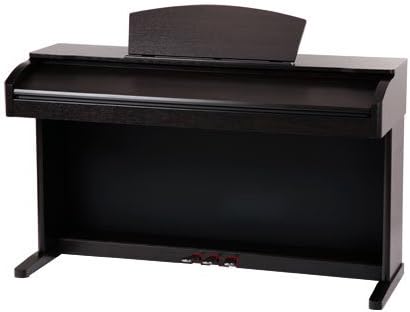
Image: The Classic Cantabile DP-400F RH Digital Piano fully assembled, showing the main unit, stand, and pedal board.
2. పవర్ కనెక్షన్
Connect the power adapter to the DC IN jack on the rear of the piano, then plug the adapter into a suitable wall outlet. Ensure the piano's power switch is in the OFF position before connecting power.
3. Pedal Connection
The 3-pedal unit provides Sustain, Sostenuto, and Soft pedal functions. Ensure the pedal cable is securely connected to the corresponding port on the piano's base.

చిత్రం: క్లోజప్ view of the three chrome-plated pedals (Sustain, Sostenuto, Soft) integrated into the digital piano's stand.
4. MIDI and USB Connectivity
The DP-400F RH features MIDI IN/OUT ports and a USB-to-Host port for connecting to computers or other MIDI devices. Use a standard USB cable to connect the piano to your computer for MIDI data transfer.
ఆపరేటింగ్ సూచనలు
1. పవర్ ఆన్/ఆఫ్
నొక్కండి శక్తి button located on the control panel to turn the instrument on or off. The display will illuminate upon power-on.

Image: A wide shot of the digital piano's control panel, showing various buttons, knobs, and the central LCD screen.
2. వాల్యూమ్ నియంత్రణ
Adjust the overall volume using the large వాల్యూమ్ knob on the control panel. Turn clockwise to increase volume, counter-clockwise to decrease.
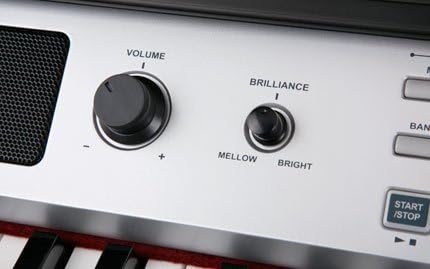
చిత్రం: వివరణాత్మక view of the 'Volume' and 'Brilliance' rotary knobs on the control panel, with labels indicating their functions.
3. Sound Selection (Voices)
The DP-400F RH offers 559 different instrument voices. Use the వాయిస్ buttons and the data entry dial to browse and select desired sounds. The selected voice will be displayed on the LCD screen.
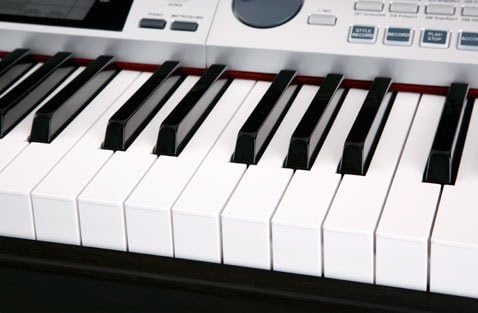
చిత్రం: క్లోజప్ view of the 88-key keyboard, showing the black and white keys of the digital piano.
4. Using the Display
The LCD screen provides visual feedback on current settings, selected voices, tempo, and other parameters. Navigate through menus and adjust values using the buttons and dial adjacent to the display.

చిత్రం: వివరణాత్మక view of the digital piano's LCD screen, displaying musical notation, current voice ("St.Gr.Pn1"), tempo, and other operational parameters.

Image: A close-up of the LCD display, showing "VOICE R1" and "St.Gr.Pn1" along with musical staff, measure, beat, and tempo information.
5. Pedal Functions
- Right Pedal (Sustain): Holds the notes played, similar to an acoustic piano's sustain pedal.
- Middle Pedal (Sostenuto): Sustains only the notes held down at the moment the pedal is pressed.
- Left Pedal (Soft): Reduces the volume and changes the timbre of the notes played.
6 ఇతర విధులు
Explore other features such as ద్వంద్వ (layering two voices), స్ప్లిట్ (dividing the keyboard into two voices), టచ్ (adjusting touch sensitivity), and various effects (DSP). Refer to the control panel for dedicated buttons and the display for detailed settings.
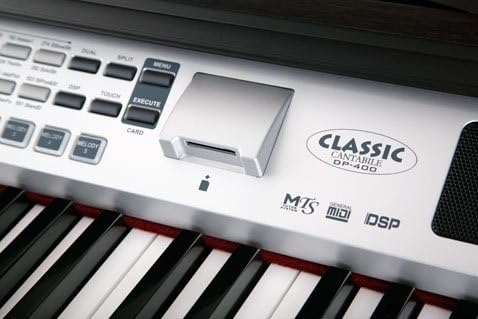
Image: A section of the control panel featuring the "Classic Cantabile DP-400" logo, along with indicators for MTS, General MIDI, and DSP, and buttons like MENU and EXECUTE.
నిర్వహణ
1. శుభ్రపరచడం
Wipe the instrument's surface with a soft, dry cloth. For stubborn dirt, slightly dampen the cloth with water and a mild detergent, then wipe dry immediately. Avoid abrasive cleaners, waxes, or solvents as they can damage the finish.
2. నిల్వ
When not in use for extended periods, cover the digital piano with a dust cover to protect it from dust and dirt. Store in a location with stable temperature and humidity, away from direct sunlight and extreme temperatures.
ట్రబుల్షూటింగ్
| సమస్య | సాధ్యమైన కారణం | పరిష్కారం |
|---|---|---|
| శబ్దం లేదు | వాల్యూమ్ చాలా తక్కువగా ఉంది లేదా మ్యూట్ చేయబడింది. హెడ్ఫోన్లు కనెక్ట్ చేయబడ్డాయి. | Increase the VOLUME knob. Disconnect headphones. |
| పవర్ ఆన్ అవ్వదు | Power adapter not connected properly. Power outlet not working. | Check power adapter connection. Try a different power outlet. |
| కీలు స్పందించడం లేదు | Instrument may be in a demo mode or a specific setting. | Restart the instrument. Check the manual for specific mode settings. |
| పెడల్స్ పనిచేయడం లేదు | పెడల్ యూనిట్ కేబుల్ వదులుగా లేదా డిస్కనెక్ట్ చేయబడింది. | Ensure the pedal cable is securely connected to the piano. |
స్పెసిఫికేషన్లు
- మోడల్: DP-400F RH
- కీలు: 88 weighted keys
- పెడల్స్: 3 (Sustain, Sostenuto, Soft)
- శబ్దాలు (స్వరాలు): 559
- బహుధ్వని: 64-గమనిక
- కనెక్టివిటీ: MIDI IN/OUT, USB-to-Host
- కొలతలు (ప్యాకేజీ): 159 x 65.5 x 45.5 సెం.మీ
- బరువు (ఉత్పత్తి): 68.7 కిలోలు
- శక్తి: AC Adapter (specified voltage)
- బ్యాటరీ: 1 Lithium-metal battery (included, likely for internal memory/clock)
వారంటీ సమాచారం
Classic Cantabile products are designed and manufactured to high-quality standards. This product is covered by a limited warranty against defects in materials and workmanship. For specific warranty terms, duration, and claim procedures, please refer to the warranty card included with your purchase or contact your local Classic Cantabile dealer or customer support.
కస్టమర్ మద్దతు
Should you encounter any issues or have questions regarding your Classic Cantabile DP-400F RH Digital Piano that are not addressed in this manual, please contact Classic Cantabile customer support. You can typically find contact information on the manufacturer's official webసైట్ లేదా మీ రిటైలర్ ద్వారా.
For service inquiries, please have your model number (DP-400F RH) and purchase date ready.