
Sanus CAPC01-B1
Sanus CAPC01-B1 Rack Mounted Power Conditioner User Manual
Model: CAPC01-B1
పరిచయం
This manual provides essential information for the proper installation, operation, and maintenance of your Sanus CAPC01-B1 Rack Mounted Power Conditioner. Please read these instructions thoroughly before use to ensure optimal performance and safety.
The Sanus CAPC01-B1 is designed to protect your rack equipment and provide clean power. It features adjustable, dual pull-out LED lights for illuminating rack equipment, 11 protected outlets, and EMI/RFI noise filtration.
ముఖ్యమైన భద్రతా సమాచారం
- అన్ని సూచనలను చదవండి: Before operating the unit, read and understand all safety and operating instructions.
- సూచనలను ఉంచండి: భవిష్యత్తు సూచన కోసం ఈ మాన్యువల్ని ఉంచండి.
- హెచ్చరికలను గమనించండి: ఉత్పత్తిపై మరియు ఆపరేటింగ్ సూచనలలోని అన్ని హెచ్చరికలను అనుసరించండి.
- Unplug during storms: మెరుపు తుఫానుల సమయంలో లేదా ఎక్కువ కాలం ఉపయోగించనప్పుడు యూనిట్ను అన్ప్లగ్ చేయండి.
- Avoid liquids: Do not expose the unit to dripping or splashing liquids. Do not place objects filled with liquids on the unit.
- సరైన వెంటిలేషన్: తగినంత వెంటిలేషన్ ఉండేలా చూసుకోండి. వెంటిలేషన్ ఓపెనింగ్లను బ్లాక్ చేయవద్దు.
- శక్తి మూలం: Connect only to a grounded AC power outlet with the specified voltage.
- సర్వీసింగ్: ఈ ఉత్పత్తిని మీరే సేవ చేయడానికి ప్రయత్నించవద్దు. అర్హత కలిగిన సేవా సిబ్బందికి అన్ని సర్వీసులను చూడండి.
ఉత్పత్తి ముగిసిందిview
The Sanus CAPC01-B1 is a rack-mounted power conditioner designed to provide clean, protected power to your audio/video equipment. Key features include:
- Adjustable, dual pull-out LED lights for illuminating rack equipment.
- 11 fast-acting 2,400-joule protected outlets.
- Multi-Mode LED panel indicating voltage, amperage, and power consumption.
- EMI/RFI noise filtration, reducing noise up to 30 dB for superior signal quality.
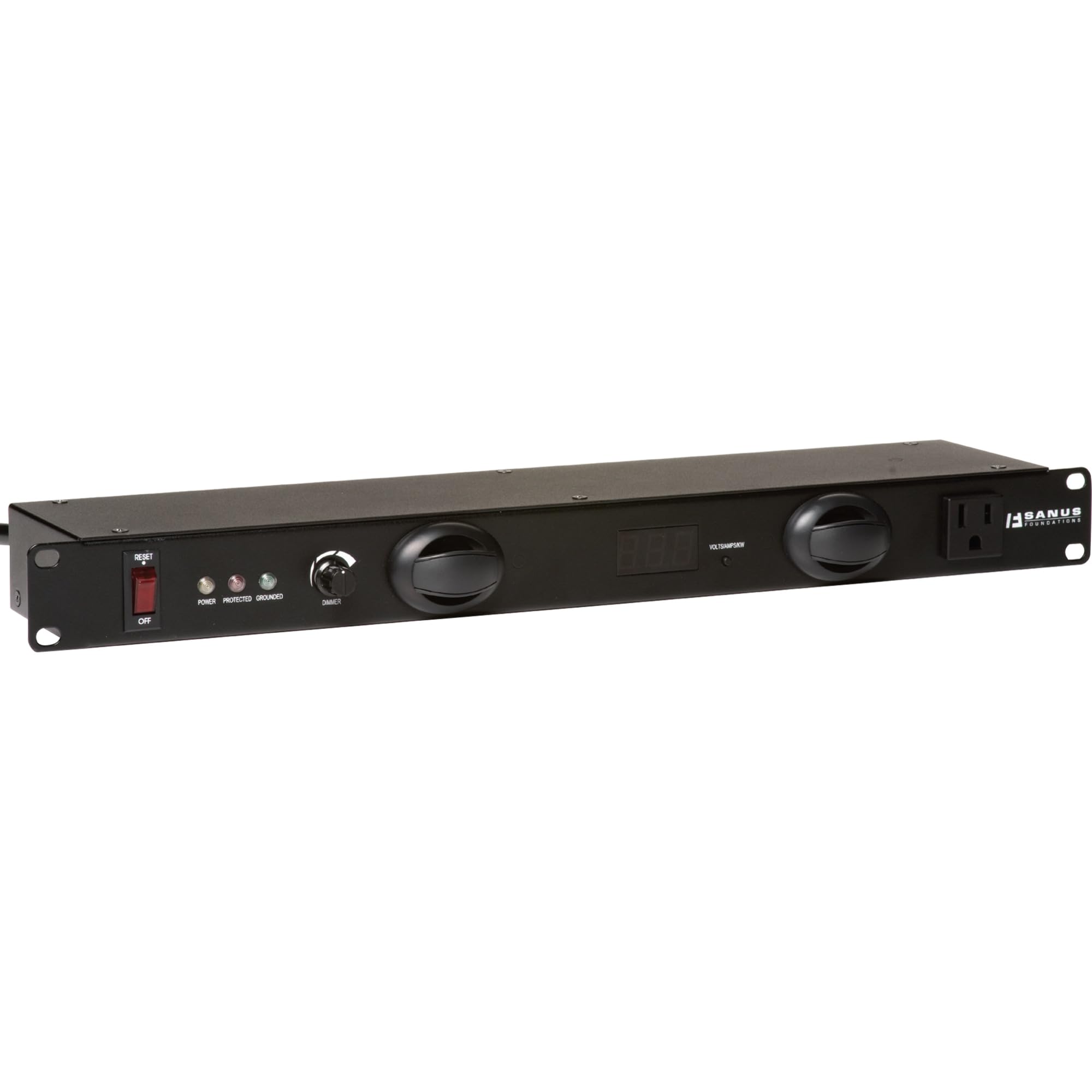
మూర్తి 1: ముందు view of the Sanus CAPC01-B1 Rack Mounted Power Conditioner, showing the LED lights and display.
సెటప్ మరియు ఇన్స్టాలేషన్
ప్యాకేజీ విషయాలు
అన్ని భాగాలు ఉన్నాయని నిర్ధారించుకోండి:
- Sanus CAPC01-B1 Power Conditioner
- ర్యాక్ మౌంటు హార్డ్వేర్
- వినియోగదారు మాన్యువల్ (ఈ పత్రం)
మౌంటు సూచనలు
- రాక్ స్థిరంగా మరియు సరిగ్గా గ్రౌండింగ్ చేయబడిందని నిర్ధారించుకోండి.
- Align the mounting ears of the CAPC01-B1 with the rack rails.
- Secure the unit to the rack using the provided rack mounting hardware. Ensure all screws are tightened securely.
- Allow adequate space for ventilation around the unit.
కనెక్టింగ్ పరికరాలు
- With the power conditioner turned OFF, plug your audio/video equipment into the protected outlets on the rear of the CAPC01-B1.
- Ensure all equipment is properly seated in the outlets.
- Plug the power conditioner's main power cord into a grounded AC wall outlet.
ఆపరేటింగ్ సూచనలు
పవర్ ఆన్/ఆఫ్
- To power on the unit, press the main power switch located on the front panel. The LED display will illuminate.
- To power off, press the main power switch again.
LED లైట్లను ఉపయోగించడం
- The CAPC01-B1 features dual pull-out LED lights. Gently pull out the lights from the front panel.
- Rotate the lights to adjust their direction.
- Use the dimmer knob on the front panel to adjust the brightness of the LED lights.
- Push the lights back into the unit when not in use.
Monitoring with the Multi-Mode LED Panel
The front panel LED display provides real-time information:
- వాల్యూమ్tage: Displays the incoming AC voltage.
- Ampకోపం: Shows the total current draw of connected equipment.
- విద్యుత్ వినియోగం: Indicates the total power being consumed.
Regularly monitor these readings to ensure your equipment is operating within safe parameters.
నిర్వహణ
క్లీనింగ్
- శుభ్రపరిచే ముందు ఎల్లప్పుడూ యూనిట్ను పవర్ అవుట్లెట్ నుండి అన్ప్లగ్ చేయండి.
- బయటి ఉపరితలాలను తుడవడానికి మృదువైన, పొడి వస్త్రాన్ని ఉపయోగించండి.
- Do not use liquid cleaners, aerosol cleaners, or strong chemicals, as they may damage the finish or internal components.
వెంటిలేషన్
- Ensure that the ventilation openings on the unit are not blocked by dust or other obstructions.
- Periodically check for dust buildup and gently clean if necessary.
ట్రబుల్షూటింగ్
| సమస్య | సాధ్యమైన కారణం | పరిష్కారం |
|---|---|---|
| యూనిట్ పవర్ ఆన్ చేయదు. | No power from wall outlet; main power switch off; internal fuse tripped. | Check wall outlet with another device. Ensure main power switch is ON. If unit has a resettable breaker, press it. If not, contact support. |
| Connected equipment not receiving power. | Equipment not plugged in correctly; power conditioner not on; surge protection tripped. | Verify equipment is securely plugged into outlets. Ensure power conditioner is ON. Check for a surge protection reset button (if applicable) or power cycle the unit. |
| LED లైట్లు పనిచేయడం లేదు. | Lights not pulled out; dimmer knob set to minimum; internal issue. | Gently pull out the LED lights. Adjust the dimmer knob. If still not working, contact support. |
| Display shows unusual readings. | Overload; faulty sensor. | Reduce the load by unplugging some equipment. If readings persist, contact support. |
స్పెసిఫికేషన్లు
- మోడల్: CAPC01-B1
- అవుట్లెట్లు: 11 protected outlets
- ఉప్పెన రక్షణ: 2,400 జౌల్స్
- Noise Filtration: EMI/RFI up to 30 dB
- కొలతలు: 20.5 x 8 x 2.6 అంగుళాలు (52.07 x 20.32 x 6.6 సెం.మీ.)
- బరువు: 6.55 పౌండ్లు (2.97 కిలోలు)
- తయారీదారు: Tjernlund Products – Audio
- మొదటి తేదీ అందుబాటులో ఉంది: మార్చి 31, 2011
వారంటీ మరియు మద్దతు
For warranty information and technical support, please refer to the documentation provided with your purchase or visit the official Sanus webసైట్. యూనిట్ను మీరే రిపేర్ చేయడానికి ప్రయత్నించవద్దు, ఎందుకంటే ఇది మీ వారంటీని రద్దు చేయవచ్చు.
సంప్రదింపు సమాచారం: Please visit the Sanus official webఅత్యంత తాజా మద్దతు సంప్రదింపు వివరాల కోసం సైట్.
Ask a question about this manual
Ask about setup, troubleshooting, compatibility, parts, safety, or missing instructions. Manuals+ will review the question and use this page’s manual context to help answer it.