
పరిచయం
This manual provides comprehensive instructions for the Iomega Portable SCSI 1GB Jaz Drive, Model V1000S. Designed for professional, high-end removable storage, the Jaz drive offers hard drive speed and 1GB capacity per disk, enabling efficient backup and storage of large files, including video and high-quality audio. This guide covers setup, operation, maintenance, and troubleshooting to ensure optimal performance of your device.
సెటప్
అన్ప్యాక్ చేస్తోంది
Carefully unpack the Jaz drive and all accessories. Ensure all components are present before proceeding.
డ్రైవ్ను కనెక్ట్ చేస్తోంది
The Iomega Jaz drive utilizes a SCSI-2 interface for connection to your computer. Locate the SCSI ports on the back of the drive and your computer. Connect the drive using a compatible SCSI cable. Ensure the SCSI ID is correctly set if your system requires it.

This image displays the rear panel of the Jaz drive, highlighting the dual SCSI ports for daisy-chaining, the power input, and the SCSI ID selector. Ensure proper cable connection and ID setting for your system.
పవర్ కనెక్షన్
Connect the provided power adapter to the drive's power input and then to an electrical outlet.
సాఫ్ట్వేర్ ఇన్స్టాలేషన్
For optimal functionality, install the IomegaWare software suite. This software provides necessary drivers and utilities to manage your Jaz drive and disks. Refer to the software's installation guide for detailed steps. The drive is compatible with both PC and Macintosh systems.
Operating the Jaz Drive
Inserting and Ejecting Disks
To insert a Jaz disk, gently push it into the drive's slot until it clicks into place. The drive will typically spin up and become ready for use. To eject a disk, use the software utility provided by IomegaWare or the physical eject button on the drive, if available.
డేటా నిల్వ మరియు బదిలీ
Once a Jaz disk is inserted and recognized by your computer, it will appear as a removable storage device. You can drag and drop files, use backup software, or save directly to the disk as you would with any other hard drive. The 1GB capacity per disk allows for significant data storage, including large multimedia files.
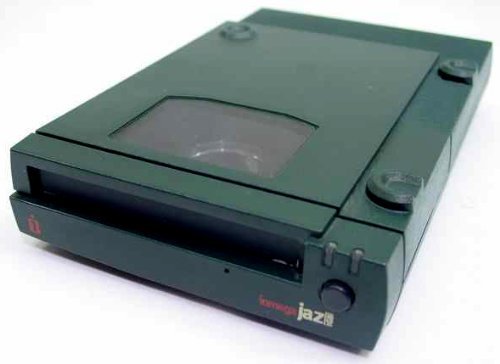
This image shows the Iomega Jaz Drive from the front, illustrating the disk insertion slot and the overall compact design of the unit.
నిర్వహణ
To ensure the longevity and reliable performance of your Iomega Jaz Drive, follow these maintenance guidelines:
- ప్లేస్మెంట్: Always place the drive flat on a stable, level surface. Avoid placing it on its side, as this can affect disk operation.
- శుభ్రపరచడం: Keep the drive's exterior clean and free from dust. Use a soft, dry cloth. Do not use liquid cleaners directly on the drive.
- డిస్క్ నిర్వహణ: Handle Jaz disks with care. Avoid touching the magnetic media surface and store them in their protective cases when not in use.
- పర్యావరణ పరిస్థితులు: Operate the drive within recommended temperature and humidity ranges. Avoid extreme conditions.
ట్రబుల్షూటింగ్
If you encounter issues with your Iomega Jaz Drive, consider the following troubleshooting steps:
- డ్రైవ్ గుర్తించబడలేదు:
- Verify all SCSI and power cables are securely connected.
- Ensure the drive is powered on.
- Check the SCSI ID setting on the drive and ensure it does not conflict with other SCSI devices on your system.
- Confirm that IomegaWare drivers are correctly installed and updated.
- మీ కంప్యూటర్ని పునఃప్రారంభించండి.
- డిస్క్ చదవడం/వ్రాయడం లోపాలు:
- Try a different Jaz disk to rule out a faulty disk.
- Ensure the disk is fully inserted into the drive.
- Check for any physical obstructions in the drive slot.
- నెమ్మదిగా పనితీరు:
- Ensure your SCSI controller and cables are functioning correctly.
- నేపథ్యంలో నడుస్తున్న అనవసరమైన అప్లికేషన్లను మూసివేయండి.
- Verify that the drive is placed on a stable, flat surface.
స్పెసిఫికేషన్లు
| ఫీచర్ | వివరాలు |
|---|---|
| బ్రాండ్ | అయోమెగా |
| మోడల్ పేరు | V1000SI |
| అంశం మోడల్ సంఖ్య | V1000S |
| మెమరీ స్టోరేజ్ కెపాసిటీ | 1 GB |
| హార్డ్ డ్రైవ్ ఇంటర్ఫేస్ | SCSI |
| హార్డ్వేర్ ఇంటర్ఫేస్ | SCSI |
| కనెక్టివిటీ టెక్నాలజీ | SCSI |
| హార్డ్వేర్ ప్లాట్ఫారమ్ | మాక్, పిసి |
| రంగు | ఆకుపచ్చ |
| ప్రత్యేక ఫీచర్ | తేలికైనది, కాంపాక్ట్ |
| వస్తువు బరువు | 3.4 పౌండ్లు |
| ఉత్పత్తి కొలతలు | 9.29 x 7.09 x 3.7 అంగుళాలు |
| తయారీదారు | అయోమెగా |
| UPC | 742709101342 |
| ASIN | B004MTOKVK |
| మొదటి తేదీ అందుబాటులో ఉంది | ఫిబ్రవరి 8, 2011 |
వారంటీ మరియు మద్దతు
For warranty information and technical support, please refer to the documentation provided at the time of purchase or contact Iomega customer service directly. Keep your purchase receipt and product serial number handy for any inquiries.