
1. పరిచయం
Welcome to the user manual for your HP EliteBook 2560p laptop. This document provides essential information for setting up, operating, maintaining, and troubleshooting your device. Please read this manual thoroughly to ensure proper use and to maximize the lifespan of your laptop.
2. భద్రతా సమాచారం
To prevent injury, damage to the product, or loss of data, observe the following safety precautions:
- మీ ల్యాప్టాప్తో పాటు అందించిన పవర్ అడాప్టర్ను మాత్రమే ఉపయోగించండి.
- ల్యాప్టాప్ను తీవ్రమైన ఉష్ణోగ్రతలు, తేమ లేదా ప్రత్యక్ష సూర్యకాంతికి బహిర్గతం చేయవద్దు.
- ల్యాప్టాప్పై బరువైన వస్తువులను ఉంచడం మానుకోండి.
- పరికరం నుండి ద్రవాలను దూరంగా ఉంచండి.
- ల్యాప్టాప్ను మీరే విడదీయడానికి లేదా రిపేర్ చేయడానికి ప్రయత్నించవద్దు. అర్హత కలిగిన సేవా సిబ్బందిని సంప్రదించండి.
- వేడెక్కడం నివారించడానికి సరైన వెంటిలేషన్ ఉండేలా చూసుకోండి.
3. ప్యాకేజీ విషయాలు
మీ ప్యాకేజీలో అన్ని అంశాలు ఉన్నాయని ధృవీకరించండి:
- HP EliteBook 2560p Laptop
- AC పవర్ అడాప్టర్ మరియు పవర్ కార్డ్
- బ్యాటరీ ప్యాక్
- డాక్యుమెంటేషన్ (ఈ మాన్యువల్, వారంటీ సమాచారం)
4. ఉత్పత్తి ముగిసిందిview
Familiarize yourself with the components of your HP EliteBook 2560p.
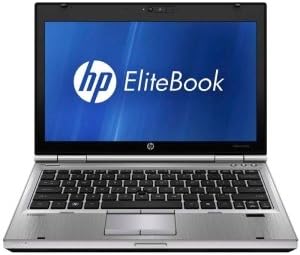
మూర్తి 4.1: ముందు view of the HP EliteBook 2560p laptop. This image shows the laptop open, revealing the 12.5-inch display, keyboard, and touchpad. The screen displays the "HP EliteBook" logo.
4.1. Front and Top Components
- 12.5-inch HD Anti-Glare LED Display: For visual output.
- కీబోర్డ్: Standard QWERTY layout for text input.
- టచ్ప్యాడ్: For cursor control and navigation.
- Webక్యామ్: Integrated for video conferencing and imaging.
- Fingerprint Reader (FPR): For enhanced security.
4.2. Side and Rear Components
- USB 2.0 పోర్ట్లు: For connecting peripheral devices.
- DVD+/-RW Optical Drive: CDలు/DVDలు చదవడం మరియు రాయడం కోసం.
- పవర్ కనెక్టర్: AC అడాప్టర్ను కనెక్ట్ చేయడానికి.
- ఈథర్నెట్ పోర్ట్: వైర్డు నెట్వర్క్ కనెక్షన్ కోసం.
- డిస్ప్లే పోర్ట్లు: బాహ్య మానిటర్లను కనెక్ట్ చేయడానికి.
- ఆడియో జాక్స్: హెడ్ఫోన్లు మరియు మైక్రోఫోన్ కోసం.
5. సెటప్
5.1. పవర్ అడాప్టర్ను కనెక్ట్ చేస్తోంది
- AC పవర్ కార్డ్ని AC అడాప్టర్కి కనెక్ట్ చేయండి.
- AC అడాప్టర్ను గ్రౌండెడ్ ఎలక్ట్రికల్ అవుట్లెట్లోకి ప్లగ్ చేయండి.
- Connect the DC output plug of the AC adapter to the power connector on your laptop.
- Allow the battery to charge fully before initial use, or use the laptop while connected to power.
5.2. Initial Boot-Up and Operating System Setup
- ల్యాప్టాప్ మూత తెరవండి.
- Press the power button, typically located above the keyboard.
- Follow the on-screen instructions to complete the Windows 7 Professional setup, including language selection, user account creation, and network configuration.
6. ఆపరేటింగ్ సూచనలు
6.1. పవర్ ఆన్ మరియు ఆఫ్
- పవర్ ఆన్ చేయడానికి: పవర్ బటన్ను నొక్కండి.
- షట్ డౌన్ చేయడానికి: Click the Start button, then select "Shut Down."
- పునఃప్రారంభించడానికి: Click the Start button, then select "Restart."
- నిద్రించడానికి: Close the lid or click the Start button and select "Sleep."
6.2. టచ్ప్యాడ్ని ఉపయోగించడం
The touchpad allows you to control the cursor on the screen.
- నొక్కండి: Single tap to click, double tap to double-click.
- లాగండి: Tap and hold, then drag your finger across the touchpad.
- స్క్రోల్: Use two fingers to scroll vertically or horizontally.
6.3. Connecting to a Wireless Network (Wi-Fi)
- Click the network icon in the system tray (bottom-right corner of the screen).
- జాబితా నుండి మీకు కావలసిన Wi-Fi నెట్వర్క్ను ఎంచుకోండి.
- "కనెక్ట్" పై క్లిక్ చేసి, ప్రాంప్ట్ చేయబడితే నెట్వర్క్ సెక్యూరిటీ కీ (పాస్వర్డ్) ను నమోదు చేయండి.
6.4. Using the Optical Drive
The integrated DVD+/-RW drive allows you to read and write CDs and DVDs.
- Press the eject button on the drive to open the tray.
- Place a disc gently onto the tray, label side up.
- Push the tray back into the laptop until it clicks shut.
7. నిర్వహణ
7.1. మీ ల్యాప్టాప్ను శుభ్రం చేయడం
- ల్యాప్టాప్ను శుభ్రం చేయడానికి ముందు ఎల్లప్పుడూ పవర్ ఆఫ్ చేసి, అన్ప్లగ్ చేయండి.
- కొద్దిగా మెత్తని, మెత్తని బట్టను ఉపయోగించండి dampడిస్ప్లే కోసం నీరు లేదా ప్రత్యేకమైన స్క్రీన్ క్లీనర్తో నింపబడి ఉంటుంది.
- కీబోర్డ్ మరియు ఛాసిస్ కోసం, మృదువైన వస్త్రాన్ని ఉపయోగించండి. కఠినమైన రసాయనాలను నివారించండి.
- వెంట్లు మరియు కీబోర్డ్ పగుళ్ల నుండి దుమ్మును తొలగించడానికి సంపీడన గాలిని ఉపయోగించండి.
7.2. బ్యాటరీ సంరక్షణ
- బ్యాటరీని తరచుగా పూర్తిగా డిశ్చార్జ్ చేయడాన్ని నివారించండి.
- ల్యాప్టాప్ను ఎక్కువ సేపు ఉపయోగించకపోతే చల్లని, పొడి ప్రదేశంలో నిల్వ చేయండి.
- If the battery is removable, ensure it is securely seated.
7.3. సాఫ్ట్వేర్ నవీకరణలు
HP మద్దతు నుండి ఆపరేటింగ్ సిస్టమ్ నవీకరణలు (విండోస్ నవీకరణ) మరియు డ్రైవర్ నవీకరణల కోసం క్రమం తప్పకుండా తనిఖీ చేసి, ఇన్స్టాల్ చేయండి. webసరైన పనితీరు మరియు భద్రతను నిర్ధారించడానికి సైట్.
8. ట్రబుల్షూటింగ్
| సమస్య | సాధ్యమైన పరిష్కారం |
|---|---|
| ల్యాప్టాప్ పవర్ ఆన్ చేయడం లేదు. | AC అడాప్టర్ సురక్షితంగా కనెక్ట్ చేయబడిందని మరియు పవర్ అవుట్లెట్ పనిచేస్తుందని నిర్ధారించుకోండి. బ్యాటరీ ఛార్జ్ను తనిఖీ చేయండి. |
| Wi-Fi కనెక్షన్ లేదు. | Verify Wi-Fi is enabled (check physical switch or function key). Restart router and laptop. Re-enter Wi-Fi password. |
| స్క్రీన్ ఖాళీగా ఉంది. | Connect an external monitor to check if the display is faulty. Adjust brightness settings. Restart the laptop. |
| సిస్టమ్ నెమ్మదిగా ఉంది లేదా స్పందించడం లేదు. | Close unnecessary applications. Check for malware. Ensure sufficient free disk space. Restart the laptop. |
మరింత క్లిష్టమైన సమస్యల కోసం, HP మద్దతును చూడండి. webసైట్ లేదా కస్టమర్ సేవను సంప్రదించండి.
9. స్పెసిఫికేషన్లు
| ఫీచర్ | వివరాలు |
|---|---|
| మోడల్ | HP EliteBook 2560p (LJ467UT#ABA) |
| ప్రాసెసర్ | ఇంటెల్ కోర్ i5-2520M |
| ప్రదర్శించు | 12.5-inch HD Anti-Glare LED (1366 x 768 pixels) |
| RAM | 4 GB DDR3 (1333 MHz) |
| నిల్వ | 320 GB HDD |
| ఆప్టికల్ డ్రైవ్ | DVD+/-RW |
| గ్రాఫిక్స్ | ఇంటిగ్రేటెడ్ ఇంటెల్ గ్రాఫిక్స్ |
| వైర్లెస్ | 802.11a/b/g/n, బ్లూటూత్ |
| ఓడరేవులు | USB 2.0 (x1), DisplayPort, VGA, Ethernet, Audio Jacks |
| ఆపరేటింగ్ సిస్టమ్ | Windows 7 ప్రొఫెషనల్ 64-బిట్ |
| Webకెమెరా | ఇంటిగ్రేటెడ్ Webకెమెరా |
| భద్రత | వేలిముద్ర రీడర్ |
| బ్యాటరీ లైఫ్ | 8.5 గంటల వరకు (సగటున) |
| కొలతలు (LxWxH) | 16.5 x 13.5 x 4.5 అంగుళాలు |
| బరువు | 6.8 పౌండ్లు |
10. వారంటీ మరియు మద్దతు
For information regarding your product's warranty, please refer to the warranty document included with your purchase or visit the official HP support webసైట్.
HP provides various support resources, including online documentation, driver downloads, and customer service contact options.
- HP మద్దతు Webసైట్: www.hp.com/support
- మద్దతును సంప్రదించండి: HPని చూడండి webప్రాంతీయ సంప్రదింపు నంబర్లు మరియు చాట్ ఎంపికల కోసం సైట్.