
పరిచయం
This manual provides essential instructions for the safe and efficient operation of your Sunstech XD TH-20 Home Cinema 5.1 Subwoofer System. Please read this manual thoroughly before using the product and retain it for future reference.
ముఖ్యమైన భద్రతా సూచనలు
- శక్తి మూలం: విద్యుత్ సరఫరా వాల్యూమ్తో సరిపోలుతుందని నిర్ధారించుకోండిtagఇ యూనిట్లో పేర్కొనబడింది.
- వెంటిలేషన్: వెంటిలేషన్ ఓపెనింగ్లను బ్లాక్ చేయవద్దు. తయారీదారు సూచనలకు అనుగుణంగా ఇన్స్టాల్ చేయండి.
- నీరు మరియు తేమ: ఈ ఉపకరణాన్ని వర్షం లేదా తేమకు గురిచేయవద్దు. నీటి దగ్గర ఉపయోగించవద్దు.
- వేడి: రేడియేటర్లు, హీట్ రిజిస్టర్లు, స్టవ్లు లేదా ఇతర ఉపకరణాలు (సహా ampలిఫైయర్లు) వేడిని ఉత్పత్తి చేస్తాయి.
- శుభ్రపరచడం: పొడి గుడ్డతో మాత్రమే శుభ్రం చేయండి.
- సర్వీసింగ్: అర్హత కలిగిన సేవా సిబ్బందికి అన్ని సర్వీసులను చూడండి. ఉపకరణం ఏ విధంగానైనా దెబ్బతిన్నప్పుడు సర్వీసింగ్ అవసరం.
ప్యాకేజీ విషయాలు
క్రింద జాబితా చేయబడిన అన్ని అంశాలు మీ ప్యాకేజీలో ఉన్నాయని నిర్ధారించుకోండి:
- 1 x Sunstech XD TH-20 Subwoofer Unit
- 5 x శాటిలైట్ స్పీకర్లు
- 1 x రిమోట్ కంట్రోల్ (బ్యాటరీలతో)
- స్పీకర్ కేబుల్స్
- Audio Input Cables
- వినియోగదారు మాన్యువల్ (ఈ పత్రం)
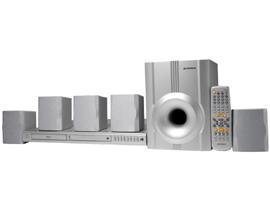
Image: Sunstech XD TH-20 Home Cinema 5.1 Subwoofer System components.
సెటప్ సూచనలు
1. స్పీకర్ ప్లేస్మెంట్
సరైన 5.1 సరౌండ్ సౌండ్ అనుభవం కోసం, స్పీకర్లను ఈ క్రింది విధంగా ఉంచండి:
- సెంటర్ స్పీకర్: Place directly above or below your TV/monitor.
- ముందు ఎడమ/కుడి స్పీకర్లు: Position to the left and right of your TV, equidistant from the listening position.
- వెనుక ఎడమ/కుడి స్పీకర్లు: Place behind the main listening position, slightly to the sides.
- subwoofer: Can be placed anywhere in the room, typically near the front speakers. Experiment with placement for best bass response.
2. స్పీకర్లను కనెక్ట్ చేస్తోంది
- Connect each satellite speaker to the corresponding output terminals on the subwoofer unit using the provided speaker cables. Ensure correct polarity (+ to + and - to -).
- Connect the subwoofer to your audio source (e.g., TV, DVD player, PC) using the appropriate audio input cables. The system supports MP3 playback.
3. పవర్ కనెక్షన్
- అన్ని ఆడియో కనెక్షన్లు సురక్షితంగా ఉన్నాయని నిర్ధారించుకోండి.
- Plug the subwoofer's power cord into a wall outlet.
- Turn on the power switch on the subwoofer unit.
ఆపరేటింగ్ సూచనలు
ప్రాథమిక ఆపరేషన్
- పవర్ ఆన్/ఆఫ్: Use the power button on the front panel of the subwoofer or the remote control.
- వాల్యూమ్ నియంత్రణ: Adjust the master volume using the knob on the subwoofer or the VOL+/- buttons on the remote.
- ఇన్పుట్ ఎంపిక: Press the "Input" or "Source" button on the remote or front panel to cycle through available audio inputs (e.g., AUX, MP3).
- బాస్/ట్రెబుల్ కంట్రోల్: Use the dedicated controls on the remote or subwoofer to adjust bass and treble levels to your preference.
MP3 ప్లేబ్యాక్
The Sunstech XD TH-20 supports MP3 audio playback. Connect your MP3 device to the designated MP3 input port on the subwoofer unit. Select the MP3 input source using the input selection button.
నిర్వహణ మరియు సంరక్షణ
- శుభ్రపరచడం: Disconnect the power before cleaning. Use a soft, dry cloth to wipe the surfaces of the speakers and subwoofer. Do not use liquid cleaners or aerosol sprays.
- ప్లేస్మెంట్: యూనిట్ను ప్రత్యక్ష సూర్యకాంతిలో, ఉష్ణ వనరుల దగ్గర లేదా అధిక తేమ లేదా దుమ్ము ఉన్న ప్రదేశాలలో ఉంచకుండా ఉండండి.
- వెంటిలేషన్: Ensure adequate airflow around the subwoofer to prevent overheating. Do not cover ventilation openings.
- కేబుల్స్: Periodically check all cable connections for security and damage.
ట్రబుల్షూటింగ్ గైడ్
| సమస్య | సాధ్యమైన కారణం | పరిష్కారం |
|---|---|---|
| స్పీకర్ల నుండి శబ్దం లేదు |
|
|
| వక్రీకరించిన ధ్వని |
|
|
| రిమోట్ కంట్రోల్ పనిచేయడం లేదు |
|
|
స్పెసిఫికేషన్లు
| మోడల్ పేరు | TH-XD 20 |
| బ్రాండ్ | సన్స్టెక్ |
| సరౌండ్ సౌండ్ ఛానెల్ కాన్ఫిగరేషన్ | 5 + Subwoofer (5.1) |
| ప్రత్యేక ఫీచర్ | MP3 ప్లేబ్యాక్ |
| వస్తువు బరువు | 5.2 కిలోలు |
| ASIN | B0055ZKOYW |
వారంటీ మరియు మద్దతు
For warranty information and technical support, please refer to the warranty card included with your product or contact Sunstech customer service directly. Keep your purchase receipt as proof of purchase.
For further assistance, visit the official Sunstech webసైట్ లేదా వారి మద్దతు ఛానెల్లను సంప్రదించండి.