
పరిచయం
This manual provides essential instructions for setting up, operating, and maintaining your Canon PowerShot ELPH 310 HS digital camera. Please read this manual thoroughly to ensure proper use and to maximize your camera's performance.
పెట్టెలో ఏముంది
అన్ప్యాక్ చేసిన తర్వాత, కింది అన్ని అంశాలు చేర్చబడ్డాయని నిర్ధారించుకోండి:
- Canon PowerShot ELPH 310 HS Camera
- బ్యాటరీ ప్యాక్ NB-4L
- Battery Charger CB-2LV
- మణికట్టు పట్టీ
- USB కేబుల్
- CD-ROM (Software/Drivers)
సెటప్
1 బ్యాటరీని ఛార్జ్ చేస్తోంది
Insert the Battery Pack NB-4L into the Battery Charger CB-2LV. Plug the charger into a power outlet. The charging indicator light will show the charging status. Once fully charged, remove the battery.
2. బ్యాటరీ మరియు మెమరీ కార్డ్ను చొప్పించడం
Open the battery/card compartment cover on the camera. Insert the charged battery pack, ensuring correct orientation. Insert a compatible SD/SDHC/SDXC memory card into the card slot until it clicks into place. Close the compartment cover securely.

చిత్రం: ముందు భాగం view of the Canon PowerShot ELPH 310 HS digital camera, showcasing its silver finish and lens.
కెమెరాను ఆపరేట్ చేస్తోంది
1. పవర్ ఆన్/ఆఫ్
నొక్కండి ఆన్/ఆఫ్ button located on the top or side of the camera to power it on or off. The lens will extend when powered on.
2. ప్రాథమిక ఫోటోగ్రఫీ
- దృష్టి కేంద్రీకరించడం: Gently press the shutter button halfway down to focus. The camera will emit a beep and display a green frame when focus is achieved.
- చిత్రాన్ని తీయడం: చిత్రాన్ని క్యాప్చర్ చేయడానికి షట్టర్ బటన్ను పూర్తిగా క్రిందికి నొక్కండి.
- జూమ్: Use the zoom lever around the shutter button to adjust the optical zoom (8x).
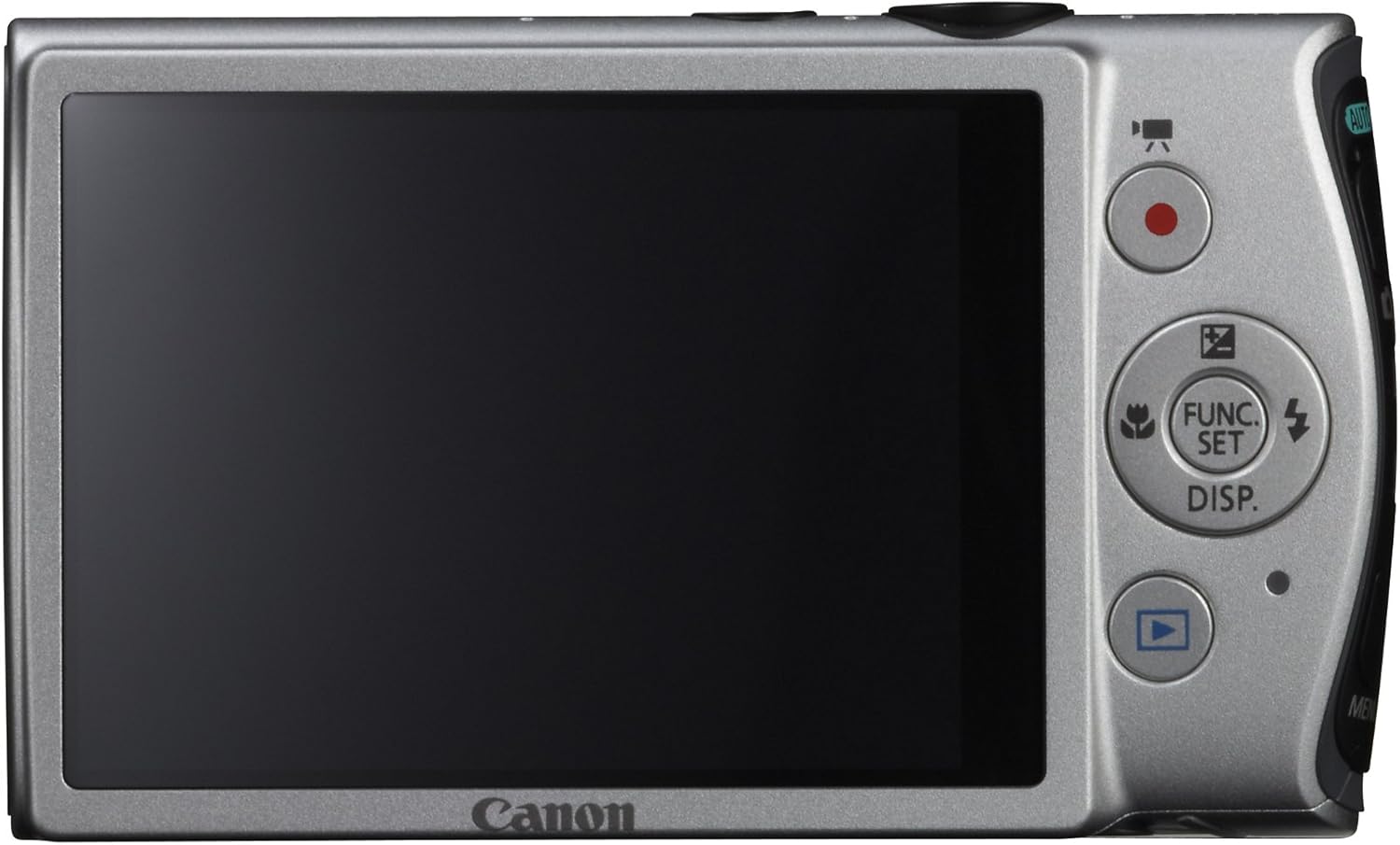
చిత్రం: వెనుక view of the Canon PowerShot ELPH 310 HS, displaying the 3.0-inch LCD screen and various control buttons for navigation and function selection.
3. షూటింగ్ మోడ్లు
The PowerShot ELPH 310 HS offers various shooting modes to suit different situations. Use the mode dial or menu to select:
- స్మార్ట్ ఆటో: Automatically detects scenes and applies optimal settings for point-and-shoot simplicity.
- కార్యక్రమం (పి): Allows for automatic aperture/shutter speed selection based on conditions, with some user control.
- Movie Digest: Records a short video clip before each still image, combining them into a daily video.
- హై-స్పీడ్ బర్స్ట్: Captures rapid action at approximately 8.7 frames per second.
- Super Slow Motion Movie: Records video at high frame rates (up to 240 fps) for slow-motion playback.
- Special Scene Modes: Includes options like Handheld Night Scene, Portrait, Beach, Snow, Fireworks, Fisheye Effect, Miniature Effect, Toy Camera Effect, and more for specific photographic effects.
4. వీడియో రికార్డింగ్
To record videos, press the dedicated movie button. The camera supports Full HD 1080p video at 24 fps and 720p HD video at 30 fps. The iFrame movie format is also supported for easier editing.
5. Image Stabilization (Intelligent IS)
The camera features Intelligent IS, which automatically selects the best shake correction method for your shooting situation. This includes modes for stills (Normal, Panning, Macro, Tripod) and videos (Dynamic, Powered, Macro, Tripod) to ensure steady images and footage.
నిర్వహణ
1. కెమెరాను శుభ్రపరచడం
- లెన్స్: కెమెరా లెన్స్ల కోసం ప్రత్యేకంగా రూపొందించిన మృదువైన, మెత్తటి రహిత వస్త్రాన్ని ఉపయోగించండి. లెన్స్ను వేళ్లతో నేరుగా తాకకుండా ఉండండి.
- LCD స్క్రీన్: Wipe gently with a soft, dry cloth. Do not use abrasive cleaners.
- కెమెరా బాడీ: Use a soft, dry cloth to wipe away dust and smudges.
2. బ్యాటరీ సంరక్షణ
- ఉపయోగంలో లేనప్పుడు బ్యాటరీలను చల్లని, పొడి ప్రదేశంలో నిల్వ చేయండి.
- బ్యాటరీ జీవితకాలం పొడిగించడానికి తరచుగా పూర్తిగా డిశ్చార్జ్ చేయడాన్ని నివారించండి.
- బ్యాటరీలను తీవ్రమైన ఉష్ణోగ్రతలకు గురిచేయవద్దు.
3. నిల్వ
కెమెరాను ఎక్కువసేపు నిల్వ చేసేటప్పుడు, బ్యాటరీ మరియు మెమరీ కార్డ్ను తీసివేయండి. కెమెరాను పొడి, దుమ్ము లేని వాతావరణంలో, ప్రాధాన్యంగా కెమెరా బ్యాగ్ లేదా కేసులో నిల్వ చేయండి.
ట్రబుల్షూటింగ్
| సమస్య | సాధ్యమైన కారణం / పరిష్కారం |
|---|---|
| కెమెరా పవర్ ఆన్ అవ్వదు. | బ్యాటరీ ఖాళీ అయి ఉండవచ్చు లేదా తప్పుగా చొప్పించబడి ఉండవచ్చు. బ్యాటరీ ఛార్జ్ చేయబడిందని మరియు సరిగ్గా చొప్పించబడిందని నిర్ధారించుకోండి. |
| చిత్రాలు అస్పష్టంగా ఉన్నాయి. | Camera shake, subject movement, or incorrect focus. Ensure proper grip, use Intelligent IS, or check focus settings. |
| మెమరీ కార్డ్ లోపం. | Memory card may be full, corrupted, or incompatible. Try formatting the card (this will erase all data) or use a different card. |
| ఫ్లాష్ వెలగదు. | Flash may be set to OFF or Red-Eye Reduction mode. Check flash settings in the menu. |
| వీడియో రికార్డ్ చేయడం సాధ్యం కాదు. | Memory card may be full or too slow. Ensure sufficient space and use a high-speed memory card. |
స్పెసిఫికేషన్లు
| ఫీచర్ | వివరాలు |
|---|---|
| మోడల్ పేరు | Canon PowerShot ELPH 310 HS |
| చిత్రం సెన్సార్ | 12.1 మెగాపిక్సెల్ CMOS |
| ఇమేజ్ ప్రాసెసర్ | డిజిక్ 4 |
| ఆప్టికల్ జూమ్ | 8x |
| లెన్స్ | 28mm Wide-Angle (35mm equivalent: 28-224mm) |
| చిత్రం స్థిరీకరణ | ఆప్టికల్ (ఇంటెలిజెంట్ IS) |
| వీడియో రికార్డింగ్ | Full HD 1080p (24 fps), HD 720p (30 fps) |
| LCD స్క్రీన్ | 3.0-inch PureColor LCD (461,000 dots) |
| నిల్వ మీడియా | SD, SDHC, SDXC Memory Cards |
| కనెక్టివిటీ | HDMI, USB |
| బ్యాటరీ | NB-4L Lithium-ion Battery Pack |
| బరువు | సుమారు 0.31 పౌండ్లు (బ్యాటరీ మరియు మెమరీ కార్డ్తో సహా) |
వారంటీ మరియు మద్దతు
For warranty information and technical support, please refer to the documentation included with your product or visit the official Canon webవారంటీ క్లెయిమ్ల కోసం కొనుగోలు రుజువుగా మీ కొనుగోలు రసీదును ఉంచండి.
కానన్ మద్దతు Webసైట్: www.usa.canon.com/support