
1. పరిచయం
ధన్యవాదాలు, ధన్యవాదాలు.asing the Hello Kitty KT2064 AM/FM Projection Alarm Clock Radio. This device combines a digital alarm clock with an AM/FM radio and a unique projection feature, allowing you to display the time on your ceiling or wall. Please read this manual carefully to ensure proper operation and to fully utilize all features of your new alarm clock radio.

చిత్రం 1.1: ముందు view of the Hello Kitty KT2064 Projection Alarm Clock Radio, showing the digital display and the Hello Kitty design.
2 ఫీచర్లు
- ప్రొజెక్షన్ ఫీచర్: Projects the time onto your ceiling or wall with adjustable focus and up to 120-degree pivot angle.
- Dual Alarm Options: Wake up to either a buzzer alarm or your favorite radio station.
- AM/FM రేడియో: Integrated radio tuner for listening to broadcast stations.
- తాత్కాలికంగా ఆపివేయి ఫంక్షన్: Allows for an additional 9 minutes of sleep before the alarm sounds again.
- Sleep to Radio: Set a timer (up to 2 hours) for the radio to play before automatically turning off.
- బ్యాటరీ బ్యాకప్: Maintains time and alarm settings during power outages (requires 3 CR2025 button cell batteries, not included).
- LED Time Display: Clear red LED display for current time.
3. ప్యాకేజీ విషయాలు
దయచేసి ఈ క్రింది అంశాల కోసం ప్యాకేజీని తనిఖీ చేయండి:
- Hello Kitty KT2064 Projection Alarm Clock Radio Unit
- ఎసి పవర్ అడాప్టర్
- వినియోగదారు మాన్యువల్ (ఈ పత్రం)
Note: 3 CR2025 button cell batteries for backup are not included and must be purchased separately.
4. సెటప్
4.1 పవర్ కనెక్షన్
- Unpack the alarm clock radio and its accessories.
- Connect the AC power adapter to the DC input jack located on the back of the unit.
- Plug the other end of the AC power adapter into a standard wall outlet. The unit will power on, and the LED display will light up.
4.2 Installing Backup Batteries
Installing backup batteries ensures that your time and alarm settings are retained during a power outage.
- Locate the battery compartment on the bottom or back of the unit.
- బ్యాటరీ కంపార్ట్మెంట్ కవర్ తెరవండి.
- Insert 3 CR2025 button cell batteries, observing the correct polarity (+ and - markings).
- బ్యాటరీ కంపార్ట్మెంట్ కవర్ను సురక్షితంగా మూసివేయండి.

చిత్రం 4.2: వెనుక view of the alarm clock radio, showing control buttons and potential location for battery compartment.
5. ఆపరేటింగ్ సూచనలు
5.1 సమయాన్ని సెట్ చేయడం
- నొక్కండి మరియు పట్టుకోండి టైమ్ సెట్ button (or similar button, refer to unit markings) for approximately 3 seconds until the hour digits begin to flash.
- ఉపయోగించండి గంట or + / - గంటను సర్దుబాటు చేయడానికి బటన్లు. AM/PM సూచికపై శ్రద్ధ వహించండి.
- నొక్కండి టైమ్ సెట్ మళ్ళీ బటన్ నొక్కండి. నిమిషాల అంకెలు ఫ్లాష్ అవుతాయి.
- ఉపయోగించండి నిమిషం or + / - నిమిషాలను సర్దుబాటు చేయడానికి బటన్లు.
- నొక్కండి టైమ్ సెట్ సమయ సెట్టింగ్ మోడ్ను నిర్ధారించడానికి మరియు నిష్క్రమించడానికి మరోసారి బటన్ను నొక్కండి.
5.2 Setting the Alarm (Alarm 1 and Alarm 2)
ఈ యూనిట్ రెండు స్వతంత్ర అలారాలకు మద్దతు ఇస్తుంది.
- నొక్కండి మరియు పట్టుకోండి AL1 సెట్ బటన్ (అలారం 1 కోసం) లేదా AL2 సెట్ button (for Alarm 2) for approximately 3 seconds until the hour digits of the alarm time begin to flash.
- ఉపయోగించండి గంట or + / - అలారం గంటను సర్దుబాటు చేయడానికి బటన్లు.
- సంబంధిత నొక్కండి AL సెట్ మళ్ళీ బటన్ నొక్కండి. నిమిషాల అంకెలు ఫ్లాష్ అవుతాయి.
- ఉపయోగించండి నిమిషం or + / - అలారం నిమిషాలను సర్దుబాటు చేయడానికి బటన్లు.
- నొక్కండి AL సెట్ అలారం మూలాన్ని ఎంచుకోవడానికి మళ్ళీ బటన్ను నొక్కండి: బజర్ or రేడియో. ఉపయోగించండి + / - buttons to toggle.
- నొక్కండి AL సెట్ అలారం సెట్టింగ్ మోడ్ను నిర్ధారించడానికి మరియు నిష్క్రమించడానికి మరోసారి బటన్ను నొక్కండి.
- అలారంను యాక్టివేట్/డియాక్టివేట్ చేయడానికి, AL1 ఆన్/ఆఫ్ or AL2 ఆన్/ఆఫ్ button (or similar) repeatedly until the alarm indicator appears/disappears on the display.
5.3 Using the Radio
- నొక్కండి రేడియో ఆన్/ఆఫ్ రేడియోను ఆన్ చేయడానికి బటన్.
- నొక్కండి AM/FM AM మరియు FM బ్యాండ్ల మధ్య మారడానికి బటన్.
- ఉపయోగించండి ట్యూన్+ మరియు ట్యూన్- buttons to manually tune to a desired station.
- For automatic scanning, press and hold ట్యూన్+ or ట్యూన్- for a few seconds until the radio finds the next clear station.
- ఉపయోగించి వాల్యూమ్ను సర్దుబాటు చేయండి వాల్యూమ్ + మరియు వాల్యూమ్ - బటన్లు.
- రేడియోను ఆఫ్ చేయడానికి, నొక్కండి రేడియో ఆన్/ఆఫ్ మళ్ళీ బటన్.
5.4 Projection Feature
- Locate the projector lens on top of the unit.
- నొక్కండి ప్రొజెక్టర్ ఆన్/ఆఫ్ button to activate the time projection.
- Adjust the angle of the projector head (up to 120 degrees) to direct the time display onto your ceiling or wall.
- తిప్పండి ఫోకస్ ring around the projector lens to achieve a clear image.
- To turn off the projection, press the ప్రొజెక్టర్ ఆన్/ఆఫ్ మళ్ళీ బటన్.

Image 5.4: The alarm clock radio actively projecting the time and Hello Kitty logo onto a surface.
5.5 స్నూజ్ ఫంక్షన్
అలారం మోగినప్పుడు, పెద్ద బటన్ను నొక్కండి స్నూజ్ button (usually located on top of the unit). The alarm will pause for approximately 9 minutes and then sound again.
5.6 Sleep to Radio Function
This feature allows you to fall asleep to the radio, which will automatically turn off after a set period.
- Turn on the radio and tune to your desired station.
- నొక్కండి నిద్రించు button repeatedly to cycle through the available sleep timer durations (e.g., 120, 90, 60, 30, 15 minutes, or OFF). The selected duration will appear on the display.
- The radio will play for the chosen duration and then automatically turn off.
6. నిర్వహణ
- శుభ్రపరచడం: మెత్తటి, పొడి గుడ్డతో యూనిట్ను తుడవండి. రాపిడి క్లీనర్లు లేదా ద్రావకాలను ఉపయోగించవద్దు.
- నీటి బహిర్గతం: యూనిట్ను నీరు లేదా అధిక తేమ నుండి దూరంగా ఉంచండి.
- ఉష్ణోగ్రత: యూనిట్ను తీవ్రమైన ఉష్ణోగ్రతలు లేదా ప్రత్యక్ష సూర్యకాంతికి గురికాకుండా ఉండండి.
- బ్యాటరీ భర్తీ: Replace backup batteries annually or when the low battery indicator appears to ensure continuous functionality during power outages.
7. ట్రబుల్షూటింగ్
| సమస్య | సాధ్యమైన కారణం | పరిష్కారం |
|---|---|---|
| యూనిట్ పవర్ ఆన్ చేయదు. | పవర్ అడాప్టర్ కనెక్ట్ కాలేదు లేదా అవుట్లెట్ తప్పుగా ఉంది. | పవర్ అడాప్టర్ యూనిట్ మరియు వర్కింగ్ వాల్ అవుట్లెట్కి సురక్షితంగా ప్లగ్ చేయబడిందని నిర్ధారించుకోండి. మరొక పరికరంతో అవుట్లెట్ను పరీక్షించండి. |
| Time/alarm settings are lost after power outage. | బ్యాకప్ బ్యాటరీలు డెడ్ అయ్యాయి లేదా ఇన్స్టాల్ చేయబడలేదు. | Install new CR2025 button cell batteries or replace existing ones. |
| ప్రొజెక్షన్ అస్పష్టంగా ఉంది. | ఫోకస్ సరిగ్గా సర్దుబాటు చేయబడలేదు. | తిప్పండి ఫోకస్ ring around the projector lens until the image is clear. |
| రేడియో రిసెప్షన్ పేలవంగా ఉంది. | యాంటెన్నా విస్తరించబడలేదు లేదా జోక్యం చేసుకోలేదు. | Extend the FM wire antenna fully. For AM, try repositioning the unit. Avoid placing near electronic devices that may cause interference. |
| అలారం మోగడం లేదు. | అలారం సక్రియం చేయబడలేదు లేదా తప్పుగా సెట్ చేయబడలేదు. | Ensure the alarm is set and activated (alarm indicator visible). Check alarm volume if set to radio. |
8. స్పెసిఫికేషన్లు
| బ్రాండ్ | హలో కిట్టి |
| మోడల్ సంఖ్య | KT2064P |
| ప్రదర్శన రకం | డిజిటల్ LED |
| శక్తి మూలం | ఎసి పవర్ అడాప్టర్ |
| బ్యాకప్ బ్యాటరీ | 3 x CR2025 Button Cell (not included) |
| రేడియో ఫ్రీక్వెన్సీ | AM/FM (FM up to 108 MHz) |
| ఉత్పత్తి కొలతలు (L x W x H) | 14.5 x 11.9 x 17.3 సెం.మీ (సుమారు 5.7 x 4.7 x 6.8 అంగుళాలు) |
| ఉత్పత్తి బరువు | 885 గ్రా (సుమారు 1.95 పౌండ్లు) |
| ప్రొజెక్షన్ యాంగిల్ | 120 డిగ్రీల వరకు |
| స్నూజ్ వ్యవధి | 9 నిమిషాల |
| స్లీప్ టైమర్ | 2 గంటల వరకు |
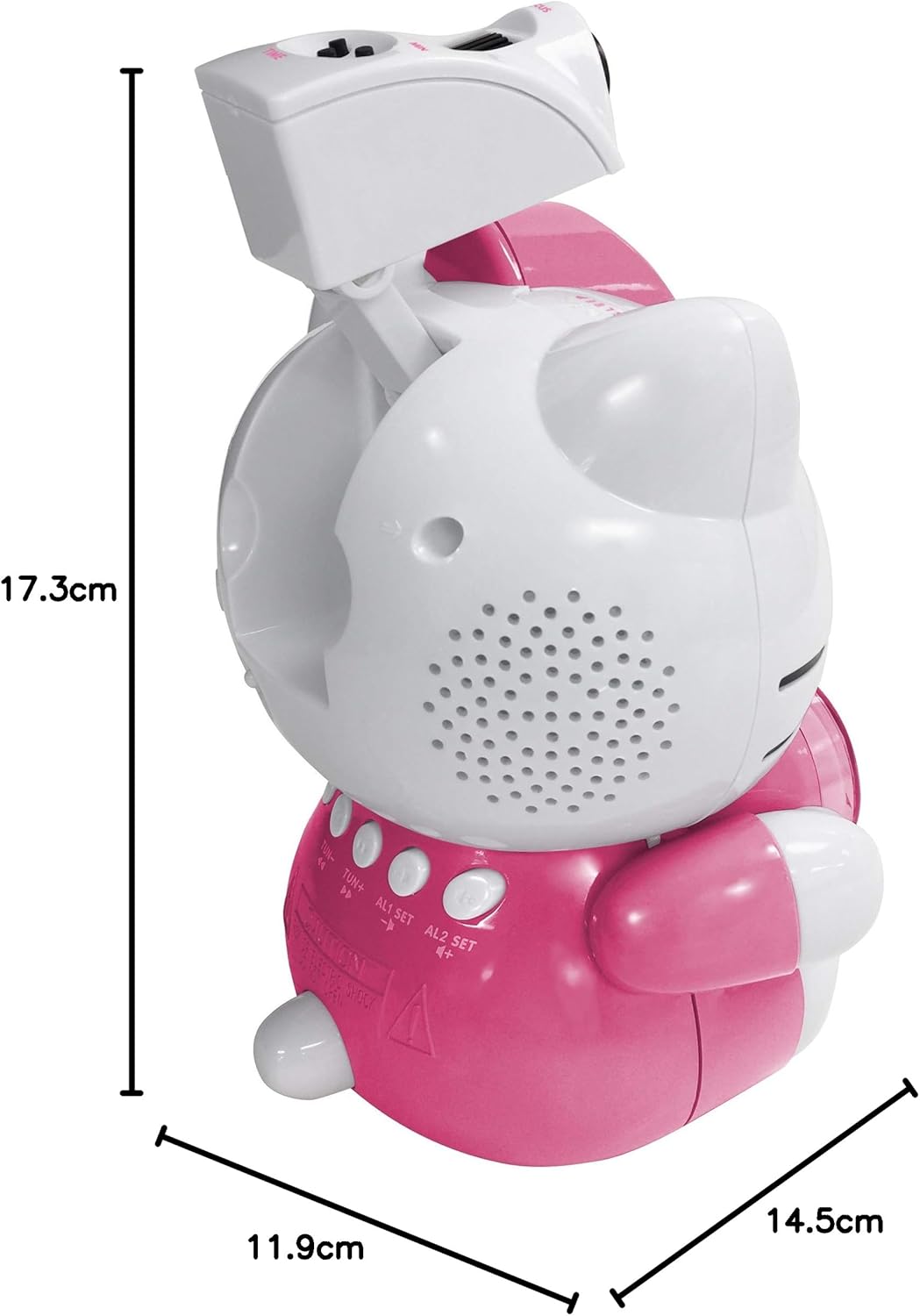
Image 8.1: Dimensions of the Hello Kitty KT2064 Projection Alarm Clock Radio.
9. వారంటీ మరియు మద్దతు
This product comes with a standard manufacturer's warranty. For specific warranty details, please refer to the documentation provided at the time of purchase or contact your retailer. If you encounter any issues not covered in the troubleshooting section, please contact customer support for assistance.
For support inquiries, please visit the official Hello Kitty product support webసైట్ లేదా మీ స్థానిక పంపిణీదారుని సంప్రదించండి.