
పరిచయం
This manual provides essential information for the proper setup, operation, and maintenance of your Samson Auro D208 8-Inch Active Loudspeaker. Please read these instructions thoroughly before using the product to ensure optimal performance and safety.
భద్రతా సమాచారం
Always follow basic safety precautions when using this product to reduce the risk of fire, electric shock, or injury. Keep the loudspeaker away from water and moisture. Do not block ventilation openings. Refer all servicing to qualified personnel.
ప్యాకేజీ విషయాలు
మీ ప్యాకేజీ కింది అంశాలను కలిగి ఉందని ధృవీకరించండి:
- Samson Auro D208 8-Inch Active Loudspeaker
- పవర్ కేబుల్
- వినియోగదారు మాన్యువల్
సెటప్
ప్లేస్మెంట్
The Auro D208 is designed for versatile placement. It can be used as a main PA speaker, a floor monitor, or mounted on a standard 1 3/8-inch (35mm) pole. Ensure the speaker is placed on a stable, level surface or securely mounted to prevent tipping.
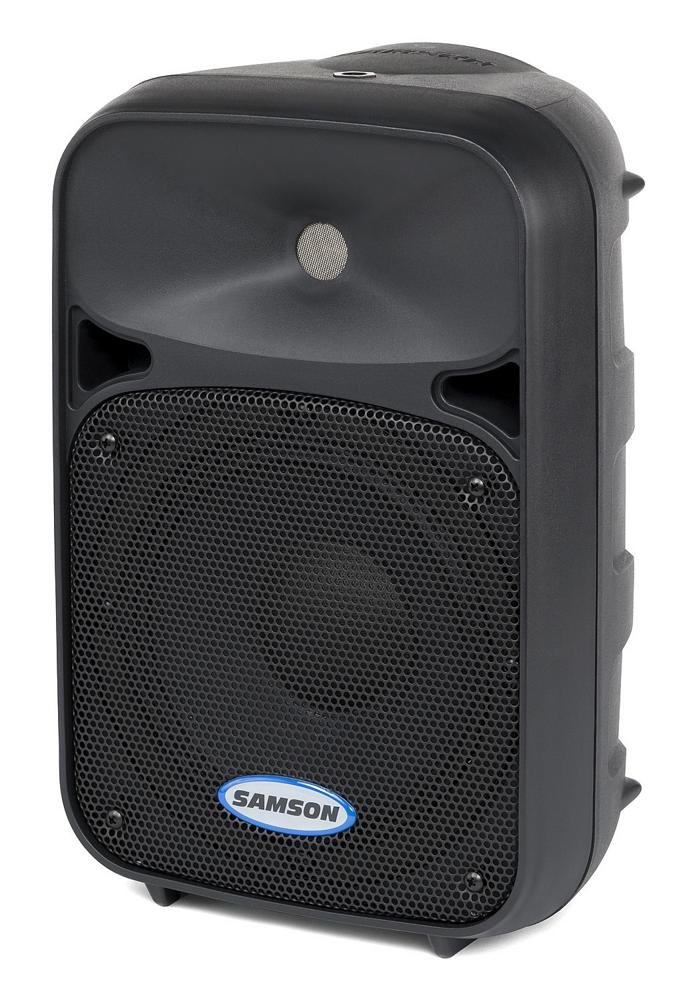
ముందు view of the Samson Auro D208 Active Loudspeaker, showcasinదాని కాంపాక్ట్ డిజైన్ మరియు రక్షణ గ్రిల్.
కనెక్షన్లు
The Auro D208 features a Mic/Line input and an additional Line output for linking multiple speakers.
- పవర్ కనెక్షన్: Connect the supplied power cable to the AC inlet on the rear panel and then to a suitable power outlet.
- ఇన్పుట్ కనెక్షన్: Use an XLR or 1/4-inch cable to connect your microphone or line-level audio source (e.g., mixer, instrument) to the Mic/Line input.
- Linking Speakers: To connect additional Auro D208 speakers, use an XLR cable from the Line output of the first speaker to the input of the next speaker.

Rear panel of the Samson Auro D208, illustrating the Mic/Line input, Line output, volume control, and Clip LED.
ఆపరేటింగ్ సూచనలు
పవర్ ఆన్/ఆఫ్
After all connections are made, turn on the power switch located on the rear panel. It is recommended to turn on the Auro D208 last in your audio chain and turn it off first.
వాల్యూమ్ నియంత్రణ
Adjust the main Volume control knob on the rear panel to set the overall output level of the loudspeaker. Start with the volume at its minimum setting and gradually increase it to the desired level.
క్లిప్ LED సూచిక
The Clip LED illuminates when the input signal is too strong, indicating potential distortion. If the Clip LED lights up frequently, reduce the input level from your source or the volume on the Auro D208 to prevent signal clipping.
నిర్వహణ
క్లీనింగ్
Clean the exterior of the loudspeaker with a soft, dry cloth. Do not use abrasive cleaners, solvents, or waxes. Ensure the speaker is unplugged before cleaning.
నిల్వ
When not in use, store the loudspeaker in a dry, cool environment, away from direct sunlight and extreme temperatures. If storing for extended periods, consider covering it to protect against dust.
ట్రబుల్షూటింగ్
| సమస్య | సాధ్యమైన కారణం | పరిష్కారం |
|---|---|---|
| సౌండ్ లేదు | No power; input cable disconnected; volume too low. | Check power connection and switch; ensure input cables are secure; increase volume. |
| వక్రీకరించిన ధ్వని | Input signal too high (clipping); faulty cable. | Reduce input level from source or speaker volume; replace cable. |
| హమ్ లేదా బజ్ | Ground loop; faulty cable; interference. | Ensure all equipment is on the same electrical circuit; try different cables; move away from power sources. |
స్పెసిఫికేషన్లు
| ఫీచర్ | వివరాలు |
|---|---|
| బ్రాండ్ | శాంసన్ |
| మోడల్ పేరు | Auro D208 |
| మోడల్ సంఖ్య | SAROD208A |
| స్పీకర్ రకం | 2-Way Active Loudspeaker |
| స్పీకర్ పరిమాణం | 8 అంగుళాలు |
| వూఫర్ వ్యాసం | 8 అంగుళాలు |
| ట్వీటర్ వ్యాసం | 1 అంగుళాలు |
| గరిష్ట అవుట్పుట్ పవర్ | 200 వాట్స్ |
| కనెక్టివిటీ టెక్నాలజీ | USB (for control, not audio streaming) |
| ఆడియో అవుట్పుట్ మోడ్ | స్టీరియో |
| మౌంటు రకం | Clip On, Floor Mount, 1 3/8-inch (35mm) Pole Mount Receptacle |
| అదనపు ఫీచర్లు | Mic/Line input with Volume control and Clip LED, Additional Line output for linking multiple speakers |
| అంశం కొలతలు (D x W x H) | 17"డి x 12.25"వా x 10.25"హ |
| వస్తువు బరువు | 7.75 గ్రాములు |
| శక్తి మూలం | కార్డెడ్ ఎలక్ట్రిక్ |
వారంటీ మరియు మద్దతు
వారంటీ సమాచారం
This product is covered by a 1-year parts and labor limited warranty. Please retain your proof of purchase for warranty claims.
కస్టమర్ మద్దతు
For technical assistance, service, or warranty inquiries, please visit the official Samson website or contact their customer support department. Contact information can typically be found on the manufacturer's webసైట్ లేదా ఉత్పత్తి ప్యాకేజింగ్లో.