
పరిచయం
This manual provides essential instructions for the setup, operation, maintenance, and troubleshooting of your Insignia 6.1-Channel 600W Digital Home Theater Receiver, model IS-HC040917. Please read this manual thoroughly before using the receiver to ensure proper and safe operation.
ముఖ్యమైన భద్రతా సూచనలు
- వెంటిలేషన్ ఓపెనింగ్లను బ్లాక్ చేయవద్దు. తయారీదారు సూచనలకు అనుగుణంగా ఇన్స్టాల్ చేయండి.
- రేడియేటర్లు, హీట్ రిజిస్టర్లు, స్టవ్లు లేదా ఇతర ఉపకరణాలు (సహా ampలిఫైయర్లు) వేడిని ఉత్పత్తి చేస్తాయి.
- ప్రత్యేకించి ప్లగ్లు, కన్వీనియన్స్ రెసెప్టాకిల్స్ మరియు అవి ఉపకరణం నుండి నిష్క్రమించే ప్రదేశంలో నడవడం లేదా పించ్ చేయడం నుండి పవర్ కార్డ్ను రక్షించండి.
- తయారీదారు పేర్కొన్న జోడింపులు/యాక్సెసరీలను మాత్రమే ఉపయోగించండి.
- మెరుపు తుఫానుల సమయంలో లేదా ఎక్కువ కాలం ఉపయోగించనప్పుడు ఈ ఉపకరణాన్ని అన్ప్లగ్ చేయండి.
- అర్హత కలిగిన సేవా సిబ్బందికి అన్ని సర్వీసులను చూడండి. ఉపకరణం ఏ విధంగానైనా దెబ్బతిన్నప్పుడు సర్వీసింగ్ అవసరం.
సెటప్ గైడ్
1. అన్ప్యాకింగ్
Carefully remove the receiver and all accessories from the packaging. Ensure all components are present:
- Insignia IS-HC040917 Receiver
- రిమోట్ కంట్రోల్
- AM లూప్ యాంటెన్నా
- FM వైర్ యాంటెన్నా
- వినియోగదారు మాన్యువల్ (ఈ పత్రం)
2. స్పీకర్లను కనెక్ట్ చేస్తోంది
The IS-HC040917 receiver supports a 6.1-channel speaker configuration. Connect your speakers to the corresponding terminals on the rear panel. Ensure correct polarity (+ to + and - to -) for each speaker.
- ముందు ఎడమ/కుడి: ప్రధాన స్టీరియో ధ్వని కోసం.
- కేంద్రం: సంభాషణ కోసం.
- ఎడమ/కుడి చుట్టూ: For ambient sound effects.
- సరౌండ్ బ్యాక్: For additional rear channel effects in 6.1 setups.
- Subwoofer (Pre-out): Connect to a powered subwoofer's LFE input.
Note: The receiver is designed for speakers with an impedance of 8 ohms.
3. Connecting Audio/Video Sources
Connect your external devices (e.g., DVD player, Blu-ray player, game console, cable box) to the appropriate input jacks on the receiver.
- HDMI: Use HDMI cables for high-definition audio and video signals. The receiver has 3 HDMI input ports.
- డిజిటల్ ఆడియో (ఆప్టికల్/కోక్సియల్): For digital audio from devices like CD players or set-top boxes.
- అనలాగ్ ఆడియో (RCA): For standard stereo audio connections from devices like VCRs or older CD players.
- ఎస్-వీడియో: For video signals from compatible devices.
4. యాంటెన్నా కనెక్షన్
Connect the supplied AM loop antenna and FM wire antenna to their respective terminals on the rear panel for radio reception.
5. పవర్ కనెక్షన్
Once all audio/video and speaker connections are made, plug the receiver's power cord into a standard AC wall outlet.
చిత్రం: Rear panel of the Insignia IS-HC040917 receiver, showing various input and output connections for speakers, audio/video sources (HDMI, RCA, S-Video, Digital), and antenna terminals. This diagram is crucial for correctly wiring the home theater system.
ఆపరేటింగ్ సూచనలు
1. పవర్ ఆన్/ఆఫ్
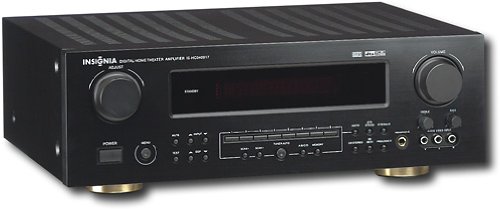
నొక్కండి శక్తి రిసీవర్ను ఆన్ లేదా ఆఫ్ చేయడానికి ముందు ప్యానెల్లోని బటన్ లేదా రిమోట్ కంట్రోల్.
2. ఇన్పుట్ ఎంపిక
ఉపయోగించండి ఇన్పుట్ సెలెక్టర్ knob/buttons on the front panel or the remote control to choose the desired audio/video source (e.g., HDMI 1, DVD, CD, Tuner).
3. వాల్యూమ్ నియంత్రణ
పెద్ద వాల్యూమ్ను ఉపయోగించి మాస్టర్ వాల్యూమ్ను సర్దుబాటు చేయండి వాల్యూమ్ ముందు ప్యానెల్లోని నాబ్ లేదా వాల్యూమ్ +/- రిమోట్ కంట్రోల్లో బటన్లు.
4. Audio Modes
The receiver supports various audio modes, including 6.1-channel surround sound. Use the మోడ్ or DSP buttons on the remote to cycle through available sound modes (e.g., Stereo, Dolby Digital, DTS, Pro Logic).
5. Tuner Operation (AM/FM Radio)
Select the "Tuner" input. Use the బ్యాండ్ button to switch between AM and FM. Use the ట్యూన్ +/- buttons to manually tune to stations or ప్రీసెట్ +/- to select stored stations. Refer to the remote control for specific tuner functions.
నిర్వహణ
1. శుభ్రపరచడం
Wipe the exterior of the receiver with a soft, dry cloth. Do not use liquid cleaners or aerosol sprays, as they may damage the finish or internal components. Ensure the unit is unplugged before cleaning.
2 వెంటిలేషన్
Ensure that the ventilation openings on the top and sides of the receiver are not blocked. Proper airflow is essential to prevent overheating and ensure long-term performance.
3. కేబుల్ నిర్వహణ
Periodically check all cable connections to ensure they are secure. Loose connections can lead to poor audio or video quality.
ట్రబుల్షూటింగ్
| సమస్య | సాధ్యమైన కారణం | పరిష్కారం |
|---|---|---|
| శక్తి లేదు | పవర్ కార్డ్ అన్ప్లగ్ చేయబడింది; పవర్ అవుట్లెట్ యాక్టివ్గా లేదు. | పవర్ కార్డ్ కనెక్షన్ను తనిఖీ చేయండి; వేరే అవుట్లెట్ను ప్రయత్నించండి. |
| శబ్దం లేదు | తప్పు ఇన్పుట్ ఎంచుకోబడింది; స్పీకర్ వైర్లు వదులుగా ఉన్నాయి; వాల్యూమ్ చాలా తక్కువగా ఉంది; మ్యూట్ యాక్టివేట్ చేయబడింది. | సరైన ఇన్పుట్ను ఎంచుకోండి; స్పీకర్ కనెక్షన్లను తనిఖీ చేయండి; వాల్యూమ్ పెంచండి; మ్యూట్ను నిష్క్రియం చేయండి. |
| వీడియో లేదు | Incorrect input selected; video cables loose or incorrect. | Select correct input; check video cable connections (HDMI, S-Video, RCA). |
| రిమోట్ కంట్రోల్ పనిచేయడం లేదు | Batteries depleted; obstruction between remote and receiver; incorrect remote mode. | Replace batteries; remove obstructions; ensure remote is in the correct operating mode. |
స్పెసిఫికేషన్లు
- మోడల్: IS-HC040917
- బ్రాండ్: బ్యాడ్జ్
- అవుట్పుట్ పవర్: 600 వాట్స్
- ఛానెల్ల సంఖ్య: 6.1 ఛానెల్
- ఆడియో అవుట్పుట్ మోడ్: చుట్టుముట్టండి
- మొత్తం HDMI పోర్ట్లు: 3
- కనెక్టర్ రకాలు: 3.5mm Jack, HDMI, RCA, USB
- అనుకూల పరికరాలు: స్పీకర్
- నియంత్రణ పద్ధతి: రిమోట్
- రంగు: నలుపు
- UPC: 799530659962
- ASIN: B0075C3DN2
వారంటీ మరియు మద్దతు
For warranty information and customer support, please refer to the warranty card included with your product or visit the official Insignia webసైట్. వారంటీ క్లెయిమ్ల కోసం మీ కొనుగోలు రసీదుని ఉంచండి.
For further assistance, you may contact Insignia customer service. Contact details are typically available on the manufacturer's webసైట్ లేదా ఉత్పత్తి ప్యాకేజింగ్లో.