
BONTEC 109MB
BONTEC TV Wall Bracket User Manual
మోడల్: 109MB
1. పరిచయం
Thank you for choosing the BONTEC TV Wall Bracket. This full-motion wall mount is designed to securely hold 37-80 inch LED LCD flat and curved screen televisions, offering exceptional flexibility for optimal viewing angles. Manufactured from reinforced, compressed steel, it ensures durability and safety for your television. This manual provides essential information for safe installation, operation, and maintenance of your TV wall bracket.
2. భద్రతా సమాచారం
Please read all instructions carefully before installation and use. Failure to follow these instructions may result in serious personal injury, property damage, or voiding of your warranty.
- బరువు సామర్థ్యం: గరిష్ట లోడ్ బరువు 65 కిలోల (144 పౌండ్లు) మించకూడదు.
- గోడ రకం: This bracket is designed for installation on wood studs, concrete walls, or brick walls. DO NOT MOUNT ON DRYWALL ALONE without securing to a stud or using appropriate heavy-duty anchors for hollow walls.
- వృత్తిపరమైన సంస్థాపన: If you are unsure about the installation process or the suitability of your wall, consult a qualified professional.
- Check VESA Pattern: Ensure your TV's VESA pattern is compatible with the bracket before beginning installation.
- సురక్షిత ఫాస్టెనర్లు: Ensure all screws and bolts are securely tightened before mounting the TV. Do not overtighten.
- కేబుల్ నిర్వహణ: Route cables carefully to prevent pinching or damage when adjusting the TV.
3. ప్యాకేజీ విషయాలు
Verify that all components are present and undamaged before installation. If any parts are missing or defective, contact BONTEC customer support.
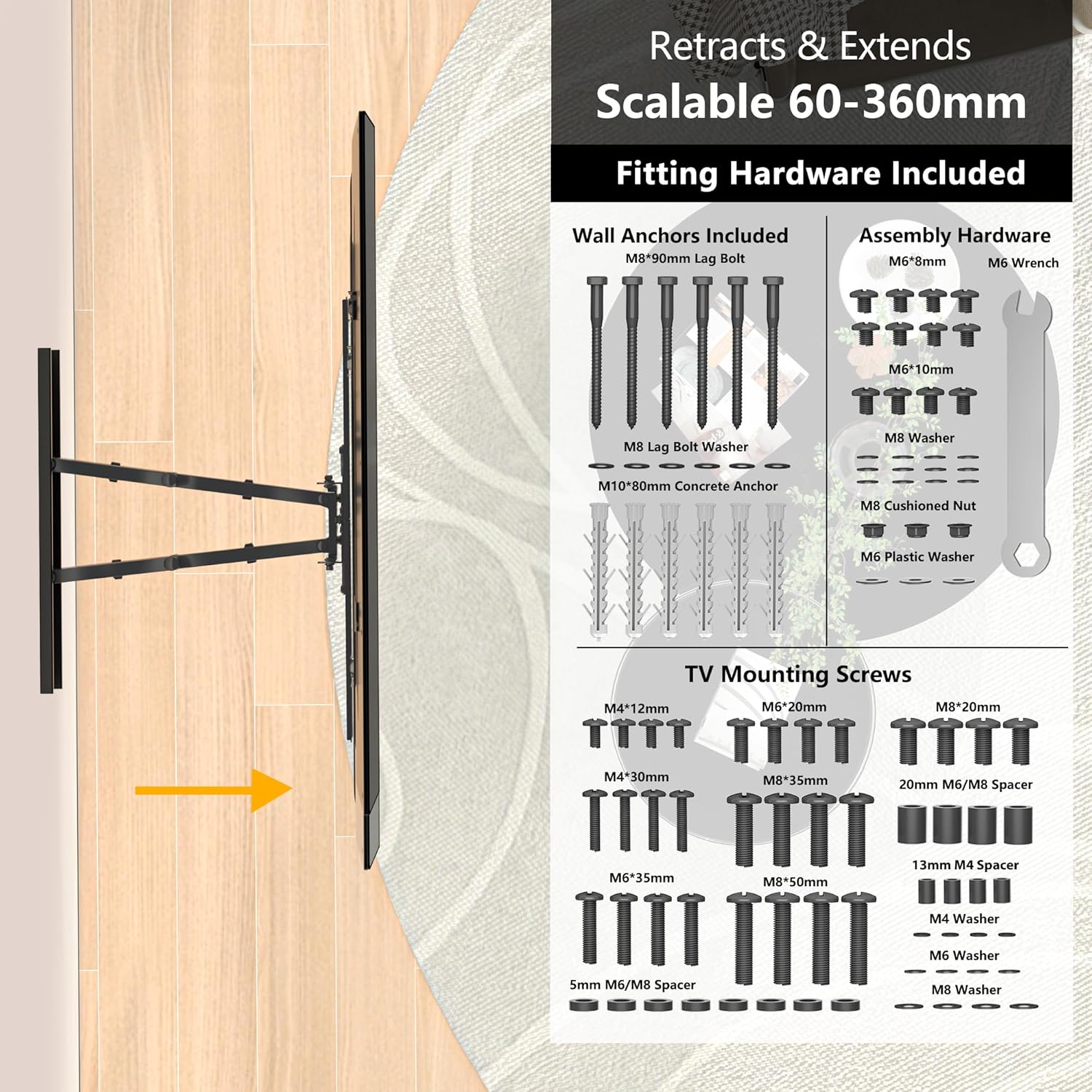
చిత్రం: పైగాview of included fitting hardware and TV mounting screws.
- TV Wall Bracket Assembly
- Wall Anchors (M8*90mm Lag Bolts, M10*80mm Concrete Anchors)
- Assembly Hardware (M6*6mm, M6*10mm screws, M8 Washers, M8 Cushioned Nuts, M6 Plastic Washers, M6 Wrench)
- TV Mounting Screws (Various sizes: M4*12mm, M4*30mm, M6*20mm, M6*35mm, M8*20mm, M8*35mm, M8*50mm)
- Spacers (20mm M6/M8, 13mm M4, 5mm M6/M8)
- Washers (M4, M6, M8)
- 1.8మీ HDMI కేబుల్
- ఆత్మ స్థాయి
- ఇలస్ట్రేటెడ్ సూచనలు
4. స్పెసిఫికేషన్లు
| ఫీచర్ | వివరణ |
|---|---|
| అనుకూల టీవీ పరిమాణాలు | 37 - 80 అంగుళాలు |
| VESA అనుకూలత | 100x100, 200x100, 200x200, 300x200, 300x300, 400x200, 400x400, 600x400mm |
| గరిష్ట లోడ్ సామర్థ్యం | 65 కిలోలు (144 పౌండ్లు) |
| టిల్ట్ యాంగిల్ | +5° (up) to -15° (down) |
| స్వివెల్ యాంగిల్ | ±45° (left to right) |
| భ్రమణ సర్దుబాటు | ±3° (level adjustment) |
| Wall Distance (Retracted) | 60మి.మీ |
| Wall Distance (Extended) | 360మి.మీ |
| మెటీరియల్ | Reinforced, Compressed Steel |
| ఉత్పత్తి కొలతలు | 64 x 45 x 43 సెం.మీ |
| ఉత్పత్తి బరువు | 7.71 కిలోలు |

Image: TV size and VESA compatibility overview.
5. సెటప్ మరియు ఇన్స్టాలేషన్
Follow these steps for a secure and efficient installation. It is recommended to have at least two people for installation, especially when mounting the TV.
5.1. ప్రీ-ఇన్స్టాలేషన్ తనిఖీలు
- టీవీ అనుకూలతను ధృవీకరించండి: Check your TV's VESA pattern and weight against the specifications.
- గోడ రకాన్ని గుర్తించండి: Determine if your wall is wood stud, concrete, or brick. Use the appropriate anchors and drilling methods.
- Locate Studs (for wood walls): Use a stud finder to accurately locate the center of wood studs.
- క్లియర్ ఏరియా: Ensure the installation area is clear of obstructions, electrical wires, and plumbing.

Image: Diverse wall compatibility information.
5.2. వాల్ ప్లేట్ మౌంట్ చేయడం
- టెంప్లేట్ను ఉంచండి: Hold the wall plate or use the provided template against the wall at your desired height. Use the spirit level to ensure it is perfectly horizontal.
- డ్రిల్ హోల్స్ గుర్తించండి: Mark the drilling points through the holes on the wall plate.
- డ్రిల్ రంధ్రాలు: Drill pilot holes according to the marked points and the type of wall. For concrete/brick, use a masonry drill bit and insert concrete anchors. For wood studs, drill pilot holes directly into the center of the studs.
- వాల్ ప్లేట్ అటాచ్ చేయండి: Secure the wall plate to the wall using the appropriate lag bolts and washers. Tighten firmly but do not overtighten.
5.3. Attaching Brackets to TV
- Lay TV Face Down: గీతలు పడకుండా ఉండటానికి మీ టీవీ ముఖాన్ని మృదువైన, శుభ్రమైన ఉపరితలంపై జాగ్రత్తగా ఉంచండి.
- టీవీ బ్రాకెట్లను అటాచ్ చేయండి: Align the vertical TV brackets with the VESA mounting holes on the back of your TV. Use the correct size screws and spacers from the provided hardware kit. Ensure the brackets are securely fastened.
5.4. Hanging the TV and Final Adjustments
- టీవీని ఆపివేయండి: With assistance, carefully lift the TV and hook the TV brackets onto the wall plate. Ensure the TV is securely seated on the wall plate.
- సురక్షిత టీవీ: Use the safety screws or locking mechanisms on the TV brackets to secure the TV to the wall plate, preventing accidental dislodgement.
- Adjust Level: Use the ±3° rotation adjustment feature to fine-tune the TV's level if needed.

Image: Easy installation steps.
6. ఆపరేటింగ్ మరియు సర్దుబాట్లు
The BONTEC TV Wall Bracket offers full motion capabilities for an optimized viewing అనుభవం.
6.1. స్వివెల్ సర్దుబాటు
Gently push or pull the TV to swivel it up to 45° left or right. This allows you to direct the screen towards different viewing areas in your room.

Image: Swivel adjustment for optimal viewing.
6.2. టిల్ట్ సర్దుబాటు
To adjust the vertical tilt, gently push the top or bottom of the TV. The bracket allows for a tilt of +5° up and -15° down, helping to reduce glare and improve viewing సౌకర్యం.

Image: Tilt and level adjustment features.
6.3. Extension and Retraction
The dual arms allow the TV to extend up to 360mm from the wall and retract to a low profile of 60mm, saving space when not in use.
6.4. కేబుల్ నిర్వహణ
Utilize the integrated cable management system on the bracket arms to neatly route and conceal unsightly cables, maintaining a clean and tidy appearance.
7. నిర్వహణ
Regular maintenance ensures the longevity and safe operation of your TV wall bracket.
- శుభ్రపరచడం: Wipe the bracket with a soft, dry cloth. Avoid using abrasive cleaners or solvents that could damage the finish.
- కాలానుగుణ తనిఖీలు: Periodically check all mounting screws and bolts to ensure they remain tight and secure. Over time, vibrations or adjustments may cause them to loosen slightly.
- సరళత: The moving parts are designed for smooth operation and generally do not require lubrication. If movement becomes stiff, consult BONTEC customer support.
8. ట్రబుల్షూటింగ్
If you encounter any issues with your BONTEC TV Wall Bracket, refer to the following common problems and solutions.
- టీవీ స్థాయి కాదు: Use the ±3° rotation adjustment feature to fine-tune the level. Ensure the wall plate was installed horizontally using the spirit level.
- Bracket feels unstable or sags:
- Verify that the TV weight does not exceed the 65 kg (144 lbs) maximum capacity.
- Ensure all wall mounting bolts and TV attachment screws are securely tightened.
- Confirm that the bracket is mounted to appropriate wall studs or solid concrete/brick, not just drywall.
- Difficulty adjusting the TV (swivel/tilt/extension):
- కదలికను నిరోధించే ఏవైనా అడ్డంకులు ఉన్నాయా అని తనిఖీ చేయండి.
- Ensure no cables are caught in the moving parts.
- The joints are designed to be firm to hold the TV's position. Apply gentle, steady pressure.
If the problem persists after attempting these solutions, please contact BONTEC customer support for further assistance.
9. వారంటీ మరియు మద్దతు
For information regarding warranty coverage, returns, or technical support, please refer to the documentation provided at the time of purchase or visit the official BONTEC webసైట్. కొనుగోలు రుజువుగా మీ కొనుగోలు రసీదుని ఉంచండి.
BONTEC Customer Service: Please refer to the contact information provided on the product packaging or the official BONTEC webఅత్యంత తాజా మద్దతు ఛానెల్ల కోసం సైట్.
Ask a question about this manual
Ask about setup, troubleshooting, compatibility, parts, safety, or missing instructions. Manuals+ will review the question and use this page’s manual context to help answer it.