
1. పరిచయం
ధన్యవాదాలు, ధన్యవాదాలు.asing the Medeli M30 61-Key Professional Keyboard. This instrument is designed to provide a rich musical experience with its touch-sensitive keys, extensive voice library, and versatile accompaniment styles. This manual will guide you through the setup, operation, and maintenance of your new keyboard.
ప్యాకేజీ విషయాలు
- Medeli M30 61-Key Professional Keyboard
- పవర్ అడాప్టర్
- మ్యూజిక్ రెస్ట్
- వినియోగదారు మాన్యువల్ (ఈ పత్రం)
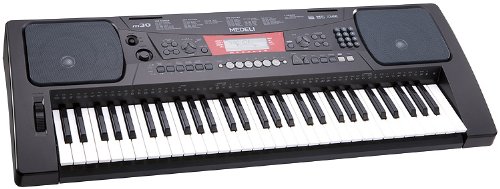
Figure 1: Medeli M30 61-Key Professional Keyboard. This image shows the keyboard from a front-angle view, highlighting its 61 keys, control panel, and display.
2. భద్రతా సూచనలు
- విద్యుత్ సరఫరా: పేర్కొన్న పవర్ అడాప్టర్ను మాత్రమే ఉపయోగించండి. వాల్యూమ్ను నిర్ధారించుకోండిtagఇ మీ స్థానిక విద్యుత్ సరఫరాతో సరిపోలుతుంది.
- నీరు మరియు తేమ: Do not expose the keyboard to water or moisture. Avoid placing liquids near the instrument.
- వెంటిలేషన్: Do not block ventilation openings. Ensure adequate airflow around the keyboard.
- ఉష్ణ మూలాలు: రేడియేటర్లు, హీట్ రిజిస్టర్లు, స్టవ్లు లేదా ఇతర ఉపకరణాలు (సహా) వంటి ఉష్ణ వనరుల నుండి కీబోర్డ్ను దూరంగా ఉంచండి. ampలిఫైయర్లు) వేడిని ఉత్పత్తి చేస్తాయి.
- శుభ్రపరచడం: పొడి గుడ్డతో మాత్రమే శుభ్రం చేయండి. లిక్విడ్ క్లీనర్లు లేదా ఏరోసోల్లను ఉపయోగించవద్దు.
- సర్వీసింగ్: ఈ ఉత్పత్తిని మీరే సేవ చేయడానికి ప్రయత్నించవద్దు. అర్హత కలిగిన సేవా సిబ్బందికి అన్ని సర్వీసులను చూడండి.
3. సెటప్
3.1 అన్ప్యాకింగ్
ప్యాకేజింగ్ నుండి అన్ని భాగాలను జాగ్రత్తగా తొలగించండి. భవిష్యత్తులో రవాణా లేదా నిల్వ కోసం ప్యాకేజింగ్ను ఉంచండి.
3.2 పవర్ కనెక్షన్
- Ensure the keyboard's power switch is in the "OFF" position.
- Connect the power adapter to the DC IN jack on the rear panel of the keyboard.
- పవర్ అడాప్టర్ను ప్రామాణిక AC అవుట్లెట్లోకి ప్లగ్ చేయండి.
- Turn the power switch to the "ON" position to power on the keyboard.
3.3 Music Rest Installation
Insert the music rest into the designated slots on the top panel of the keyboard. Ensure it is securely seated.
4. ఆపరేటింగ్ సూచనలు
4.1 ప్రాథమిక ప్లేబ్యాక్
- పవర్ ఆన్: Press the [POWER] button to turn on the keyboard.
- వాల్యూమ్ సర్దుబాటు: Use the [MASTER VOLUME] knob to adjust the overall sound level.
- కీలను ప్లే చేయడం: The M30 features 61 touch-sensitive keys. The harder you press, the louder the sound.
4.2 స్వరాలను ఎంచుకోవడం
The M30 offers 359 different voices (instrument sounds).
- [VOICE] బటన్ను నొక్కండి.
- Use the numeric keypad or the [+] / [-] buttons to select a voice number.
- The selected voice name will appear on the display.
4.3 Selecting Styles
The keyboard includes 150 accompaniment styles.
- [STYLE] బటన్ను నొక్కండి.
- Use the numeric keypad or the [+] / [-] buttons to select a style number.
- Press [START/STOP] to begin the accompaniment.
- Adjust the style volume using the [ACCOMPANIMENT VOLUME] button (if available, or general volume).
4.4 Playing Songs
The M30 has 100 built-in songs and 2 demo songs.
- [SONG] బటన్ను నొక్కండి.
- Use the numeric keypad or the [+] / [-] buttons to select a song number.
- Press [PLAY/PAUSE] to start or pause the song.
- Press [STOP] to stop the song.
5 కనెక్టివిటీ
5.1 USB కనెక్షన్
The Medeli M30 features a USB port for connecting to a computer. This allows for MIDI data transfer, enabling the keyboard to be used as a MIDI controller or to connect with music software.
- Connect a standard USB cable (Type B to Type A, not included) from the keyboard's USB port to your computer's USB port.
- Your computer should automatically recognize the keyboard as a MIDI device.
- Refer to your music software's documentation for instructions on setting up MIDI input devices.
6. నిర్వహణ
6.1 శుభ్రపరచడం
- Wipe the keyboard's surface with a soft, dry cloth.
- మొండి ధూళికి, కొద్దిగా dampనీరు మరియు తేలికపాటి డిటర్జెంట్తో గుడ్డను తుడిచి, వెంటనే ఆరబెట్టండి.
- రాపిడి క్లీనర్లు, మైనపులు లేదా ద్రావకాలను ఉపయోగించవద్దు.
6.2 నిల్వ
- ఎక్కువసేపు ఉపయోగంలో లేనప్పుడు, పవర్ అడాప్టర్ను డిస్కనెక్ట్ చేయండి.
- కీబోర్డ్ను చల్లని, పొడి ప్రదేశంలో, ప్రత్యక్ష సూర్యకాంతి మరియు తీవ్రమైన ఉష్ణోగ్రతలకు దూరంగా నిల్వ చేయండి.
- Consider using a dust cover to protect the keys and control panel.
7. ట్రబుల్షూటింగ్
| సమస్య | సాధ్యమైన కారణం | పరిష్కారం |
|---|---|---|
| శబ్దం లేదు | వాల్యూమ్ చాలా తక్కువగా ఉంది లేదా మ్యూట్ చేయబడింది. | Increase the [MASTER VOLUME] knob. |
| కీబోర్డ్ పవర్ ఆన్ చేయబడదు | పవర్ అడాప్టర్ కనెక్ట్ కాలేదు లేదా తప్పుగా ఉంది. | Ensure power adapter is securely connected and plugged into a working outlet. Check power switch position. |
| కీలు స్పందించడం లేదు | Keyboard may be in a specific mode (e.g., demo mode). | Try powering off and on again. Refer to the operating section for specific mode exits. |
8. స్పెసిఫికేషన్లు
| ఫీచర్ | వివరాలు |
|---|---|
| కీలు | 61, Touch-Sensitive |
| స్వరాలు | 359 |
| శైలులు | 150 |
| పాటలు | 100 (plus 2 Demo Songs) |
| కనెక్టివిటీ | USB (MIDI) |
| కొలతలు (L x W x H) | 93.98 x 35.56 x 15.24 సెం.మీ |
| బరువు | 6.8 కిలోలు |
| మోడల్ సంఖ్య | M30 |
| యుపిసి/జిటిఐఎన్ | 857285003529 |
9. వారంటీ మరియు మద్దతు
వారంటీ సమాచారం మరియు సాంకేతిక మద్దతు కోసం, దయచేసి మీ ఉత్పత్తితో చేర్చబడిన వారంటీ కార్డును చూడండి లేదా అధికారిక మెడెలిని సందర్శించండి. webసైట్. ఏవైనా వారంటీ క్లెయిమ్ల కోసం మీ కొనుగోలు రుజువును ఉంచుకోండి.
తయారీదారు: మెడెలి
Webసైట్: www.మెడెలి.కామ్ (గమనిక: ఇది ఒక ప్లేస్హోల్డర్ URL, సరైన మద్దతు సంప్రదింపు కోసం దయచేసి వాస్తవ ఉత్పత్తి డాక్యుమెంటేషన్ను చూడండి.)