
పరిచయం
Thank you for choosing the Medeli MD600 61-Key Professional Keyboard. This manual provides essential information for the safe and efficient use of your instrument. Please read it thoroughly before operating the keyboard and retain it for future reference.
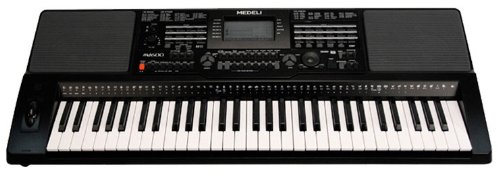
Image: The Medeli MD600 61-Key Professional Keyboard, showcasing దాని కాంపాక్ట్ డిజైన్ మరియు కీ లేఅవుట్.
ముఖ్యమైన భద్రతా సమాచారం
- విద్యుత్ సరఫరా: పేర్కొన్న పవర్ అడాప్టర్ను మాత్రమే ఉపయోగించండి. వాల్యూమ్ను నిర్ధారించుకోండిtagఇ మీ స్థానిక విద్యుత్ సరఫరాతో సరిపోలుతుంది.
- తేమ: Do not expose the keyboard to rain, moisture, or excessive humidity. Avoid placing liquid containers on the instrument.
- వెంటిలేషన్: Ensure adequate ventilation around the keyboard. Do not block ventilation openings.
- ప్లేస్మెంట్: Place the keyboard on a stable, level surface. Avoid extreme temperatures, direct sunlight, or heat sources.
- శుభ్రపరచడం: శుభ్రపరిచే ముందు విద్యుత్తును డిస్కనెక్ట్ చేయండి. మృదువైన, పొడి వస్త్రాన్ని ఉపయోగించండి. ద్రవ క్లీనర్లను లేదా ఏరోసోల్లను ఉపయోగించవద్దు.
- సర్వీసింగ్: Do not attempt to service the instrument yourself. Refer all servicing to qualified personnel.
ప్యాకేజీ విషయాలు
దయచేసి ప్యాకేజీలో అన్ని అంశాలు ఉన్నాయో లేదో తనిఖీ చేయండి:
- Medeli MD600 61-Key Professional Keyboard
- పవర్ అడాప్టర్
- మ్యూజిక్ రెస్ట్
- వినియోగదారు మాన్యువల్ (ఈ పత్రం)
సెటప్
1. పవర్ కనెక్షన్
- Ensure the keyboard's power switch is in the ఆఫ్ స్థానం.
- Connect the power adapter cable to the DC IN jack on the rear panel of the keyboard.
- పవర్ అడాప్టర్ను ప్రామాణిక AC వాల్ అవుట్లెట్లోకి ప్లగ్ చేయండి.
2. Music Rest Installation
Insert the tabs of the music rest into the slots located on the top panel of the keyboard, behind the control panel.
3. పెరిఫెరల్స్ కనెక్ట్ చేయడం
- హెడ్ఫోన్లు: Connect standard stereo headphones to the ఫోన్లు jack for private practice. This will mute the internal speakers.
- USB కనెక్టివిటీ: The MD600 features USB connectivity. Connect a USB cable (not included) from the keyboard's USB port to your computer for MIDI data transfer. Refer to your computer's operating system and music software documentation for specific setup instructions.
ఆపరేటింగ్ సూచనలు
1. పవర్ ఆన్/ఆఫ్
- ఆన్ చేయడానికి: నొక్కండి శక్తి button located on the control panel. The display will illuminate.
- ఆఫ్ చేయడానికి: నొక్కండి శక్తి మళ్ళీ బటన్.
2. వాల్యూమ్ నియంత్రణ
Adjust the overall output volume using the మాస్టర్ వాల్యూమ్ knob or buttons on the control panel. Start with a low volume and increase gradually.
3. Selecting Voices (Tones)
The MD600 offers 559 different voices. To select a voice:
- నొక్కండి వాయిస్ బటన్.
- Use the numeric keypad or the +/- buttons to enter the desired voice number. Voice categories and numbers are listed in the Voice List appendix (not included in this manual, refer to full product documentation).
- నొక్కండి నమోదు చేయండి మీ ఎంపికను నిర్ధారించడానికి.
4. Selecting Styles (Accompaniment)
The MD600 includes 203 accompaniment styles. To select a style:
- నొక్కండి శైలి బటన్.
- Use the numeric keypad or the +/- buttons to enter the desired style number. Style categories and numbers are listed in the Style List appendix.
- నొక్కండి నమోదు చేయండి మీ ఎంపికను నిర్ధారించడానికి.
- నొక్కండి START/STOP to begin or end the accompaniment.
5. Touch Response
The keyboard features touch-sensitive keys, meaning the volume and timbre of the sound change based on how hard you strike the keys. This allows for expressive playing. The touch response sensitivity can often be adjusted in the keyboard's settings menu (refer to the full manual for detailed instructions).
నిర్వహణ
క్లీనింగ్
To clean the keyboard, first disconnect the power adapter. Use a soft, dry, lint-free cloth to wipe the surfaces. Do not use abrasive cleaners, waxes, or solvents, as these can damage the finish. For stubborn dirt, a slightly damp cloth followed by a dry cloth may be used, ensuring no moisture enters any openings.
నిల్వ
When not in use for extended periods, store the keyboard in a cool, dry place away from direct sunlight and extreme temperatures. If possible, cover the keyboard with a dust cover to prevent dust accumulation.
ట్రబుల్షూటింగ్
| సమస్య | సాధ్యమైన కారణం | పరిష్కారం |
|---|---|---|
| స్పీకర్లు/హెడ్ఫోన్ల నుండి శబ్దం లేదు. |
|
|
| కీలు స్పందించడం లేదు లేదా తప్పుగా ధ్వనిస్తున్నాయి. |
|
|
| Accompaniment not starting. |
|
|
If the problem persists after trying these solutions, please contact Medeli customer support or refer to the full product manual for more detailed troubleshooting.
స్పెసిఫికేషన్లు
- మోడల్: Medeli MD600
- కీలు: 61, Touch Response
- స్వరాలు: 559
- శైలులు: 203
- కనెక్టివిటీ: USB
- కొలతలు (L x W x H): సుమారు 37 x 14 x 6 అంగుళాలు (94 x 35.5 x 15.2 సెం.మీ.)
- బరువు: సుమారు 15 పౌండ్లు (6.8 కిలోలు)
- విద్యుత్ సరఫరా: DC 12V (via included AC adapter)
- తయారీదారు: మెడెలి
ఉత్పత్తి మెరుగుదల కోసం స్పెసిఫికేషన్లు నోటీసు లేకుండానే మారవచ్చు.
వారంటీ మరియు మద్దతు
The Medeli MD600 61-Key Professional Keyboard comes with a One year warranty from date of purchase against manufacturer defects. వారంటీ క్లెయిమ్ల కోసం దయచేసి మీ కొనుగోలు రుజువును ఉంచుకోండి.
For technical support, service, or further inquiries, please contact your authorized Medeli dealer or visit the official Medeli webసంప్రదింపు సమాచారం కోసం సైట్.