
1. ఉత్పత్తి ముగిసిందిview
The Corsair Air Series SP120 Quiet Edition Twin Pack Fans are designed to provide superior static pressure and airflow, making them ideal for use with heatsinks and radiators. These fans feature a wide body, low-pitch blade design, custom housing, and an Advanced Hydraulic Bearing for quiet and reliable operation. Each twin pack includes two fans and interchangeable colored rings (red, blue, white) to customize your system's aesthetics.

Image: Corsair SP120 Quiet Edition Twin Pack Fans, showcasing the two fans with red rings and the additional blue and white interchangeable rings.
2. ప్యాకేజీ విషయాలు
- 2 x Corsair Air Series SP120 Quiet Edition Fans
- 6 x Interchangeable Color Rings (2x Red, 2x Blue, 2x White)
- 8 x మౌంటు స్క్రూలు
- 2 x Low-Noise Adapter Cables (step-down resistors)
3. సెటప్ మరియు ఇన్స్టాలేషన్
Follow these steps to install your Corsair SP120 Quiet Edition fans:
- మీ వ్యవస్థను సిద్ధం చేయండి: Ensure your computer is powered off and unplugged from the wall outlet. Open your computer case to access the fan mounting locations.
- మౌంటు స్థానాన్ని ఎంచుకోండి: Identify the desired location for your fan(s) on your heatsink, radiator, or case. Ensure proper airflow direction for optimal cooling.
- Install Color Rings (Optional): If you wish to change the color of the rings, gently pry off the pre-installed ring from the fan frame. Align the desired color ring with the fan frame and press firmly until it snaps into place.
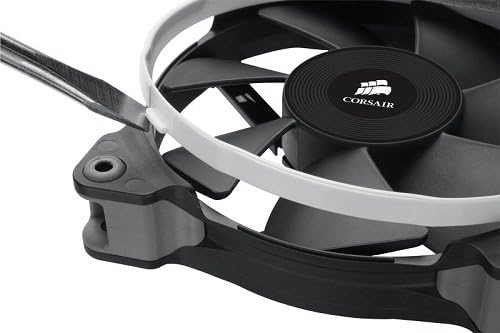
Image: Demonstrating the installation of an interchangeable white color ring onto the fan frame.
- ఫ్యాన్ను మౌంట్ చేయండి: Position the fan against the mounting holes. Use the included mounting screws to secure the fan firmly. Do not overtighten.
- పవర్ కనెక్ట్ చేయండి: Connect the fan's 3-pin power connector to an available 3-pin or 4-pin fan header on your motherboard or fan controller.
- Use Low-Noise Adapter (Optional): For even quieter operation, connect the included low-noise adapter cable (step-down resistor) between the fan's 3-pin connector and the motherboard/controller header. This will reduce the fan speed and noise level.
- కేస్ మూసివేసి పవర్ ఆన్ చేయండి: Once all connections are secure, close your computer case, plug it back in, and power on your system. Verify that the fans are spinning correctly.
4. ఆపరేటింగ్ సూచనలు
The Corsair SP120 Quiet Edition fans are designed for continuous operation to maintain optimal system temperatures. Once installed and powered, they will operate automatically based on your motherboard's fan control settings or at a constant speed if connected directly to a power supply without speed control.
- ప్రామాణిక ఆపరేషన్: When connected directly to a 3-pin fan header, the fan will operate at its rated speed (1450 RPM).
- Quiet Operation (with Low-Noise Adapter): Using the included low-noise adapter will reduce the fan speed to approximately 1100 RPM, resulting in lower noise output.
- మదర్బోర్డ్ నియంత్రణ: If connected to a 4-pin PWM header or a 3-pin header with voltage control capabilities, you can adjust the fan speed through your motherboard's BIOS/UEFI settings or dedicated software.
5. నిర్వహణ
To ensure the longevity and optimal performance of your Corsair SP120 fans, periodic maintenance is recommended:
- దుమ్ము తొలగింపు: Over time, dust can accumulate on the fan blades and frame, reducing airflow and increasing noise. Regularly clean the fans using compressed air or a soft brush. Ensure the fan is powered off before cleaning.
- బేరింగ్: The Advanced Hydraulic Bearing is designed for long-term, maintenance-free operation. No lubrication is required.
- తనిఖీ: Periodically inspect the fan blades for any damage or obstructions. Ensure all mounting screws are secure.
6. ట్రబుల్షూటింగ్
If you encounter issues with your Corsair SP120 fans, refer to the following troubleshooting steps:
- ఫ్యాన్ తిరగడం లేదు:
- Check all power connections to ensure they are securely seated on the motherboard or fan controller.
- BIOS/UEFI సెట్టింగ్లలో మదర్బోర్డులోని ఫ్యాన్ హెడర్ ప్రారంభించబడిందని ధృవీకరించండి.
- Test the fan on a different fan header or with a known working power source to rule out a faulty fan or header.
- అసాధారణ శబ్దం:
- Ensure no cables or obstructions are touching the fan blades.
- Check that the fan is securely mounted and screws are not loose.
- If using the low-noise adapter, ensure it is properly connected.
- Dust accumulation can cause noise; clean the fan as described in the Maintenance section.
- తగినంత శీతలీకరణ లేదు:
- Verify the fan's airflow direction is appropriate for your system's cooling setup (intake or exhaust).
- Ensure there are no significant obstructions blocking airflow to or from the fan.
- Consider removing the low-noise adapter if maximum airflow is desired.
- Clean any dust from the fan, heatsink, or radiator fins.
7. స్పెసిఫికేషన్లు
| ఫీచర్ | స్పెసిఫికేషన్ |
|---|---|
| మోడల్ | CO-9050006-WW |
| ఫ్యాన్ పరిమాణం | 120mm x 25mm (4.72"L x 0.98"W x 4.72"H) |
| శబ్దం (dBA) | 23 dBA (Standard), ~18 dBA (with Low-Noise Adapter) |
| గాలి ప్రవాహం (CFM) | 37.85 CFM (Standard), ~28 CFM (with Low-Noise Adapter) |
| Static Pressure (mm/H2O) | 1.29 mm/H2O (Standard), ~0.8 mm/H2O (with Low-Noise Adapter) |
| ఫ్యాన్ వేగం | 1450 RPM (Standard), 1100 RPM (with Low-Noise Adapter) |
| Power Draw (@ +12V) | 0.08A |
| పవర్ కనెక్టర్ రకం | 3-పిన్ |
| వాల్యూమ్tage | 12 వోల్ట్లు |
| బేరింగ్ రకం | Advanced Hydraulic Bearing |
| మెటీరియల్ | Rubber (corners) |
| వస్తువు బరువు | 1.1 Pounds (for twin pack) |
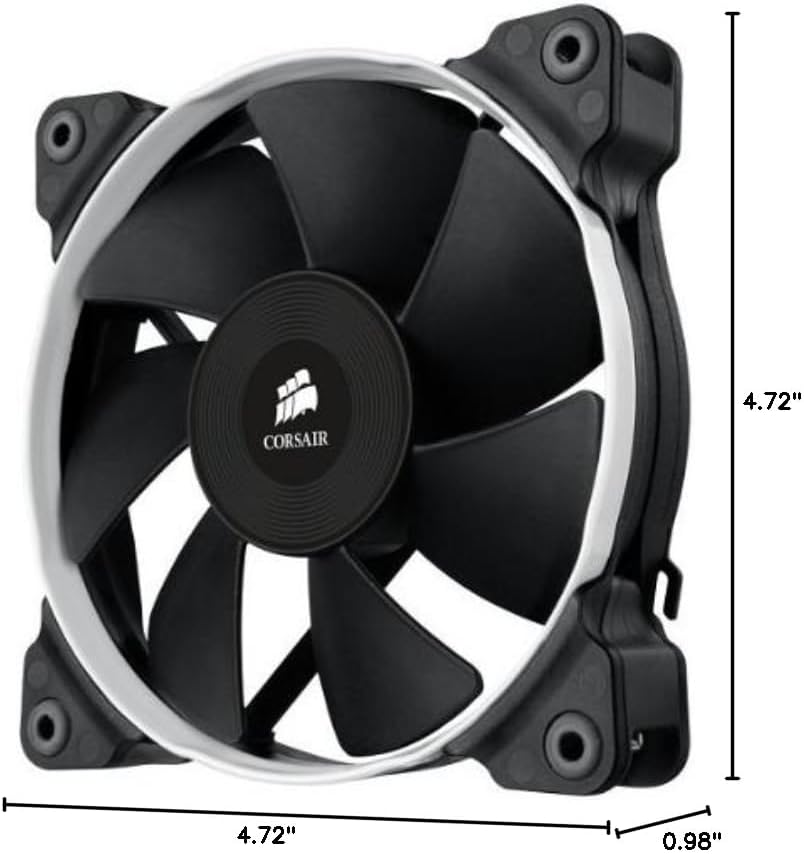
Image: Dimensional drawing of the Corsair SP120 fan.
8. వారంటీ సమాచారం
This Corsair Air Series SP120 Quiet Edition Twin Pack Fan comes with a 2 సంవత్సరం వారంటీ కొనుగోలు చేసిన తేదీ నుండి. వారంటీ క్లెయిమ్ల కోసం దయచేసి మీ కొనుగోలు రుజువును ఉంచుకోండి. సాధారణ ఉపయోగంలో మెటీరియల్స్ మరియు పనితనంలో లోపాలను వారంటీ కవర్ చేస్తుంది.
9. మద్దతు
For technical assistance, customer service, or warranty inquiries, please contact Corsair support:
- ఫోన్: 1-888-222-4346 opt. 1
- ఆన్లైన్ మద్దతు: అధికారిక కోర్సెయిర్ను సందర్శించండి webమద్దతు వనరులు, తరచుగా అడిగే ప్రశ్నలు మరియు సంప్రదింపు ఫారమ్ల కోసం సైట్.