
పరిచయం
ధన్యవాదాలు, ధన్యవాదాలు.asing the GPX Weatherx WR282B Weather and Alert Radio. This portable radio is designed to provide you with AM/FM radio reception and access to all 7 NOAA weatherband channels, ensuring you stay informed during various conditions. It offers flexible power options, operating on either AC power or D-size batteries, making it suitable for both indoor and outdoor use.
Please read this manual thoroughly before operating the device to ensure proper use and to maximize its performance and longevity.
ముఖ్యమైన భద్రతా సమాచారం
- సూచనలను చదవండి: ఉత్పత్తిని ఆపరేట్ చేయడానికి ముందు అన్ని భద్రత మరియు ఆపరేటింగ్ సూచనలను చదవాలి.
- సూచనలను నిల్వ చేయండి: భవిష్యత్తు సూచన కోసం భద్రత మరియు ఆపరేటింగ్ సూచనలను అలాగే ఉంచాలి.
- జాగ్రత్త హెచ్చరికలు: ఉత్పత్తి మరియు ఆపరేటింగ్ సూచనలలో అన్ని హెచ్చరికలు కట్టుబడి ఉండాలి.
- సూచనలను అనుసరించండి: అన్ని ఆపరేటింగ్ మరియు ఉపయోగం సూచనలను అనుసరించాలి.
- నీరు మరియు తేమ: Do not use this product near water (e.g., near a bathtub, washbowl, kitchen sink, laundry tub, in a wet basement, or near a swimming pool).
- శుభ్రపరచడం: పొడి గుడ్డతో మాత్రమే శుభ్రం చేయండి.
- వెంటిలేషన్: వెంటిలేషన్ ఓపెనింగ్లను బ్లాక్ చేయవద్దు. తయారీదారు సూచనలకు అనుగుణంగా ఇన్స్టాల్ చేయండి.
- వేడి: రేడియేటర్లు, హీట్ రిజిస్టర్లు, స్టవ్లు లేదా ఇతర ఉపకరణాలు (సహా ampలిఫైయర్లు) వేడిని ఉత్పత్తి చేస్తాయి.
- పవర్-కార్డ్ ప్రొటెక్షన్: ప్రత్యేకించి ప్లగ్లు, కన్వీనియన్స్ రెసెప్టాకిల్స్ మరియు అవి ఉపకరణం నుండి నిష్క్రమించే ప్రదేశంలో నడవడం లేదా పించ్ చేయడం నుండి పవర్ కార్డ్ను రక్షించండి.
- మెరుపు: మెరుపు తుఫానుల సమయంలో లేదా ఎక్కువ కాలం ఉపయోగించనప్పుడు ఈ ఉపకరణాన్ని అన్ప్లగ్ చేయండి.
- సర్వీసింగ్: అన్ని సేవలను అర్హత కలిగిన సేవా సిబ్బందికి సూచించండి. విద్యుత్ సరఫరా త్రాడు లేదా ప్లగ్ పాడైపోయినప్పుడు, ద్రవం చిందినప్పుడు లేదా ఉపకరణంలో వస్తువులు పడిపోయినప్పుడు, ఉపకరణం వర్షం లేదా తేమకు గురైనప్పుడు, సాధారణంగా పని చేయనప్పుడు, ఉపకరణం ఏదైనా విధంగా దెబ్బతిన్నప్పుడు సర్వీసింగ్ అవసరం. , లేదా తొలగించబడింది.
ఫీచర్లు
- AM/FM రేడియో ట్యూనర్
- Weatherband - All 7 NOAA Channels
- Swivel Telescopic Antenna
- వాల్యూమ్ నియంత్రణ
- Audio Line Input (Auxiliary Input)
- ఇంటిగ్రేటెడ్ క్యారీ హ్యాండిల్
- Dual Power Options: AC/DC Adapter or 3 x 'D' Batteries
ప్యాకేజీ విషయాలు
- GPX Weatherx WR282B Weather and Alert Radio
- AC/DC పవర్ అడాప్టర్
- వినియోగదారు మాన్యువల్ (ఈ పత్రం)
నియంత్రణలు మరియు సూచికలు
Familiarize yourself with the various controls and indicators on your WR282B radio.
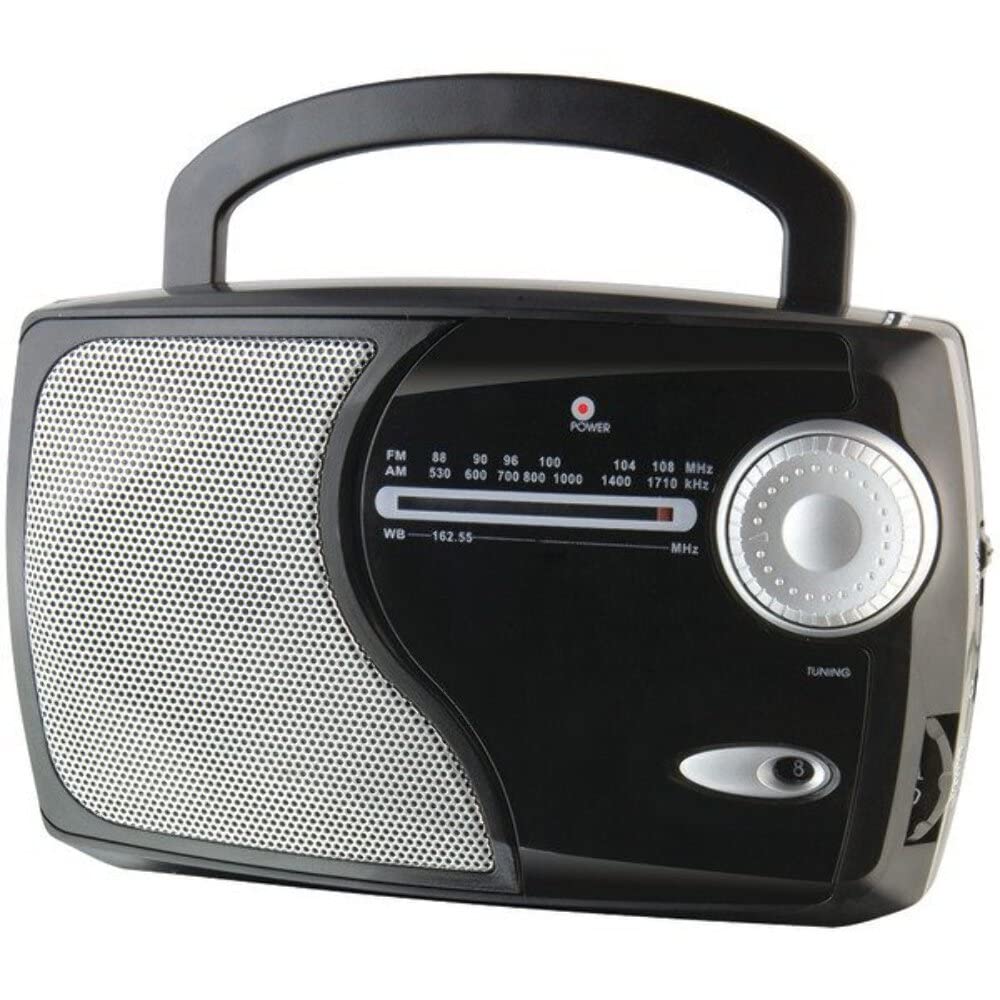
చిత్రం: ముందు భాగం view of the GPX Weatherx WR282B radio, showing the speaker, tuning dial, and control knobs.
- పవర్/వాల్యూమ్ నాబ్: Turns the radio on/off and adjusts the audio output level.
- Band Selector Switch: Selects between AM, FM, and Weatherband (WB) modes.
- ట్యూనింగ్ నాబ్: Adjusts the frequency to tune into desired radio stations or weather channels.
- ట్యూనింగ్ సూచిక: Illuminates when a strong signal is received.
- ఫ్రీక్వెన్సీ డయల్: ప్రస్తుత రేడియో ఫ్రీక్వెన్సీని ప్రదర్శిస్తుంది.
- టెలిస్కోపిక్ యాంటెన్నా: Extendable antenna for improved FM and Weatherband reception.
- సహాయక ఇన్పుట్ (AUX IN): బాహ్య ఆడియో పరికరాలను కనెక్ట్ చేయడానికి 3.5mm జాక్.
- AC పవర్ ఇన్పుట్: Jack for connecting the included AC/DC power adapter.
- బ్యాటరీ కంపార్ట్మెంట్: Located on the back, holds 3 'D' size batteries.
- క్యారీ హ్యాండిల్: సులభమైన పోర్టబిలిటీ కోసం.
సెటప్
రేడియోను శక్తివంతం చేయడం
The WR282B radio can be powered using either the included AC/DC power adapter or three 'D' size batteries.
1. AC Power Operation
- Ensure the radio is turned off by rotating the Power/Volume knob counter-clockwise until it clicks.
- Insert the small plug of the AC/DC power adapter into the AC Power Input jack on the radio.
- Plug the other end of the AC/DC power adapter into a standard wall outlet (AC 120V~60Hz).
- The radio is now ready for use with AC power.
గమనిక: When the AC adapter is connected, battery power is automatically disconnected.
2. Battery Power Operation
- రేడియో ఆఫ్ చేయబడిందని నిర్ధారించుకోండి.
- రేడియో వెనుక బ్యాటరీ కంపార్ట్మెంట్ను గుర్తించండి.
- బ్యాటరీ కంపార్ట్మెంట్ కవర్ తెరవండి.
- Insert three (3) 'D' size batteries (not included) into the compartment, observing the correct polarity (+/-) as indicated inside the compartment.
- బ్యాటరీ కంపార్ట్మెంట్ కవర్ను సురక్షితంగా మూసివేయండి.
- The radio is now ready for use with battery power.
ముఖ్యమైన: Remove batteries if the radio will not be used for an extended period to prevent leakage and damage.
ఆపరేటింగ్ సూచనలు
1. Turning On and Adjusting Volume
- తిప్పండి పవర్/వాల్యూమ్ నాబ్ clockwise to turn on the radio. Continue rotating to increase the volume to a comfortable listening level.
- రేడియోను ఆపివేయడానికి, తిప్పండి పవర్/వాల్యూమ్ నాబ్ counter-clockwise until it clicks.
2. Selecting a Radio Band (AM/FM/Weatherband)
- ఉపయోగించండి బ్యాండ్ సెలెక్టర్ స్విచ్ to choose your desired listening mode:
- AM: కోసం Amplitude Modulation radio stations.
- FM: For Frequency Modulation radio stations.
- WB: For NOAA Weatherband channels.
3. Tuning to a Station or Channel
- విస్తరించండి టెలిస్కోపిక్ యాంటెన్నా fully for optimal FM and Weatherband reception. For AM reception, the radio has a built-in antenna, and adjusting the radio's position may improve reception.
- తిప్పండి ట్యూనింగ్ నాబ్ to scan through frequencies on the ఫ్రీక్వెన్సీ డయల్.
- When a strong signal is received, the ట్యూనింగ్ ఇండికేటర్ కాంతి ప్రకాశిస్తుంది.
- For Weatherband (WB) mode, tune to one of the 7 NOAA weather channels (162.400 MHz to 162.550 MHz).
4. Using the Auxiliary Input (AUX IN)
- Connect a 3.5mm audio cable (not included) from your external audio device (e.g., MP3 player, smartphone) to the Auxiliary Input (AUX IN) jack on the radio.
- Ensure the radio is turned on and the volume is adjusted.
- The audio from your external device will now play through the radio's speaker. Control playback and track selection from your external device.
నిర్వహణ
- శుభ్రపరచడం: రేడియో వెలుపలి భాగాన్ని మృదువైన, పొడి గుడ్డతో తుడవండి. రాపిడి క్లీనర్లు, మైనపులు లేదా ద్రావకాలను ఉపయోగించవద్దు.
- బ్యాటరీ భర్తీ: Replace all three 'D' batteries when the radio's performance diminishes or if the unit will not be used for an extended period. Always replace with new batteries of the same type.
- నిల్వ: When storing the radio for a long time, remove the batteries to prevent leakage. Store in a cool, dry place away from direct sunlight and extreme temperatures.
- యాంటెన్నా సంరక్షణ: వంగకుండా లేదా విరగకుండా ఉండటానికి టెలిస్కోపిక్ యాంటెన్నాను సున్నితంగా నిర్వహించండి.
ట్రబుల్షూటింగ్
| సమస్య | సాధ్యమైన కారణం | పరిష్కారం |
|---|---|---|
| శక్తి లేదు |
|
|
| పేలవమైన రేడియో రిసెప్షన్ |
|
|
| No sound from AUX IN |
|
|
స్పెసిఫికేషన్లు
- మోడల్: WR282B
- రేడియో బ్యాండ్లు: AM, FM, Weatherband (7 NOAA channels)
- శక్తి మూలం: AC 120V~60Hz (via included adapter) or 3 x 'D' Batteries (not included)
- కనెక్టివిటీ: 3.5mm సహాయక ఇన్పుట్
- యాంటెన్నా: Telescopic (FM/WB), Built-in Ferrite Bar (AM)
- ఉత్పత్తి కొలతలు: 8.86" L x 2.76" W x 5.51" H (approximately)
- వస్తువు బరువు: 1.06 పౌండ్లు (బ్యాటరీలు లేకుండా)
వారంటీ మరియు మద్దతు
For detailed warranty information and customer support, please refer to the warranty card included with your product or visit the official GPX webసైట్. ఏవైనా వారంటీ క్లెయిమ్లకు కొనుగోలు రుజువుగా మీ కొనుగోలు రసీదును ఉంచండి.
If you experience issues not covered in the troubleshooting section, please contact GPX customer service for assistance.