
పరిచయం
This manual provides detailed instructions for the setup, operation, and maintenance of your One For All OARH01B Single Device Universal Remote Control. This remote is designed to provide simplified control for your television, featuring an intuitive layout and essential functions.
ఉత్పత్తి లక్షణాలు
The One For All OARH01B remote control is engineered for ease of use and reliability. Key features include:
- Large, Easy-to-Use Buttons: Designed for comfortable handling and clear visibility.
- Intuitive Key Grouping: Buttons are logically arranged with easy-to-recognize icons for quick access to functions.
- Glow Keys: Volume, Channel, and Sleep keys illuminate for easy identification in low-light conditions.
- Braille Support: Tactile indicators for Power, Channel, and Volume buttons enhance accessibility.
- సమగ్ర కార్యాచరణ: Includes dedicated keys for Menu, Sleep, Input, Closed Captioning (CC), and Previous Channel.
- Digital Sub-Channel Capability: Supports navigation of digital sub-channels (e.g., 59.1) for modern TV programming.
- సురక్షిత బ్యాటరీ కంపార్ట్మెంట్: Features a secure screw for the battery door, preventing accidental opening.
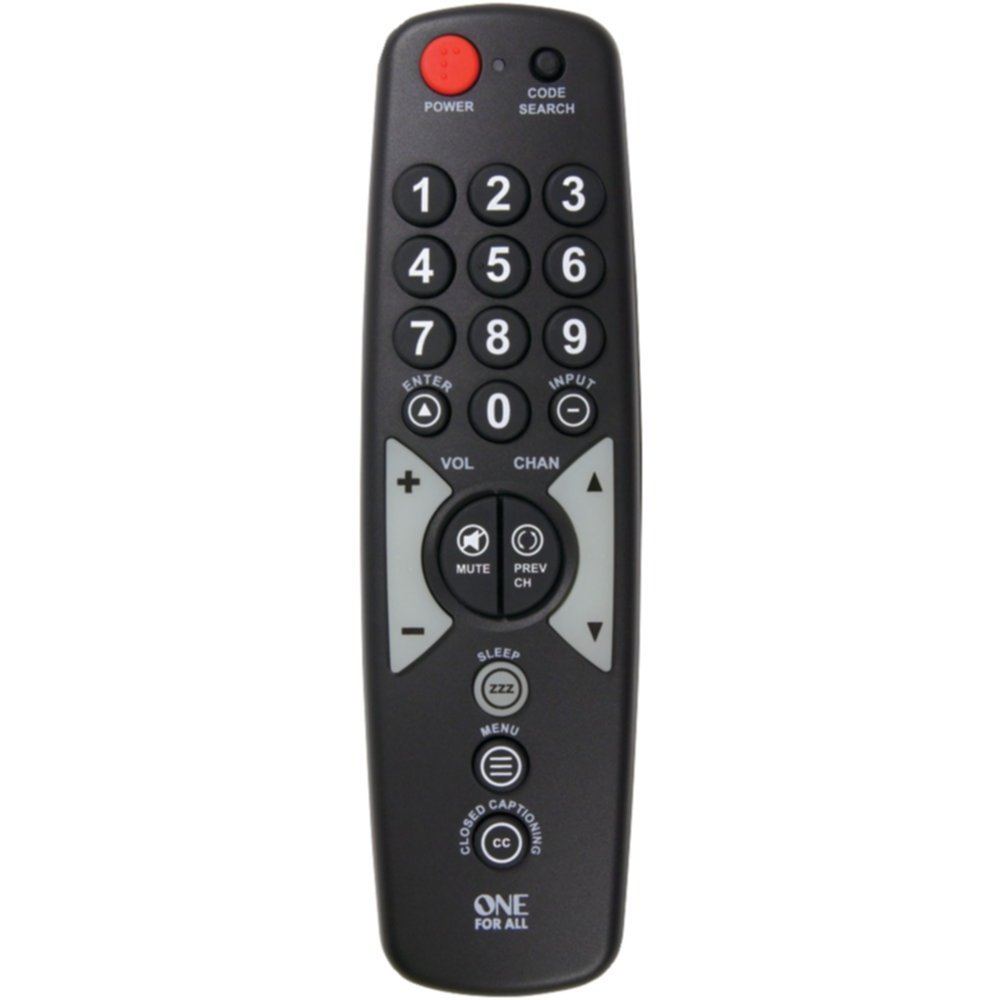
A black universal remote control with large, clearly labeled buttons. The top features a red power button and a code search button. Below are the numeric keypad (0-9), followed by navigation buttons for volume, channel, enter, and input. Mute and previous channel buttons are centrally located. Further down are buttons for sleep, menu, and closed captioning. The 'ONE FOR ALL' logo is at the bottom.
Getting Started: Battery Installation
To begin using your remote control, you must first install the batteries.
- రిమోట్ కంట్రోల్ వెనుక బ్యాటరీ కంపార్ట్మెంట్ను గుర్తించండి.
- Using a small screwdriver, carefully remove the secure screw from the battery compartment door.
- బ్యాటరీ కంపార్ట్మెంట్ తలుపు తెరిచి ఉంచండి.
- Insert two (2) AAA batteries (not included), ensuring the positive (+) and negative (-) terminals align with the indicators inside the compartment.
- Close the battery compartment door and re-insert the secure screw to fasten it.
Note: Always use new batteries and dispose of old batteries responsibly.
Setup: Programming the Remote
Your One For All OARH01B remote control needs to be programmed to operate your specific television. There are typically two methods for programming:
Method 1: Direct Code Entry
- Turn on the television you wish to control.
- నొక్కండి మరియు పట్టుకోండి కోడ్ శోధన సూచిక లైట్ వెలుగుతున్నంత వరకు రిమోట్లోని బటన్ను నొక్కి ఉంచండి.
- Refer to the code list provided with your remote (or available online from One For All) and find the 3-digit code for your TV brand.
- Enter the 3-digit code using the number buttons on the remote. The indicator light should turn off after the last digit is entered.
- మీ టీవీ వైపు రిమోట్ను పాయింట్ చేసి, నొక్కండి శక్తి button. If the TV turns off, the remote is successfully programmed.
- If the TV does not respond, repeat the process with the next code listed for your brand.
Method 2: Auto Code Search
- Turn on the television you wish to control.
- నొక్కండి మరియు పట్టుకోండి కోడ్ శోధన సూచిక లైట్ వెలుగుతున్నంత వరకు రిమోట్లోని బటన్ను నొక్కి ఉంచండి.
- నొక్కండి శక్తి button once. The indicator light will flash, indicating the remote is searching for a code.
- Point the remote at your TV and wait. The remote will send power codes to your TV every few seconds.
- As soon as your TV turns off, immediately press the నమోదు చేయండి button to save the code. If you wait too long, the remote may pass the correct code.
- Test the remote's functions (Volume, Channel, etc.). If all functions work correctly, programming is complete. If not, repeat the auto search process.
రిమోట్ని ఆపరేట్ చేస్తోంది
Once programmed, your One For All OARH01B remote provides control over your television's primary functions.
- శక్తి: మీ టెలివిజన్ను ఆన్ లేదా ఆఫ్ చేస్తుంది.
- నంబర్ ప్యాడ్ (0-9): ఛానెల్ నంబర్లను నేరుగా నమోదు చేయడానికి ఉపయోగించబడుతుంది.
- నమోదు చేయండి: Confirms channel selection or menu options.
- ఇన్పుట్: Cycles through available video inputs on your TV (e.g., HDMI 1, AV, Component).
- VOL (+/-): టెలివిజన్ వాల్యూమ్ను పెంచుతుంది లేదా తగ్గిస్తుంది.
- మ్యూట్: Silences the television's audio.
- CHAN (Up/Down): టెలివిజన్ ఛానెల్ని పైకి లేదా క్రిందికి మారుస్తుంది.
- PREV CH: Switches to the previously viewed ఛానెల్.
- నిద్ర: Activates the TV's sleep timer function (if available).
- మెను: Accesses the television's on-screen menu. Use VOL and CHAN buttons to navigate menu options, and ENTER to select.
- CLOSED CAPTIONING (CC): క్లోజ్డ్ క్యాప్షన్లను ఆన్ లేదా ఆఫ్ టోగుల్ చేస్తుంది.
ట్రబుల్షూటింగ్
మీ రిమోట్ కంట్రోల్తో మీకు సమస్యలు ఎదురైతే, ఈ క్రింది సాధారణ పరిష్కారాలను చూడండి:
- రిమోట్ స్పందించడం లేదు:
- బ్యాటరీలు సరిగ్గా ఇన్స్టాల్ చేయబడ్డాయో లేదో మరియు తగినంత పవర్ ఉందో లేదో తనిఖీ చేయండి. అవసరమైతే భర్తీ చేయండి.
- Ensure there is a clear line of sight between the remote and the TV's infrared sensor. Remove any obstructions.
- రిమోట్ టీవీని నియంత్రించదు:
- The remote may not be programmed correctly for your TV. Re-attempt the programming steps (Direct Code Entry or Auto Code Search).
- If using Direct Code Entry, try other codes listed for your TV brand.
- Specific Functions Not Working (e.g., Input, Menu):
- Some advanced TV functions may not be fully supported by all universal remotes. Verify if your TV model is fully compatible with the remote's features.
- When navigating TV menus, remember that VOL and CHAN buttons often serve as navigation arrows. Press ENTER to confirm selections.
- Indicator Light Not Functioning:
- ఇది సాధారణంగా తక్కువ బ్యాటరీ పవర్ను సూచిస్తుంది. బ్యాటరీలను మార్చండి.
నిర్వహణ
మీ రిమోట్ కంట్రోల్ యొక్క దీర్ఘాయువు మరియు సరైన పనితీరును నిర్ధారించడానికి, ఈ నిర్వహణ మార్గదర్శకాలను అనుసరించండి:
- శుభ్రపరచడం: రిమోట్ను మృదువైన, పొడి వస్త్రంతో తుడవండి. మొండి ధూళి కోసం, కొద్దిగా dampen the cloth with water or a mild cleaning solution, then wipe dry immediately. Avoid abrasive cleaners or solvents.
- బ్యాటరీ భర్తీ: Replace batteries promptly when the remote's performance degrades or the indicator light fails to illuminate. Always replace both batteries at the same time.
- నిల్వ: రిమోట్ను ప్రత్యక్ష సూర్యకాంతి, విపరీతమైన ఉష్ణోగ్రతలు మరియు అధిక తేమ నుండి దూరంగా చల్లని, పొడి ప్రదేశంలో నిల్వ చేయండి.
- చుక్కలను నివారించండి: భౌతిక ప్రభావం నుండి రిమోట్ను రక్షించండి, ఎందుకంటే ఇది అంతర్గత భాగాలను దెబ్బతీస్తుంది.
స్పెసిఫికేషన్లు
| స్పెసిఫికేషన్ | వివరాలు |
|---|---|
| బ్రాండ్ | అందరికీ ఒకటి |
| మోడల్ | OARH01B |
| అనుకూల పరికరాలు | టెలివిజన్ |
| మద్దతు ఉన్న పరికరాల గరిష్ట సంఖ్య | 1 |
| శక్తి మూలం | బ్యాటరీ ఆధారితమైనది |
| బ్యాటరీలు అవసరం | 2 x AAA (చేర్చబడలేదు) |
| కనెక్టర్ రకం | ఇన్ఫ్రారెడ్ |
| కొలతలు (LxWxH) | 17.8 x 2.5 x 5.1 సెంటీమీటర్లు |
| వస్తువు బరువు | 104 గ్రా |
వారంటీ మరియు మద్దతు
Your One For All OARH01B Universal Remote Control comes with a పరిమిత జీవితకాల వారంటీ. For specific terms and conditions, please refer to the warranty documentation included with your purchase or visit the official One For All webసైట్.
For further assistance, troubleshooting tips, or to find the latest device codes, please visit the One For All support webసైట్. You may also contact their customer service for personalized support.