
1. పరిచయం
This manual provides detailed instructions for the safe and effective use of your Fujifilm Finepix S4800 digital camera. The Finepix S4800 is a versatile digital camera featuring a 16-megapixel CCD sensor, a powerful 30x optical zoom lens with Optical Image Stabilization (OIS), and a 3-inch LCD screen. It offers quick autofocus in 0.3 seconds and a battery life of approximately 320 photos.
2. భద్రతా సమాచారం
Please read these safety instructions carefully before using your camera to prevent injury to yourself or others and to avoid damage to the product. Keep this manual in a safe place for future reference.
- Do not disassemble, repair, or modify the camera.
- కెమెరాను నీరు లేదా తేమకు బహిర్గతం చేయవద్దు.
- సిఫార్సు చేయబడిన బ్యాటరీలు మరియు ఉపకరణాలను మాత్రమే ఉపయోగించండి.
- Keep the camera away from strong magnetic fields or excessive heat.
- Clean the camera with a soft, dry cloth. Avoid using harsh chemicals.
3. ప్యాకేజీ విషయాలు
మీ కెమెరా ప్యాకేజీలో ఈ క్రింది అంశాలన్నీ చేర్చబడ్డాయని ధృవీకరించండి:
- Fujifilm Finepix S4800 డిజిటల్ కెమెరా
- USB కేబుల్
- భుజం పట్టీ
- లెన్స్ క్యాప్
- CD-ROM (Software/Drivers)
- వినియోగదారు మాన్యువల్ (ఈ పత్రం)
- AA Batteries (may be included depending on region)
4. కెమెరా భాగాలు మరియు నియంత్రణలు
Familiarize yourself with the various parts and controls of your Finepix S4800 camera.
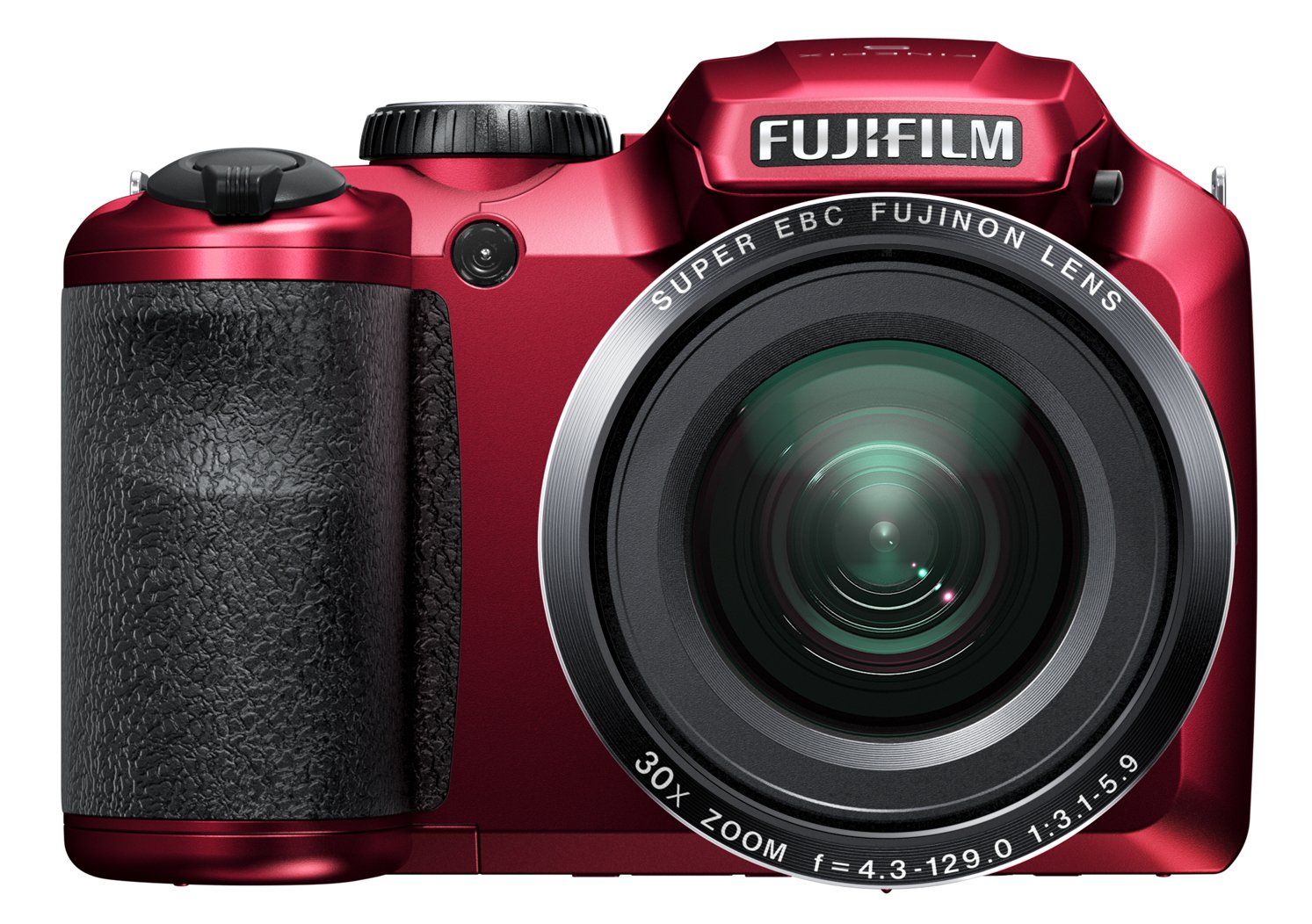
మూర్తి 4.1: ముందు view of the Fujifilm Finepix S4800 digital camera, showing the lens, flash, and ergonomic grip.
ముందు View:
- లెన్స్: 30x optical zoom lens.
- ఫ్లాష్: తక్కువ కాంతి పరిస్థితులకు అంతర్నిర్మిత ఫ్లాష్.
- పట్టు: Ergonomic grip for stable handling.
టాప్ View:
- షట్టర్ బటన్: ఫోకస్ చేయడానికి సగం నొక్కండి, చిత్రాన్ని తీయడానికి పూర్తిగా నొక్కండి.
- జూమ్ లివర్: ఆప్టికల్ జూమ్ను నియంత్రిస్తుంది.
- మోడ్ డయల్: Selects shooting modes (e.g., Auto, Program, Manual, Video).
- పవర్ బటన్: కెమెరాను ఆన్ లేదా ఆఫ్ చేస్తుంది.
వెనుక View:
- LCD మానిటర్: 3-inch display for framing shots and reviewచిత్రాలు.
- ఎలక్ట్రానిక్ Viewఫైండర్ (EVF): For framing shots.
- ప్లేబ్యాక్ బటన్: Enters playback mode.
- మెనూ/సరే బటన్: Accesses menus and confirms selections.
- డైరెక్షనల్ ప్యాడ్: మెనూలను నావిగేట్ చేసి, ఎంపికలను ఎంచుకుంటుంది.
- Display/Back Button: Changes display information or returns to previous screen.
5. సెటప్
5.1. బ్యాటరీలను వ్యవస్థాపించడం
- కెమెరా దిగువన ఉన్న బ్యాటరీ కంపార్ట్మెంట్ కవర్ను తెరవండి.
- Insert four AA-type batteries, ensuring correct polarity (+/-) as indicated inside the compartment.
- బ్యాటరీ కంపార్ట్మెంట్ కవర్ను సురక్షితంగా మూసివేయండి.
5.2. మెమరీ కార్డ్ని చొప్పించడం
- Open the memory card slot cover, usually located on the side or bottom of the camera.
- Insert an SD/SDHC/SDXC memory card with the label facing the correct direction until it clicks into place.
- మెమరీ కార్డ్ స్లాట్ కవర్ను మూసివేయండి.
5.3. ప్రారంభ సెట్టింగ్లు (తేదీ మరియు సమయం)
- Turn on the camera using the Power button.
- The date and time setting screen will appear automatically on first use.
- Use the directional pad to set the correct date, time, and time zone.
- Press the MENU/OK button to confirm the settings.
6. కెమెరాను ఆపరేట్ చేయడం
6.1. ఆన్/ఆఫ్ చేయడం
- కెమెరాను ఆన్ చేయడానికి, శక్తి బటన్. లెన్స్ విస్తరించి ఉంటుంది.
- కెమెరాను ఆఫ్ చేయడానికి, నొక్కండి శక్తి మళ్ళీ బటన్ నొక్కండి. లెన్స్ వెనక్కి తగ్గుతుంది.
6.2. Basic Photography (Auto Mode)
- మోడ్ డయల్ను దీనికి సెట్ చేయండి ఆటో.
- Frame your shot using the LCD monitor or electronic viewఫైండర్.
- ఫోకస్ చేయడానికి షట్టర్ బటన్ను సగం వరకు నొక్కండి. ఫోకస్ సాధించినప్పుడు ఫోకస్ ఫ్రేమ్ ఆకుపచ్చగా మారుతుంది.
- చిత్రాన్ని తీయడానికి షట్టర్ బటన్ను పూర్తిగా క్రిందికి నొక్కండి.
6.3. Using the Zoom
The camera features a 30x optical zoom. Use the zoom lever located around the shutter button:
- జూమ్ లివర్ను T జూమ్ ఇన్ చేయడానికి (టెలిఫోటో).
- జూమ్ లివర్ను W జూమ్ అవుట్ చేయడానికి (వైడ్-యాంగిల్).
6.4. షూటింగ్ మోడ్లు
Rotate the Mode Dial to select different shooting modes:
- పి (ప్రోగ్రామ్ AE): కెమెరా సరైన ఎక్స్పోజర్ కోసం అపర్చర్ మరియు షట్టర్ వేగాన్ని సెట్ చేస్తుంది.
- S (Shutter-Priority AE): మీరు షట్టర్ వేగాన్ని సెట్ చేస్తారు, కెమెరా ఎపర్చర్ను సెట్ చేస్తుంది.
- A (Aperture-Priority AE): మీరు ఎపర్చరును సెట్ చేస్తారు, కెమెరా షట్టర్ వేగాన్ని సెట్ చేస్తుంది.
- M (మాన్యువల్): మీరు అపెర్చర్ మరియు షట్టర్ స్పీడ్ రెండింటినీ సెట్ చేసారు.
- Scene Position (SP): Select from various scene modes (e.g., Portrait, Landscape, Sport).
- వీడియో: వీడియో క్లిప్లను రికార్డ్ చేస్తుంది.
6.5. వీడియో రికార్డింగ్
- మోడ్ డయల్ను దీనికి సెట్ చేయండి వీడియో.
- Press the dedicated video recording button (if available) or the shutter button to start recording.
- రికార్డింగ్ ఆపివేయడానికి బటన్ను మళ్లీ నొక్కండి.
7. ప్లేబ్యాక్ మరియు Viewచిత్రాలు
- నొక్కండి ప్లేబ్యాక్ ప్లేబ్యాక్ మోడ్లోకి ప్రవేశించడానికి బటన్.
- Use the directional pad (left/right) to scroll through your photos and videos.
- కు view video, select a video file మరియు నొక్కండి మెనూ / సరే ప్లేబ్యాక్ ప్రారంభించడానికి బటన్.
- నొక్కండి ప్లేబ్యాక్ button again or the shutter button to return to shooting mode.
8. కంప్యూటర్ లేదా టీవీకి కనెక్ట్ చేయడం
8.1. కంప్యూటర్ (USB) కి కనెక్ట్ చేయడం
- కెమెరాను ఆఫ్ చేయండి.
- సరఫరా చేయబడిన USB కేబుల్ని ఉపయోగించి కెమెరాను మీ కంప్యూటర్కి కనెక్ట్ చేయండి.
- Turn on the camera. It should be recognized as a removable disk or prompt for connection mode.
- Transfer photos and videos to your computer.
8.2. టీవీ (HDMI) కి కనెక్ట్ చేయడం
The Fujifilm Finepix S4800 supports HDMI connectivity.
- Ensure both the camera and TV are turned off.
- Connect the camera's HDMI output port to an HDMI input port on your TV using an HDMI cable (sold separately).
- Turn on the TV and select the correct HDMI input.
- Turn on the camera. Images and videos will be displayed on the TV screen.
9. నిర్వహణ మరియు సంరక్షణ
- కెమెరా బాడీని శుభ్రపరచడం: మెత్తని, పొడి వస్త్రంతో తుడవండి. మొండి ధూళి కోసం, తేలికగా వస్త్రాన్ని ఉపయోగించండి dampనీటితో తడిపి, పొడిగా తుడవండి.
- లెన్స్ శుభ్రపరచడం: Use a lens blower to remove dust, then gently wipe with a lens cleaning cloth. Avoid touching the lens with your fingers.
- నిల్వ: When not in use for extended periods, remove the batteries and store the camera in a cool, dry place away from direct sunlight and humidity.
- బ్యాటరీ సంరక్షణ: Do not expose batteries to heat or fire. Dispose of used batteries according to local regulations.
10. ట్రబుల్షూటింగ్
| సమస్య | సాధ్యమైన కారణం | పరిష్కారం |
|---|---|---|
| కెమెరా ఆన్ అవ్వదు. | బ్యాటరీలు డెడ్ అయ్యాయి లేదా తప్పుగా చొప్పించబడ్డాయి. | బ్యాటరీలను కొత్త వాటితో భర్తీ చేయండి లేదా వాటిని సరిగ్గా తిరిగి చొప్పించండి. |
| చిత్రాలు అస్పష్టంగా ఉన్నాయి. | Camera shake, subject too close, or incorrect focus. | Hold the camera steady, ensure proper distance to subject, or allow camera to focus before fully pressing shutter. |
| ఫ్లాష్ వెలగదు. | Flash mode is off or battery level is low. | Check flash settings. Replace or recharge batteries. |
| మెమరీ కార్డ్ లోపం. | Card is full, corrupted, or incorrectly inserted. | అనవసరంగా తొలగించండి files, format the card (this will erase all data), or reinsert the card. Try a different card. |
11. స్పెసిఫికేషన్లు
| ఫీచర్ | వివరాలు |
|---|---|
| మోడల్ పేరు | Finepix S4800 |
| సెన్సార్ | 16 మెగాపిక్సెల్ సీసీడీ |
| ఆప్టికల్ జూమ్ | 30x |
| డిజిటల్ జూమ్ | 7x |
| Focal Length (Equivalent) | 24mm - 720mm |
| గరిష్ట ఎపర్చరు | f/5.9 |
| LCD స్క్రీన్ | 3-అంగుళాల |
| Autofocus Speed | 0.3 సెకన్లు |
| గరిష్ట షట్టర్ వేగం | 8 సెకన్లు |
| నిరంతర షూటింగ్ వేగం | 10.00 fps |
| స్వీయ-టైమర్ | 5 సెకన్లు |
| కనెక్టివిటీ | HDMI, USB |
| శక్తి మూలం | 4x AA Batteries (approx. 320 photos) |
| కొలతలు (L x W x H) | 11.43 x 7.97 x 9.7 సెం.మీ |
| బరువు | 426 గ్రాములు |
12. వారంటీ మరియు మద్దతు
For information regarding warranty coverage, technical support, or service, please refer to the warranty card included with your product or visit the official Fujifilm webవారంటీ క్లెయిమ్ల కోసం మీ కొనుగోలు రుజువును ఉంచండి.