
1. పరిచయం
This manual provides essential information for the proper installation, operation, and maintenance of your Olicom OC-3137 Token Ring 16/4 PCI Adapter. Please read this manual thoroughly before attempting to install or operate the device to ensure optimal performance and safety.
The Olicom OC-3137 is a Peripheral Component Interconnect (PCI) adapter designed to provide Token Ring network connectivity at speeds of 16 Mbps or 4 Mbps. It is suitable for integration into compatible computer systems requiring Token Ring network access.
2. ఉత్పత్తి ముగిసిందిview
The Olicom OC-3137 is a robust network interface card (NIC) that allows a computer to connect to a Token Ring network. It features a standard PCI interface for easy integration into desktop computers with available PCI slots. The adapter supports both 16 Mbps and 4 Mbps Token Ring speeds, automatically adapting to the network environment.
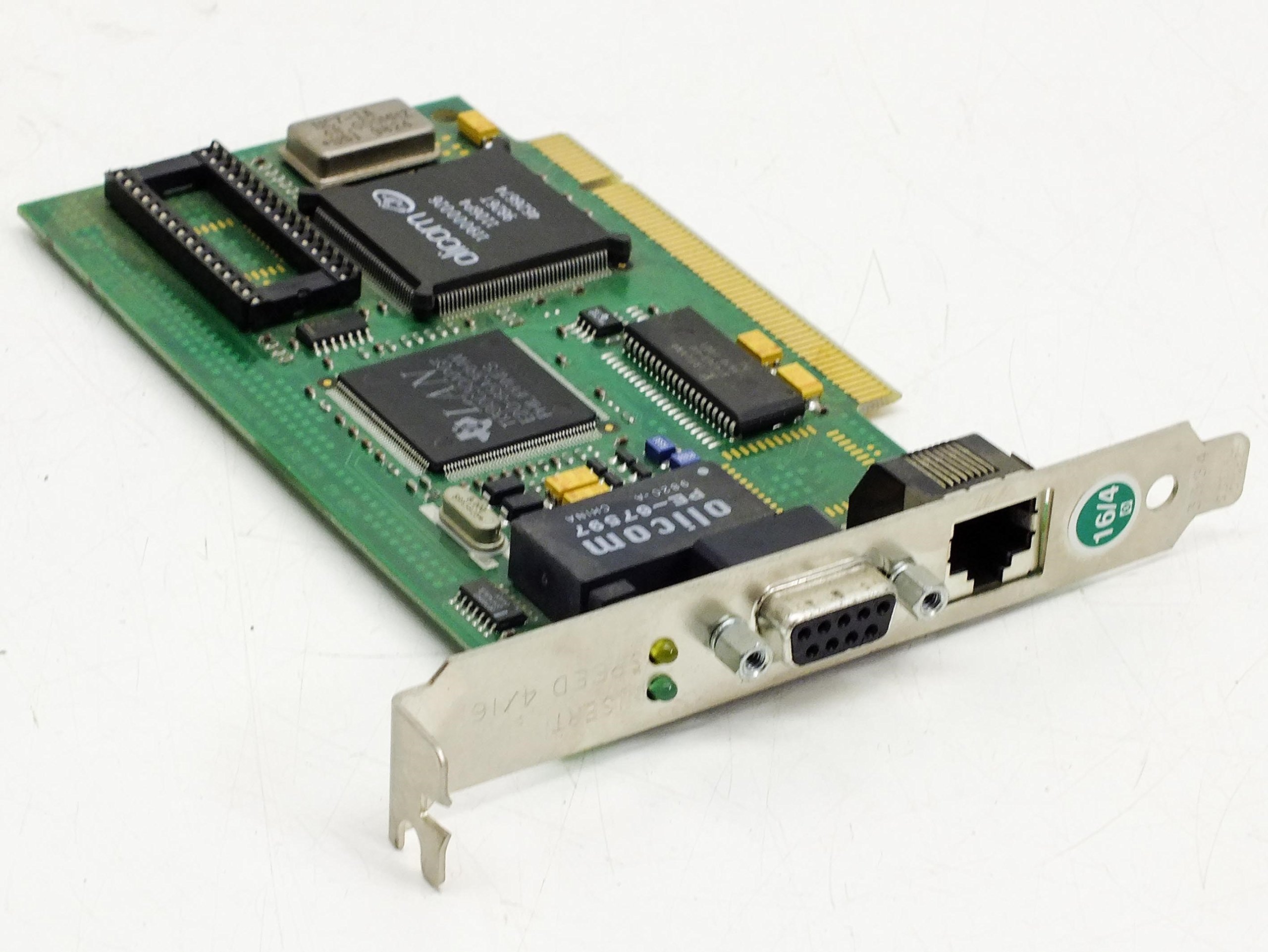
చిత్రం 2.1: కోణీయ view of the Olicom OC-3137 Token Ring 16/4 PCI Adapter. This image shows the PCI connector, the RJ45 network port, and the DB9 connector, along with various integrated circuits on the green PCB.
Key components include the PCI interface, the Token Ring controller, and the necessary connectors for network attachment. The card is identified by its part number P/N: 770001120 and PCB NO: 121 REV 1 P/N 200121100.

చిత్రం 2.2: పై నుండి క్రిందికి view of the Olicom OC-3137 Token Ring 16/4 PCI Adapter. This image provides a clear view of the PCB layout, including the LAN and Olicom branded chips, and the various electronic components.
3. సెటప్ మరియు ఇన్స్టాలేషన్
3.1 భద్రతా జాగ్రత్తలు
- Always power off and unplug your computer before opening the case or installing any internal components.
- Discharge any static electricity from your body by touching a grounded metal object (e.g., the computer chassis) before handling the adapter.
- Handle the adapter by its edges to avoid touching components or connectors.
3.2 సిస్టమ్ అవసరాలు
Ensure your computer system meets the following minimum requirements:
- Available PCI expansion slot.
- Compatible operating system (e.g., Windows, Linux distributions with Token Ring support).
- Appropriate drivers for the Olicom OC-3137 adapter (typically provided by the operating system or Olicom).
3.3 హార్డ్వేర్ ఇన్స్టాలేషన్
- Power down your computer and disconnect all power cables and peripherals.
- Open the computer case according to your computer's manufacturer instructions.
- Locate an available PCI expansion slot on the motherboard.
- Remove the metal slot cover corresponding to the chosen PCI slot.
- Carefully align the Olicom OC-3137 adapter with the PCI slot and press down firmly until it is securely seated. Do not force the card.
- Secure the adapter with the screw or retention clip provided by your computer case.
- Close the computer case and reconnect all power cables and peripherals.
3.4 డ్రైవర్ ఇన్స్టాలేషన్
After hardware installation, power on your computer. The operating system may automatically detect the new hardware and attempt to install drivers. If not, you may need to:
- Insert the driver CD (if provided) or download the latest drivers from the Olicom support webసైట్ (అందుబాటులో ఉంటే).
- డ్రైవర్ ఇన్స్టాలేషన్ను పూర్తి చేయడానికి ఆన్-స్క్రీన్ సూచనలను అనుసరించండి.
- ప్రాంప్ట్ చేయబడితే మీ కంప్యూటర్ని పునఃప్రారంభించండి.
4. ఆపరేటింగ్ సూచనలు
4.1 Connecting to a Token Ring Network
Once the adapter is physically installed and drivers are loaded:
- Connect a Token Ring cable to the appropriate port on the Olicom OC-3137 adapter. The adapter typically features an RJ45 port for UTP (Unshielded Twisted Pair) or a DB9 port for STP (Shielded Twisted Pair) connections, depending on the specific model variant.
- Ensure the other end of the cable is connected to a functional Token Ring Multistation Access Unit (MAU) or equivalent network device.
- Verify network connectivity through your operating system's network settings. Look for status indicators or network configuration tools to confirm the adapter is recognized and connected.
4.2 LED సూచికలు
The adapter may feature LED indicators to provide status information. Common indicators include:
- లింక్/కార్యకలాపం LED: Illuminates when a network link is established and blinks to indicate network activity (data transmission/reception).
- స్పీడ్ LED: May indicate the current operating speed (e.g., 16 Mbps or 4 Mbps). Refer to the adapter's specific documentation for LED behavior.
5. నిర్వహణ
The Olicom OC-3137 adapter is designed for reliable operation with minimal maintenance. Follow these guidelines to ensure longevity:
- శుభ్రపరచడం: Keep the computer's interior clean and free of dust. Dust accumulation can lead to overheating and component failure. Use compressed air to gently remove dust from the adapter and surrounding components. Ensure the computer is powered off and unplugged before cleaning.
- పర్యావరణం: Operate the computer in a well-ventilated area, away from direct sunlight, excessive heat, humidity, and corrosive chemicals.
- Firmware/Drivers: Periodically check for updated drivers or firmware from Olicom (if available) to ensure optimal performance and compatibility.
6. ట్రబుల్షూటింగ్
If you encounter issues with your Olicom OC-3137 adapter, consider the following troubleshooting steps:
6.1 నెట్వర్క్ కనెక్టివిటీ లేదు
- భౌతిక కనెక్షన్లను తనిఖీ చేయండి: Ensure the Token Ring cable is securely connected to both the adapter and the network device (MAU).
- Verify Adapter Seating: Power off the computer, open the case, and ensure the adapter is firmly seated in its PCI slot.
- డ్రైవర్ స్థితి: Check Device Manager (Windows) or equivalent system tools to confirm the adapter is recognized and its drivers are installed correctly. Reinstall drivers if necessary.
- నెట్వర్క్ పరికరం: Confirm the Token Ring MAU or network switch is powered on and functioning correctly.
6.2 నెమ్మది నెట్వర్క్ పనితీరు
- కేబుల్ నాణ్యత: Inspect the Token Ring cable for damage. Try a different cable if possible.
- నెట్వర్క్ రద్దీ: High network traffic can reduce performance. Consult your network administrator.
- డ్రైవర్ నవీకరణలు: Ensure you are using the latest drivers for the adapter.
6.3 అడాప్టర్ గుర్తించబడలేదు
- రీసీట్ అడాప్టర్: Power off, unplug, and reseat the adapter in its PCI slot. Try a different PCI slot if available.
- BIOS/UEFI సెట్టింగ్లు: Check your computer's BIOS/UEFI settings to ensure the PCI slot is enabled and functioning.
- Hardware Conflict: Check Device Manager for any hardware conflicts indicated by exclamation marks or error codes.
7. స్పెసిఫికేషన్లు
| ఫీచర్ | వివరాలు |
|---|---|
| బ్రాండ్ | Olicom |
| మోడల్ సంఖ్య | OC-3137 (P/N: 770001120) |
| తయారీదారు పార్ట్ నంబర్ | 200121100 (PCB NO: 121 REV 1) |
| హార్డ్వేర్ ఇంటర్ఫేస్ | PCI |
| నెట్వర్క్ రకం | టోకెన్ రింగ్ |
| డేటా బదిలీ రేటు | 16 Mbps / 4 Mbps (Auto-sensing) |
| FCC ID | HST96B |
| వస్తువు బరువు | సుమారు 3 పౌండ్లు (1.36 కిలోలు) |
| ASIN | B00B86QDM4 |
8. Safety and Compliance Information
This device complies with relevant safety and electromagnetic compatibility standards. Any modifications not expressly approved by Olicom could void the user's authority to operate the equipment.
- అడాప్టర్ను తేమ లేదా తీవ్రమైన ఉష్ణోగ్రతలకు గురిచేయవద్దు.
- Do not attempt to repair or modify the adapter yourself. Refer all servicing to qualified personnel.
- స్థానిక నిబంధనల ప్రకారం ఎలక్ట్రానిక్ వ్యర్థాలను బాధ్యతాయుతంగా పారవేయండి.
9. వారంటీ మరియు మద్దతు
For warranty information, please refer to the documentation provided at the time of purchase or contact your reseller. Olicom's official website (if available) may also provide support resources, driver downloads, and contact information.
వారంటీ క్లెయిమ్ల కోసం కొనుగోలు రుజువుగా మీ కొనుగోలు రసీదును ఉంచండి.