
1. పరిచయం
This manual provides instructions for the OEM RMT-B119A remote control, designed as a replacement or secondary remote for various Sony Blu-ray player models. This remote offers full functionality for controlling your Blu-ray player's features.
Compatible Sony Blu-ray Player Models:
- BDP-BX59
- BDP-S390
- BDP-S590
- BDP-BX110
- BDP-S1100
- BDP-S3100
- BDP-BX310
2. సెటప్
2.1 బ్యాటరీ ఇన్స్టాలేషన్
రిమోట్ కంట్రోల్కు రెండు (2) AAA బ్యాటరీలు అవసరం (చేర్చబడలేదు). బ్యాటరీలను ఇన్స్టాల్ చేయడానికి ఈ దశలను అనుసరించండి:
- రిమోట్ కంట్రోల్ వెనుక బ్యాటరీ కంపార్ట్మెంట్ కవర్ను గుర్తించండి.
- కంపార్ట్మెంట్ తెరవడానికి ట్యాబ్పై క్రిందికి నొక్కి, కవర్ను క్రిందికి జారండి.
- రెండు AAA బ్యాటరీలను చొప్పించండి, పాజిటివ్ (+) మరియు నెగటివ్ (-) టెర్మినల్స్ కంపార్ట్మెంట్ లోపల ఉన్న గుర్తులతో సరిగ్గా సమలేఖనం చేయబడ్డాయని నిర్ధారించుకోండి.
- బ్యాటరీ కంపార్ట్మెంట్ కవర్ సురక్షితంగా క్లిక్ అయ్యే వరకు దాన్ని తిరిగి స్థానంలోకి స్లైడ్ చేయండి.
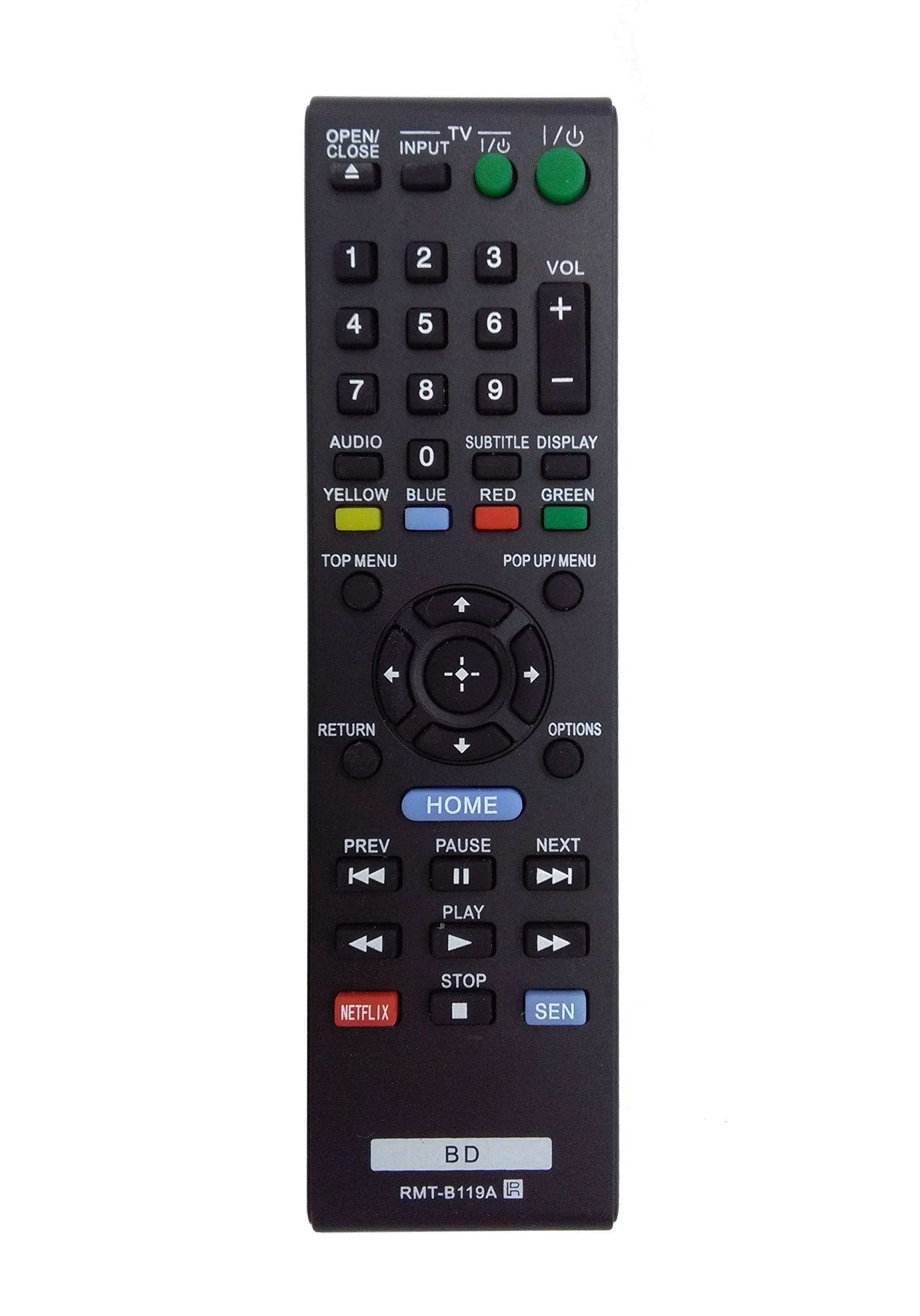
Image: The OEM RMT-B119A remote control, showing the full button layout on the front and a partial view of the open battery compartment on the back, revealing the battery terminals.
3. ఆపరేటింగ్ సూచనలు
3.1 రిమోట్ కంట్రోల్ లేఅవుట్ మరియు బటన్ విధులు
Familiarize yourself with the buttons on your RMT-B119A remote control. Below is a description of each button's primary function.
Image: The OEM RMT-B119A remote control, displaying all buttons and their labels.
- పవర్ (I/O): Turns the Blu-ray player on or off.
- OPEN/CLOSE (▲): డిస్క్ ట్రేని తెరుస్తుంది లేదా మూసివేస్తుంది.
- ఇన్పుట్: Switches the input source on the connected TV (if programmed).
- TV: Switches the remote to TV control mode (if programmed).
- నంబర్ ప్యాడ్ (0-9): Used for direct track selection, chapter selection, or entering numerical data.
- VOL (+/-): Adjusts the volume level (typically for the connected TV, if programmed).
- ఆడియో: Changes the audio track or language during playback.
- SUBTITLE DISPLAY: Toggles subtitle display on or off, or cycles through available subtitle languages.
- YELLOW, BLUE, RED, GREEN: Color-coded function buttons, typically used for specific features within menus or interactive content. Their function varies depending on the disc or menu.
- టాప్ మెనూ: Accesses the main menu of the Blu-ray disc.
- POP UP/MENU: Displays the pop-up menu during disc playback.
- Directional Pad (↑↓←→): మెనులు మరియు ఎంపికల ద్వారా నావిగేట్ చేస్తుంది.
- Center Button (Enter/Select): Confirms a selection or enters a menu item.
- వాపసు: మునుపటి స్క్రీన్ లేదా మెనూకు తిరిగి వెళుతుంది.
- ఎంపికలు: Displays context-sensitive options or settings.
- హోమ్: Accesses the Blu-ray player's home menu.
- PREV (◀◀): Skips to the beginning of the current track/chapter or the previous track/chapter.
- PAUSE (▌▌): ప్లేబ్యాక్ను పాజ్ చేస్తుంది.
- NEXT (▶▶): తదుపరి ట్రాక్ లేదా అధ్యాయానికి వెళుతుంది.
- PLAY (▶): ప్లేబ్యాక్ను ప్రారంభిస్తుంది లేదా పునఃప్రారంభిస్తుంది.
- ఆపు (■): ప్లేబ్యాక్ను ఆపివేస్తుంది.
- NETFLIX: Direct access button for the Netflix streaming service.
- SEN: Direct access button for the Sony Entertainment Network (now PlayStation Video/Music).
- బిడి: Likely a dedicated button for Blu-ray Disc functions or to switch to Blu-ray mode.
4. నిర్వహణ
మీ రిమోట్ కంట్రోల్ యొక్క దీర్ఘాయువు మరియు సరైన పనితీరును నిర్ధారించడానికి, ఈ నిర్వహణ మార్గదర్శకాలను అనుసరించండి:
- శుభ్రపరచడం: రిమోట్ కంట్రోల్ను మృదువైన, పొడి గుడ్డతో తుడవండి. మొండి ధూళి కోసం, కొద్దిగా dampనీటితో లేదా తేలికపాటి, రాపిడి లేని క్లీనర్తో గుడ్డను తుడవండి. కఠినమైన రసాయనాలు లేదా ద్రావకాలను ఉపయోగించకుండా ఉండండి.
- బ్యాటరీ భర్తీ: Replace batteries when the remote's response becomes sluggish or it stops functioning. Always replace both batteries at the same time with new ones of the same type.
- నిల్వ: రిమోట్ను చల్లని, పొడి ప్రదేశంలో ప్రత్యక్ష సూర్యకాంతి, విపరీతమైన ఉష్ణోగ్రతలు మరియు అధిక తేమ నుండి దూరంగా నిల్వ చేయండి. రిమోట్ను ఎక్కువ కాలం ఉపయోగించకపోతే, లీకేజీని నివారించడానికి బ్యాటరీలను తీసివేయండి.
- చుక్కలను నివారించండి: చుక్కలు అంతర్గత భాగాలను దెబ్బతీస్తాయి కాబట్టి, భౌతిక ప్రభావం నుండి రిమోట్ను రక్షించండి.
5. ట్రబుల్షూటింగ్
If you experience issues with your remote control, refer to the following table for common problems and solutions:
| సమస్య | సాధ్యమైన కారణం | పరిష్కారం |
|---|---|---|
| రిమోట్ పనిచేయదు. | డెడ్ లేదా తప్పుగా చొప్పించిన బ్యాటరీలు. | బ్యాటరీలను కొత్త వాటితో భర్తీ చేయండి, సరైన ధ్రువణతను (+/-) నిర్ధారించుకోండి. |
| రిమోట్ అడపాదడపా పనిచేస్తుంది. | Low battery power or obstruction. | Replace batteries. Ensure no objects are blocking the remote's signal path to the Blu-ray player. |
| రిమోట్ టీవీని నియంత్రించదు. | Remote not programmed for TV or TV mode not selected. | This remote is primarily for Blu-ray players. TV control functionality may require specific programming not covered by this manual, or may not be supported by this OEM model. |
| బటన్లు స్పందించడం లేదు లేదా జిగటగా ఉంటాయి. | బటన్ల కింద ధూళి లేదా శిధిలాలు. | Clean the remote control surface. Avoid spilling liquids on the remote. |
6. స్పెసిఫికేషన్లు
- బ్రాండ్: OEM
- మోడల్ సంఖ్య: RMT-B119A
- కనెక్టివిటీ టెక్నాలజీ: ఇన్ఫ్రారెడ్ (IR)
- అనుకూల పరికరాలు: Sony Blu-ray Players (specific models listed in Introduction)
- శక్తి మూలం: 2 x AAA బ్యాటరీలు (చేర్చబడలేదు)
- గరిష్ట పరిధి: సుమారు 10 మీటర్లు (33 అడుగులు)
- ప్రత్యేక ఫీచర్: ఎర్గోనామిక్ డిజైన్
7. వారంటీ మరియు మద్దతు
This OEM RMT-B119A remote control comes with a 30-రోజుల వారంటీ కొనుగోలు తేదీ నుండి, తయారీ లోపాలను కవర్ చేస్తుంది. వారంటీ క్లెయిమ్ల కోసం దయచేసి మీ కొనుగోలు రుజువును ఉంచుకోండి.
సాంకేతిక మద్దతు లేదా వారంటీ విచారణల కోసం, దయచేసి రిటైలర్ లేదా తయారీదారుని నేరుగా సంప్రదించండి. నిర్దిష్ట సంప్రదింపు సమాచారం కోసం మీ కొనుగోలు డాక్యుమెంటేషన్ను చూడండి.