
పరిచయం
This manual provides instructions for the Vivanco RR 220 remote control, designed for compatibility with Samsung Smart TVs. Please read this manual thoroughly before using the device to ensure proper operation and to understand its features.
ప్యాకేజీ విషయాలు
- Vivanco RR 220 Remote Control
- ఈ వినియోగదారు మాన్యువల్
గమనిక: బ్యాటరీలు చేర్చబడలేదు మరియు విడిగా కొనుగోలు చేయాలి.
సెటప్
1. బ్యాటరీ ఇన్స్టాలేషన్
- రిమోట్ కంట్రోల్ వెనుక బ్యాటరీ కంపార్ట్మెంట్ను గుర్తించండి.
- బ్యాటరీ కవర్ను క్రిందికి జారండి లేదా తెరవడానికి గడియను నొక్కి, ఎత్తండి.
- Insert two (2) AAA batteries, ensuring the positive (+) and negative (-) terminals align with the markings inside the compartment.
- బ్యాటరీ కవర్ను మార్చండి, అది సురక్షితంగా క్లిక్ అయ్యేలా చూసుకోండి.
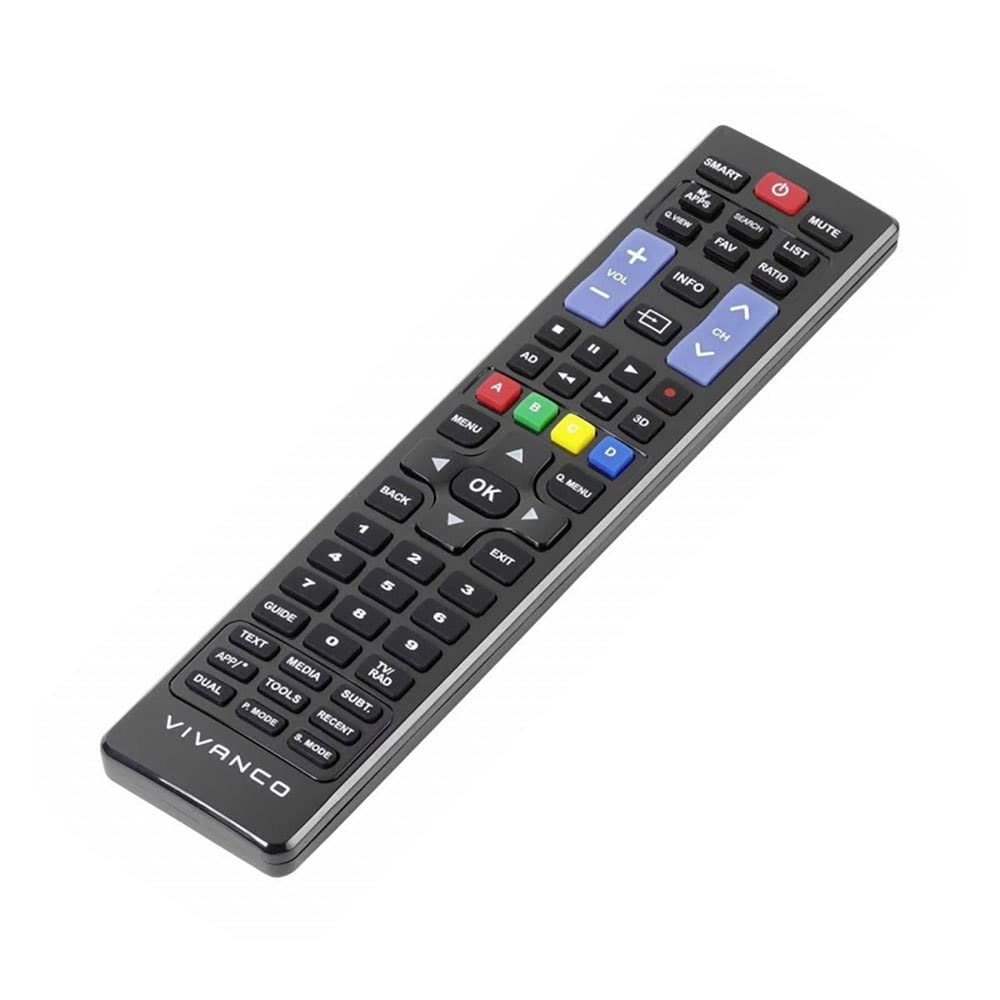
చిత్రం 1: Vivanco RR 220 remote control. This image displays the front of the remote control, highlighting its 57 buttons and ergonomic design. The battery compartment is located on the reverse side.
2. ప్రారంభ ఉపయోగం
The Vivanco RR 220 is pre-programmed for Samsung Smart TVs. No additional setup or pairing is typically required. Once batteries are installed, point the remote control towards your Samsung Smart TV and press the Power button to test functionality.
ఆపరేటింగ్ సూచనలు
The remote control features 57 buttons, providing comprehensive control over your Samsung Smart TV and compatible devices. Below are common button functions:
- పవర్ బటన్: టీవీని ఆన్ లేదా ఆఫ్ చేస్తుంది.
- సంఖ్య బటన్లు (0-9): For direct channel selection or data input.
- వాల్యూమ్ అప్/డౌన్: ఆడియో వాల్యూమ్ను సర్దుబాటు చేస్తుంది.
- ఛానల్ పైకి/క్రిందికి: టీవీ ఛానళ్లు మారుస్తాడు.
- మ్యూట్ బటన్: టీవీ ఆడియోను నిశ్శబ్దం చేస్తుంది.
- నావిగేషన్ ప్యాడ్ (పైకి, క్రిందికి, ఎడమకు, కుడికి, ప్రవేశించు): మెనూలను నావిగేట్ చేయడానికి మరియు ఎంపికలను ఎంచుకోవడానికి ఉపయోగించబడుతుంది.
- వెనుకకు/తిరిగి వెళ్ళు బటన్: మునుపటి స్క్రీన్ లేదా మెనుకి తిరిగి వస్తుంది.
- స్మార్ట్ హబ్/హోమ్ బటన్: Accesses the Smart Hub or main menu of your Samsung Smart TV.
- మూలం/ఇన్పుట్ బటన్: ఇన్పుట్ సోర్స్లను (HDMI, AV, మొదలైనవి) ఎంచుకుంటుంది.
- రంగు బటన్లు (ఎరుపు, ఆకుపచ్చ, పసుపు, నీలం): For specific functions within certain applications or menus, as indicated on-screen.
- ప్లేబ్యాక్ నియంత్రణలు (ప్లే, పాజ్, స్టాప్, ఫాస్ట్ ఫార్వర్డ్, రివైండ్): Controls media playback on compatible devices or apps.
For specific functions related to your TV model, refer to your Samsung TV's user manual.
నిర్వహణ
రిమోట్ కంట్రోల్ క్లీనింగ్
- రిమోట్ కంట్రోల్ ఉపరితలాన్ని తుడవడానికి మృదువైన, పొడి వస్త్రాన్ని ఉపయోగించండి.
- మొండి ధూళికి, కొద్దిగా dampనీరు లేదా తేలికపాటి, నాన్-బ్రాసివ్ క్లీనర్తో వస్త్రాన్ని en.
- Do not use harsh chemicals, solvents, or abrasive cleaning pads, as these can damage the remote's finish or internal components.
- Ensure no liquid enters the remote control through button gaps or the battery compartment.
బ్యాటరీ భర్తీ
Replace batteries when the remote's response becomes sluggish or it stops functioning. Always replace both batteries simultaneously with new AAA alkaline batteries. Do not mix old and new batteries or different types of batteries.
ట్రబుల్షూటింగ్
| సమస్య | సాధ్యమైన కారణం | పరిష్కారం |
|---|---|---|
| రిమోట్ కంట్రోల్ పనిచేయడం లేదు. |
|
|
| కొన్ని బటన్లు పనిచేయవు. |
|
|
స్పెసిఫికేషన్లు
- బ్రాండ్: Vivanco
- మోడల్ పేరు: RR 220
- ఉత్పత్తి మోడల్ సంఖ్య: 38016
- అనుకూల పరికరాలు: Home cinema, DVD/Blu-ray player, Television (Samsung Smart TV compatible)
- కనెక్టివిటీ టెక్నాలజీ: Wireless IR (Infrared)
- బటన్ల సంఖ్య: 57
- బ్యాటరీ రకం: 2 x AAA (ఆల్కలీన్ సిఫార్సు చేయబడింది)
- బ్యాటరీలు ఉన్నాయి: నం
- ఉత్పత్తి కొలతలు: 18 x 4.8 x 2.3 సెం.మీ
- ఉత్పత్తి బరువు: 80 గ్రా
- గరిష్ట పరిధి: 15 మీటర్లు
- ప్రత్యేక లక్షణాలు: IPTV, DVB-T, HDTV compatibility