
పరిచయం
Thank you for choosing the Divoom Onbeat 200 Bluetooth Portable Speaker. This manual provides essential information for setting up, operating, and maintaining your speaker. Please read it thoroughly before use to ensure optimal performance and longevity of your device.
The Divoom Onbeat 200 is a compact and powerful portable speaker designed to deliver rich audio with the convenience of Bluetooth wireless connectivity. It features a built-in microphone for hands-free calling, making it versatile for both music playback and communication.
ప్యాకేజీ విషయాలు
దయచేసి ఈ క్రింది అంశాల కోసం ప్యాకేజీని తనిఖీ చేయండి:
- Divoom Onbeat 200 Bluetooth Portable Speaker
- USB ఛార్జింగ్ కేబుల్
- 3.5mm ఆడియో కేబుల్
- వినియోగదారు మాన్యువల్
If any items are missing or damaged, please contact your retailer for assistance.
ఉత్పత్తి ముగిసిందిview
The Divoom Onbeat 200 features a sleek design with intuitive controls. Familiarize yourself with the speaker's components before use.
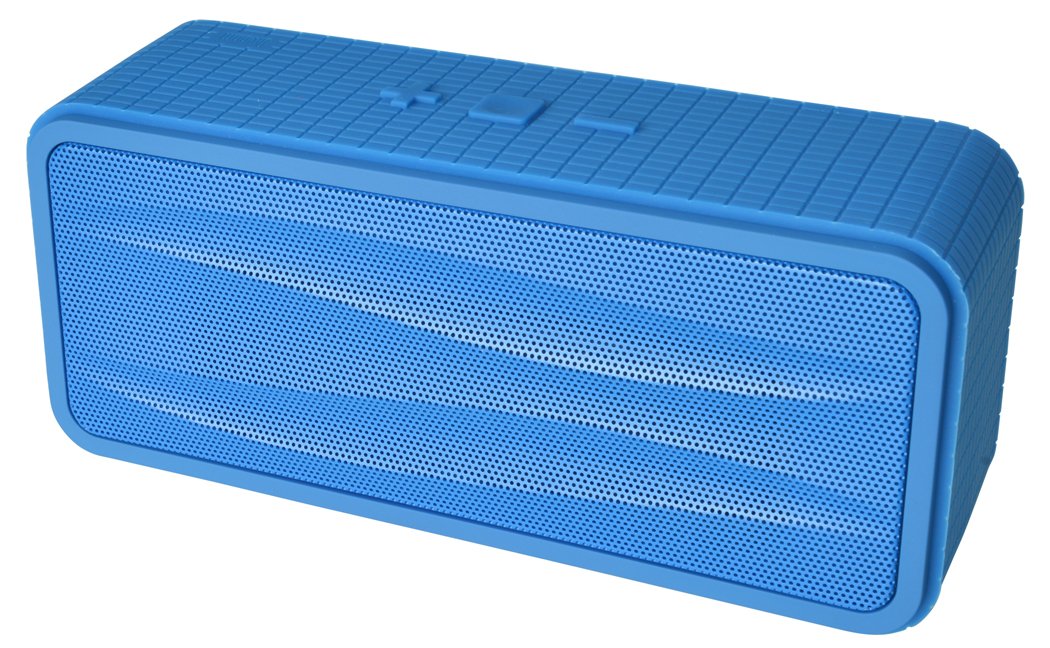
మూర్తి 1: Divoom Onbeat 200 Bluetooth Portable Speaker shown with various compatible smartphones, highlighting its wireless connectivity. The speaker is blue and rectangular with a mesh grille.
The speaker is equipped with dual drivers for stereo sound and a passive radiator for enhanced bass. The control panel typically includes power, volume, and Bluetooth pairing buttons. A built-in microphone is integrated for hands-free communication.

మూర్తి 2: Detailed dimensions of the Divoom Onbeat 200 speaker. The speaker measures approximately 16.5 cm in length, 7 cm in height, and 5.2 cm in depth.
సెటప్
1. స్పీకర్ను ఛార్జింగ్
- USB ఛార్జింగ్ కేబుల్ యొక్క చిన్న చివరను స్పీకర్లోని ఛార్జింగ్ పోర్ట్కు కనెక్ట్ చేయండి.
- USB ఛార్జింగ్ కేబుల్ యొక్క పెద్ద చివరను USB పవర్ అడాప్టర్ (చేర్చబడలేదు) లేదా కంప్యూటర్ యొక్క USB పోర్ట్కి కనెక్ట్ చేయండి.
- ఛార్జింగ్ సమయంలో ఛార్జింగ్ ఇండికేటర్ లైట్ సాధారణంగా ఎరుపు రంగులో వెలుగుతుంది.
- Once fully charged, the indicator light will change color or turn off (refer to specific LED behavior in the full manual if available). A full charge usually takes 2-3 hours.
గమనిక: For first-time use, ensure the speaker is fully charged.
2. బ్లూటూత్ పెయిరింగ్
- Ensure the speaker is charged and turned off.
- Press and hold the Power button (or dedicated Bluetooth button) for a few seconds until you hear an audible prompt or see the Bluetooth indicator light flashing rapidly, indicating it's in pairing mode.
- మీ స్మార్ట్ఫోన్, టాబ్లెట్ లేదా ఇతర బ్లూటూత్-ప్రారంభించబడిన పరికరంలో, బ్లూటూత్ సెట్టింగ్లకు వెళ్లండి.
- బ్లూటూత్ని ప్రారంభించి, అందుబాటులో ఉన్న పరికరాల కోసం శోధించండి.
- Select "Onbeat 200" from the list of devices.
- Once paired, you will hear a confirmation tone, and the Bluetooth indicator light will typically glow solid blue.
చిట్కా: The speaker will automatically attempt to reconnect to the last paired device when powered on, if that device's Bluetooth is active and within range.
ఆపరేటింగ్ సూచనలు
పవర్ ఆన్/ఆఫ్
- పవర్ ఆన్ చేయడానికి: సూచిక లైట్ వెలిగే వరకు పవర్ బటన్ను నొక్కి పట్టుకోండి.
- పవర్ ఆఫ్ చేయడానికి: సూచిక లైట్ ఆఫ్ అయ్యే వరకు పవర్ బటన్ను నొక్కి పట్టుకోండి.
వాల్యూమ్ నియంత్రణ
- To increase volume: Press the Volume Up (+) button.
- To decrease volume: Press the Volume Down (-) button.
మీరు మీ కనెక్ట్ చేయబడిన పరికరం నుండి నేరుగా వాల్యూమ్ను కూడా సర్దుబాటు చేయవచ్చు.
మ్యూజిక్ ప్లేబ్యాక్
- Play/Pause: Press the Play/Pause button (often integrated with the Power or Bluetooth button).
- Next Track: Double-press the Volume Up (+) button (or a dedicated skip button).
- Previous Track: Double-press the Volume Down (-) button (or a dedicated skip button).
గమనిక: Specific button functions may vary slightly. Refer to the physical markings on your speaker.
సహాయక ఇన్పుట్ (AUX)
For devices without Bluetooth, you can use the 3.5mm audio cable:
- Connect one end of the 3.5mm audio cable to the AUX-in port on the speaker.
- మీ ఆడియో పరికరం యొక్క హెడ్ఫోన్ జాక్తో మరొక చివరను కనెక్ట్ చేయండి.
- The speaker will automatically switch to AUX mode, or you may need to press a mode button.
కాల్స్ చేయడం మరియు స్వీకరించడం
The Divoom Onbeat 200 features a built-in microphone for hands-free calling when connected via Bluetooth to a smartphone.
- కాల్కు సమాధానం ఇవ్వడం: When a call comes in, the music will pause. Press the Play/Pause button (or phone icon button) once to answer the call.
- కాల్ని ముగించడం: During a call, press the Play/Pause button (or phone icon button) once to end the call.
- కాల్ను తిరస్కరించడం: Press and hold the Play/Pause button (or phone icon button) for approximately 2 seconds to reject an incoming call.
- చివరి నంబర్ను మళ్లీ డయల్ చేస్తోంది: Double-press the Play/Pause button (or phone icon button) to redial the last number called.
Audio will be routed through the speaker, and your voice will be picked up by the built-in microphone.
నిర్వహణ
- స్పీకర్ను నీరు, తేమ మరియు తీవ్రమైన ఉష్ణోగ్రతల నుండి దూరంగా ఉంచండి.
- స్పీకర్ను మృదువైన, పొడి గుడ్డతో శుభ్రం చేయండి. రాపిడి క్లీనర్లను లేదా ద్రావకాలను ఉపయోగించవద్దు.
- స్పీకర్ను వదలడం లేదా బలమైన ప్రభావాలకు గురిచేయడం మానుకోండి.
- ఎక్కువసేపు ఉపయోగంలో లేనప్పుడు, స్పీకర్ను చల్లని, పొడి ప్రదేశంలో నిల్వ చేసి, బ్యాటరీ ఆరోగ్యాన్ని కాపాడుకోవడానికి కాలానుగుణంగా ఛార్జ్ చేయండి.
ట్రబుల్షూటింగ్
| సమస్య | సాధ్యమైన పరిష్కారం |
|---|---|
| స్పీకర్ పవర్ ఆన్ చేయదు. | స్పీకర్ పూర్తిగా ఛార్జ్ అయ్యిందని నిర్ధారించుకోండి. దానిని పవర్ సోర్స్కి కనెక్ట్ చేసి, మళ్లీ ప్రయత్నించండి. |
| బ్లూటూత్ ద్వారా జత చేయడం సాధ్యం కాదు. |
|
| శబ్దం లేదు లేదా తక్కువ వాల్యూమ్ ఉంది. |
|
| ధ్వని వక్రీకరణ. |
|
స్పెసిఫికేషన్లు
- మోడల్ పేరు: Onbeat 200
- అంశం మోడల్ సంఖ్య: Onbeat 200-Blue
- బ్రాండ్: దివూమ్
- స్పీకర్ రకం: పుస్తకాల అర
- ప్రత్యేక లక్షణాలు: Built-in Microphone, Stereo
- సిఫార్సు చేసిన ఉపయోగాలు: సంగీతం
- అనుకూల పరికరాలు: స్మార్ట్ఫోన్
- సరౌండ్ సౌండ్ ఛానెల్ కాన్ఫిగరేషన్: 2.0
- రంగు: నీలం
- వస్తువు బరువు: 544 గ్రా (1.2 పౌండ్లు)
- జలనిరోధిత: నం
- నియంత్రణ పద్ధతి: App (Note: While listed, primary control is via physical buttons and connected device)
- వైర్లెస్ కమ్యూనికేషన్ టెక్నాలజీ: బ్లూటూత్
- శక్తి మూలం: బ్యాటరీ ఆధారితం (1 లిథియం అయాన్ బ్యాటరీ కూడా ఉంది)
- ఉత్పత్తి కొలతలు: 16.51 x 5.08 x 7.11 సెం.మీ
- స్పీకర్ గరిష్ట అవుట్పుట్ పవర్: 4 వాట్స్
- కనెక్టివిటీ టెక్నాలజీ: బ్లూటూత్
- మౌంటు రకం: టాబ్లెట్ టాప్
- మొదట అందుబాటులో ఉన్నవి: మే 17, 2013
వారంటీ మరియు మద్దతు
The Divoom Onbeat 200 comes with a standard manufacturer's warranty. Please refer to the warranty card included in your package or visit the official Divoom webవివరణాత్మక వారంటీ నిబంధనలు మరియు షరతుల కోసం సైట్.
For technical support, troubleshooting assistance, or service inquiries, please contact Divoom customer support through their official channels. Keep your purchase receipt and product model information handy when contacting support.