
1. పరిచయం
The Mastech MS8232B is a compact, auto-ranging digital multimeter designed for measuring AC/DC voltage, AC/DC current, resistance, frequency, capacitance, and duty cycle. It features a 3 3/4 digit LCD display with 3999 counts, overload protection, a flashlight function, low voltage display, and automatic power-off for energy conservation. This manual provides essential information for safe and effective operation of the device.
2. భద్రతా సమాచారం
To ensure safe operation and avoid damage to the meter, observe the following safety precautions:
- Always ensure the test leads are in good condition and properly connected before making any measurements.
- సంపుటిని వర్తింపజేయవద్దుtage or current that exceeds the maximum specified limits for each range.
- వాల్యూమ్తో పని చేస్తున్నప్పుడు చాలా జాగ్రత్తగా ఉండండిtag60V DC లేదా 30V AC RMS కంటే ఎక్కువ, ఎందుకంటే ఇవి షాక్ ప్రమాదాన్ని కలిగిస్తాయి.
- విధులను మార్చడానికి ముందు, పరీక్షలో ఉన్న సర్క్యూట్ నుండి టెస్ట్ లీడ్లను డిస్కనెక్ట్ చేయండి.
- మీటర్ దెబ్బతిన్నట్లు కనిపిస్తే లేదా కేసు తెరిచి ఉంటే దాన్ని ఆపరేట్ చేయవద్దు.
- ఖచ్చితమైన రీడింగ్లను నిర్ధారించడానికి తక్కువ బ్యాటరీ సూచిక కనిపించిన వెంటనే బ్యాటరీని మార్చండి.
- స్థానిక మరియు జాతీయ భద్రతా కోడ్లకు కట్టుబడి ఉండండి.
3. ఉత్పత్తి ముగిసిందిview
The Mastech MS8232B is a compact and versatile digital multimeter. Key features include a 4000-count display, non-contact voltage detection, and an integrated flashlight.

Figure 3.1: Mastech MS8232B Mini Digital Multimeter with test leads.
3.1 భాగాలు
- LCD డిస్ప్లే: కొలత రీడింగ్లు, యూనిట్లు మరియు ఫంక్షన్ సూచికలను చూపుతుంది.
- రోటరీ స్విచ్: Used to select the desired measurement function.
- FUNC బటన్: Toggles between different measurement modes within a single rotary switch position (e.g., AC/DC, Resistance/Continuity/Diode).
- ఫ్లాష్లైట్ బటన్: అంతర్నిర్మిత ఫ్లాష్లైట్ను సక్రియం చేస్తుంది.
- Hz% బటన్: Toggles between frequency and duty cycle measurements.
- ఇన్పుట్ జాక్స్: For connecting test leads.
- సంపర్కం కాని సంtage (NCV) Sensor: AC వాల్యూమ్ని గుర్తిస్తుందిtagఇ ప్రత్యక్ష పరిచయం లేకుండా.

Figure 3.2: Close-up of the rotary switch and function buttons, including FUNC, Flashlight, and Hz%.

Figure 3.3: The multimeter's LCD display showing a measurement.
4. సెటప్
4.1 బ్యాటరీ ఇన్స్టాలేషన్
The MS8232B is powered by batteries. To install or replace batteries:
- మల్టీమీటర్ ఆఫ్ చేయబడిందని నిర్ధారించుకోండి.
- యూనిట్ వెనుక భాగంలో బ్యాటరీ కంపార్ట్మెంట్ కవర్ను గుర్తించండి.
- Use a screwdriver to remove the screw(s) securing the cover.
- Carefully remove the old batteries (if any) and insert new ones, observing the correct polarity (+ and -).
- బ్యాటరీ కంపార్ట్మెంట్ కవర్ను మార్చి, దానిని స్క్రూ(లు)తో భద్రపరచండి.
4.2 టెస్ట్ లీడ్లను కనెక్ట్ చేయడం
Connect the red test lead to the 'VΩHz%CAP' input jack and the black test lead to the 'COM' input jack for most voltage, resistance, frequency, and capacitance measurements. For current measurements, refer to the specific current measurement section.
5. ఆపరేటింగ్ సూచనలు
Always ensure the correct function is selected and test leads are properly connected before making any measurement.
5.1 DC వాల్యూమ్tage (DCV) కొలత
- Set the rotary switch to the 'VΩHz%' position.
- Press the 'FUNC' button until 'DC' is indicated on the display.
- Connect the red test lead to the positive side of the circuit and the black test lead to the negative side.
- సంపుటాన్ని చదవండిtagఎల్సిడి డిస్ప్లేపై ఇ విలువ.
5.2 AC వాల్యూమ్tage (ACV) కొలత
- Set the rotary switch to the 'VΩHz%' position.
- Press the 'FUNC' button until 'AC' is indicated on the display.
- AC వాల్యూమ్ అంతటా టెస్ట్ లీడ్లను కనెక్ట్ చేయండి.tagఇ మూలం.
- సంపుటాన్ని చదవండిtagఎల్సిడి డిస్ప్లేపై ఇ విలువ.
5.3 DC కరెంట్ (DCA) కొలత
- Set the rotary switch to the 'μA' or 'mA' position, depending on the expected current range.
- Press the 'FUNC' button until 'DC' is indicated on the display.
- Disconnect power to the circuit. Break the circuit and connect the multimeter in series. The red lead connects to the higher potential side, and the black lead to the lower potential side.
- సర్క్యూట్కు శక్తిని వర్తింపజేసి, ప్రస్తుత విలువను చదవండి.
5.4 AC Current (ACA) Measurement
- Set the rotary switch to the 'μA' or 'mA' position, depending on the expected current range.
- Press the 'FUNC' button until 'AC' is indicated on the display.
- Disconnect power to the circuit. Break the circuit and connect the multimeter in series.
- సర్క్యూట్కు శక్తిని వర్తింపజేసి, ప్రస్తుత విలువను చదవండి.
5.5 నిరోధక కొలత
- Set the rotary switch to the 'Ω' position.
- పరీక్షించబడుతున్న సర్క్యూట్ డి-ఎనర్జైజ్ చేయబడిందని నిర్ధారించుకోండి.
- Connect the test leads across the component to measure its resistance.
- LCD డిస్ప్లేలో నిరోధక విలువను చదవండి.
5.6 Frequency (Hz) and Duty Cycle (%) Measurement
- Set the rotary switch to the 'VΩHz%' position.
- Press the 'Hz%' button to cycle between Frequency and Duty Cycle modes.
- సిగ్నల్ సోర్స్ అంతటా టెస్ట్ లీడ్లను కనెక్ట్ చేయండి.
- Read the frequency or duty cycle value on the LCD display.
5.7 కెపాసిటెన్స్ కొలత
- Set the rotary switch to the 'CAP' position.
- పరీక్ష లీడ్లను కనెక్ట్ చేసే ముందు కెపాసిటర్ పూర్తిగా డిశ్చార్జ్ అయ్యిందని నిర్ధారించుకోండి.
- కెపాసిటర్ టెర్మినల్స్ అంతటా టెస్ట్ లీడ్లను కనెక్ట్ చేయండి.
- LCD డిస్ప్లేలో కెపాసిటెన్స్ విలువను చదవండి.
5.8 ఫ్లాష్లైట్ ఫంక్షన్
The multimeter includes a built-in flashlight for illuminating dark work areas.
- Press the flashlight button (labeled with a light bulb icon) to turn the flashlight ON.
- Press the button again to turn the flashlight OFF.

Figure 5.1: The integrated flashlight on the Mastech MS8232B.
5.9 నాన్-కాంటాక్ట్ వాల్యూమ్tagఇ (NCV) గుర్తింపు
NCV ఫంక్షన్ AC వాల్యూమ్ను గుర్తించడానికి అనుమతిస్తుందిtagకండక్టర్లతో ప్రత్యక్ష సంబంధం లేకుండా.
- Set the rotary switch to the 'NCV' position (often integrated with other functions or a dedicated position).
- Bring the top front part of the multimeter (where the NCV sensor is located) close to the conductor.
- మీటర్ AC వాల్యూమ్ ఉనికిని సూచిస్తుందిtagవినగల బీప్ మరియు/లేదా దృశ్య సూచిక ద్వారా.
5.10 ఆటోమేటిక్ పవర్ ఆఫ్
The multimeter features an automatic power-off function to conserve battery life. If no operation is performed for approximately 15 minutes, the meter will automatically shut down. To reactivate, turn the rotary switch to OFF and then back to the desired function, or press any button.
6. నిర్వహణ
6.1 శుభ్రపరచడం
ప్రకటనతో కేసును తుడిచివేయండిamp వస్త్రం మరియు తేలికపాటి డిటర్జెంట్. అబ్రాసివ్లు లేదా ద్రావకాలను ఉపయోగించవద్దు. ఇన్పుట్ టెర్మినల్స్ను ధూళి మరియు తేమ లేకుండా ఉంచండి.
6.2 బ్యాటరీ భర్తీ
Refer to Section 4.1 for battery replacement instructions. Always use the specified battery type.
6.3 నిల్వ
If the meter is not to be used for an extended period, remove the batteries to prevent leakage and damage to the unit. Store the meter in a cool, dry place away from direct sunlight.
7. ట్రబుల్షూటింగ్
| సమస్య | సాధ్యమైన కారణం | పరిష్కారం |
|---|---|---|
| మీటర్ పవర్ ఆన్ చేయడం లేదు | డెడ్ లేదా తప్పుగా ఇన్స్టాల్ చేయబడిన బ్యాటరీలు | బ్యాటరీ ధ్రువణతను తనిఖీ చేయండి లేదా బ్యాటరీలను మార్చండి. |
| "OL" (ఓవర్లోడ్) ప్రదర్శించబడింది | Input value exceeds selected range or meter's maximum capacity | Select a higher range (if available) or ensure the input is within the meter's specifications. |
| సరికాని రీడింగ్లు | Low battery, incorrect function selected, or poor test lead connection | Replace batteries, verify function selection, ensure leads are securely connected. |
| No NCV detection | AC వాల్యూమ్ లేదుtage present, or sensor not close enough to source | AC వాల్యూమ్ను ధృవీకరించండిtage presence with direct contact method if safe, move sensor closer. |
8. స్పెసిఫికేషన్లు
The Mastech MS8232B offers the following technical specifications:
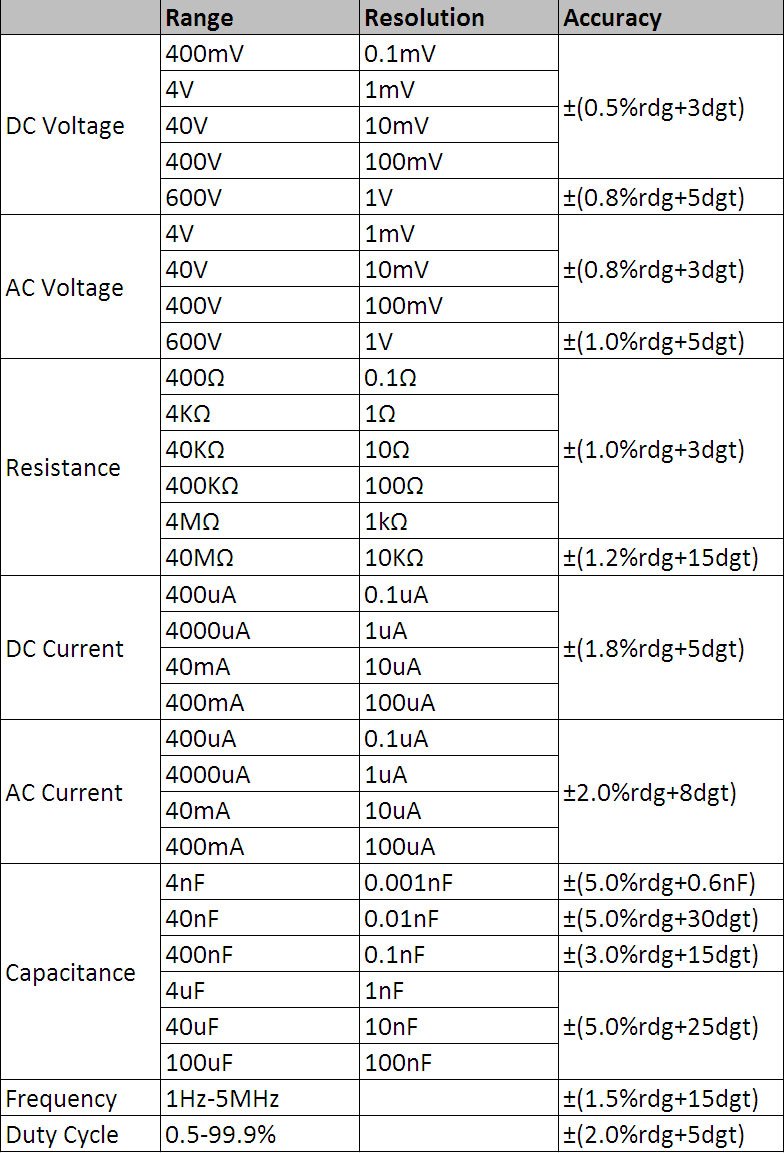
Figure 8.1: Detailed technical specifications table.
సాధారణ లక్షణాలు:
- ప్రదర్శన: 3 3/4 digits LCD, 3999 Counts
- ఓవర్లోడ్ రక్షణ: Full range protection
- తక్కువ వాల్యూమ్tagఇ డిస్ప్లే: అవును
- ఆటోమేటిక్ పవర్ ఆఫ్: అవును
- ఫ్లాష్లైట్ ఫంక్షన్: అవును
- శక్తి మూలం: బ్యాటరీ ఆధారితమైనది
- భద్రతా ప్రమాణాలు: UL 61010-1, IEC 61010-1
కొలత పరిధులు మరియు ఖచ్చితత్వం:
- DC సంtage (DCV): 400mV / 4V / 40V / 400V / 600V (±0.5% + 3 digits)
- AC వాల్యూమ్tage (ACV): 4V / 40V / 400V / 600V (±0.8% + 3 digits)
- DC Current (DCA): 400μA / 4000μA / 40mA / 400mA (±1.8% + 5 digits)
- AC Current (ACA): 400μA / 4000μA / 40mA / 400mA (±2.0% + 8 digits)
- ప్రతిఘటన: 400Ω / 4KΩ / 40KΩ / 400KΩ / 4MΩ / 40MΩ (±1.0% + 3 digits)
- ఫ్రీక్వెన్సీ: 1Hz - 5MHz (±1.5% + 15 digits)
- కెపాసిటెన్స్: 4nF / 40nF / 400nF / 4μF / 40μF / 100μF (±5.0% + 6 digits)
- డ్యూటీ సైకిల్: 0.5% - 99.9% (±2.0% + 5 digits)
9. వారంటీ మరియు మద్దతు
Specific warranty information for the Mastech MS8232B Mini Digital Multimeter is not provided in the product data. For warranty claims or technical support, please contact your retailer or the manufacturer directly. Retain your proof of purchase for any warranty-related inquiries.