
1. పరిచయం
The Mount-It! MI-65156 Quad Monitor Desk Mount is designed to optimize your workspace by securely holding up to four monitors. This full-motion mount features height-adjustable arms, VESA compatibility, and integrated cable management, providing an ergonomic and organized setup. This manual provides detailed instructions for assembly, operation, and maintenance to ensure safe and efficient use of your monitor mount.
2. భద్రతా సమాచారం
- అసెంబ్లీ మరియు ఇన్స్టాలేషన్కు ముందు అన్ని సూచనలను జాగ్రత్తగా చదవండి.
- Ensure your desk surface can support the combined weight of the mount and all monitors.
- మానిటర్కు గరిష్ట బరువు సామర్థ్యం 19.8 పౌండ్లు (9 కిలోలు) మించకూడదు.
- Use only the hardware provided. If any parts are missing or damaged, contact Mount-It! customer service.
- అసెంబ్లీ సమయంలో పిల్లలు మరియు పెంపుడు జంతువులను దూరంగా ఉంచండి.
- అన్ని స్క్రూలను గట్టిగా బిగించండి కానీ ఎక్కువగా బిగించకండి.
3. ప్యాకేజీ విషయాలు
Verify that all components are present and undamaged before proceeding with assembly. The package includes the main pole, clamp base, L-plate, grommet plate, arm segments, VESA heads, and various screws and tools for installation.
4. సెటప్ మరియు అసెంబ్లీ
Follow these steps to assemble your Mount-It! MI-65156 Quad Monitor Desk Mount.
4.1. Base Installation (Clamp లేదా గ్రోమెట్)
The mount offers both C-clamp and grommet mounting options to suit various desk types. The C-clamp 0.79 నుండి 2.36 అంగుళాల వరకు డెస్క్ మందాలకు మద్దతు ఇస్తుంది.

చిత్రం 1: Clamp మరియు గ్రోమెట్ మౌంటు ఎంపికలు
For a visual guide on converting between clamp and grommet mounting, refer to the 'Convert Clamp to Grommet' section in the troubleshooting video below.
Video 1: Full Motion Quad Monitor Desk Mount Assembly (MI-65156)
4.2. Attaching Arm Segments
Once the pole is securely mounted, attach the arm segments. The modular design allows for flexible arrangement. Ensure each arm segment clicks firmly into place.

Figure 2: MI-65156 Assembly Diagram
4.3. Attaching Monitors to VESA Heads
The mount supports VESA patterns of 75x75mm and 100x100mm. Attach the VESA plate to the back of your monitor using the provided screws. Then, slide the monitor with the attached VESA plate onto the end of the arm until it clicks into place. The quick-release mechanism allows for easy attachment and removal.

Figure 3: Quick-Release and Cable Management Features

Figure 4: Screen Size and VESA Compatibility
5. ఆపరేటింగ్ సూచనలు మరియు సర్దుబాట్లు
The MI-65156 mount offers extensive adjustability for optimal viewing సౌకర్యం.
5.1. Gas Spring Arm Tension Adjustment
Adjust the gas spring tension to ensure your monitors stay in the desired position. If a monitor drops, increase tension by turning the adjustment screw counter-clockwise. If it rises, decrease tension by turning it clockwise. Use the provided Allen wrench.

చిత్రం 5: గ్యాస్ స్ప్రింగ్ టెన్షన్ సర్దుబాటు
For a detailed video guide on gas spring arm tension adjustment, refer to the 'Gas Spring Arm Tension Adjustment' section in the troubleshooting video below.
5.2. Tilt, Swivel, Rotation, and Height Adjustment
The arms provide 105 degrees of tilt, 360 degrees of rotation (for portrait or landscape orientation), and 360 degrees of swivel. The height is adjustable by 15.75 inches along the pole.
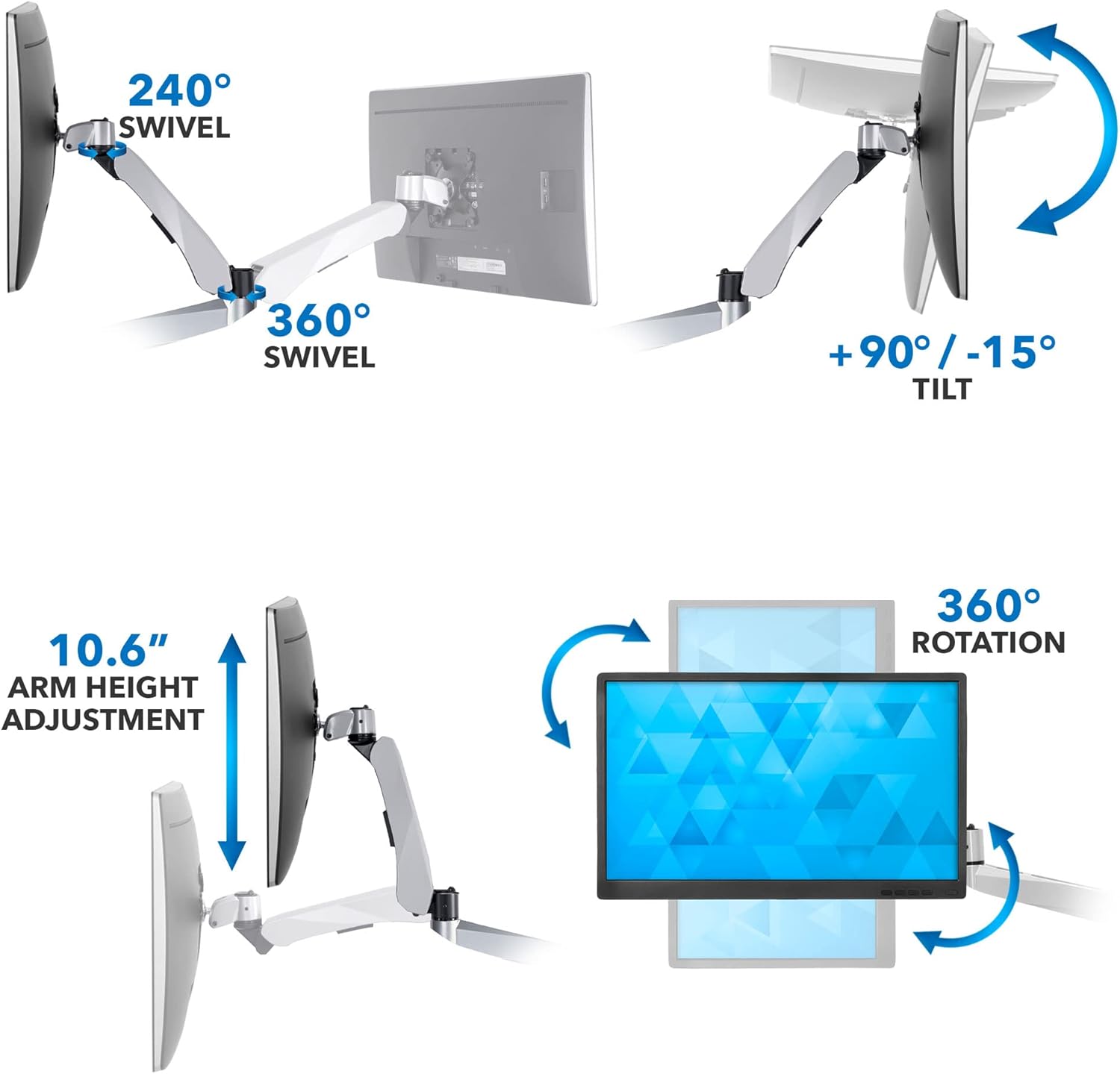
Figure 6: Articulation Features
5.3. కేబుల్ నిర్వహణ
Route your cables through the integrated cable management channels in the arms and use the pole clips to maintain a neat and organized workspace.
6. నిర్వహణ
Regularly check all screws and connections to ensure they remain tight. Clean the mount with a soft, damp వస్త్రం. ముగింపును దెబ్బతీసే రాపిడి క్లీనర్లు లేదా ద్రావకాలను ఉపయోగించకుండా ఉండండి.
7. ట్రబుల్షూటింగ్
If you encounter any issues with your monitor mount, refer to the following video for common troubleshooting steps.
Video 2: Modular Monitor Mount Troubleshooting Video!
- Vesa Plate Rotation: If the VESA plate is difficult to rotate upon assembly, loosen the screw on the VESA plate using the provided Allen key. Place the VESA plate flat on a table, attach the arm, and firmly hold the VESA plate while pulling back on the arm to rotate.
- Clamp to Grommet Conversion: The video demonstrates how to convert the clamp base to a grommet mount by disassembling the clamp and reassembling with the grommet plate and bolt.
- Gas Spring Arm Tension: If your monitor is not holding its position, adjust the gas spring tension as described in Section 5.1.
- Quick Release Issues: Ensure the quick-release mechanism clicks into place during assembly. To remove a component, pull back on the clip and slide the component off.
8. స్పెసిఫికేషన్లు
| ఫీచర్ | స్పెసిఫికేషన్ |
|---|---|
| మోడల్ సంఖ్య | MI-65156 |
| మౌంటు రకం | టేబుల్టాప్ మౌంట్ (Clamp లేదా గ్రోమెట్) |
| మానిటర్ మద్దతు | క్వాడ్ మానిటర్ |
| గరిష్ట స్క్రీన్ పరిమాణం | 27 అంగుళాలు |
| లోడ్ కెపాసిటీ | మానిటర్కు 19.8 పౌండ్లు (9 కిలోలు) |
| VESA అనుకూలత | 75x75 మిమీ, 100x100 మిమీ |
| C-Clamp Table Thickness | 0.79 నుండి 2.36 అంగుళాలు |
| కదలిక రకం | ఆర్టిక్యులేటింగ్, రొటేట్, స్వివెల్, టిల్ట్ |
| టిల్ట్ పరిధి | 105 degrees (+90°/-15°) |
| భ్రమణం | 360 degrees (portrait or landscape) |
| స్వివెల్ | గరిష్టంగా 360 డిగ్రీలు |
| ఎత్తు సర్దుబాటు | 15.75 అంగుళాలు |
| మెటీరియల్ | అల్యూమినియం |

చిత్రం 7: ఉత్పత్తి కొలతలు మరియు సామర్థ్యం
9. వారంటీ మరియు మద్దతు
Mount-It! products are designed for durability and performance. For warranty information or technical support, please contact Mount-It! customer service. Keep your purchase receipt for warranty claims.