
పరిచయం
The BONECO S450 Digital Steam Humidifier is designed to provide optimal humidity levels in your indoor environment. This appliance heats water to its boiling point, producing hygienic, germ-free steam that is released into the air. This manual provides essential information for the safe and efficient operation, maintenance, and troubleshooting of your S450 humidifier. Please read these instructions carefully before first use and keep them for future reference.
భద్రతా సూచనలు
- Always place the humidifier on a firm, level, and water-resistant surface.
- Do not place the humidifier directly on carpet or soft surfaces that may block the air vents.
- Keep the humidifier out of reach of children and pets. The steam produced is hot and can cause burns.
- పవర్ కార్డ్ దెబ్బతినకుండా మరియు అది జారిపోలేని చోట ఉంచబడిందని నిర్ధారించుకోండి.
- హ్యూమిడిఫైయర్ నింపడానికి, శుభ్రపరచడానికి లేదా ఏదైనా నిర్వహణ చేయడానికి ముందు దాన్ని అన్ప్లగ్ చేయండి.
- పరికరాన్ని నీటిలో లేదా ఇతర ద్రవాలలో ముంచవద్దు.
- Only use clean tap water. Do not add essential oils directly into the water tank, use the designated fragrance container.
- Do not block the steam outlet.
- If the appliance is damaged, do not operate it. Contact BONECO customer support.
ఉత్పత్తి ముగిసిందిview
Familiarize yourself with the components of your BONECO S450 humidifier.

మూర్తి 1: ముందు view of the BONECO S450 Digital Steam Humidifier, showing the water level indicator and control panel.

మూర్తి 2: Close-up of the digital display and control panel, featuring buttons for AUTO mode, Sleep mode, timer, and humidity level adjustment.

మూర్తి 3: ఇంటీరియర్ view of the humidifier base, showing the heating element and the placement for anti-mineral pads.
సెటప్
- అన్ప్యాకింగ్: Carefully remove the humidifier from its packaging. Retain packaging for future transport or storage.
- ప్లేస్మెంట్: Place the humidifier on a stable, level, and water-resistant surface, at least 6 inches (15 cm) away from walls and furniture. Ensure the steam outlet is not obstructed.
- వాటర్ ట్యాంక్ నింపడం:
- బేస్ నుండి నీటి ట్యాంక్ తొలగించండి.
- Unscrew the tank cap at the bottom of the water tank.
- Fill the tank with clean tap water. Do not exceed the maximum fill line.
- ట్యాంక్ మూతను సురక్షితంగా తిరిగి బిగించండి.
- నింపిన వాటర్ ట్యాంక్ను తిరిగి హ్యూమిడిఫైయర్ బేస్పై ఉంచండి.
- Anti-Mineral Pads: Insert one of the included anti-mineral pads into the designated area in the base of the humidifier (refer to Figure 3). These pads help reduce mineral buildup.
- పవర్ కనెక్షన్: Plug the power cord into a suitable electrical outlet. The humidifier is now ready for operation.
ఆపరేటింగ్ సూచనలు
The BONECO S450 features a digital LED display and touch controls for easy operation.
- పవర్ ఆన్/ఆఫ్: పవర్ బటన్ నొక్కండి (⏻ ⏻ తెలుగు) హ్యూమిడిఫైయర్ను ఆన్ లేదా ఆఫ్ చేయడానికి కంట్రోల్ ప్యానెల్లో.
- కావలసిన తేమను సెట్ చేయడం:
- అప్ ఉపయోగించండి (▲ ▲ తెలుగు) మరియు క్రిందికి (▼) arrows to adjust the desired humidity level, ranging from 30% to 70% relative humidity (RH).
- The humidifier will automatically maintain the set humidity level.
- ఆటో మోడ్: Press the "AUTO" button to activate automatic operation. In this mode, the humidifier will automatically select the optimal output level to reach and maintain a comfortable humidity.
- ECON Mode: The humidifier may also feature an ECON mode (Economy mode) which optimizes energy consumption while maintaining humidity. Refer to the display for activation.
- డిస్ప్లే డిమ్మర్: The display features an auto dimmer for night use. This function automatically reduces the brightness of the LED display in low light conditions.
- సువాసన కంటైనర్: To use fragrances, add a few drops of essential oil to the designated fragrance container, typically a small tray located on the side or back of the unit. Do not add oils directly into the water tank.
- Empty Tank Indicator: The humidifier will indicate when the water tank is empty and will automatically shut off to prevent damage. Refill the tank as described in the Setup section.
నిర్వహణ
Regular cleaning and maintenance ensure the longevity and efficient operation of your BONECO S450 humidifier. Always unplug the unit before cleaning.
- రోజువారీ నిర్వహణ:
- Empty any remaining water from the base and water tank.
- వాటర్ ట్యాంక్ మరియు బేస్ను మంచినీటితో శుభ్రం చేయండి.
- ఒక మృదువైన, డితో బాహ్య భాగాన్ని తుడవండిamp గుడ్డ.
- Weekly Cleaning / Descaling:
- The S450 features a self-cleaning mode and a decalcification mode. Follow the instructions on the display for activating these modes.
- For manual descaling, remove the water tank and base.
- Pour a descaling solution (e.g., citric acid solution or a commercial descaler recommended for humidifiers) into the heating element area in the base.
- Allow the solution to sit for the recommended time (e.g., 30 minutes to several hours, or overnight for heavy buildup).
- Carefully scrub the heating plate with a soft brush or sponge to remove mineral deposits. Avoid using abrasive materials that could scratch the surface.
- Rinse the base thoroughly with clean water multiple times to remove all descaling solution residue.
- నీటి ట్యాంక్ను తేలికపాటి డిటర్జెంట్తో శుభ్రం చేసి బాగా కడగాలి.
- Anti-Mineral Pads Replacement: The included anti-mineral pads help reduce mineral buildup. Replace these pads regularly, typically every 2-4 weeks depending on water hardness and usage. Dispose of used pads responsibly. The humidifier includes 2 anti-mineral pads.
ట్రబుల్షూటింగ్
| సమస్య | సాధ్యమైన కారణం | పరిష్కారం |
|---|---|---|
| Humidifier not producing steam. |
|
|
| Humidifier leaks water. |
|
|
| ఆపరేషన్ సమయంలో అసాధారణ శబ్దం. |
|
|
| Humidity level not increasing. |
|
|
స్పెసిఫికేషన్లు
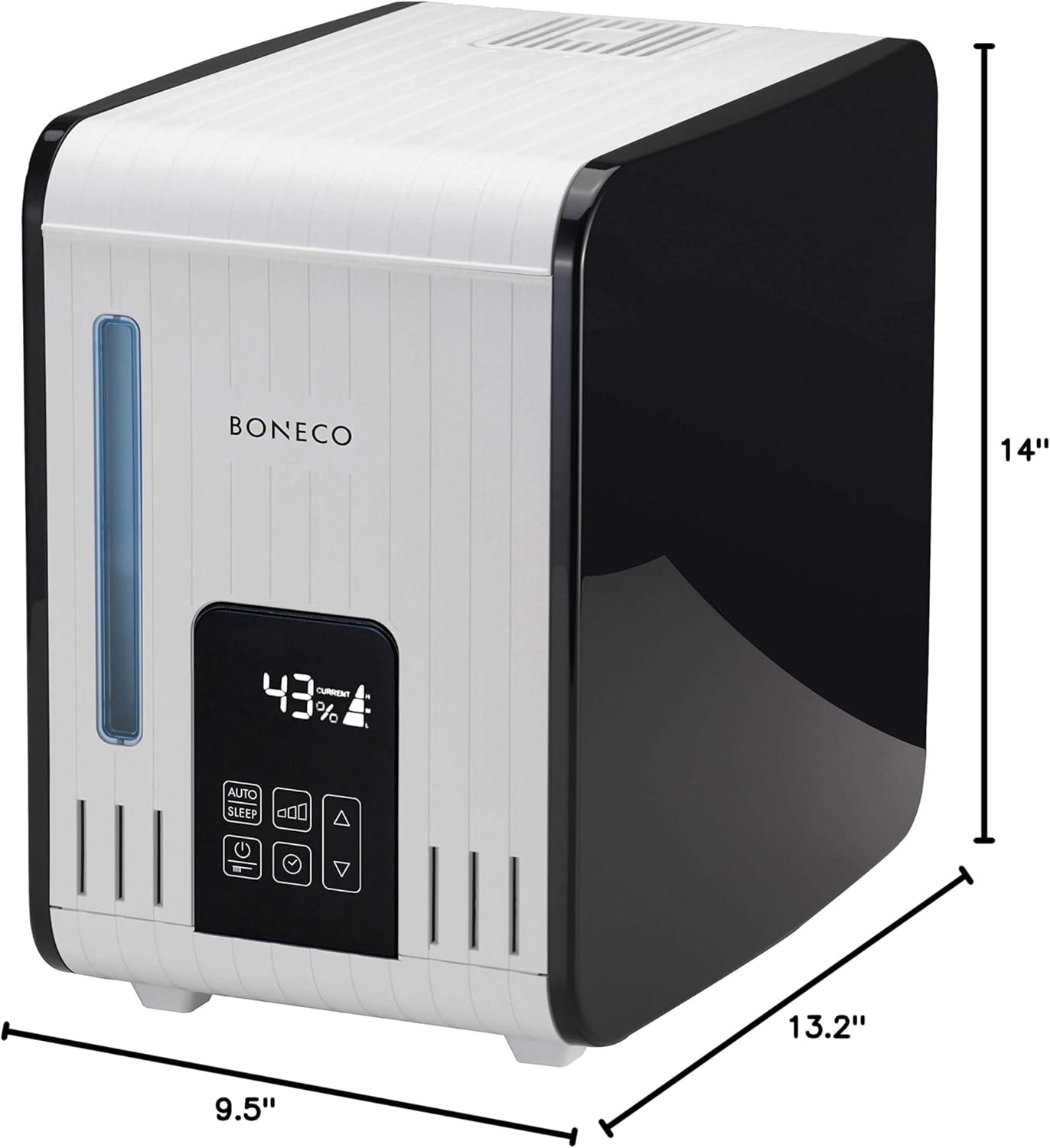
మూర్తి 4: Dimensions of the BONECO S450 Digital Steam Humidifier.
- మోడల్: AOS S450
- ఉత్పత్తి కొలతలు: 9.5"డి x 14"వా x 13.2"హ
- వస్తువు బరువు: 10 పౌండ్లు
- నీటి ట్యాంక్ సామర్థ్యం: 3.5 గ్యాలన్లు (7 లీటర్లు)
- వాల్యూమ్tage: 230 వోల్ట్లు
- వాట్tage: 480 వాట్స్
- ప్రత్యేక లక్షణాలు: Auto Shut Off, Digital LED Display, Programmable Hygrostat, Self-Cleaning Mode, Decalcification Mode, Auto Display Dimmer, Fragrance Container.
- చేర్చబడిన భాగాలు: 2 Anti-Mineral Pads
- తయారీదారు: బోనెకో
వారంటీ మరియు మద్దతు
For warranty information, product registration, or technical support, please visit the official BONECO webసైట్లో లేదా వారి కస్టమర్ సర్వీస్ విభాగాన్ని సంప్రదించండి. కొనుగోలు రుజువుగా మీ కొనుగోలు రసీదును ఉంచండి.