
1. పరిచయం
The Tivoli Audio Albergo is a compact and versatile Bluetooth clock radio designed to provide high-fidelity audio, AM/FM radio reception, and convenient alarm clock functionalities. This manual provides detailed instructions for setting up, operating, and maintaining your Albergo unit.
2. భద్రతా సూచనలు
- యూనిట్ను ఆపరేట్ చేయడానికి ముందు అన్ని సూచనలను చదవండి.
- భవిష్యత్ సూచన కోసం ఈ సూచనలను ఉంచండి.
- ఉత్పత్తి మరియు మాన్యువల్లోని అన్ని హెచ్చరికలను గమనించండి.
- నీరు లేదా తేమ దగ్గర ఈ ఉపకరణాన్ని ఉపయోగించవద్దు.
- పొడి గుడ్డతో మాత్రమే శుభ్రం చేయండి.
- వెంటిలేషన్ ఓపెనింగ్లను బ్లాక్ చేయవద్దు. తయారీదారు సూచనలకు అనుగుణంగా ఇన్స్టాల్ చేయండి.
- రేడియేటర్లు, హీట్ రిజిస్టర్లు, స్టవ్లు లేదా ఇతర ఉపకరణాలు (సహా ampలిఫైయర్లు) వేడిని ఉత్పత్తి చేస్తాయి.
- పవర్ కార్డ్ను నడవకుండా లేదా పించ్ చేయకుండా రక్షించండి.
- తయారీదారు పేర్కొన్న జోడింపులు/యాక్సెసరీలను మాత్రమే ఉపయోగించండి.
- మెరుపు తుఫానుల సమయంలో లేదా ఎక్కువ కాలం ఉపయోగించనప్పుడు ఈ ఉపకరణాన్ని అన్ప్లగ్ చేయండి.
- అన్ని సేవలను అర్హత కలిగిన సేవా సిబ్బందికి సూచించండి.
3. ప్యాకేజీ విషయాలు
మీ ప్యాకేజీ కింది అంశాలను కలిగి ఉందని ధృవీకరించండి:
- Tivoli Audio Albergo Bluetooth Clock Radio Unit
- పవర్ అడాప్టర్
- రిమోట్ కంట్రోల్
- FM యాంటెన్నా
4. ఉత్పత్తి ముగిసిందిview
ముందు ప్యానెల్ నియంత్రణలు మరియు ప్రదర్శన
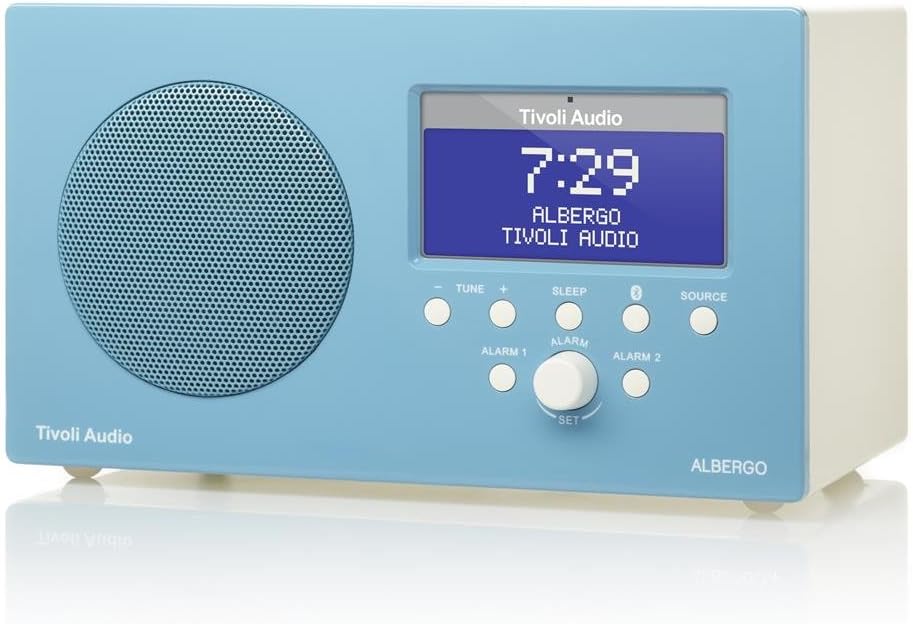
మూర్తి 4.1: ముందు view of the Albergo unit. The front panel features a speaker grille, a digital display, and control buttons for tuning, sleep, Bluetooth, source selection, and alarm settings.
- ప్రదర్శన: Shows time, station, source, and menu information.
- Tune - / Tune +: Adjusts radio frequency or navigates menu options.
- నిద్ర: Activates the sleep timer.
- బ్లూటూత్ బటన్: బ్లూటూత్ జత చేసే మోడ్ను ప్రారంభిస్తుంది.
- మూలం: Cycles through available audio sources (FM, AM, Bluetooth, Auxiliary).
- అలారం 1 / అలారం 2: Activates or sets Alarm 1 or Alarm 2.
- Set Knob: Rotates to adjust values and presses to confirm selections.
వైపు View and Rear Connections

మూర్తి 4.2: కోణీయ view of the Albergo unit. The rear panel typically includes connections for power, external antenna, and auxiliary input.
The rear panel of the Albergo unit contains the following connections:
- DC ఇన్పుట్: చేర్చబడిన పవర్ అడాప్టర్ను కనెక్ట్ చేయడానికి.
- FM యాంటెన్నా ఇన్పుట్: For connecting the external FM antenna.
- సహాయక ఇన్పుట్: For connecting external audio devices via a 3.5mm cable (not included).
- హెడ్ఫోన్ అవుట్పుట్: ప్రైవేట్ వినడం కోసం.
5. సెటప్
5.1 పవర్ కనెక్షన్
- Insert the small end of the power adapter into the DC Input jack on the rear of the Albergo unit.
- పవర్ అడాప్టర్ యొక్క మరొక చివరను గోడ అవుట్లెట్లోకి ప్లగ్ చేయండి.
- యూనిట్ పవర్ ఆన్ అవుతుంది లేదా స్టాండ్బై మోడ్లోకి ప్రవేశిస్తుంది.
5.2 యాంటెన్నా కనెక్షన్
- For FM reception, connect the included external FM antenna to the FM Antenna Input on the rear of the unit.
- సరైన రిసెప్షన్ కోసం యాంటెన్నాను పూర్తిగా విస్తరించండి.
- For AM reception, the Albergo has a built-in internal AM antenna. If reception is poor, try repositioning the unit.
6. ఆపరేటింగ్ సూచనలు
6.1 పవర్ ఆన్/ఆఫ్
- నొక్కండి శక్తి button (usually integrated with the Set knob or a dedicated button on the remote) to turn the unit on or off.
- When powered off, the clock display will remain active.
6.2 రేడియో ఆపరేషన్ (AM/FM)
- నొక్కండి మూలం డిస్ప్లేలో "FM" లేదా "AM" కనిపించే వరకు బటన్ను నొక్కి ఉంచండి.
- ఉపయోగించండి ట్యూన్ - or ట్యూన్ + ఫ్రీక్వెన్సీని మాన్యువల్గా సర్దుబాటు చేయడానికి బటన్లు.
- తదుపరి అందుబాటులో ఉన్న స్టేషన్ కోసం ఆటో-స్కాన్ చేయడానికి, నొక్కి పట్టుకోండి ట్యూన్ - or ట్యూన్ +.
- The Albergo supports FM RDS (Radio Data System) where available, displaying station information.
6.3 బ్లూటూత్ ఆపరేషన్
- నొక్కండి మూలం button until "Bluetooth" appears on the display.
- The unit will enter pairing mode, indicated by a flashing Bluetooth icon on the display.
- మీ బ్లూటూత్-ఎనేబుల్డ్ పరికరంలో (ఉదా. స్మార్ట్ఫోన్, టాబ్లెట్), బ్లూటూత్ను ఎనేబుల్ చేసి, అందుబాటులో ఉన్న పరికరాల కోసం శోధించండి.
- Select "Tivoli Albergo" from the list of devices.
- Once paired, the Bluetooth icon on the Albergo display will stop flashing and remain solid. You can now stream audio wirelessly.
6.4 గడియారం మరియు అలారం సెట్టింగ్లు
Many clock and alarm settings are best accessed and adjusted using the included remote control.
- సమయాన్ని సెట్ చేయడం:
- స్టాండ్బై మోడ్లో, నొక్కి పట్టుకోండి సెట్ నాబ్ లేదా ది మెనూ రిమోట్లోని బటన్.
- Navigate to "Time Set" using the ట్యూన్ +/- buttons or remote arrows.
- నొక్కండి సెట్ or నమోదు చేయండి on the remote to confirm.
- ఉపయోగించి గంటలు మరియు నిమిషాలను సర్దుబాటు చేయండి ట్యూన్ +/- or remote arrows, confirming each with సెట్ or నమోదు చేయండి.
- Setting Alarms (Alarm 1 / Alarm 2):
- నొక్కండి అలారం 1 or అలారం 2 button on the front panel or remote.
- Follow the on-screen prompts to set the alarm time, source (buzzer, FM, AM), and volume.
- Confirm each setting using the సెట్ knob or remote's నమోదు చేయండి బటన్.
- తాత్కాలికంగా ఆపివేయి ఫంక్షన్: అలారం మోగినప్పుడు, నొక్కండి తాత్కాలికంగా ఆపివేయండి బటన్ (తరచుగా నిద్రించు button or a dedicated button on the remote) to temporarily silence the alarm for a set period.
- స్లీప్ టైమర్: నొక్కండి నిద్రించు button repeatedly to cycle through available sleep timer durations (e.g., 15, 30, 45, 60 minutes, Off). The unit will automatically turn off after the selected time.
6.5 రిమోట్ కంట్రోల్ వినియోగం
The included full-function remote control provides access to all features and settings, including those not directly available on the front panel. Ensure the remote has working batteries and is pointed towards the front of the Albergo unit during use.
7. నిర్వహణ
- శుభ్రపరచడం: యూనిట్ శుభ్రం చేయడానికి మృదువైన, పొడి వస్త్రాన్ని ఉపయోగించండి. రాపిడి క్లీనర్లు, మైనపులు లేదా ద్రావకాలను ఉపయోగించవద్దు.
- ప్లేస్మెంట్: యూనిట్ను ప్రత్యక్ష సూర్యకాంతిలో, ఉష్ణ వనరుల దగ్గర లేదా అధిక తేమ లేదా దుమ్ము ఉన్న ప్రదేశాలలో ఉంచకుండా ఉండండి.
- యాంటెన్నా: Handle the FM antenna carefully to prevent damage.
8. ట్రబుల్షూటింగ్
| సమస్య | సాధ్యమైన కారణం | పరిష్కారం |
|---|---|---|
| శక్తి లేదు | పవర్ అడాప్టర్ కనెక్ట్ కాలేదు లేదా అవుట్లెట్ తప్పుగా ఉంది. | పవర్ అడాప్టర్ యూనిట్ మరియు వర్కింగ్ వాల్ అవుట్లెట్కి సురక్షితంగా కనెక్ట్ చేయబడిందని నిర్ధారించుకోండి. |
| పేలవమైన రేడియో రిసెప్షన్ | Antenna not properly connected or positioned; weak signal. | Extend the FM antenna fully. Reposition the unit for better AM reception. Try a different location. |
| బ్లూటూత్ పరికరం జత కావడం లేదు | Albergo not in pairing mode; device too far; previously paired device connected. | Ensure Albergo is in Bluetooth source mode and flashing. Move device closer. Disconnect from other Bluetooth devices. |
| Clock displays incorrect time | సమయం సరిగ్గా సెట్ కాలేదు; విద్యుత్ అంతరాయం. | Refer to Section 6.4 to reset the time. Unplug and replug the unit to reset if necessary. |
| అలారం వినిపించదు | Alarm not activated; volume too low; incorrect alarm source. | Verify Alarm 1 or Alarm 2 is enabled. Check alarm volume. Ensure correct alarm source (buzzer/radio) is selected. |
| రిమోట్ కంట్రోల్ పనిచేయడం లేదు | Dead batteries; obstruction; not pointed correctly. | Replace remote control batteries. Ensure no obstructions between remote and unit. Point remote directly at the unit. |
9. స్పెసిఫికేషన్లు
- బ్రాండ్: టివోలి ఆడియో
- మోడల్ సంఖ్య: ALBERGO
- కనెక్టివిటీ టెక్నాలజీ: బ్లూటూత్
- ట్యూనర్ టెక్నాలజీ: AM, FM (with RDS where available)
- ప్రత్యేక లక్షణాలు: Digital Clock, Dual Alarms, Sleep Timer, Snooze
- శక్తి మూలం: ఎసి పవర్ అడాప్టర్
- ప్రదర్శన రకం: డిజిటల్ ఎల్సిడి
- చేర్చబడిన భాగాలు: రిమోట్ కంట్రోల్
- వస్తువు బరువు: సుమారు 2.3 పౌండ్లు (1.04 కిలోలు)
- UPC: 815097015581
10. వారంటీ మరియు మద్దతు
For warranty information and technical support, please refer to the documentation provided with your purchase or visit the official Tivoli Audio webవారంటీ క్లెయిమ్ల కోసం మీ కొనుగోలు రుజువును ఉంచండి.