
InFocus IN126x
InFocus Projector User Manual
Model: IN126x (F321717)
పరిచయం
This manual provides comprehensive instructions for the setup, operation, and maintenance of your InFocus IN126x WXGA Network Projector. Designed for both business presentations and home cinema, this projector delivers 4200 lumens and excellent image quality with high contrast and BrilliantColor technology. Its compact and lightweight design ensures portability while maintaining powerful performance.

Figure 1: InFocus IN126x Projector Front View
This image displays the InFocus IN126x projector from a front-right angle, highlighting its main lens and the sleek black casing. The top panel features control buttons and the InFocus logo.
ముఖ్యమైన భద్రతా సమాచారం
Please read all safety instructions carefully before operating the projector. Failure to follow these instructions may result in fire, electric shock, or other injuries.
- శక్తి మూలం: ప్రొజెక్టర్తో సరఫరా చేయబడిన పవర్ అడాప్టర్ను మాత్రమే ఉపయోగించండి. పవర్ అవుట్లెట్ వాల్యూమ్కు సరిపోలుతుందని నిర్ధారించుకోండి.tagఇ అవసరాలు.
- వెంటిలేషన్: Do not block ventilation openings. Adequate airflow is essential to prevent overheating.
- వేడి: ప్రొజెక్టర్ ఎల్amp and surrounding areas can become very hot during operation. Avoid touching these areas.
- Lamp హెచ్చరిక: ది ఎల్amp contains mercury. Dispose of lamps according to local regulations. Do not open the lamp compartment until the projector has cooled down.
- లిక్విడ్ ఎక్స్పోజర్: ప్రొజెక్టర్ను వర్షం, తేమ లేదా ఏదైనా ద్రవాలకు గురిచేయవద్దు.
- సర్వీసింగ్: ఈ ఉత్పత్తిని మీరే సేవ చేయడానికి ప్రయత్నించవద్దు. అర్హత కలిగిన సేవా సిబ్బందికి అన్ని సర్వీసులను చూడండి.

Figure 2: Projector Bottom Panel with Warning Labels
This image shows the underside of the InFocus IN126x projector, displaying various regulatory and safety labels. Notable warnings include information about mercury in the lamp and instructions for lamp replacement, emphasizing the need to allow the unit to cool down before servicing.
సెటప్ గైడ్
1. అన్ప్యాకింగ్ మరియు ప్లేస్మెంట్
Carefully remove the projector and all accessories from the packaging. Place the projector on a stable, flat surface or mount it securely. Ensure there is adequate space around the projector for proper ventilation.

Figure 3: Projector Dimensions
This image illustrates the physical dimensions of the InFocus IN126x projector. The measurements are approximately 29.2 cm (length), 22.1 cm (width), and 9.8 cm (height), providing a clear understanding of its compact size for placement considerations.
2. కనెక్ట్ పవర్
Connect the power cord to the projector's power inlet and then plug the other end into a grounded electrical outlet.
3. ఇన్పుట్ సోర్స్లను కనెక్ట్ చేయడం
The InFocus IN126x projector supports various input sources. Connect your device (e.g., laptop, Blu-ray player) to the appropriate port on the projector's rear panel.
- HDMI: హై-డెఫినిషన్ డిజిటల్ వీడియో మరియు ఆడియో కోసం.
- VGA (కంప్యూటర్ 1/2): For analog computer video input.
- S-Video/Video: స్టాండర్డ్ డెఫినిషన్ వీడియో కోసం.
- Audio In (Audio 1/2): అనలాగ్ ఆడియో ఇన్పుట్ కోసం.
- USB-A/USB-B: For service or specific data transfer.
- LAN: నెట్వర్క్ కనెక్టివిటీ కోసం.
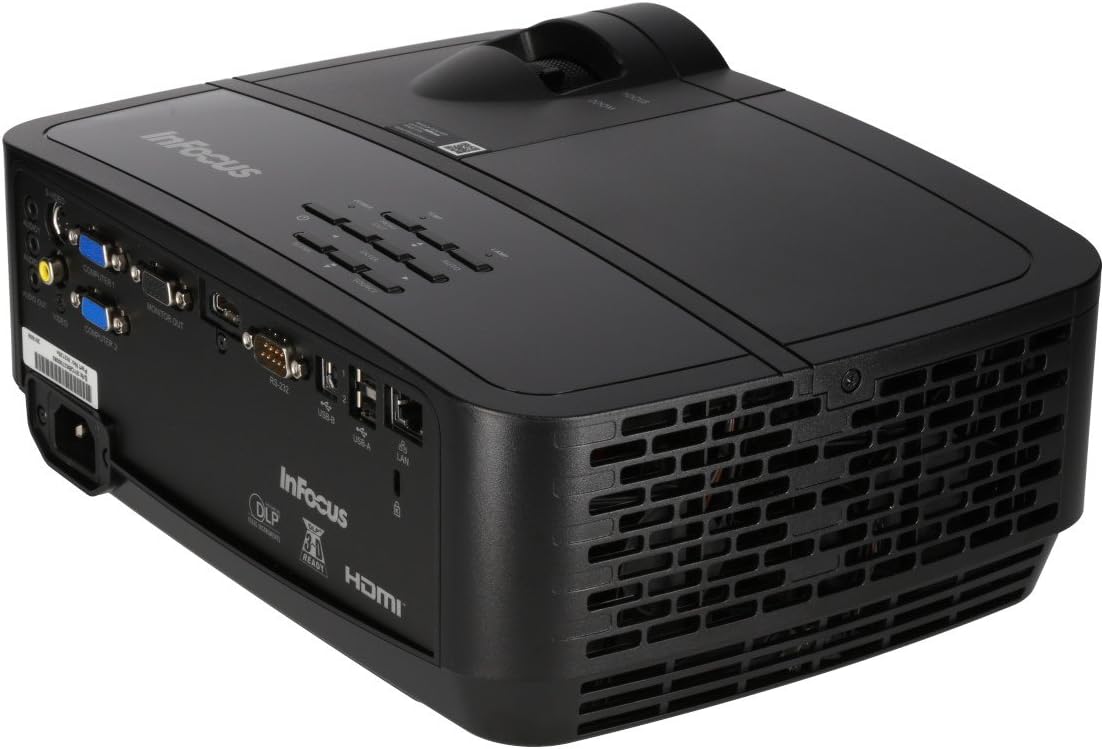
Figure 4: Projector Rear Panel Connectivity
ఈ చిత్రం వివరణాత్మకమైన view of the rear panel of the InFocus IN126x projector, clearly showing all available input and output ports. These include HDMI, VGA (Computer 1 and 2), S-Video, Video, Audio In (Audio 1 and 2), Monitor Out, RS-232, USB-B, USB-A, and LAN ports, facilitating diverse connectivity options.
4. ప్రారంభ పవర్ ఆన్ మరియు సర్దుబాటు
Press the power button on the projector or remote control. The projector will power on and display the input source. Use the focus and zoom rings on the lens to adjust the image clarity and size to your desired projection area.

Figure 5: Projector Top Panel Controls
This image shows the top surface of the InFocus IN126x projector, highlighting the control panel with various buttons for navigation and settings adjustment. The focus and zoom rings on the lens are also visible, used for fine-tuning the projected image.
ఆపరేటింగ్ సూచనలు
ప్రాథమిక నియంత్రణలు
The projector can be operated using the control panel on the top of the unit or the included remote control.
- పవర్ బటన్: ప్రొజెక్టర్ను ఆన్ లేదా ఆఫ్ చేస్తుంది.
- మూల బటన్: Cycles through available input sources (HDMI, VGA, etc.).
- మెనూ బటన్: ఆన్-స్క్రీన్ డిస్ప్లే (OSD) మెనుని తెరుస్తుంది.
- నావిగేషన్ బటన్లు: Used to navigate through menu options and adjust settings.
- ఎంటర్ బటన్: మెనూలో ఎంపికలను నిర్ధారిస్తుంది.
మెను నావిగేషన్ మరియు సెట్టింగ్లు
Press the Menu button to access the OSD. Use the navigation buttons to select categories such as Picture, Display, Setup, and Advanced. Within each category, you can adjust settings like:
- ప్రకాశం & కాంట్రాస్ట్: Optimize image visibility.
- Color & Tint: రంగు ఖచ్చితత్వాన్ని చక్కగా ట్యూన్ చేయండి.
- కారక నిష్పత్తి: Select between 4:3, 16:9, or other ratios to match your content.
- కీస్టోన్ దిద్దుబాటు: Adjust image shape if the projector is not perfectly perpendicular to the screen.
- BrilliantColor Technology: Enhance color vibrancy and detail.
అధునాతన ఫీచర్లు
The IN126x supports a superior viewing experience, including 3D home cinema (3D Glasses sold separately). For enhanced connectivity, the projector can easily connect to your phone or iPad with a LightCast Key (sold separately).
నిర్వహణ
Lamp ప్రత్యామ్నాయం
ప్రొజెక్టర్ ఎల్amp has a lifespan of over 5,000 hours. When the lamp reaches the end of its life, a warning message may appear, or the lamp indicator light may illuminate. Always allow the projector to cool down completely (at least 60 minutes) before attempting to replace the lamp. Refer to the safety information on the bottom of the projector for specific warnings regarding mercury content and replacement procedures.
క్లీనింగ్
- లెన్స్: ఆప్టికల్ లెన్స్ల కోసం ప్రత్యేకంగా రూపొందించిన మృదువైన, మెత్తటి రహిత వస్త్రాన్ని ఉపయోగించండి. రాపిడి క్లీనర్లను ఉపయోగించవద్దు.
- ప్రొజెక్టర్ సిasing: మెత్తగా తుడవండి, డిamp గుడ్డ. కఠినమైన రసాయనాలను నివారించండి.
- ఎయిర్ వెంట్స్: Regularly check and clean the air vents to ensure proper airflow and prevent overheating. Use a soft brush or compressed air to remove dust.

Figure 6: Projector Side Ventilation
This image displays the side of the InFocus IN126x projector, prominently featuring the ventilation grilles. These grilles are crucial for dissipating heat generated during operation, and keeping them clear of obstructions is vital for the projector's longevity and performance.
ట్రబుల్షూటింగ్
| సమస్య | సాధ్యమైన కారణం | పరిష్కారం |
|---|---|---|
| తెరపై చిత్రం లేదు |
|
|
| Image is dim or poor quality |
|
|
| శబ్దం లేదు |
|
|
స్పెసిఫికేషన్లు
| ఫీచర్ | వివరాలు |
|---|---|
| బ్రాండ్ | ఇన్ఫోకస్ |
| మోడల్ సంఖ్య | F321717 (IN126x) |
| ఉత్పత్తి కొలతలు | 18.58 x 20.67 x 7.44 అంగుళాలు |
| వస్తువు బరువు | 5.5 పౌండ్లు |
| డిస్ప్లే రిజల్యూషన్ | 1280 x 800 (WXGA) |
| కనెక్టివిటీ టెక్నాలజీ | HDMI, VGA, S-Video, USB, LAN |
| Lamp జీవితం | 5,000 గంటలకు పైగా |
| ప్రత్యేక ఫీచర్ | పోర్టబుల్ |
| మొదట అందుబాటులో ఉన్న తేదీ | ఆగస్టు 7, 2016 |
వారంటీ సమాచారం
The InFocus IN126x Projector comes with a 2 సంవత్సరాల వారంటీ. InFocus stands behind its products and provides customer service for any issues you may encounter. Please retain your proof of purchase for warranty claims.
కస్టమర్ మద్దతు
For technical assistance, troubleshooting beyond this manual, or warranty inquiries, please contact InFocus customer support. Visit the official InFocus webఫోన్ నంబర్లు మరియు ఆన్లైన్ మద్దతు వనరులతో సహా అత్యంత తాజా సంప్రదింపు సమాచారం కోసం సైట్.
You can also refer to the official InFocus webఅదనపు వనరులు మరియు తరచుగా అడిగే ప్రశ్నల కోసం సైట్: www.infocus.com
Ask a question about this manual
Ask about setup, troubleshooting, compatibility, parts, safety, or missing instructions. Manuals+ will review the question and use this page’s manual context to help answer it.