
PROSCAN PKCR2713_AMZ
PROSCAN ELITE PKCR2713AMZ Under Counter CD Player with Clock Radio and Bluetooth
Model: PKCR2713_AMZ
పరిచయం
The PROSCAN ELITE PKCR2713AMZ is a versatile under-counter audio system designed to provide entertainment and convenience in your kitchen or workspace. Featuring a CD player, FM radio, and Bluetooth connectivity, this unit allows you to enjoy your favorite music from various sources. Its space-saving design and intuitive controls make it a practical addition to any home.
పెట్టెలో ఏముంది
ఇన్స్టాలేషన్ ప్రారంభించే ముందు అన్ని అంశాలు ఉన్నాయని ధృవీకరించండి:
- PROSCAN ELITE PKCR2713AMZ Under Counter CD Player
- Mounting Kit (includes template and hardware)
- పూర్తి ఫంక్షన్ రిమోట్ కంట్రోల్
- ఎసి పవర్ అడాప్టర్
సెటప్ మరియు ఇన్స్టాలేషన్
Follow these steps to properly install your under-counter CD player:
- ఒక స్థానాన్ని ఎంచుకోండి: Select a flat, sturdy surface under a kitchen cabinet. Ensure there is adequate space for the unit and access to a power outlet.
- మౌంటు కోసం సిద్ధం చేయండి: Use the provided mounting template to mark the drilling locations under your cabinet. Note: Some users have reported the template may not be perfectly accurate; verify measurements before drilling.
- డ్రిల్ పైలట్ రంధ్రాలు: Carefully drill pilot holes at the marked locations.
- మౌంటు ప్లేట్ను అటాచ్ చేయండి: Secure the mounting plate to the underside of the cabinet using the provided screws.
- యూనిట్ మౌంట్: Slide the PROSCAN ELITE unit onto the mounting plate until it clicks securely into place.
- పవర్ కనెక్ట్ చేయండి: Plug the AC power adapter into the unit and then into a wall outlet.
- Install Backup Batteries: For clock and preset memory retention during power outages, install 2 x AA batteries (not included) into the battery compartment.
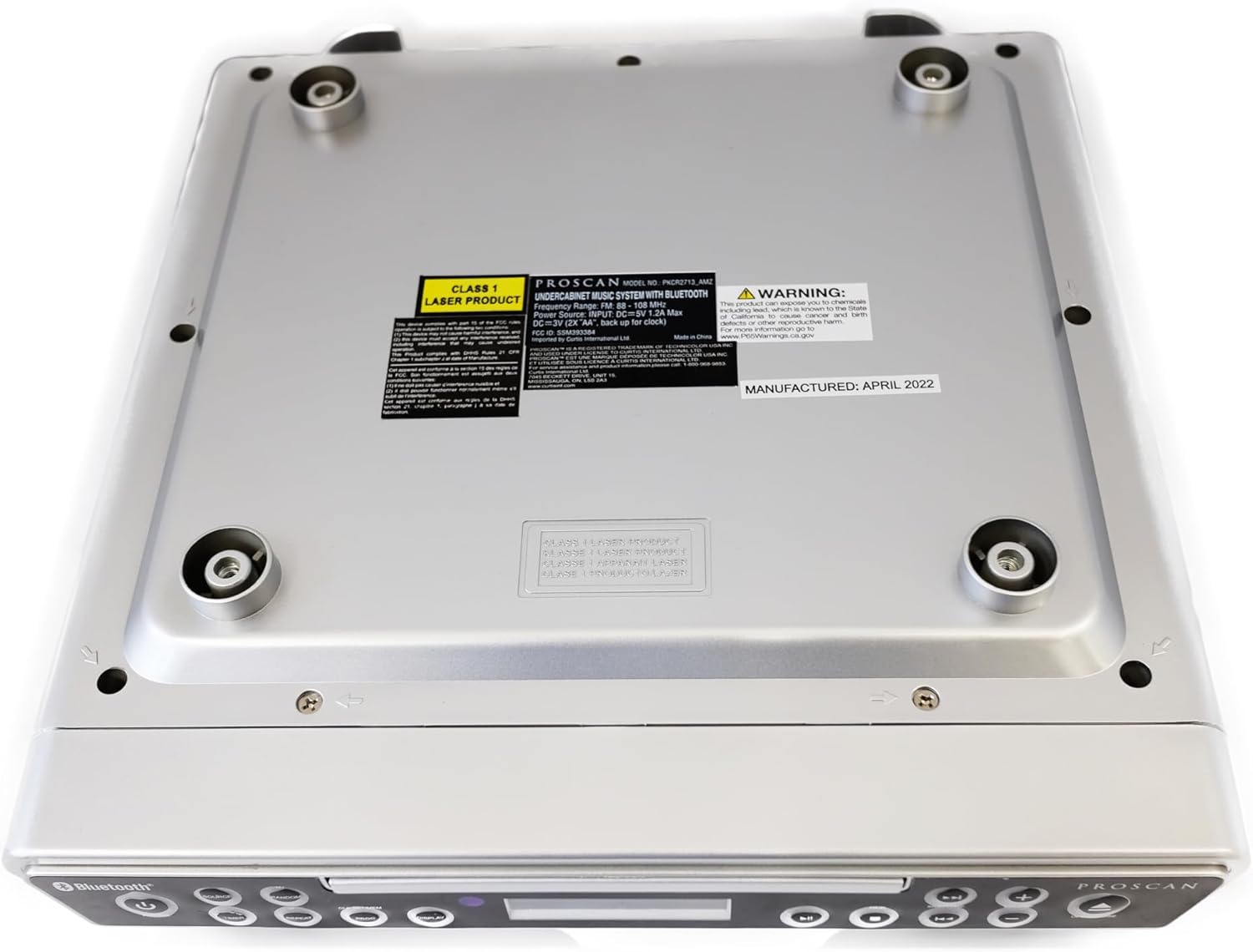
చిత్రం: దిగువన view of the unit, illustrating the mounting points and product information label.
ఆపరేటింగ్ సూచనలు
ముందు ప్యానెల్ నియంత్రణలు

Image: Front panel of the unit, showing the display, CD tray, and various control buttons.
- పవర్ బటన్: యూనిట్ని ఆన్ లేదా ఆఫ్ చేయడానికి నొక్కండి.
- మూలాధార బటన్: Cycle through available modes: CD, FM Radio, Bluetooth.
- వాల్యూమ్ +/- బటన్లు: Adjust the audio output level.
- ఓపెన్/క్లోజ్ బటన్: Eject or retract the CD tray.
- SKIP/TUNE Buttons:
- In CD mode: Skip to the next/previous track.
- In FM mode: Tune to the next/previous radio station.
- ప్లే/పాజ్ బటన్: Play or pause CD playback.
- జత బటన్: బ్లూటూత్ జత చేసే మోడ్ను ప్రారంభించండి.
- డిస్ప్లే బటన్: Adjust display brightness or cycle through display information.
- CLK SET/MEM Button: Set the clock or save/recall radio presets.
- TIMER బటన్: Set sleep timer or alarm functions.
- రిపీట్ బటన్: Repeat current track or entire CD.
- PROG బటన్: Program CD playback order.
- RANDOM Button: Play CD tracks in random order.
CD ప్లేయర్ ఆపరేషన్
- నొక్కండి తెరవండి/మూసివేయండి CD ట్రేని తెరవడానికి బటన్.
- Place a CD onto the tray with the label side facing up.
- నొక్కండి తెరవండి/మూసివేయండి button again to close the tray. The unit will automatically begin playing the CD.
- ఉపయోగించండి ప్లే/పాజ్ చేయండి, SKIP/TUNE, పునరావృతం చేయండి, PROG, మరియు యాదృచ్ఛికం ప్లేబ్యాక్ని నియంత్రించడానికి బటన్లు.
FM రేడియో ఆపరేషన్
- నొక్కండి మూలం డిస్ప్లేలో "FM" కనిపించే వరకు బటన్.
- ఉపయోగించండి SKIP/TUNE buttons to manually tune to a desired frequency or press and hold to auto-scan for the next available station.
- ప్రీసెట్ను సేవ్ చేయడానికి: కావలసిన స్టేషన్కు ట్యూన్ చేసి, ఆపై నొక్కి పట్టుకోండి CLK SET/MEM ప్రీసెట్ నంబర్ ఫ్లాష్ అయ్యే వరకు బటన్. ఉపయోగించండి SKIP/TUNE ప్రీసెట్ నంబర్ను ఎంచుకోవడానికి బటన్లను నొక్కి, ఆపై నొక్కండి CLK SET/MEM మళ్ళీ నిర్ధారించడానికి.
- ప్రీసెట్ను రీకాల్ చేయడానికి: క్లుప్తంగా నొక్కండి CLK SET/MEM బటన్ మరియు ఉపయోగించండి SKIP/TUNE buttons to select the desired preset.
బ్లూటూత్ ఆపరేషన్
- నొక్కండి మూలం డిస్ప్లేలో "BT" లేదా "బ్లూటూత్" కనిపించే వరకు బటన్ను నొక్కి ఉంచండి. యూనిట్ జత చేసే మోడ్లోకి ప్రవేశిస్తుంది, ఇది ఫ్లాషింగ్ బ్లూటూత్ చిహ్నం ద్వారా సూచించబడుతుంది.
- మీ బ్లూటూత్-ప్రారంభించబడిన పరికరంలో (స్మార్ట్ఫోన్, టాబ్లెట్, మొదలైనవి), బ్లూటూత్ను ప్రారంభించి, అందుబాటులో ఉన్న పరికరాల కోసం శోధించండి.
- Select "PROSCAN ELITE" or similar from the list of devices.
- Once paired, the Bluetooth icon on the unit's display will stop flashing, and you can stream audio from your device to the unit.
- To disconnect, either turn off Bluetooth on your device or press and hold the జత యూనిట్ మీద బటన్.

చిత్రం: వైపు view of the unit, highlighting the 'LINE IN' auxiliary input port.
నిర్వహణ
- శుభ్రపరచడం: మెత్తటి, పొడి గుడ్డతో యూనిట్ను తుడవండి. రాపిడి క్లీనర్లు లేదా ద్రావకాలను ఉపయోగించవద్దు.
- CD కేర్: Handle CDs by the edges. Keep them clean and free of scratches to ensure optimal playback.
- బ్యాటరీ భర్తీ: Replace backup batteries (AA) annually or when the clock/presets are not retained during power outages.
ట్రబుల్షూటింగ్
| సమస్య | సాధ్యమైన కారణం | పరిష్కారం |
|---|---|---|
| యూనిట్ పవర్ ఆన్ చేయదు. | No power, AC adapter not connected. | AC అడాప్టర్ యూనిట్ మరియు వర్కింగ్ వాల్ అవుట్లెట్కి సురక్షితంగా ప్లగ్ చేయబడిందని నిర్ధారించుకోండి. |
| స్పీకర్ల నుండి శబ్దం లేదు. | Volume too low, incorrect source selected, muted. | Increase volume. Press SOURCE to select correct mode (CD, FM, BT). Check if unit is muted. |
| CD స్కిప్ అవుతుంది లేదా ప్లే అవ్వదు. | Dirty or scratched CD, CD inserted incorrectly. | Clean the CD with a soft cloth. Ensure CD is inserted label-side up. Try a different CD. |
| FM రేడియో స్పందన సరిగా లేదు. | Weak signal, internal antenna position. | Reposition the unit for better reception. Note: This unit does not have an AM feature. |
| బ్లూటూత్ జత చేయడంలో సమస్యలు. | Device too far, Bluetooth not enabled on device, unit not in pairing mode. | Ensure device is within range. Enable Bluetooth on your device. Press PAIR button on unit. |
స్పెసిఫికేషన్లు
- ఉత్పత్తి కొలతలు: 14 x 4 x 12.5 అంగుళాలు (L x W x H)
- వస్తువు బరువు: 0.035 ఔన్సులు
- బ్రాండ్: ప్రోస్కాన్
- మోడల్ సంఖ్య: PKCR2713_AMZ
- కనెక్టివిటీ టెక్నాలజీ: బ్లూటూత్
- రంగు: వెండి
- స్పీకర్ రకం: స్టీరియో
- పవర్ అవుట్పుట్: 2 x 1.2 W
- శక్తి మూలం: AC Adapter with Battery Backup (2 x AA, not included)
- ఫీచర్లు: Under-cabinet mounting, CD player, FM radio, Bluetooth 3.0, LED display, remote control.
వారంటీ మరియు మద్దతు
For warranty information and technical support, please refer to the documentation included with your purchase or visit the official PROSCAN webవారంటీ క్లెయిమ్ల కోసం మీ కొనుగోలు రుజువును ఉంచండి.
ఆన్లైన్ వనరులు:
- Official PROSCAN Store: PROSCAN ELITE Store
- యూజర్ మాన్యువల్ (PDF): PDF మాన్యువల్ని డౌన్లోడ్ చేయండి
Ask a question about this manual
Ask about setup, troubleshooting, compatibility, parts, safety, or missing instructions. Manuals+ will review the question and use this page’s manual context to help answer it.