
లింసిస్ EA6900
Linksys EA6900 Smart WiFi AC1900 Router Instruction Manual
మోడల్: EA6900 | బ్రాండ్: లింక్సిస్
పరిచయం
The Linksys EA6900 Smart WiFi AC1900 Router is designed to provide high-speed wireless connectivity for your home network. Featuring advanced Wireless-AC technology and simultaneous dual-band operation, it is optimized for demanding tasks such as HD video streaming and online gaming. This manual provides essential information for setting up, operating, and maintaining your router, ensuring optimal performance and a secure network environment.
ప్యాకేజీ విషయాలు
- Linksys స్మార్ట్ Wi-Fi రూటర్ AC1900, EA6900
- త్వరిత ప్రారంభ గైడ్
- 3 యాంటెన్నాలు
- డాక్యుమెంటేషన్తో CD-ROM
- ఈథర్నెట్ కేబుల్
- పవర్ అడాప్టర్
సెటప్
మీ Linksys EA6900 రౌటర్ను సెటప్ చేయడానికి ఈ దశలను అనుసరించండి:
- రౌటర్ను అన్ప్యాక్ చేయండి: ప్యాకేజింగ్ నుండి రౌటర్ మరియు అన్ని ఉపకరణాలను జాగ్రత్తగా తీసివేయండి.
- యాంటెన్నాలను కనెక్ట్ చేయండి: Attach the three external antennas to the designated ports on the back of the router. Ensure they are securely fastened.
- రూటర్ను ఉంచండి: మీ ఇంటిలో రౌటర్ను కేంద్ర స్థానంలో ఉంచండి, అడ్డంకులు మరియు ఇతర ఎలక్ట్రానిక్ పరికరాలకు దూరంగా ఉంచండి, అవి అంతరాయం కలిగిస్తాయి.
- శక్తికి కనెక్ట్ చేయండి: Plug the power adapter into the router's power port and then into an electrical outlet. The power LED on the router should illuminate.
- మోడెమ్కి కనెక్ట్ చేయండి: Connect one end of the provided Ethernet cable to the yellow "Internet" (WAN) port on the router and the other end to your modem's Ethernet port.
- పరికరాలను కనెక్ట్ చేయండి (ఐచ్ఛికం): For wired connections, connect Ethernet cables from your devices (e.g., computer, gaming console) to any of the four blue "Ethernet" (LAN) ports on the router.
- ప్రారంభ కాన్ఫిగరేషన్:
- Connect your computer or mobile device to the router's default Wi-Fi network (SSID and password can be found on the router's label or Quick Start Guide).
- తెరవండి a web browser and navigate to the Linksys Smart WiFi setup page (usually
linksyssmartwifi.comor192.168.1.1). - Follow the on-screen instructions to complete the setup, including creating a new Wi-Fi network name (SSID) and password, and setting up an administrator password for the router.
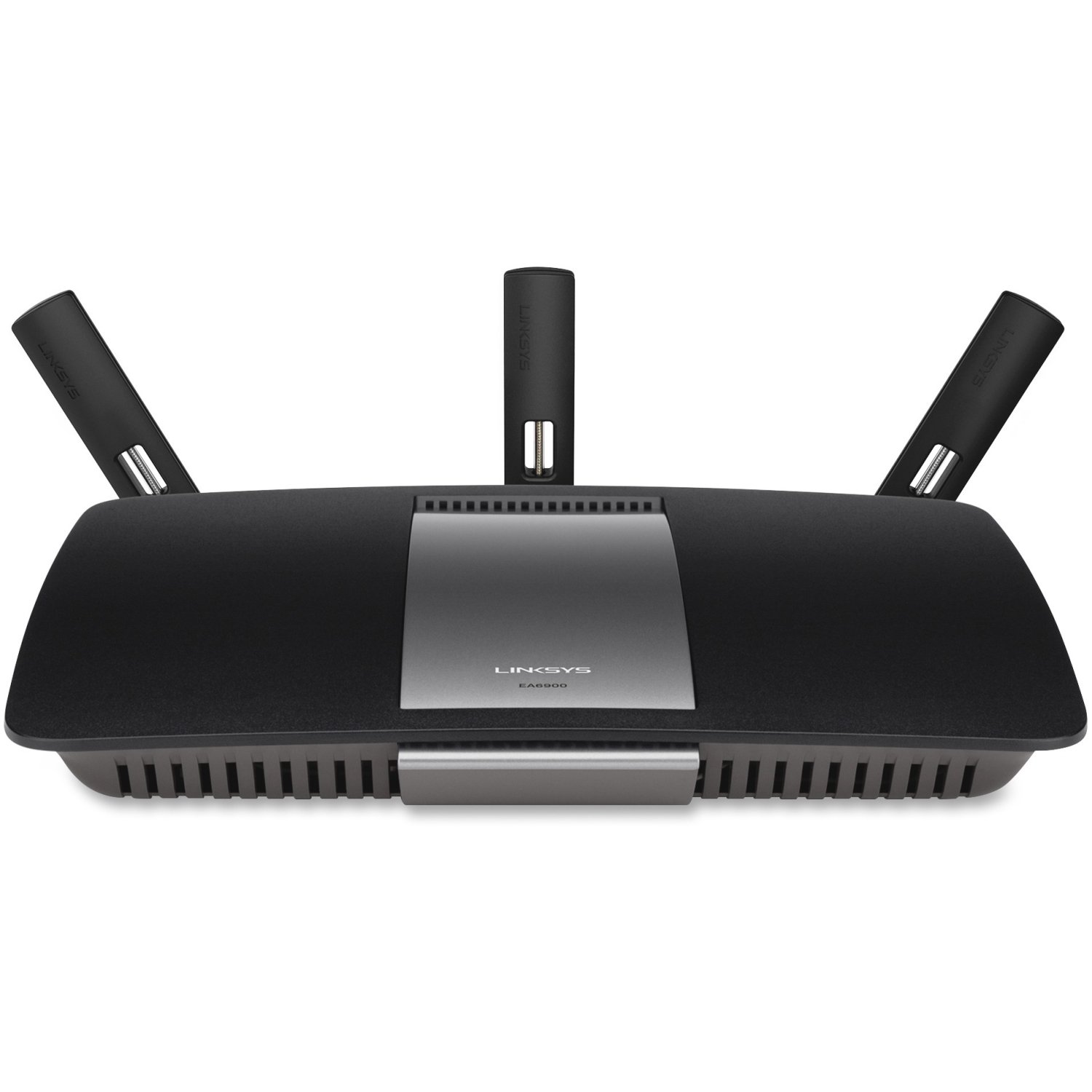
మూర్తి 1: ముందు view of the Linksys EA6900 Router, showcasing its design and external antennas.

Figure 2: Rear panel of the Linksys EA6900 Router, showing the power port, WAN port, four LAN ports, and USB ports.
రూటర్ను ఆపరేట్ చేయడం
The Linksys EA6900 router offers various features to manage your network:
- డ్యూయల్-బ్యాండ్ Wi-Fi: The router operates on both 2.4 GHz and 5 GHz frequencies simultaneously. The 2.4 GHz band provides wider coverage, while the 5 GHz band offers faster speeds for compatible devices.
- Linksys Smart WiFi Software: Access your router settings and manage your network from anywhere using the Linksys Smart WiFi app or web interface. Features include guest access, parental controls, and device prioritization.
- Wi-Fi ప్రొటెక్టెడ్ సెటప్ (WPS): Easily connect WPS-compatible devices to your Wi-Fi network by pressing the WPS button on the router and the device.
- USB పోర్ట్లు: The router includes one USB 2.0 port and one USB 3.0 port. These can be used to connect external storage devices for network-attached storage (NAS) functionality, allowing you to share fileమీ నెట్వర్క్ అంతటా.
- గిగాబిట్ ఈథర్నెట్ పోర్ట్లు: Four Gigabit LAN ports provide high-speed wired connections for devices like desktop computers, smart TVs, and gaming consoles.
నిర్వహణ
To ensure the longevity and optimal performance of your Linksys EA6900 router, consider the following maintenance tips:
- ఫర్మ్వేర్ నవీకరణలు: Regularly check for and install firmware updates through the Linksys Smart WiFi software. Updates often include performance improvements, security patches, and new features.
- భౌతిక స్థానం: రౌటర్ వేడెక్కకుండా ఉండటానికి బాగా వెంటిలేషన్ ఉన్న ప్రదేశంలో ఉంచబడిందని నిర్ధారించుకోండి. మూసివేసిన ప్రదేశాలలో లేదా ఉష్ణ వనరుల దగ్గర ఉంచకుండా ఉండండి.
- కేబుల్ నిర్వహణ: Keep all cables connected to the router tidy and free from kinks or excessive bending to prevent signal degradation.
- కాలానుగుణంగా పునఃప్రారంభించండి: Occasionally restarting your router (power cycling) can help clear its memory and resolve minor performance issues.
ట్రబుల్షూటింగ్
If you encounter issues with your Linksys EA6900 router, try these troubleshooting steps:
- ఇంటర్నెట్ కనెక్షన్ లేదు:
- మోడెమ్ సరిగ్గా పనిచేస్తుందో లేదో తనిఖీ చేయండి.
- Ensure the Ethernet cable from the modem is securely connected to the router's yellow "Internet" (WAN) port.
- Restart both your modem and router by unplugging them from power for 30 seconds and then plugging them back in.
- Slow Wi-Fi Speeds or Frequent Disconnects:
- Move the router to a more central location, away from walls, large metal objects, and other electronics.
- మీ పరికరాలు తగిన Wi-Fi బ్యాండ్కి కనెక్ట్ అయ్యాయని నిర్ధారించుకోండి (వేగవంతమైన వేగానికి 5 GHz, విస్తృత పరిధికి 2.4 GHz).
- Check for firmware updates for your router.
- Reduce the number of active devices or bandwidth-intensive applications if possible.
- రూటర్ సెట్టింగ్లను యాక్సెస్ చేయలేరు:
- మీ పరికరం రౌటర్ యొక్క Wi-Fi నెట్వర్క్కి లేదా ఈథర్నెట్ కేబుల్ ద్వారా కనెక్ట్ చేయబడిందని నిర్ధారించుకోండి.
- Verify the router's IP address (usually
192.168.1.1) లేదా ఉపయోగించండిlinksyssmartwifi.com. - If you forgot your administrator password, you may need to perform a factory reset (see Quick Start Guide for instructions).
- Wi-Fi Protected Setup (WPS) Issues:
- Ensure your device supports WPS.
- Try initiating WPS from both the router and the device within two minutes.
- If WPS fails, connect the device manually using the Wi-Fi network name (SSID) and password.
స్పెసిఫికేషన్లు
| ఫీచర్ | వివరాలు |
|---|---|
| బ్రాండ్ | లింసిస్ |
| మోడల్ పేరు | EA6900 |
| వైర్లెస్ టెక్నాలజీ | Advanced Wireless-AC (up to 4.3x faster than Wireless-N) |
| ఫ్రీక్వెన్సీ బ్యాండ్ క్లాస్ | డ్యూయల్-బ్యాండ్ (2.4 GHz & 5 GHz) |
| Max. Link Rate | 1300 Mbps (AC1300) + N600 Mbps |
| ఈథర్నెట్ పోర్ట్స్ | 1x Gigabit WAN (10/100/1000), 4x Gigabit LAN (10/100/1000) |
| USB పోర్ట్లు | 1x USB 2.0, 1x USB 3.0 |
| యాంటెన్నాలు | 3 Fixed Antennas |
| ప్రత్యేక లక్షణాలు | Linksys Smart WiFi software, Wi-Fi Protected Setup (WPS) |
| ఆపరేటింగ్ ఉష్ణోగ్రత | 32 నుండి 104 °F (0 నుండి 40 °C) |
| ఆపరేటింగ్ తేమ | 10 నుండి 80% నాన్కండెన్సింగ్ |
| నెట్వర్క్ ప్రమాణాలు | ఐఈఈఈ 802.11a/b/g/n/ac, ఐఈఈఈ 802.3/3u |
| అనుకూల OS | Mac OS X (10.5.8 to 10.9), Windows (XP to 8 32/64) |
వారంటీ మరియు మద్దతు
The Linksys EA6900 Smart WiFi AC1900 Router comes with a 1-సంవత్సరం హార్డ్వేర్ పరిమిత వారంటీ. For technical support, product registration, or to access the full documentation, please visit the official Linksys support website. You can also find additional resources and FAQs through the Linksys Smart WiFi software.
Ask a question about this manual
Ask about setup, troubleshooting, compatibility, parts, safety, or missing instructions. Manuals+ will review the question and use this page’s manual context to help answer it.