
1. పరిచయం
The PORTTA N3C21BT is a versatile 2-way Digital SPDIF (Coaxial/Toslink) Audio Converter designed to facilitate audio signal conversion and extension. This device allows users to connect a SPDIF audio signal input via either a Coaxial cable or a Toslink cable. It then passes the signal to both its coaxial and Toslink output ports simultaneously. With its built-in amplification feature, the N3C21BT can also function as an audio signal repeater, effectively doubling the transferring distance for both coaxial and Toslink cables.
2 కీ ఫీచర్లు
- Supports two-way conversion: Coaxial to Toslink or Toslink to Coaxial.
- Audio format support: LPCM2.0, DTS, Dolby-AC3.
- Amplifies SPDIF audio signals to extend transferring distance via coaxial or Toslink cables.
- Compact design for easy installation and integration into existing audio systems.

Image: The PORTTA N3C21BT converter, illustrating its support for various audio formats including LPCM2.0, 5.1, Dolby AC3, and DTS, along with its capability to extend Toslink output distance up to 30 meters (98 feet).
3. ఉత్పత్తి రేఖాచిత్రం
Familiarize yourself with the input and output ports, as well as the mode selection switch on your PORTTA N3C21BT converter.

Image: A detailed diagram of the PORTTA N3C21BT converter, clearly labeling the Optical Toslink Output, Digital Coaxial Output, Optical Toslink Input, Digital Coaxial Input, USB/Power port, and the TOSLINK/COAX bidirectional switch.
పోర్ట్ వివరణలు:
- TOSLINK/COAX Switch: This switch determines the direction of conversion. Slide it to 'TOSLINK' for Toslink input and Coaxial output, or to 'COAX' for Coaxial input and Toslink output.
- USB/Power: Connect the provided USB power cable to this port and a suitable USB power source (e.g., a USB wall adapter, TV USB port) to power the device.
- Optical Toslink Input/Output: For connecting optical fiber cables.
- Digital Coaxial Input/Output: For connecting coaxial digital audio cables.
4. సెటప్ సూచనలు
Follow these steps to connect your PORTTA N3C21BT audio converter to your audio system.

Image: An illustration demonstrating typical connection scenarios for the PORTTA N3C21BT. It shows how to connect source devices like an Xbox or AV receiver to the converter's input, and then connect the converter's output to audio systems such as soundbars or speaker setups using both Toslink and Coaxial cables.
- పవర్ కనెక్షన్: Connect the USB power cable to the 'USB/Power' port on the converter and plug the other end into a 5V DC USB power source. Ensure the power source is stable.
- Select Conversion Direction: Use the 'TOSLINK/COAX' switch to select the desired conversion direction.
- If your source device uses Toslink and your receiving device uses Coaxial, set the switch to 'TOSLINK'.
- If your source device uses Coaxial and your receiving device uses Toslink, set the switch to 'COAX'.
- మూల పరికరాన్ని కనెక్ట్ చేయండి: Connect your audio source device (e.g., TV, DVD player, game console) to the corresponding input port (Toslink or Coaxial) on the converter, based on your switch selection.
- స్వీకరించే పరికరాన్ని కనెక్ట్ చేయండి: Connect your audio receiving device (e.g., amplifier, soundbar, home theater system) to the corresponding output port (Coaxial or Toslink) on the converter. The converter will output the signal to both output types simultaneously.
- పవర్ ఆన్ పరికరాల: Power on all connected audio devices and the converter.
- ఆడియో సెట్టింగ్లు: Ensure your source device's audio output settings are configured to output the correct digital audio format (LPCM2.0, DTS, or Dolby-AC3) that the converter supports.
5. ఆపరేటింగ్ సూచనలు
The PORTTA N3C21BT is designed for straightforward operation. Once properly set up, it functions automatically.
ద్విముఖ మార్పిడి:
The primary function of this converter is its bidirectional capability. The 'TOSLINK/COAX' switch on the side of the unit determines the input type. The converter will then output the audio signal to రెండూ the Toslink and Coaxial output ports, regardless of the input type selected.
- ఇన్పుట్ ఎంపిక: Slide the switch to 'TOSLINK' if your audio source is connected to the Toslink input. Slide it to 'COAX' if your audio source is connected to the Coaxial input.
- అవుట్పుట్: The converter will automatically send the converted audio signal to both the Toslink and Coaxial output ports. You can connect one or both outputs to your receiving audio devices.

Image: The PORTTA N3C21BT converter integrated into a home living room audio setup, demonstrating its role in connecting various audio components. Icons indicate support for Toslink/Coaxial bidirectional conversion, LPCM audio, and 96KHz sampలింగ్ రేట్లు.
6. ట్రబుల్షూటింగ్
If you encounter issues while using the PORTTA N3C21BT, please refer to the following common problems and solutions:
- ఆడియో అవుట్పుట్ లేదు:
- Ensure the converter is properly powered via the USB port.
- Verify that all audio cables (Toslink/Coaxial) are securely connected to both the source, converter, and receiving devices.
- Check the 'TOSLINK/COAX' switch position. It must match the type of input cable you are using.
- Confirm that your source device's audio output settings are correctly configured for digital audio (e.g., PCM, Bitstream) and that the output format is supported by the converter (LPCM2.0, DTS, Dolby-AC3).
- Test with different cables if possible, as faulty cables can prevent audio transmission.
- Ensure the receiving audio device (amplifier, soundbar) is set to the correct input source.
- Intermittent Audio / Signal Drops:
- Check the power supply. An unstable or insufficient power source can cause intermittent operation. Use a reliable 5V USB power adapter.
- Ensure cables are not damaged or excessively bent, especially optical cables.
- Try resetting the converter by unplugging and re-plugging the USB power cable.
- Verify that the audio format from the source is consistently supported.
- Humming or Static Noise:
- This can sometimes be caused by ground loops. Ensure all devices are connected to properly grounded outlets.
- ఇతర ఎలక్ట్రానిక్ పరికరాల నుండి జోక్యం కోసం తనిఖీ చేయండి.
- Ensure cables are of good quality and properly shielded.
7. స్పెసిఫికేషన్లు
Detailed technical specifications for the PORTTA N3C21BT converter.
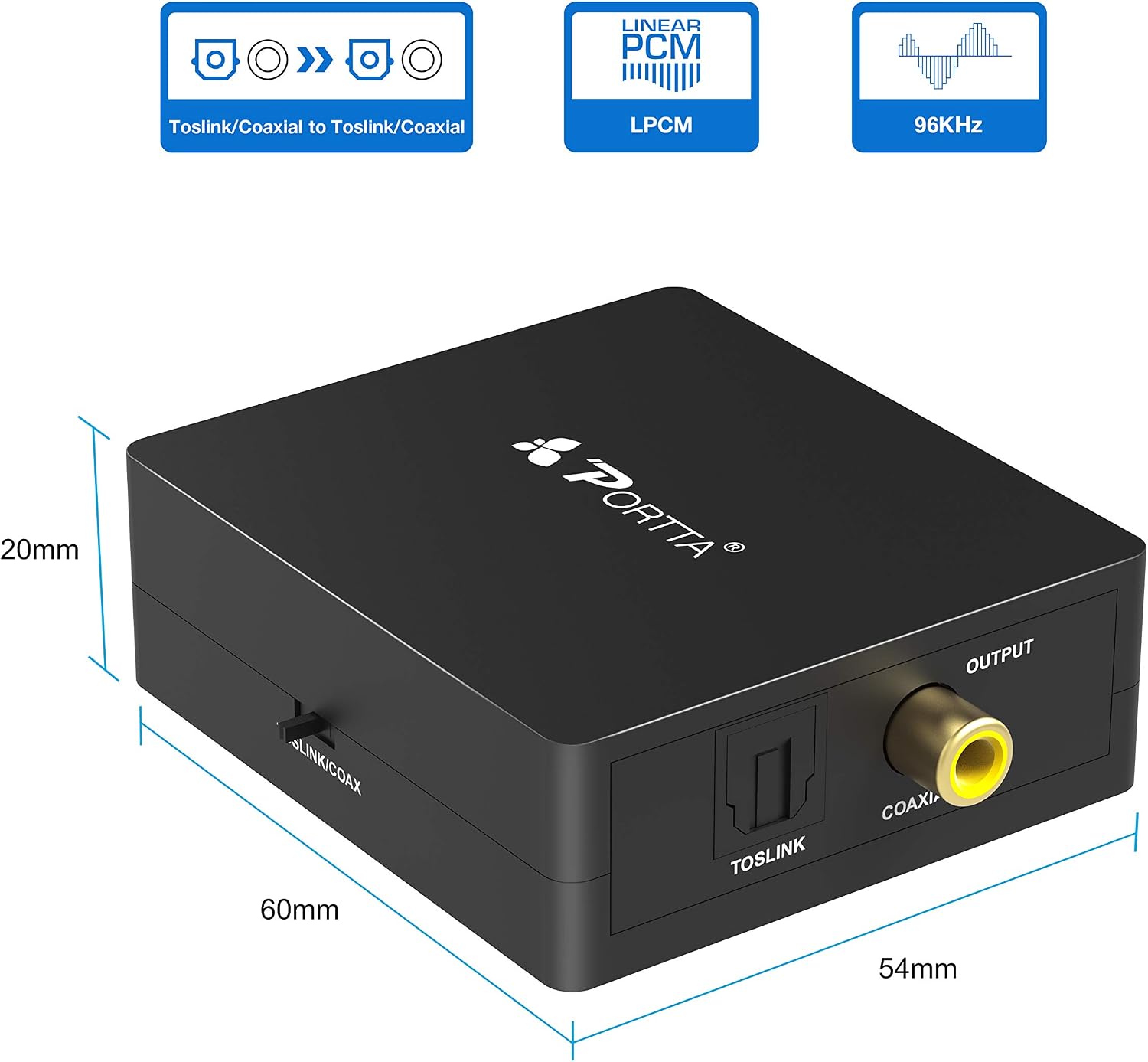
Image: A visual representation of the PORTTA N3C21BT converter with its dimensions clearly marked: 60mm in length, 54mm in width, and 20mm in height.
| ఫీచర్ | వివరణ |
|---|---|
| మోడల్ సంఖ్య | N3C21BT |
| కనెక్టర్ రకం | Coaxial, Optical (Toslink) |
| పోర్టుల సంఖ్య | 2 (Input/Output for each type) |
| ఆడియో ఫార్మాట్ మద్దతు | LPCM2.0, DTS, Dolby-AC3 |
| అంతర్నిర్మిత మీడియా | ఆప్టికల్ స్ప్లిటర్ |
| వస్తువు బరువు | 1.4 ఔన్సులు (సుమారు 40 గ్రాములు) |
| కొలతలు (L x W x H) | 60mm x 54mm x 20mm (approximate, refer to diagram) |
| విద్యుత్ సరఫరా | USB 5V DC (via Micro-USB port) |
| అనుకూల పరికరాలు | DVD Player, Television, Game Consoles, Amplifiers, Soundbars, Speakers (2.0, 5.1) |
8. నిర్వహణ
To ensure the longevity and optimal performance of your PORTTA N3C21BT converter, follow these simple maintenance guidelines:
- శుభ్రపరచడం: Use a soft, dry cloth to clean the exterior of the unit. Do not use liquid cleaners or aerosols, as they may damage the device.
- పర్యావరణం: Keep the converter in a cool, dry place, away from direct sunlight, heat sources, and excessive moisture.
- నిర్వహణ: Avoid dropping or subjecting the unit to strong impacts. Handle cables carefully, especially optical cables, to prevent damage to the connectors or fiber.
- ఉపయోగంలో లేనప్పుడు పవర్ ఆఫ్ చేయండి: If the device will not be used for an extended period, it is advisable to disconnect the power supply.
9. వారంటీ మరియు మద్దతు
PORTTA products are designed for reliability and performance. For specific warranty information, please refer to the documentation provided with your purchase or visit the official PORTTA website. If you encounter any issues that cannot be resolved using the troubleshooting guide, please contact PORTTA customer support for assistance.
వారంటీ క్లెయిమ్ల కోసం దయచేసి మీ కొనుగోలు రుజువును ఉంచుకోండి.