
Mastech MS2002A
MASTECH MS2002A మినీ ఆటోరేంజింగ్ డిజిటల్ Clamp మీటర్ యూజర్ మాన్యువల్
Model: MS2002A
1. పరిచయం
This manual provides essential information for the safe and effective operation of the MASTECH MS2002A Mini Autoranging Digital Clamp మీటర్. దయచేసి ఈ మాన్యువల్ని ఉపయోగించే ముందు పూర్తిగా చదవండి మరియు భవిష్యత్తు సూచన కోసం దీన్ని ఉంచండి.
The MS2002A is a compact and versatile digital clamp AC/DC వాల్యూమ్ను కొలవడానికి రూపొందించిన మీటర్tage, AC current, and resistance. It features a 28mm (1.1 inch) jaw size, backlight, data hold function, and low battery indication.
2. భద్రతా సమాచారం
Always adhere to basic safety precautions when using electrical testing equipment to reduce the risk of fire, electric shock, or personal injury.
- Ensure the meter is in good working condition before each use.
- ఏదైనా ఫంక్షన్ కోసం గరిష్ట ఇన్పుట్ పరిమితులను మించకూడదు.
- వాల్యూమ్తో పని చేస్తున్నప్పుడు జాగ్రత్త వహించండిtages above 60V DC or 30V AC RMS, as they pose a shock hazard.
- Always disconnect power to the circuit under test before making connections or changing functions.
- Do not operate the meter if it appears damaged or if the test leads are damaged.
- Refer to the back of the device for important safety warnings, including instructions to remove test leads before opening the battery compartment.
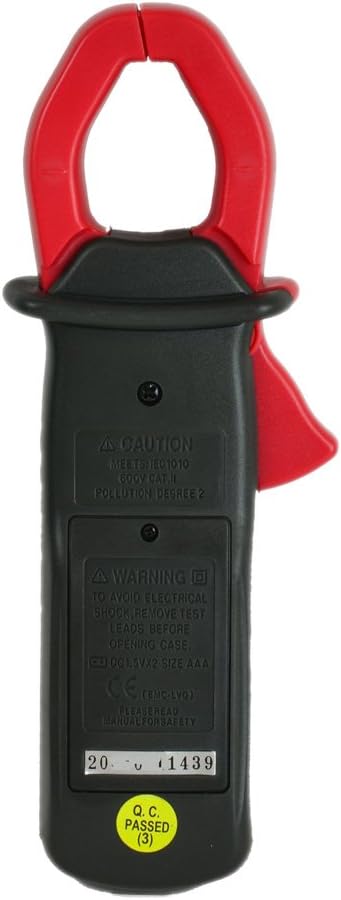
చిత్రం: వెనుక view of the MS2002A clamp meter, highlighting the battery compartment and printed safety warnings regarding electrical shock and battery replacement.
3. ఉత్పత్తి లక్షణాలు
The MASTECH MS2002A is equipped with several features for efficient and accurate measurements:
- Pocket Size Design: కాంపాక్ట్ మరియు తీసుకువెళ్లడానికి సులభం.
- 200A Current and Voltagఇ తనిఖీ: Capable of measuring AC current up to 200A and AC/DC voltage.
- బ్యాక్లైట్: Illuminates the LCD for clear readings in low-light conditions.
- డేటా హోల్డ్: అనుకూలమైన రికార్డింగ్ కోసం ప్రదర్శించబడే పఠనాన్ని స్తంభింపజేస్తుంది.
- 3 1/2 Digits LCD: Provides a maximum reading of 1999.
- 2A Low Current Measurement: Allows for precise measurement of small AC currents.
- తక్కువ బ్యాటరీ సూచిక: బ్యాటరీలను మార్చాల్సిన అవసరం వచ్చినప్పుడు వినియోగదారుని హెచ్చరిస్తుంది.
- దవడ పరిమాణం: 28mm (1.1 inch) for clampకండక్టర్ల చుట్టూ ing.

చిత్రం: కోణీయ view of the MS2002A clamp meter, showcasing its compact design, LCD display, function selector, and the current clamp దవడ.
4. సెటప్
4.1. బ్యాటరీ ఇన్స్టాలేషన్
The MS2002A requires 2 x 1.5V AAA batteries for operation.
- మీటర్ ఆఫ్ చేయబడిందని నిర్ధారించుకోండి.
- మీటర్ వెనుక భాగంలో బ్యాటరీ కంపార్ట్మెంట్ను గుర్తించండి.
- బ్యాటరీ కంపార్ట్మెంట్ కవర్ను తెరవడానికి స్క్రూడ్రైవర్ని ఉపయోగించండి.
- సరైన ధ్రువణతను (+ మరియు -) గమనిస్తూ రెండు AAA బ్యాటరీలను చొప్పించండి.
- బ్యాటరీ కంపార్ట్మెంట్ కవర్ను మార్చండి మరియు దానిని స్క్రూతో భద్రపరచండి.
4.2. ప్రారంభ తనిఖీ
Before first use, inspect the meter for any signs of damage. Ensure the test leads (if included) are intact and free from cracks or frayed insulation.
5. ఆపరేటింగ్ సూచనలు
Familiarize yourself with the meter's controls and display before taking measurements.

చిత్రం: ముందు భాగం view of the MS2002A clamp meter, clearly showing the LCD screen, rotary function switch, and buttons for AC/DC, Range, and Light.
5.1. ఫంక్షన్ ఎంపిక
Rotate the central dial to select the desired measurement function:
- ఆఫ్: Turns the meter off.
- A~: AC Current measurement.
- వి ~: AC వాల్యూమ్tagఇ కొలత.
- V-: DC సంtagఇ కొలత.
- Ω: నిరోధక కొలత.
- : కొనసాగింపు పరీక్ష.
5.2. బటన్ విధులు
- పట్టుకోండి: డిస్ప్లేలో ప్రస్తుత రీడింగ్ను స్తంభింపజేయడానికి నొక్కండి. విడుదల చేయడానికి మళ్ళీ నొక్కండి.
- AC నుండి DC: Toggles between AC and DC modes for voltage measurement if the dial position supports both.
- RANGE: Toggles between auto-ranging and manual ranging. In manual ranging, press to cycle through available ranges.
- కాంతి: Activates the display backlight for improved visibility.
5.3. కొలతలు తీసుకోవడం
5.3.1. AC Current Measurement (A~)
- ఫంక్షన్ డయల్ని సెట్ చేయండి A~.
- cl తెరవండిamp ట్రిగ్గర్ నొక్కడం ద్వారా దవడ.
- cl లోపల సర్క్యూట్ యొక్క ఒక కండక్టర్ను మాత్రమే మూసివేయండి.amp దవడ పూర్తిగా మూసివేయబడిందని నిర్ధారించుకోండి.
- డిస్ప్లేలో AC కరెంట్ విలువను చదవండి.
5.3.2. AC/DC వాల్యూమ్tage కొలత (V~ / V-)
- ఫంక్షన్ డయల్ని సెట్ చేయండి V~ AC వాల్యూమ్ కోసంtagఇ లేదా V- DC వాల్యూమ్ కోసంtage.
- Insert the red test lead into the VΩ input jack and the black test lead into the COM input jack.
- Connect the test leads in parallel to the circuit or component you wish to measure.
- సంపుటాన్ని చదవండిtagడిస్ప్లేలో ఇ విలువ.
5.3.3. Resistance Measurement (Ω)
- ఫంక్షన్ డయల్ని సెట్ చేయండి Ω.
- Insert the red test lead into the VΩ input jack and the black test lead into the COM input jack.
- పరీక్ష లీడ్లను కనెక్ట్ చేసే ముందు సర్క్యూట్ లేదా భాగం డీ-ఎనర్జైజ్ చేయబడిందని నిర్ధారించుకోండి.
- Connect the test leads across the component to measure its resistance.
- ప్రదర్శనలో నిరోధక విలువను చదవండి.
5.3.4. Continuity Test ()
- Set the function dial to the continuity symbol ().
- Insert the red test lead into the VΩ input jack and the black test lead into the COM input jack.
- సర్క్యూట్ లేదా భాగం డి-ఎనర్జైజ్ చేయబడిందని నిర్ధారించుకోండి.
- సర్క్యూట్ లేదా కాంపోనెంట్ అంతటా టెస్ట్ లీడ్లను కనెక్ట్ చేయండి.
- If the resistance is below approximately 50Ω, the meter will emit an audible beep, indicating continuity.
6. నిర్వహణ
6.1. శుభ్రపరచడం
మీటర్ యొక్క సి తుడవండిasinప్రకటనతో గ్రాamp cloth and mild detergent. Do not use abrasives or solvents. Ensure the meter is dry before storage or use.
6.2. బ్యాటరీ భర్తీ
డిస్ప్లేలో తక్కువ బ్యాటరీ సూచిక కనిపించినప్పుడు, విభాగం 4.1లో వివరించిన విధంగా బ్యాటరీలను భర్తీ చేయండి. బ్యాటరీని సత్వరంగా మార్చడం వలన ఖచ్చితమైన రీడింగ్లు మరియు సరైన మీటర్ పనితీరు నిర్ధారిస్తుంది.
6.3. నిల్వ
మీటర్ను ఎక్కువ కాలం ఉపయోగించకపోతే, లీకేజీ మరియు నష్టాన్ని నివారించడానికి బ్యాటరీలను తీసివేయండి. మీటర్ను చల్లని, పొడి ప్రదేశంలో, ప్రత్యక్ష సూర్యకాంతి మరియు తీవ్రమైన ఉష్ణోగ్రతలకు దూరంగా నిల్వ చేయండి.
7. ట్రబుల్షూటింగ్
| సమస్య | సాధ్యమైన కారణం | పరిష్కారం |
|---|---|---|
| మీటర్ ఆన్ అవ్వదు. | డెడ్ లేదా తప్పుగా ఇన్స్టాల్ చేయబడిన బ్యాటరీలు. | బ్యాటరీ ధ్రువణతను తనిఖీ చేయండి లేదా బ్యాటరీలను మార్చండి. |
| రీడింగ్ లేదా "OL" ప్రదర్శించబడలేదు. | Overload, open circuit, or incorrect function selected. | Ensure circuit is complete, select correct function, or check if measurement exceeds meter's range. |
| సరికాని రీడింగ్లు. | Low battery, damaged test leads, or external interference. | Replace batteries, inspect/replace test leads, or move away from strong electromagnetic fields. |
| బ్యాక్లైట్ పనిచేయడం లేదు. | Low battery or backlight button issue. | బ్యాటరీలను మార్చండి. సమస్య కొనసాగితే, మద్దతును సంప్రదించండి. |
8. స్పెసిఫికేషన్లు
The following table outlines the key specifications for the MASTECH MS2002A Digital Clamp మీటర్:
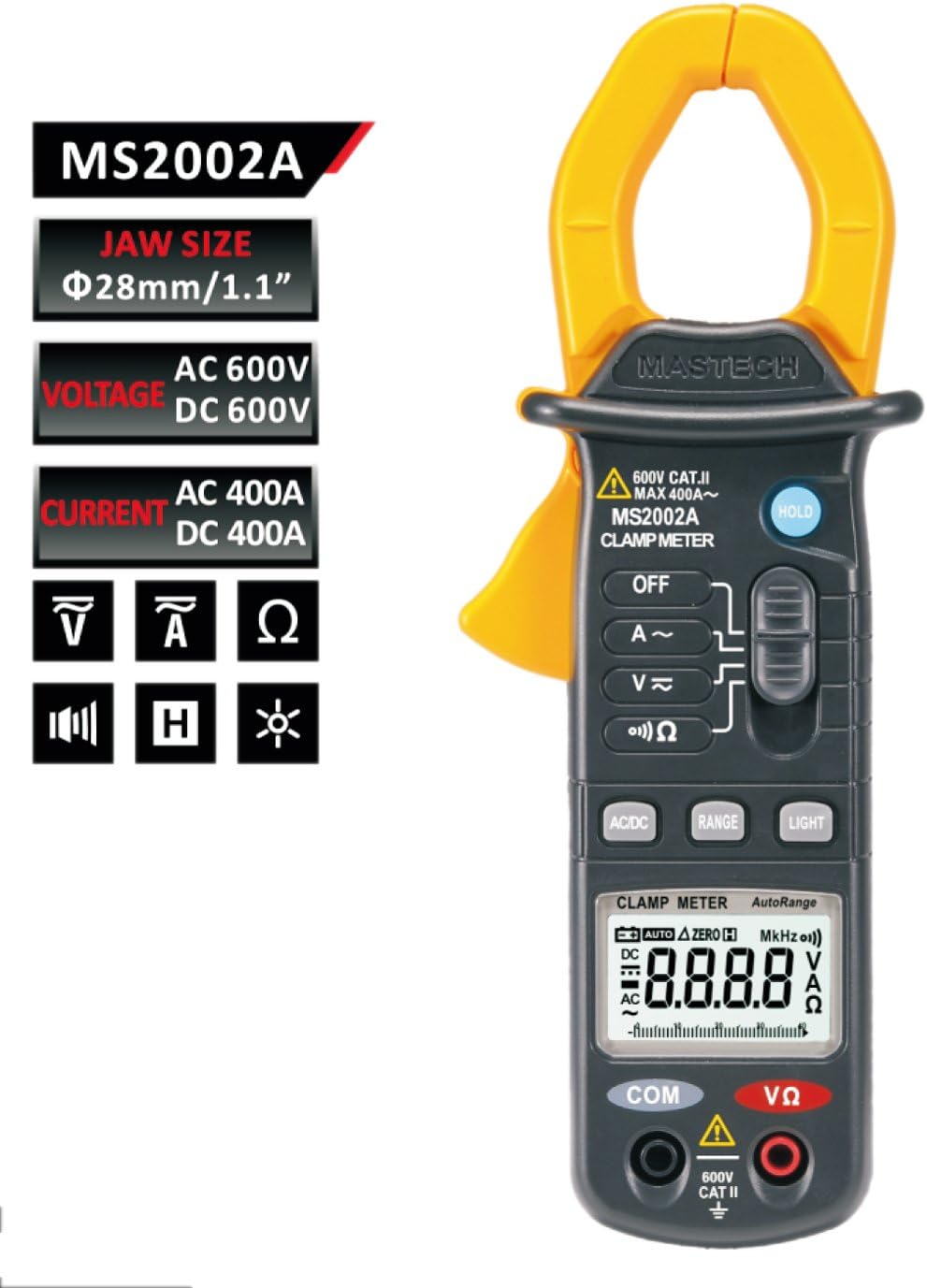
Image: A comprehensive table detailing the specifications of the MS2002A, including measurement ranges, accuracy, display type, jaw opening, continuity buzzer, data hold, display light, power supply, product size, product weight, and safety rating.
| స్పెసిఫికేషన్ | విలువ |
|---|---|
| మోడల్ | MS2002A |
| దవడ పరిమాణం | 28 మిమీ / 1.1 అంగుళాలు |
| ప్రదర్శించు | 3 1/2 digits LCD, Max reading 1999 |
| ఎసి ప్రస్తుత పరిధి | 2A/20A/200A |
| AC వాల్యూమ్tagఇ పరిధి | 600V వరకు |
| DC సంtagఇ పరిధి | 600V వరకు |
| ప్రతిఘటన పరిధి | 2000Ω వరకు |
| శక్తి మూలం | 2 x 1.5V AAA బ్యాటరీలు |
| వస్తువు బరువు | సుమారు 4 ఔన్సులు (113గ్రా) |
| ప్యాకేజీ కొలతలు | 8.4 x 4.2 x 2.2 అంగుళాలు |
| భద్రతా రేటింగ్ | CAT II 600V |
9. వారంటీ మరియు మద్దతు
For warranty information or technical support, please refer to the contact details provided with your purchase or visit the official Mastech webవారంటీ క్లెయిమ్ల కోసం కొనుగోలు రుజువుగా మీ కొనుగోలు రసీదును ఉంచండి.
గమనిక: ఉత్పత్తి వివరణలు మరియు లక్షణాలు ముందస్తు నోటీసు లేకుండానే మారవచ్చు.
Ask a question about this manual
Ask about setup, troubleshooting, compatibility, parts, safety, or missing instructions. Manuals+ will review the question and use this page’s manual context to help answer it.