
1. పరిచయం
ధన్యవాదాలు, ధన్యవాదాలు.asing the Mastech MS8230B Digital Multimeter. This device is a compact, battery-operated, handheld digital multimeter designed for measuring DC and AC voltage, DC current, resistance, diode, and transistor (hFE) tests. It features a large LCD display for easy reading and is built to international safety standards.
Please read this instruction manual thoroughly before using the multimeter to ensure safe and proper operation. Keep this manual for future reference.
2. భద్రతా సమాచారం
This multimeter is designed according to IEC 1010-1 international safety standards for electronic measuring instruments. It complies with CAT III 600V and CAT II 1000V overvoltage categories. Always adhere to the following safety precautions:
- Never exceed the maximum input limits for any function.
- Do not use the meter if the case is damaged or open.
- పరీక్ష లీడ్స్ మంచి స్థితిలో ఉన్నాయని, ఎటువంటి ఇన్సులేషన్ దెబ్బతినకుండా ఉన్నాయని నిర్ధారించుకోండి.
- Always turn off the circuit power and discharge all high-voltage capacitors before measuring resistance, diodes, or hFE.
- వాల్యూమ్తో పనిచేసేటప్పుడు చాలా జాగ్రత్తగా ఉండండిtag60V DC లేదా 30V AC RMS కంటే ఎక్కువ, ఎందుకంటే ఇవి షాక్ ప్రమాదాన్ని కలిగిస్తాయి.
- Remove test leads from the circuit before changing functions or ranges.
- ఖచ్చితమైన రీడింగ్లను నిర్ధారించడానికి తక్కువ బ్యాటరీ సూచిక కనిపించిన వెంటనే బ్యాటరీని మార్చండి.
- పేలుడు వాయువు, ఆవిరి లేదా ధూళి వాతావరణంలో మీటర్ను ఆపరేట్ చేయవద్దు.
3. ప్యాకేజీ విషయాలు
Verify that all items listed below are present and undamaged:
- Mastech MS8230B Digital Multimeter
- Test Leads (one pair)
- 9V Battery (pre-installed or included separately)
- వినియోగదారు మాన్యువల్
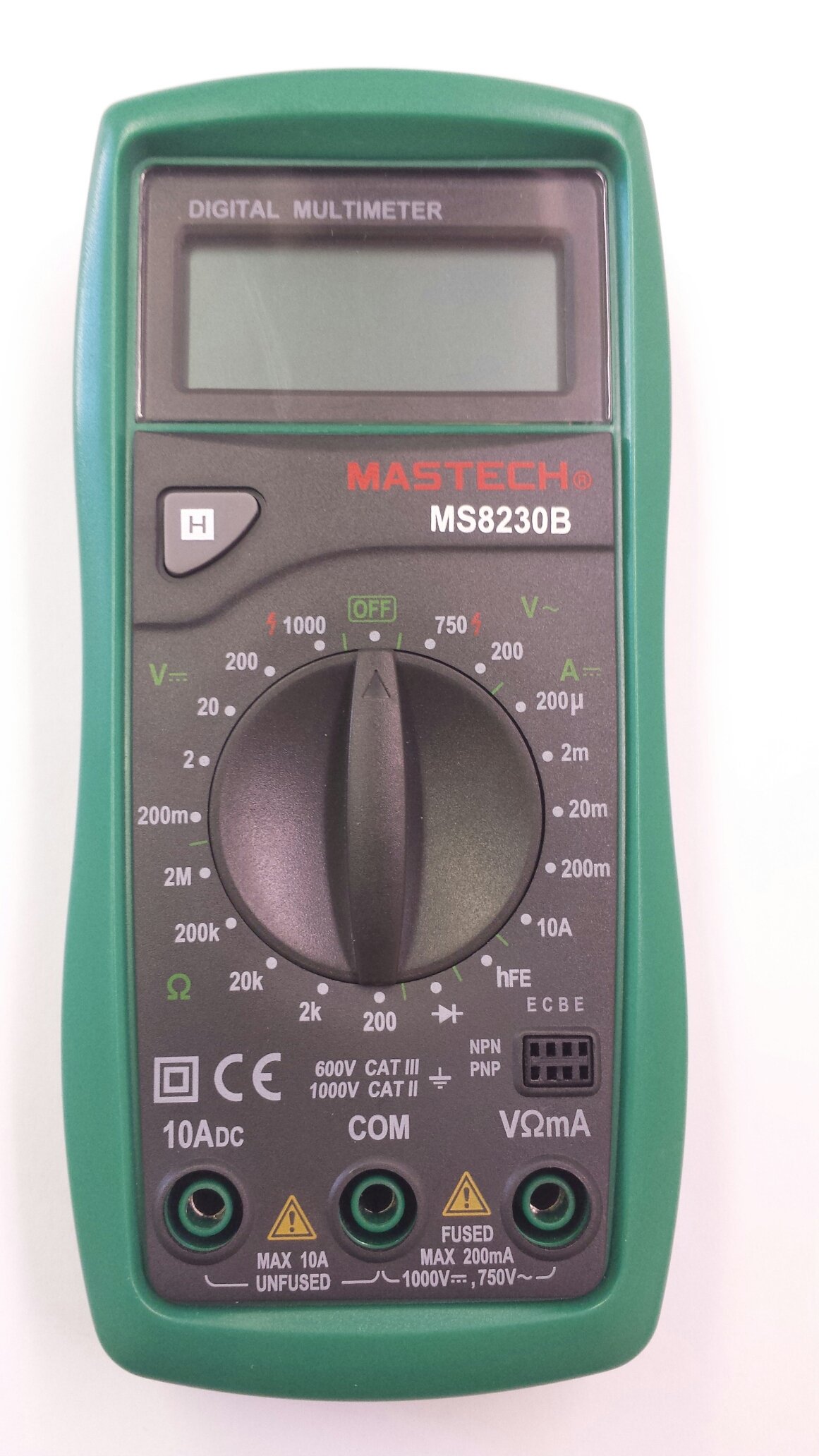
Image 1: Contents of the Mastech MS8230B package, including the multimeter, test leads, batteries, and user manual.
4. సెటప్
4.1 బ్యాటరీ ఇన్స్టాలేషన్
The MS8230B multimeter requires one 9V battery for operation. If the battery is not pre-installed or needs replacement:
- మల్టీమీటర్ ఆఫ్ చేయబడిందని నిర్ధారించుకోండి మరియు అన్ని పరీక్ష లీడ్లను డిస్కనెక్ట్ చేయండి.
- యూనిట్ వెనుక భాగంలో బ్యాటరీ కంపార్ట్మెంట్ కవర్ను గుర్తించండి.
- Loosen the screw(s) on the battery cover and remove the cover.
- Connect the 9V battery to the battery connector, observing correct polarity.
- బ్యాటరీని కంపార్ట్మెంట్లో ఉంచి కవర్ను భర్తీ చేసి, దానిని స్క్రూ(లు)తో భద్రపరచండి.
4.2 టెస్ట్ లీడ్లను కనెక్ట్ చేయడం
Always connect the test leads correctly for the desired measurement:
- వాల్యూమ్ కోసం "VΩmA" జాక్లోకి ఎరుపు రంగు టెస్ట్ లీడ్ను చొప్పించండి.tage, నిరోధకత మరియు తక్కువ కరెంట్ కొలతలు.
- Insert the red test lead into the "10ADC" jack for high DC current measurements (up to 10A).
- Always insert the black test lead into the "COM" (common) jack.
5. ఆపరేటింగ్ సూచనలు
Before taking any measurement, ensure the test leads are correctly connected and the function switch is set to the appropriate range.
5.1 DC వాల్యూమ్tagఇ కొలత (DCV)
- Connect the red test lead to the "VΩmA" jack and the black test lead to the "COM" jack.
- Set the rotary switch to the desired DCV range (e.g., 200mV, 2V, 20V, 200V, 1000V). If the voltage is unknown, start with the highest range and decrease as necessary.
- కొలవవలసిన భాగం లేదా సర్క్యూట్ అంతటా పరీక్ష లీడ్లను కనెక్ట్ చేయండి.
- సంపుటాన్ని చదవండిtage value on the LCD display. Observe the polarity indication.
5.2 AC వాల్యూమ్tagఇ కొలత (ACV)
- Connect the red test lead to the "VΩmA" jack and the black test lead to the "COM" jack.
- Set the rotary switch to the desired ACV range (e.g., 200V, 750V). Start with the highest range if the voltagఇ తెలియదు.
- కొలవవలసిన భాగం లేదా సర్క్యూట్ అంతటా పరీక్ష లీడ్లను కనెక్ట్ చేయండి.
- సంపుటాన్ని చదవండిtagఎల్సిడి డిస్ప్లేపై ఇ విలువ.
5.3 DC కరెంట్ కొలత (DCA)
జాగ్రత్త: వాల్యూమ్తో సర్క్యూట్లో కరెంట్ను కొలవడానికి ఎప్పుడూ ప్రయత్నించవద్దుtage present by connecting the meter in parallel. Always connect the meter in series with the load.
- Determine the expected current. For currents up to 200mA, connect the red lead to "VΩmA". For currents up to 10A, connect the red lead to "10ADC". The black lead always goes to "COM".
- Set the rotary switch to the appropriate DCA range (e.g., 200µA, 2mA, 20mA, 200mA, 10A).
- Turn off the power to the circuit. Open the circuit where the current is to be measured.
- Connect the multimeter in series with the circuit.
- సర్క్యూట్కు శక్తిని వర్తింపజేయండి మరియు LCD డిస్ప్లేలో ప్రస్తుత విలువను చదవండి.
5.4 నిరోధక కొలత
జాగ్రత్త: Ensure the circuit under test is completely de-energized and all capacitors are discharged before measuring resistance.
- Connect the red test lead to the "VΩmA" jack and the black test lead to the "COM" jack.
- Set the rotary switch to the desired Resistance (Ω) range (e.g., 200Ω, 2kΩ, 20kΩ, 200kΩ, 2MΩ).
- కొలవవలసిన భాగం అంతటా పరీక్ష లీడ్లను కనెక్ట్ చేయండి.
- LCD డిస్ప్లేలో నిరోధక విలువను చదవండి.
5.5 డయోడ్ టెస్ట్
జాగ్రత్త: Ensure the circuit under test is completely de-energized and all capacitors are discharged before performing a diode test.
- Connect the red test lead to the "VΩmA" jack and the black test lead to the "COM" jack.
- Set the rotary switch to the Diode symbol (→|).
- Connect the red test lead to the anode and the black test lead to the cathode of the diode. The display will show the forward voltage డ్రాప్ (సాధారణంగా సిలికాన్ డయోడ్లకు 0.5V నుండి 0.8V వరకు).
- Reverse the test leads. The display should show "OL" (Open Loop) for a good diode. A reading in both directions or "0" indicates a shorted diode.
5.6 ట్రాన్సిస్టర్ hFE పరీక్ష
జాగ్రత్త: Ensure the transistor is not connected to a live circuit.
- రోటరీ స్విచ్ను "hFE" స్థానానికి సెట్ చేయండి.
- ట్రాన్సిస్టర్ NPN లేదా PNP అని గుర్తించండి.
- Insert the transistor's emitter, base, and collector leads into the corresponding holes in the hFE socket on the multimeter.
- Read the hFE (DC current gain) value on the LCD display.
5.7 డేటా హోల్డ్ ఫంక్షన్
Press the "H" button to hold the current reading on the display. Press it again to release the hold function and resume live readings.
6. నిర్వహణ
6.1 శుభ్రపరచడం
ప్రకటనతో కేసును తుడిచివేయండిamp cloth and mild detergent. Do not use abrasives or solvents. Keep the jacks free of dust and debris.
6.2 బ్యాటరీ భర్తీ
When the battery symbol appears on the LCD, the 9V battery needs to be replaced. Refer to section 4.1 for battery installation instructions.
6.3 ఫ్యూజ్ రీప్లేస్మెంట్
The multimeter is protected by a fuse. If the current measurement function stops working, the fuse may need replacement. This should only be performed by qualified personnel. The fuse specifications are typically printed near the fuse holder or in the specifications section.
7. ట్రబుల్షూటింగ్
If the multimeter does not function correctly, check the following:
- డిస్ప్లే లేదు లేదా మందమైన డిస్ప్లే: బ్యాటరీని తనిఖీ చేయండి. అవసరమైతే మార్చండి.
- తప్పు రీడింగ్లు: Ensure the test leads are properly connected, the function switch is on the correct range, and the battery is not low.
- "OL" (Overload) displayed: The measured value exceeds the selected range. Switch to a higher range.
- కరెంట్ కొలత పనిచేయడం లేదు: ఫ్యూజ్ తనిఖీ చేయండి.
సమస్యలు కొనసాగితే, కస్టమర్ సపోర్ట్ని సంప్రదించండి.
8. స్పెసిఫికేషన్లు
The Mastech MS8230B Digital Multimeter offers the following technical specifications:

Image 2: Detailed specifications for the Mastech MS8230B Multimeter, including display, range, and accuracy.
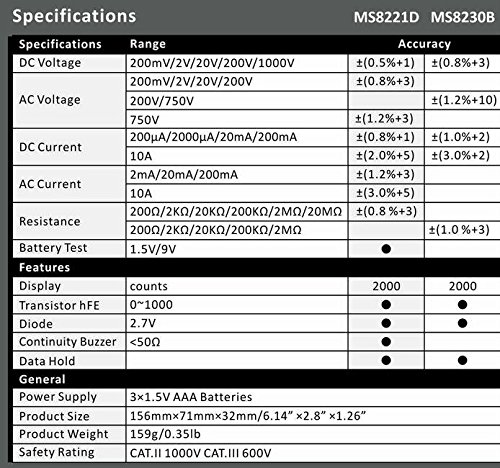
Image 3: Comparison table of specifications for Mastech MS8230B and MS8221D multimeters.
| స్పెసిఫికేషన్ | విలువ |
|---|---|
| ప్రదర్శించు | 1999 counts, 15mm digit height |
| DC సంtagఇ (DCV) | 200mV, 2V, 20V, 200V, 1000V (Accuracy: 0.5% to 0.8%) |
| AC వాల్యూమ్tagఇ (ACV) | 200V, 750V (Accuracy: 1.2%) |
| DC కరెంట్ (DCA) | 200µA, 2mA, 20mA, 200mA, 10A (Accuracy: 1.0% to 2.0%) |
| ప్రతిఘటన (Ω) | 200Ω, 2kΩ, 20kΩ, 200kΩ, 2MΩ (Accuracy: 0.8% to 1.0%) |
| డయోడ్ టెస్ట్ | ఫార్వార్డ్ వాల్యూమ్tagఇ డ్రాప్ |
| ట్రాన్సిస్టర్ hFE పరీక్ష | 1 నుండి 1000 వరకు |
| డేటా హోల్డ్ | అవును |
| తక్కువ బ్యాటరీ సూచిక | అవును |
| ఓవర్లోడ్ రక్షణ | అవును |
| శక్తి మూలం | 1 x 9V బ్యాటరీ |
| కొలతలు (L x W x H) | 15.2 x 7.6 x 2.5 సెం.మీ (సుమారుగా 6 x 3 x 1 అంగుళాలు) |
| బరువు | సుమారు 158.76 గ్రా (5.6 ఔన్సులు) |
| భద్రతా రేటింగ్ | IEC 1010-1 CAT III 600V, CAT II 1000V |
| ఆపరేటింగ్ ఉష్ణోగ్రత | 0°C నుండి 40°C (32°F నుండి 104°F) |
| నిల్వ ఉష్ణోగ్రత | -10°C నుండి 50°C (14°F నుండి 122°F) |
9. వారంటీ మరియు మద్దతు
Mastech products are designed for reliability and performance. For specific warranty details, please refer to the warranty card included with your product or contact your local Mastech distributor.
For technical support or service inquiries, please contact Mastech customer service through their official webసైట్ లేదా మీ కొనుగోలు డాక్యుమెంటేషన్తో అందించబడిన సంప్రదింపు సమాచారం.