
పరిచయం
This manual provides comprehensive instructions for the setup, operation, maintenance, and troubleshooting of your Proscan CRK83X PSVR82 TV Remote Control. This remote is designed to work seamlessly with various Proscan TV and VCR models, offering a direct replacement or compatible control solution.
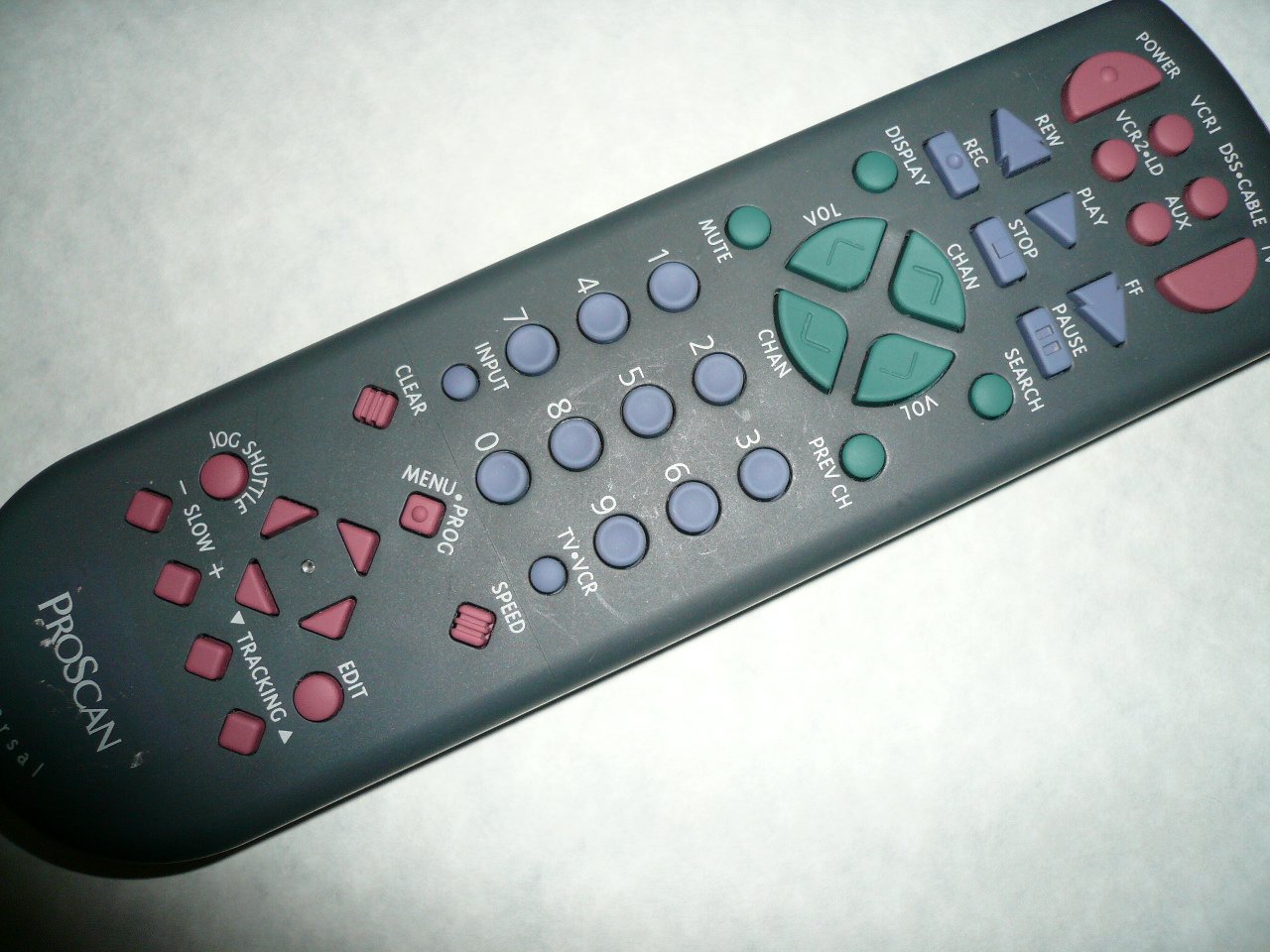
An image showing the Proscan CRK83X PSVR82 TV Remote Control, highlighting its ergonomic design and button layout. The remote is dark gray with purple and teal buttons, clearly labeled for various functions.
సెటప్
1. బ్యాటరీ ఇన్స్టాలేషన్
- రిమోట్ కంట్రోల్ వెనుక బ్యాటరీ కంపార్ట్మెంట్ కవర్ను గుర్తించండి.
- కవర్ను క్రిందికి జారండి లేదా దాన్ని తెరవడానికి గడియను నొక్కండి.
- రెండు (2) AAA బ్యాటరీలను (చేర్చబడలేదు) చొప్పించండి, పాజిటివ్ (+) మరియు నెగటివ్ (-) టెర్మినల్స్ కంపార్ట్మెంట్ లోపల ఉన్న మార్కింగ్లతో సరిగ్గా సమలేఖనం చేయబడ్డాయని నిర్ధారించుకోండి.
- బ్యాటరీ కంపార్ట్మెంట్ కవర్ సురక్షితంగా క్లిక్ అయ్యే వరకు దాన్ని తిరిగి స్థానంలోకి జారడం ద్వారా దాన్ని మార్చండి.
2. ప్రారంభ ఉపయోగం
The Proscan CRK83X PSVR82 remote control is typically pre-programmed for compatible Proscan TV and VCR models. No complex programming steps are usually required for initial use with supported devices. Simply point the remote at your device and press the desired function button.
This remote is compatible with a wide range of models, including but not limited to: P5VR74, PAVR57, PCVR72, PRVR71, PSDR72, PSDR73, PSNKVSR72, PSNPSVR57, PSNPSVR65, PSNPSVR70, PSNPSVR71, PSNPSVR72, PSNPSVR73, PSNPSVR74, PSNPSVRR73, PSNR65, PSNVR74, PSRV65, PSRV71, PSRV72, PSRV74, PSRVR65, PSRVR71, PSUR70, PSUR72, PSV174, PSV65, PSV71, PSV72, PSVDR73, PSVER72, PSVH57, PSVP71, PSVR22, PSVR27, PSVR57, PSVR61, PSVR62, PSVR65, PSVR72L, PSVR72VCR, PSVR75, PSVR79, PSVR83, PSVT73, PSVV73, PSZR65, PSZR71, PSZR73, PVSR73, R65, RCU800, RSVR73, SPVR65, SSVR62, VR653HF, VR730, VR730HF.
ఆపరేటింగ్ సూచనలు
Familiarize yourself with the buttons and their functions for optimal control of your television and VCR.
| బటన్ పేరు | ఫంక్షన్ |
|---|---|
| శక్తి | Turns the connected device (TV/VCR) on or off. |
| VCR1, DSS/CABLE, VCR2/LD, AUX | Selects the input source for the television or VCR. |
| మ్యూట్ | ఆడియో అవుట్పుట్ను మ్యూట్ చేస్తుంది లేదా అన్మ్యూట్ చేస్తుంది. |
| VOL +/- | వాల్యూమ్ స్థాయిని పైకి లేదా క్రిందికి సర్దుబాటు చేస్తుంది. |
| CHAN +/- | ఛానెల్ని పైకి లేదా క్రిందికి మారుస్తుంది. |
| PREV CH | Switches to the previously viewed ఛానెల్. |
| ప్రదర్శన | Displays on-screen information such as channel number or time. |
| REC | Initiates recording on the VCR. |
| REW | Rewinds the tape during VCR playback. |
| ఆడండి | Starts playback of a tape or disc. |
| FF | Fast forwards the tape during VCR playback. |
| ఆపు | ప్లేబ్యాక్ లేదా రికార్డింగ్ను ఆపివేస్తుంది. |
| పాజ్ చేయండి | ప్లేబ్యాక్ లేదా రికార్డింగ్ను పాజ్ చేస్తుంది. |
| శోధించు | Activates search function, typically for VCR content. |
| నంబర్ ప్యాడ్ (0-9) | Directly enters channel numbers or menu selections. |
| ఇన్పుట్ | అందుబాటులో ఉన్న ఇన్పుట్ మూలాల ద్వారా తిరుగుతుంది. |
| క్లియర్ | Clears entered numbers or menu selections. |
| MENU / PROG | Accesses the on-screen menu or programming functions. |
| TV-VCR | Toggles control between TV and VCR modes. |
| జోగ్ షటిల్ | Provides frame-by-frame or variable speed control for VCR playback. |
| నెమ్మదిగా +/- | Adjusts slow-motion speed during VCR playback. |
| వేగం | Adjusts playback speed, typically for VCR. |
| TRACKING ▲/▼ | Adjusts the VCR tracking for optimal picture quality. |
| సవరించు | Activates editing functions, typically for VCR. |
నిర్వహణ
రిమోట్ శుభ్రపరచడం
- రిమోట్ కంట్రోల్ను మృదువైన, పొడి గుడ్డతో తుడవండి.
- మొండి ధూళికి, కొద్దిగా dampగుడ్డను నీటితో లేదా తేలికపాటి, రాపిడి లేని క్లీనర్తో రుద్దండి. క్లీనర్ను నేరుగా రిమోట్పై స్ప్రే చేయవద్దు.
- కఠినమైన రసాయనాలు, ద్రావకాలు లేదా రాపిడి శుభ్రపరిచే ప్యాడ్లను ఉపయోగించడం మానుకోండి, ఎందుకంటే ఇవి రిమోట్ ఉపరితలం లేదా అంతర్గత భాగాలను దెబ్బతీస్తాయి.
బ్యాటరీ భర్తీ
Replace batteries when the remote's response becomes sluggish or it stops functioning. Refer to the "Battery Installation" section under Setup for detailed instructions.
స్థానిక నిబంధనల ప్రకారం ఉపయోగించిన బ్యాటరీలను ఎల్లప్పుడూ బాధ్యతాయుతంగా పారవేయండి.
ట్రబుల్షూటింగ్
| సమస్య | సాధ్యమైన కారణం / పరిష్కారం |
|---|---|
| రిమోట్ పనిచేయడం లేదు. |
|
| రిమోట్ అడపాదడపా పనిచేస్తుంది. |
|
| కొన్ని బటన్లు స్పందించవు. |
|
స్పెసిఫికేషన్లు
- బ్రాండ్: ప్రోస్కాన్
- మోడల్: CRK83X PSVR82
- తయారీదారు: ప్రోస్కాన్
- అనుకూల పరికరాలు: Television (and various Proscan VCR models as listed in Setup section)
- కనెక్టివిటీ టెక్నాలజీ: ఇన్ఫ్రారెడ్
- నియంత్రిక రకం: బటన్ నియంత్రణ
- ప్రత్యేక ఫీచర్: ఎర్గోనామిక్ డిజైన్
- ASIN: B00P82T2LS
- మొదటి తేదీ అందుబాటులో ఉంది: నవంబర్ 4, 2014
వారంటీ మరియు మద్దతు
Specific warranty information for the Proscan CRK83X PSVR82 TV Remote Control is not provided in this manual. Please refer to the product packaging or contact your retailer for details regarding warranty coverage.
For further assistance or technical support, please contact the manufacturer or your point of purchase. No specific support contact details are available in this document.