
ఉత్పత్తి ముగిసిందిview
The SIIG Single Monitor Desk Mount (Model CE-MT1H12-S1) is a height-adjustable, gas spring-assisted full-motion desktop mount designed for monitors ranging from 15 inches to 27 inches and weighing up to 17.6 lbs (8 kg). It provides smooth and effortless viewing angle adjustments for optimal ergonomic positioning. The VESA plate supports both portrait and landscape monitor orientations, offering flexibility for various tasks and preferences.
ముఖ్యమైన భద్రతా సూచనలు
- Read all instructions carefully before installation and use to ensure proper setup and prevent damage.
- గరిష్ట బరువు సామర్థ్యం 17.6 పౌండ్లు (8 కిలోలు) మించకూడదు. ఓవర్లోడింగ్ అస్థిరతకు మరియు సంభావ్య గాయానికి కారణమవుతుంది.
- Ensure the mounting surface (desk) is strong enough to support the combined weight of the mount and monitor.
- Use only the provided hardware. If any parts are missing or damaged, contact SIIG customer support immediately.
- Keep children and pets away from the installation area during assembly to prevent accidents.
- ప్రతిపాదన 65 హెచ్చరిక: ఈ ఉత్పత్తిలో క్యాన్సర్ మరియు పుట్టుకతో వచ్చే లోపాలు లేదా ఇతర పునరుత్పత్తికి హాని కలిగించడానికి కాలిఫోర్నియా రాష్ట్రానికి తెలిసిన రసాయనాలు ఉన్నాయి.
ప్యాకేజీ విషయాలు
Verify that all components are present and undamaged before beginning installation. If any items are missing or appear damaged, please contact SIIG customer support.
- Monitor Arm Assembly (Gas Spring Arm)
- Desk Pole
- వెసా ప్లేట్
- C-Clamp బేస్
- గ్రోమెట్ మౌంట్ బేస్
- Mounting Hardware (various screws, washers)
- Allen Keys (for assembly and tension adjustment)
- కేబుల్ నిర్వహణ క్లిప్లు
This image displays the individual components of the monitor mount, including the gas spring arm, desk pole, C-clamp, and various mounting hardware.
సెటప్ మరియు ఇన్స్టాలేషన్
దశ 1: మౌంటు పద్ధతిని ఎంచుకోండి
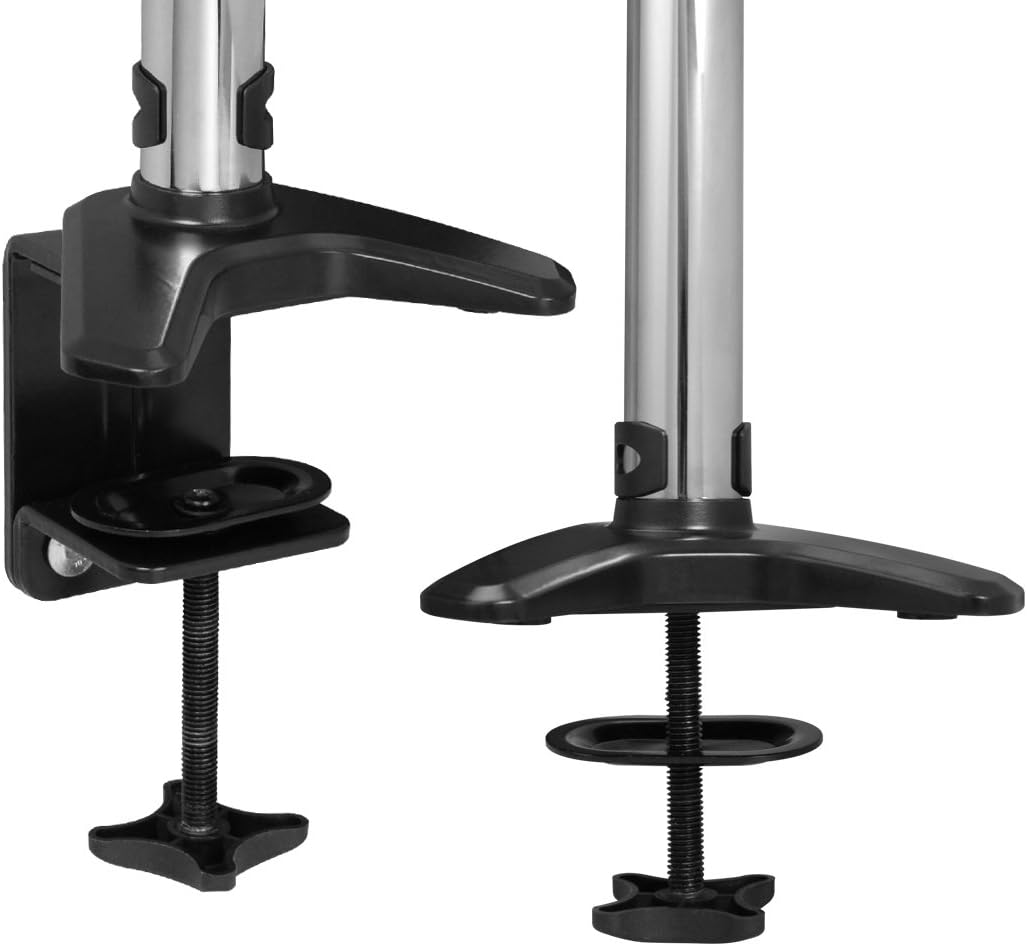
The monitor mount offers two installation options: C-clamp for desk edges or grommet mount for desks with existing holes.

This image illustrates the two available mounting options: the C-clamp for desk edges and the grommet mount for desks with existing holes.
C-Clamp సంస్థాపన
- C-clని అటాచ్ చేయండిamp base to the bottom of the desk pole.
- clని ఉంచండిamp on the edge of your desk and tighten the screw until the base is securely fastened.
గ్రోమెట్ మౌంట్ ఇన్స్టాలేషన్
- If your desk has a grommet hole, use the grommet mount base.
- Insert the desk pole through the grommet hole and secure it from underneath the desk with the provided hardware.
Step 2: Attach Monitor to VESA Plate
- Carefully align the VESA plate with the mounting holes on the back of your monitor.
- Secure the monitor to the VESA plate using the appropriate screws provided in the hardware kit. Ensure they are tightened firmly but do not overtighten.
Step 3: Mount Monitor Arm to Pole
- Slide the monitor arm assembly onto the desk pole.
- Adjust the arm to your desired initial height and tighten the collar screw on the pole to secure it in place.
దశ 4: కేబుల్ నిర్వహణ
Route monitor cables (power, video, etc.) through the integrated cable management clips located on the arm and along the pole. This helps maintain a tidy and organized workspace.
Installation and Adjustment Video
This video demonstrates the complete installation process for the SIIG Single Monitor Desk Mount, including attaching the clamp, mounting the monitor, routing cables, and adjusting the arm's movement.
ఆపరేటింగ్ సూచనలు
ఎత్తు సర్దుబాటు
The gas spring mechanism allows for smooth and effortless vertical adjustment. Gently push or pull the monitor to the desired height. The arm provides up to 13 inches of vertical adjustment from its lowest to highest point.

This image shows the vertical adjustment range of the monitor arm, highlighting the 13-inch height capability.
టెన్షన్ సర్దుబాటు
If the monitor sags or rises too easily, the gas spring tension needs adjustment. Use the included 6mm Allen key:
- తిరగండి సవ్యదిశలో to reduce tension for lighter monitors.
- తిరగండి అపసవ్య దిశలో బరువైన మానిటర్లకు ఒత్తిడిని పెంచడానికి.
Multiple turns may be needed to achieve the desired tension. Test the adjustment by moving the monitor after each set of turns.
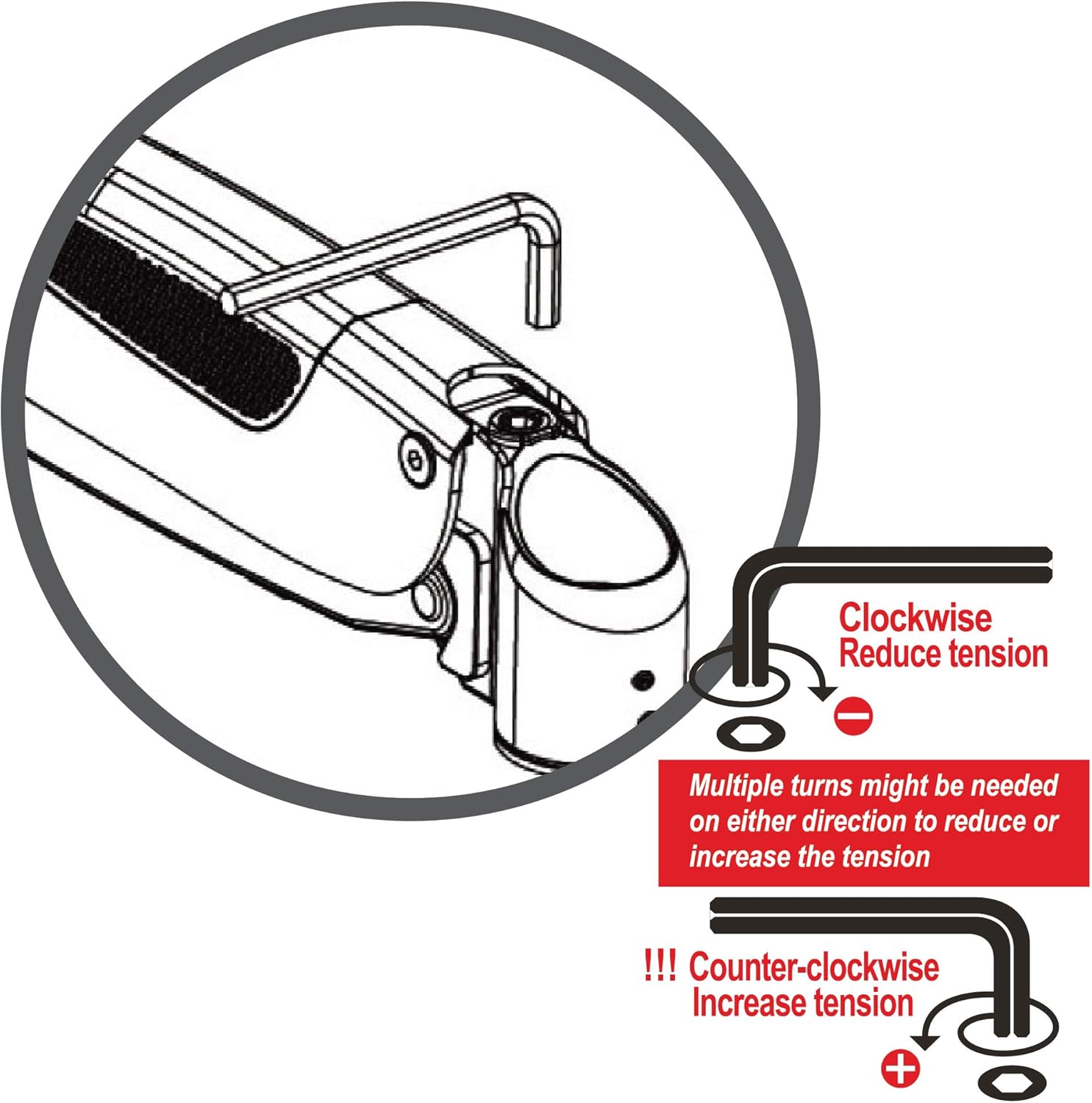
This diagram provides instructions on how to adjust the gas spring tension using the provided Allen key to accommodate different monitor weights.
టిల్ట్, స్వివెల్ మరియు భ్రమణం
The VESA plate and arm joints provide extensive movement capabilities:
- వంపు: Adjust the monitor screen up or down by up to 90 degrees.
- స్వివెల్: Rotate the monitor horizontally 360 degrees around the pole.
- భ్రమణం: Rotate the monitor 360 degrees at the VESA plate for easy switching between portrait and landscape orientations.
- చేయి పొడిగింపు: The arm can extend up to 22 inches from the mounting pole, allowing you to pull the monitor closer or push it further away.

This image demonstrates the maximum extension of the monitor arm, which is 22 inches from the base.
సంరక్షణ మరియు నిర్వహణ
- అన్ని స్క్రూలు మరియు కనెక్షన్లు బిగుతుగా మరియు సురక్షితంగా ఉన్నాయని నిర్ధారించుకోవడానికి వాటిని క్రమం తప్పకుండా తనిఖీ చేయండి. వదులుగా ఉండే కనెక్షన్లు స్థిరత్వం మరియు పనితీరును ప్రభావితం చేస్తాయి.
- మౌంట్ను మృదువైన, డి-క్లాత్తో శుభ్రం చేయండి.amp వస్త్రం. రాపిడి క్లీనర్లు, ద్రావకాలు లేదా కఠినమైన రసాయనాలను ఉపయోగించడం మానుకోండి, ఎందుకంటే ఇవి ముగింపును దెబ్బతీస్తాయి.
- Do not attempt to lubricate the gas spring mechanism. It is designed to be maintenance-free.
ట్రబుల్షూటింగ్
Monitor Sags or Does Not Stay in Position
పరిష్కారం:
Adjust the gas spring tension. Use the 6mm Allen key and turn counter-clockwise to increase tension for heavier monitors. Continue adjusting until the monitor holds its position.
Monitor is Difficult to Move
పరిష్కారం:
Adjust the gas spring tension. Use the 6mm Allen key and turn clockwise to reduce tension for lighter monitors. Continue adjusting until the monitor moves smoothly.
Mount is Unstable or Wobbles
పరిష్కారం:
C-cl ఉండేలా చూసుకోండిamp or grommet mount is securely tightened to the desk. Verify that the desk surface itself is stable and not prone to wobbling. Re-tighten all connection points on the arm and pole.
ఉత్పత్తి లక్షణాలు
| ఫీచర్ | వివరాలు |
|---|---|
| మోడల్ సంఖ్య | CE-MT1H12-S1 |
| అనుకూల స్క్రీన్ పరిమాణాలు | 15" నుండి 27" వరకు |
| బరువు సామర్థ్యం | 17.6 పౌండ్లు (8 కిలోలు) వరకు |
| VESA అనుకూలత | 75x75mm, 100x100mm |
| కదలిక రకం | Articulating, Gas Spring Assisted |
| టిల్ట్ యాంగిల్ | 90 డిగ్రీల వరకు |
| స్వివెల్ | 360 డిగ్రీలు |
| భ్రమణం | 360 డిగ్రీలు |
| ఆర్మ్ ఎక్స్టెన్షన్ | 22 అంగుళాల వరకు |
| ఎత్తు సర్దుబాటు | 13 అంగుళాల వరకు |
| మౌంటు రకం | టేబుల్టాప్ (C-clamp లేదా గ్రోమెట్) |
| మెటీరియల్ | అల్యూమినియం |
| రంగు | నలుపు & తెలుపు |
వారంటీ సమాచారం
For detailed warranty information regarding your SIIG Single Monitor Desk Mount, please refer to the official SIIG website or contact SIIG customer support directly. Keep your proof of purchase for warranty claims.
కస్టమర్ మద్దతు
If you encounter any issues, have questions, or require further assistance with your SIIG Single Monitor Desk Mount, please visit the అమెజాన్లో SIIG స్టోర్ or contact SIIG customer service through their official channels. Our support team is ready to help.