
Supersonic IQ3710DJBT
Supersonic IQ Sound IQ-3710DJBT Portable DJ Speaker User Manual
మోడల్: IQ-3710DJBT
ముఖ్యమైన భద్రతా సూచనలు
Please read all instructions carefully before operating this device. Keep this manual for future reference.
- ఈ ఉపకరణాన్ని వర్షం లేదా తేమకు బహిర్గతం చేయవద్దు.
- ఏ వెంటిలేషన్ ఓపెనింగ్లను నిరోధించవద్దు.
- రేడియేటర్లు, హీట్ రిజిస్టర్లు, స్టవ్లు లేదా ఇతర ఉపకరణాలు (సహా ampలిఫైయర్లు) వేడిని ఉత్పత్తి చేస్తాయి.
- పవర్ త్రాడు నడవకుండా లేదా పించ్ చేయకుండా, ముఖ్యంగా ప్లగ్స్, సౌలభ్యం రిసెప్టాకిల్స్ మరియు వారు ఉపకరణం నుండి నిష్క్రమించే ప్రదేశం నుండి రక్షించండి.
- తయారీదారు పేర్కొన్న జోడింపులు/యాక్సెసరీలను మాత్రమే ఉపయోగించండి.
- మెరుపు తుఫానుల సమయంలో లేదా ఎక్కువ కాలం ఉపయోగించనప్పుడు ఈ ఉపకరణాన్ని అన్ప్లగ్ చేయండి.
- అర్హత కలిగిన సేవా సిబ్బందికి అన్ని సర్వీసులను చూడండి. ఉపకరణం ఏ విధంగానైనా దెబ్బతిన్నప్పుడు సర్వీసింగ్ అవసరం.
ఉత్పత్తి ముగిసిందిview
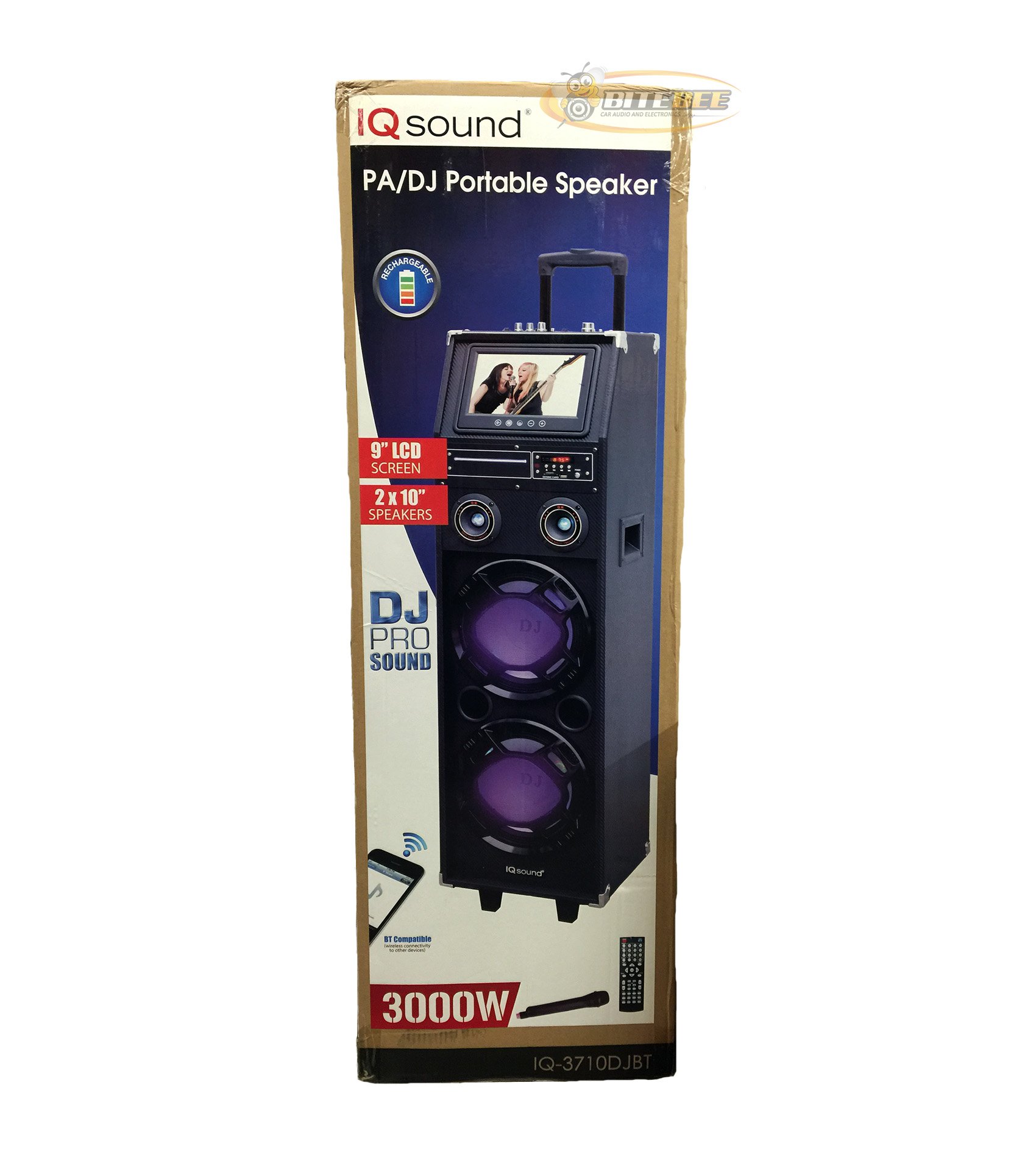
చిత్రం: ముందు భాగం view of the Supersonic IQ Sound IQ-3710DJBT Portable DJ Speaker, showcasing its dual speakers, 9-inch LCD screen, and control panel.
ఫీచర్లు
- Dual 10-inch Full Range Speakers
- Built-in Bluetooth for wireless audio streaming
- FM Radio tuner
- 5-Band Equalizer for audio customization
- 9-inch LCD Display for video and menu navigation
- Built-in Rechargeable Battery for portability
- Integrated LED Lights for visual effects
- Multimedia Compatible (supports various video and music formats)
- USB Input for external audio devices
- SD Card Slot for media playback
- 1 గిటార్ ఇన్పుట్
- 1 Microphone Jack (includes 1 microphone)
- రిమోట్ కంట్రోల్ చేర్చబడింది
- Built-in Handle and Wheels for easy transport
ప్యాకేజీ విషయాలు
- IQ-3710DJBT Portable DJ Speaker
- పవర్ అడాప్టర్
- మైక్రోఫోన్
- రిమోట్ కంట్రోల్
- వినియోగదారు మాన్యువల్ (ఈ పత్రం)
Controls and Connections (General)
The main control panel is located on the top or rear of the speaker, featuring buttons for power, mode selection, playback controls (play/pause, skip), volume adjustment, EQ settings, and light controls. Input ports for USB, SD card, microphone, and guitar are also present. The 9-inch LCD display provides visual feedback for media playback, FM radio tuning, and menu navigation.
సెటప్
1 బ్యాటరీని ఛార్జ్ చేస్తోంది
- Connect the included power adapter to the speaker's DC input port.
- Plug the power adapter into a standard wall outlet (AC 100-240V, 50/60Hz).
- The charging indicator light (if present) will illuminate. Allow approximately 6-8 hours for a full charge before first use.
- The speaker can be used while charging.
2. ప్రారంభ పవర్ ఆన్
- స్పీకర్ పూర్తిగా ఛార్జ్ చేయబడిందని లేదా పవర్ సోర్స్కి కనెక్ట్ చేయబడిందని నిర్ధారించుకోండి.
- Locate the Power button (usually on the control panel) and press it to turn on the speaker.
- The LCD display will illuminate, and the speaker will enter the default mode.
3. పెరిఫెరల్స్ కనెక్ట్ చేయడం
మైక్రోఫోన్: Insert the included microphone's cable into the Microphone Jack.
గిటార్: Insert your guitar's cable into the Guitar Input.
ఆపరేటింగ్ సూచనలు
మోడ్ ఎంపిక
నొక్కండి మోడ్ button on the control panel or remote control to switch between available modes: Bluetooth, FM Radio, USB, SD, and AUX (if applicable). The current mode will be displayed on the LCD screen.
బ్లూటూత్ ఆపరేషన్
- Turn on the speaker and switch to బ్లూటూత్ మోడ్ using the MODE button. The LCD will display "Bluetooth" or a similar indicator.
- మీ బ్లూటూత్-ఎనేబుల్డ్ పరికరంలో (ఉదా. స్మార్ట్ఫోన్, టాబ్లెట్), బ్లూటూత్ను ఎనేబుల్ చేసి, అందుబాటులో ఉన్న పరికరాల కోసం శోధించండి.
- "ఎంచుకోండి"IQ-3710DJBT" పరికరాల జాబితా నుండి.
- Once paired, the speaker will emit a confirmation sound, and you can now play audio wirelessly from your device.
- Use your device or the speaker's controls for playback (play/pause, skip tracks, volume).
FM రేడియో ఆపరేషన్
- దీనికి మారండి FM రేడియో మోడ్ MODE బటన్ని ఉపయోగించి.
- నొక్కండి ప్లే/పాజ్ చేయండి button (or a dedicated scan button) to automatically scan and save available FM stations.
- ఉపయోగించండి మునుపటి / తదుపరి సేవ్ చేసిన స్టేషన్ల ద్వారా నావిగేట్ చేయడానికి బటన్లు.
- Adjust the volume using the main volume knob or remote control.
USB/SD కార్డ్ ప్లేబ్యాక్
- USB ఫ్లాష్ డ్రైవ్ను ఇన్సర్ట్ చేయండి USB పోర్ట్ లేదా SD కార్డ్లోకి SD కార్డ్ స్లాట్.
- The speaker should automatically switch to USB or SD mode and begin playing media. If not, press the మోడ్ సరైన ఇన్పుట్ను ఎంచుకోవడానికి బటన్.
- Use the playback controls (play/pause, previous/next) on the speaker or remote to manage your media.
- The 9-inch LCD display will show file information and video playback (if applicable).
ఈక్వలైజర్ (EQ) సర్దుబాటు
The 5-band EQ allows you to fine-tune the audio output. Locate the EQ controls on the speaker's panel. Adjust the sliders or knobs for different frequency bands (e.g., bass, mid-range, treble) to achieve your desired sound profile.
Microphone and Guitar Use
Once connected, adjust the individual volume controls for the microphone and guitar (if available) on the speaker's control panel. The main volume knob controls the overall output.
LED లైట్ల నియంత్రణ
నొక్కండి లైట్లు button (or similar) on the control panel or remote to cycle through different light modes or to turn the lights on/off.
LCD డిస్ప్లే
The 9-inch LCD display shows current mode, track information, FM frequency, and can play video files from USB or SD card. Navigate menus using the dedicated navigation buttons or remote control.
నిర్వహణ
- శుభ్రపరచడం: Use a soft, dry cloth to clean the exterior of the speaker. Do not use abrasive cleaners or solvents. For the LCD screen, use a screen-specific cleaning solution and a microfiber cloth.
- బ్యాటరీ సంరక్షణ: To prolong battery life, fully charge the speaker before first use and recharge it regularly, even if not in frequent use. Avoid completely draining the battery. Store in a cool, dry place.
- నిల్వ: When not in use for extended periods, store the speaker in a cool, dry environment, away from direct sunlight and extreme temperatures.
- రవాణా: Utilize the built-in handle and wheels for easy and safe transport of the speaker.
ట్రబుల్షూటింగ్
| సమస్య | సాధ్యమైన కారణం | పరిష్కారం |
|---|---|---|
| స్పీకర్ పవర్ ఆన్ చేయదు. | Battery is drained or power adapter is not connected. | Connect the power adapter and charge the speaker. Ensure the power outlet is functional. |
| సౌండ్ అవుట్పుట్ లేదు. | Volume is too low, incorrect mode selected, or device not properly connected. | Increase volume. Verify correct mode (Bluetooth, USB, FM). Reconnect Bluetooth device or reinsert USB/SD card. Check microphone/guitar connections. |
| బ్లూటూత్ జత చేయడం విఫలమైంది. | Speaker not in Bluetooth mode, device too far, or interference. | Ensure speaker is in Bluetooth mode. Move device closer to speaker. Turn off and on Bluetooth on your device. Try pairing again. |
| FM రేడియో రిసెప్షన్ పేలవంగా ఉంది. | బలహీనమైన సిగ్నల్ లేదా జోక్యం. | స్పీకర్ను మెరుగైన రిసెప్షన్ ఉన్న ప్రాంతానికి మార్చండి. మళ్ళీ ఆటో-స్కాన్ చేయండి. |
| USB/SD media not playing. | మద్దతు లేదు file format, corrupted media, or improper insertion. | Ensure media is inserted correctly. Check file formats (refer to specifications for supported types). Try a different USB drive or SD card. |
స్పెసిఫికేషన్లు
- మోడల్: IQ-3710DJBT
- బ్రాండ్: సూపర్సోనిక్
- స్పీకర్ రకం: పోర్టబుల్ DJ స్పీకర్
- స్పీకర్లు: 2 x 10-inch Full Range
- ప్రదర్శన: 9-అంగుళాల LCD
- కనెక్టివిటీ: బ్లూటూత్, USB
- ఇన్పుట్లు: USB, SD Card, Microphone (1), Guitar (1)
- రేడియో: FM ట్యూనర్
- సమం: 5-బ్యాండ్ EQ
- శక్తి మూలం: Built-in Rechargeable Battery, AC Power Adapter
- కొలతలు (L x W x H): 15 x 14 x 45 అంగుళాలు (సుమారుగా)
- బరువు: 54 పౌండ్లు (సుమారుగా)
- చేర్చబడిన ఉపకరణాలు: Microphone, Remote Control, Power Adapter
వారంటీ మరియు మద్దతు
This product comes with a standard manufacturer's warranty. For specific warranty terms and conditions, please refer to the warranty card included in your package or visit the official Supersonic webసైట్.
For technical support, service inquiries, or to purchase replacement parts, please contact Supersonic customer service. Contact information can typically be found on the product packaging or the official brand webసైట్.
ఆన్లైన్ మద్దతు: www.supersonicinc.com (ఇది ఒక ప్లేస్హోల్డర్ లింక్, దయచేసి వాస్తవ మద్దతును ధృవీకరించండి URL.)
Ask a question about this manual
Ask about setup, troubleshooting, compatibility, parts, safety, or missing instructions. Manuals+ will review the question and use this page’s manual context to help answer it.