
RHINO BAPO-10
RHINO BAPO-10 పోర్షనింగ్ స్కేల్ యూజర్ మాన్యువల్
Model: BAPO-10 | Brand: RHINO
పరిచయం
Thank you for choosing the RHINO BAPO-10 Portioning Scale. This digital scale is designed for precise weighing in various applications, particularly in kitchens and food preparation. With a capacity of 10 kg and a precision of 1 gram, it offers versatile functions including piece counting, portion calculation, and TARE. Its durable stainless steel platform and rechargeable battery ensure reliable and long-lasting performance.

Image: The RHINO BAPO-10 Portioning Scale, showcasing its stainless steel platform and digital display.
కీ ఫీచర్లు
- అధిక సామర్థ్యం & ఖచ్చితత్వం: Weighs up to 10 kg with 1 gram accuracy.
- బహుళ యూనిట్లు: Measures in kilograms (kg), pounds (lb), and ounces (oz).
- మల్టిఫంక్షనాలిటీ: Includes Piece Counting, Portion Calculation, and TARE functions.
- పునర్వినియోగపరచదగిన బ్యాటరీ: Offers up to 300 hours of continuous use with automatic energy-saving backlight.
- ప్రదర్శనను క్లియర్ చేయండి: Liquid crystal display (LCD) with integrated illumination for 100% visibility.
- మన్నికైన నిర్మాణం: High-impact resistant ABS plastic casing and food-grade stainless steel weighing plate.
- స్థిరమైన డిజైన్: Features leveling feet with rubber surfaces for maximum grip and anti-rodent wheels.
సెటప్
1. అన్ప్యాకింగ్
Carefully remove the scale and all accessories from the packaging. Retain the packaging for future storage or transport.
2. ప్లేస్మెంట్
Place the scale on a firm, flat, and stable surface. Ensure the surface is free from vibrations or drafts that could affect accuracy.

Image: Close-up of the adjustable leveling feet on the RHINO BAPO-10 scale, designed for stability on uneven surfaces.
Use the adjustable leveling feet at the bottom of the scale to ensure it is perfectly level. The built-in bubble level (if present, refer to your specific model) can assist in achieving optimal leveling.
3. ప్రారంభ ఛార్జింగ్
Before first use, fully charge the scale's rechargeable battery. Connect the provided power adapter to the scale's charging port and plug it into a suitable power outlet. The battery indicator on the display will show charging status. A full charge can provide up to 300 hours of operation.
ఆపరేటింగ్ సూచనలు
1. పవర్ ఆన్/ఆఫ్
- స్కేల్ను ఆన్ చేయడానికి, ఆన్/ఆఫ్/జీరో బటన్.
- స్కేల్ను ఆఫ్ చేయడానికి, నొక్కి పట్టుకోండి ఆన్/ఆఫ్/జీరో డిస్ప్లే ఆఫ్ అయ్యే వరకు బటన్.
2. ప్రాథమిక బరువు
- Ensure the scale is on a level surface and powered on.
- Wait for the display to show "0.000" and the "STABLE" indicator to appear.
- Place the item to be weighed on the center of the stainless steel platform.
- LCD స్క్రీన్పై ప్రదర్శించబడే బరువును చదవండి.

Image: The RHINO BAPO-10 scale demonstrating its 1-gram precision, suitable for detailed measurements.
3. Unit Conversion (kg, lb, oz)
To switch between weighing units (kilograms, pounds, ounces), press the మోడ్ button. The display will cycle through the available units.
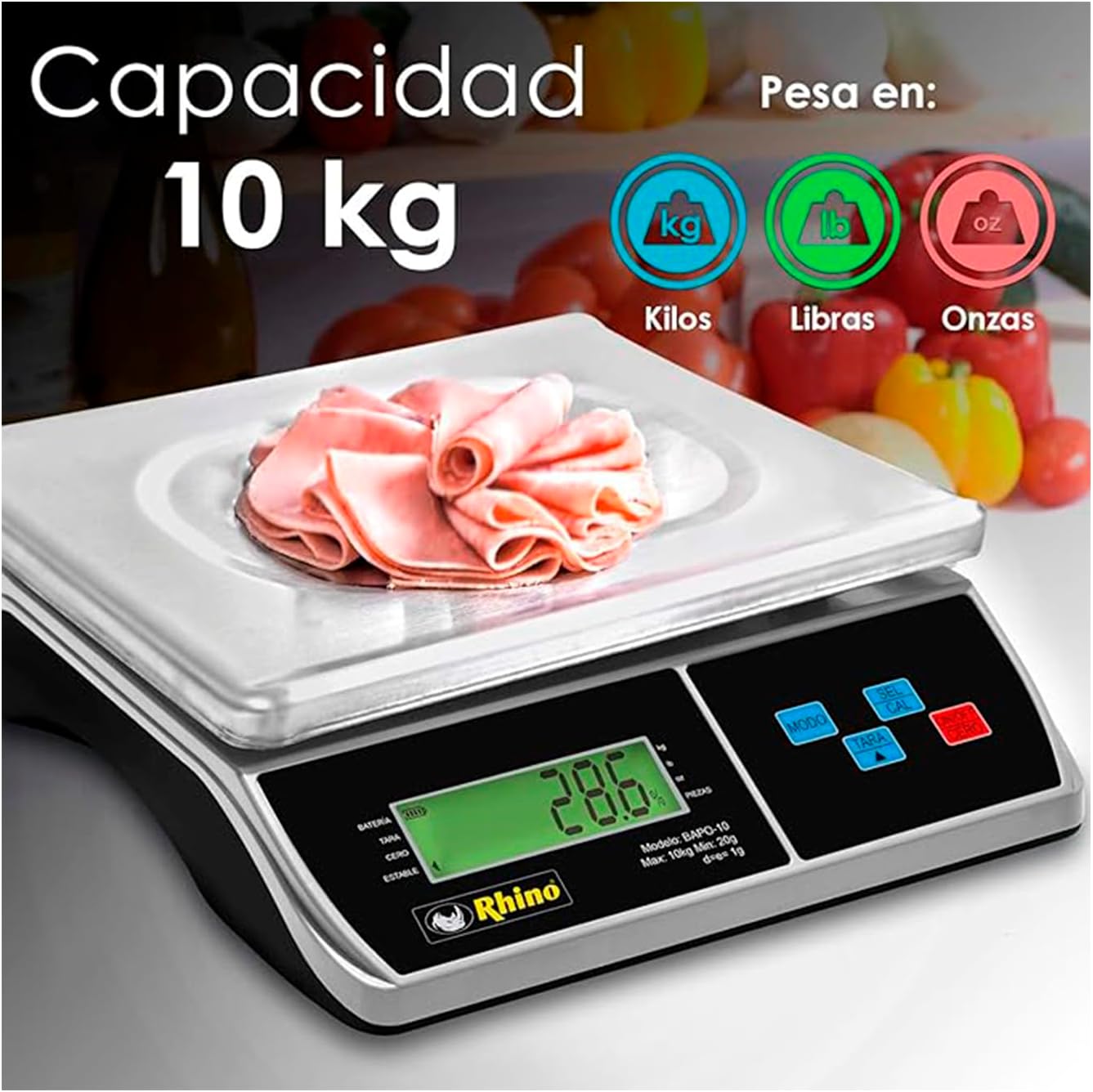
Image: The RHINO BAPO-10 scale highlighting its 10 kg capacity and the ability to weigh in kilograms, pounds, and ounces.
4. TARE Function
The TARE function allows you to subtract the weight of a container, so you only measure the weight of its contents.
- బరువు వేసే వేదికపై ఖాళీ పాత్రను ఉంచండి.
- నొక్కండి తారే బటన్. డిస్ప్లే "0.000" కు రీసెట్ చేయబడుతుంది.
- Add the items to be weighed into the container. The display will show only the net weight of the items.
5. Piece Counting Function
This function allows you to count a large number of identical items by weight.
- Place a known quantity of items (e.g., 10, 20, 50, or 100 pieces) on the platform.
- నొక్కండి SEL/CAL button to enter counting mode.
- ఉపయోగించండి మోడ్ s ని ఎంచుకోవడానికి బటన్ample quantity (e.g., 10 PCS, 20 PCS).
- నొక్కండి SEL/CAL again to confirm. The scale will now display the number of pieces.
- You can now add more items, and the scale will count them.

Image: The RHINO BAPO-10 scale illustrating its piece counting function, useful for inventory or portion control.
6. Portion Calculation Function
This function calculates the percentage of a product placed on the scale relative to a predefined total weight (100%).
- First, define the 100% total weight by placing the full amount of product on the scale and pressing the POR బటన్.
- Remove the full amount.
- Place a portion of the product on the scale. The display will show the weight as a percentage of the predefined total.

Image: The RHINO BAPO-10 scale demonstrating its portion calculation feature, ideal for precise recipe adherence.
నిర్వహణ
1. శుభ్రపరచడం
The stainless steel platform and ABS plastic casing are easy to clean. Use a soft, damp cloth with mild soap to wipe down the surfaces. Do not use abrasive cleaners or immerse the scale in water. Ensure the scale is dry before storage or next use.
2. బ్యాటరీ సంరక్షణ
- డిస్ప్లేపై తక్కువ బ్యాటరీ సూచిక కనిపించినప్పుడు బ్యాటరీని రీఛార్జ్ చేయండి.
- బ్యాటరీ జీవితకాలం పొడిగించడానికి తరచుగా బ్యాటరీని పూర్తిగా ఖాళీ చేయడాన్ని నివారించండి.
- If storing the scale for an extended period, charge the battery periodically (e.g., every 3 months) to prevent deep discharge.
3. నిల్వ
Store the scale in a cool, dry place, away from direct sunlight, extreme temperatures, and high humidity. Protect it from dust and physical impact.
ట్రబుల్షూటింగ్
| సమస్య | సాధ్యమైన కారణం | పరిష్కారం |
|---|---|---|
| స్కేల్ ఆన్ చేయబడదు. | తక్కువ బ్యాటరీ లేదా పవర్ అడాప్టర్ సమస్య. | Charge the battery. Check power adapter connection and outlet. |
| సరికాని రీడింగ్లు. | Scale not level, unstable surface, or overload. | Ensure scale is level using adjustable feet. Place on a stable surface. Do not exceed 10 kg capacity. |
| Display shows "OL" or "E". | ఓవర్లోడ్ లోపం. | Remove excess weight immediately. The scale's maximum capacity is 10 kg. |
| డిస్ప్లే మసకగా లేదా మినుకుమినుకుమంటోంది. | తక్కువ బ్యాటరీ. | బ్యాటరీని రీఛార్జ్ చేయండి. |
| TARE function not working. | Item already on scale before TARE, or scale not stable. | Ensure display shows "0.000" and "STABLE" before pressing TARE. |
స్పెసిఫికేషన్లు
| ఫీచర్ | వివరాలు |
|---|---|
| మోడల్ సంఖ్య | BAPO-10 |
| కెపాసిటీ | 10 Kilograms (10 kg) |
| ఖచ్చితత్వం | 1 gram (1 g) |
| బరువు యూనిట్లు | కేజీ, పౌండ్లు, ఔన్సులు |
| ప్రదర్శన రకం | LCD with integrated illumination |
| బ్యాటరీ లైఫ్ | 300 గంటల వరకు (రీఛార్జ్ చేసుకోవచ్చు) |
| మెటీరియల్ | Stainless Steel (platform), ABS Plastic (casing) |
| రంగు | వెండి |
| కొలతలు (L x W x H) | 39 x 13 x 34 సెం.మీ (సుమారుగా 15.35 x 5.12 x 13.39 అంగుళాలు) |
| ఉత్పత్తి బరువు | 3.19 కిలోలు (సుమారు 7.03 పౌండ్లు) |
| సిఫార్సు ఉపయోగం | Food and recipes |

Image: Diagram illustrating the dimensions of the RHINO BAPO-10 scale, showing a length of 34 cm, a width of 30 cm, and a height of 9.5 cm.
వారంటీ మరియు మద్దతు
For warranty information and customer support, please refer to the documentation included with your purchase or visit the official RHINO webసైట్. ఏవైనా వారంటీ క్లెయిమ్ల కోసం మీ కొనుగోలు రుజువును ఉంచుకోండి.
For further assistance, you may contact RHINO customer service through their official channels. Details are typically available on the product packaging or the brand's official webసైట్.
Ask a question about this manual
Ask about setup, troubleshooting, compatibility, parts, safety, or missing instructions. Manuals+ will review the question and use this page’s manual context to help answer it.