
1. పరిచయం
This manual provides detailed instructions for the installation, operation, maintenance, and troubleshooting of your Gateway SX2865 SFF Desktop Motherboard H61 (Model DB.U7411.001). This motherboard is designed for Small Form Factor (SFF) desktop systems, featuring the Intel H61 Express chipset and supporting LGA 1155/1156 CPUs and DDR3 RAM. Please read this manual thoroughly before proceeding with any installation or configuration to ensure proper functionality and safety.
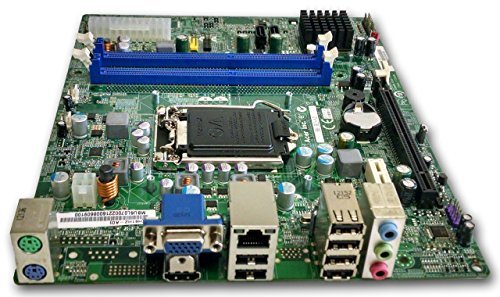
మూర్తి 1: పైగాview of the Gateway SX2865 SFF Desktop Motherboard H61. This image displays the main components and layout of the motherboard, including the CPU socket, RAM slots, and various connectors.
2. భద్రతా సమాచారం
కంప్యూటర్ భాగాలను నిర్వహించేటప్పుడు మరియు ఇన్స్టాల్ చేసేటప్పుడు ఎల్లప్పుడూ ఈ క్రింది భద్రతా జాగ్రత్తలను గమనించండి:
- ఏదైనా భాగాలను ఇన్స్టాల్ చేయడానికి లేదా తీసివేయడానికి ముందు వాల్ అవుట్లెట్ నుండి పవర్ కార్డ్ను డిస్కనెక్ట్ చేయండి.
- సున్నితమైన భాగాలకు ఎలక్ట్రోస్టాటిక్ డిశ్చార్జ్ (ESD) దెబ్బతినకుండా నిరోధించడానికి యాంటీ-స్టాటిక్ రిస్ట్ స్ట్రాప్ ధరించండి.
- సున్నితమైన భాగాలు లేదా సర్క్యూట్లను తాకకుండా ఉండటానికి మదర్బోర్డును దాని అంచుల ద్వారా పట్టుకోండి.
- కంప్యూటర్ కేసు వేడెక్కకుండా నిరోధించడానికి లోపల సరైన వెంటిలేషన్ ఉండేలా చూసుకోండి.
- మదర్బోర్డును తేమ లేదా విపరీతమైన ఉష్ణోగ్రతలకు గురిచేయవద్దు.
- ఏదైనా ఇన్స్టాలేషన్ దశ గురించి మీకు ఖచ్చితంగా తెలియకపోతే, అర్హత కలిగిన సాంకేతిక నిపుణుడిని సంప్రదించండి.
3. సెటప్ మరియు ఇన్స్టాలేషన్
Follow these steps to properly install the Gateway SX2865 SFF Desktop Motherboard into your system:
3.1. చట్రం సిద్ధం చేయడం
- Open your computer chassis and ensure it is clean and free of dust.
- Install the I/O shield provided with your chassis or motherboard into the rear panel opening.
- Verify that the standoffs in the chassis align with the mounting holes on the motherboard. Adjust if necessary.
3.2. CPU సంస్థాపన
- Locate the CPU socket (LGA 1155/1156) on the motherboard.
- లోడ్ లివర్ను సున్నితంగా ఎత్తి, CPU సాకెట్ కవర్ను తెరవండి.
- Carefully align the CPU with the socket, matching the golden triangle on the CPU with the triangle mark on the socket. Do not force the CPU into the socket.
- సాకెట్ కవర్ను మూసివేసి, లోడ్ లివర్ను అది లాక్ అయ్యే వరకు నొక్కండి.
- Apply a thin layer of thermal paste to the CPU surface (if not pre-applied on the cooler).
- Install the CPU cooler according to its manufacturer's instructions, ensuring it is securely fastened.
3.3. RAM సంస్థాపన
- మదర్బోర్డుపై DDR3 DIMM స్లాట్లను గుర్తించండి.
- DIMM స్లాట్ యొక్క రెండు చివర్లలో క్లిప్లను తెరవండి.
- DIMM స్లాట్లోని కీతో RAM మాడ్యూల్లోని నాచ్ను సమలేఖనం చేయండి.
- క్లిప్లు స్థానంలోకి వచ్చే వరకు RAM మాడ్యూల్ యొక్క రెండు చివర్లను గట్టిగా నొక్కండి.
3.4. మదర్బోర్డ్ మౌంటింగ్
- Carefully place the motherboard into the chassis, aligning the mounting holes with the standoffs.
- మదర్బోర్డును స్క్రూలతో భద్రపరచండి, అది ఎక్కువగా బిగించబడకుండా చూసుకోండి.
3.5. పెరిఫెరల్స్ మరియు పవర్ కనెక్ట్ చేయడం
- మీ పవర్ సప్లై నుండి 24-పిన్ ATX పవర్ కనెక్టర్ మరియు 4-పిన్ CPU పవర్ కనెక్టర్ను మదర్బోర్డ్కు కనెక్ట్ చేయండి.
- Connect SATA data cables from your storage devices (HDD/SSD) to the SATA ports on the motherboard.
- Connect front panel connectors (power button, reset button, USB, audio) to their respective headers on the motherboard. Refer to the motherboard's silkscreen labels for correct orientation.
- ఏవైనా ఎక్స్పాన్షన్ కార్డ్లను (ఉదా. గ్రాఫిక్స్ కార్డ్) తగిన PCIe స్లాట్లలో ఇన్స్టాల్ చేసి వాటిని భద్రపరచండి.
- Connect all necessary cables to your power supply.
4. Operating and Configuration
4.1. ప్రారంభ బూట్-అప్
- After all components are installed and connected, close the chassis.
- మీ మానిటర్, కీబోర్డ్ మరియు మౌస్ను కనెక్ట్ చేయండి.
- పవర్ కార్డ్ను విద్యుత్ సరఫరా మరియు వాల్ అవుట్లెట్కు కనెక్ట్ చేయండి.
- మీ కంప్యూటర్లోని పవర్ బటన్ను నొక్కండి.
4.2. BIOS/UEFI సెటప్
The BIOS (Basic Input/Output System) or UEFI (Unified Extensible Firmware Interface) is firmware that initializes hardware during the booting process. To enter the BIOS/UEFI setup utility:
- During the initial boot-up sequence, repeatedly press the designated key (commonly డెల్, F2, లేదా F10). The exact key may vary; check the on-screen prompts.
- Within the BIOS/UEFI, you can configure settings such as:
- సిస్టమ్ తేదీ మరియు సమయం
- Boot Order (to install an operating system from a USB drive or DVD)
- SATA Mode (AHCI, IDE)
- CPU and Memory settings (advanced users)
- Save changes and exit the BIOS/UEFI to continue booting.
4.3. ఆపరేటింగ్ సిస్టమ్ మరియు డ్రైవర్ ఇన్స్టాలేషన్
After configuring the BIOS/UEFI, proceed with installing your preferred operating system (e.g., Windows, Linux). Once the OS is installed, install the necessary drivers for the motherboard's components (chipset, audio, LAN, etc.). These drivers are typically available on the manufacturer's website (Acer/Gateway) or can be found through the operating system's update features.
5. నిర్వహణ
Regular maintenance helps ensure the longevity and stable performance of your motherboard:
- దుమ్ము తొలగింపు: Periodically clean the inside of your computer case, including the motherboard, CPU cooler, and fan vents, using compressed air. Ensure the system is powered off and unplugged before cleaning.
- BIOS నవీకరణలు: తయారీదారుని తనిఖీ చేయండి website (Acer/Gateway) for BIOS/UEFI updates. Updates can improve stability, add support for new hardware, or fix bugs. Follow the update instructions carefully to avoid damaging the motherboard.
- డ్రైవర్ నవీకరణలు: Keep your system drivers updated to ensure optimal performance and compatibility.
- భౌతిక తనిఖీ: Occasionally inspect the motherboard for any signs of damage, loose connections, or bulging capacitors.
6. ట్రబుల్షూటింగ్
మీ మదర్బోర్డుతో మీకు సమస్యలు ఎదురైతే, ఈ క్రింది సాధారణ ట్రబుల్షూటింగ్ దశలను చూడండి:
- శక్తి లేదు:
- Ensure the power supply is connected correctly to the motherboard (24-pin ATX and 4-pin CPU).
- Check that the power supply switch is in the 'ON' position.
- Verify the power cord is securely plugged into both the power supply and the wall outlet.
- Confirm the front panel power button connector is correctly attached to the motherboard.
- ప్రదర్శన లేదు:
- Ensure the monitor is powered on and connected to the correct video output (either integrated graphics or a dedicated graphics card).
- Reseat the RAM modules. Try booting with only one RAM module installed.
- గ్రాఫిక్స్ కార్డును తిరిగి అమర్చండి (వర్తిస్తే).
- Check if the CPU cooler is properly installed and the CPU power connector is secure.
- System Fails to Boot / POST Errors:
- Listen for beep codes from the motherboard's speaker (if installed). Consult the motherboard's documentation for beep code meanings.
- Clear the CMOS (Complementary Metal-Oxide-Semiconductor) by removing the CMOS battery for a few minutes or using the clear CMOS jumper (refer to motherboard layout).
- Ensure all essential components (CPU, RAM, GPU) are correctly installed.
- ఆపరేటింగ్ సిస్టమ్ సమస్యలు:
- Verify that all necessary drivers are installed and up to date.
- Check SATA cable connections for storage devices.
- Run diagnostic tools for hard drives/SSDs and RAM.
7. స్పెసిఫికేషన్లు
Key technical specifications for the Gateway SX2865 SFF Desktop Motherboard H61 (Model DB.U7411.001):
| ఫీచర్ | వివరాలు |
|---|---|
| బ్రాండ్ | గేట్వే |
| మోడల్ పేరు | SX2865 |
| అంశం మోడల్ సంఖ్య | DB.U7411.001 |
| తయారీదారు | ఏసర్ |
| చిప్సెట్ రకం | ఇంటెల్ H61 ఎక్స్ప్రెస్ |
| CPU సాకెట్ | LGA 1155 or LGA 1156 |
| అనుకూల ప్రాసెసర్లు | Intel Xeon (and other compatible LGA 1155/1156 CPUs) |
| RAM మెమరీ టెక్నాలజీ | DDR3 |
| మెమరీ క్లాక్ స్పీడ్ | 2133 MHz (Max supported, actual speed depends on CPU and RAM) |
| మెమరీ స్టోరేజ్ కెపాసిటీ | 16 GB (Maximum supported) |
| అనుకూల పరికరాలు | వ్యక్తిగత కంప్యూటర్ |
| వేదిక | Linux (and other compatible operating systems) |
| ఫారమ్ ఫ్యాక్టర్ | uATX (Micro-ATX) |
8. వారంటీ మరియు మద్దతు
For warranty information and technical support regarding your Gateway SX2865 SFF Desktop Motherboard H61 (Model DB.U7411.001), please refer to the documentation provided with your original system or contact the manufacturer directly.
- తయారీదారు: Acer (as per product specifications)
- బ్రాండ్: గేట్వే
- అధికారిని సందర్శించండి గేట్వే మద్దతు webసైట్ or ఏసర్ మద్దతు webసైట్ for drivers, FAQs, and contact information.
- వారంటీ క్లెయిమ్ల కోసం మీ కొనుగోలు రుజువును ఉంచండి.