
1. పరిచయం
This manual provides detailed instructions for the setup, operation, and maintenance of your Excelvan AOK-5019TC Wireless Weather Station. Please read this manual thoroughly before using the device to ensure proper function and longevity.
ప్యాకేజీ విషయాలు
- 1 x Excelvan AOK-5019TC Weather Station Main Unit
- 1 x Wireless Remote Sensor (433MHz)
- 1 x యూజర్ మాన్యువల్ (ఈ పత్రం)

Image 1.1: Contents of the Excelvan AOK-5019TC package, showing the main weather station unit, the wireless remote sensor, and the instruction manual.
2 కీ ఫీచర్లు
- పెద్ద LED డిస్ప్లే: Easy-to-read display for all weather data.
- Radio-Controlled Clock (DCF77): Automatic time synchronization for precise timekeeping, including automatic Summer/Winter time adjustment.
- సమయ ప్రదర్శన: 12/24 hour format with adjustable 24 time zones (+/-12).
- క్యాలెండర్: Displays Day, Month, and Weekday (up to 2099). Weekday display in 7 languages: German, English, Italian, French, Dutch, Spanish, and Danish.
- Dual Alarm with Snooze: Two independent alarms with a 5-minute snooze function.
- వాతావరణ సూచన: 5 weather forecast icons (sunny, partially sunny, cloudy, rainy, stormy) with customizable symbols.
- బారోమెట్రిక్ ప్రెజర్ చరిత్ర: Displays 12-hour history of atmospheric pressure in hPa/inHg. Altitude setting for accurate pressure calculation.
- ఇండోర్/బహిరంగ ఉష్ణోగ్రత & తేమ: Displays current, maximum, and minimum values with trend indicators.
- ఉష్ణోగ్రత పరిధి: Indoor: 0℃ to +50℃ (32℉ to 122℉); Outdoor: -20℃ to +60℃ (-4℉ to 140℉). Switchable between ℃ and ℉.
- ఉష్ణోగ్రత హెచ్చరిక: Programmable alerts for temperature thresholds.
- చంద్ర దశ: Displays current moon phase.
- Sunrise/Sunset & Moonrise/Moonset: Provides times for 150 pre-programmed cities.
- తక్కువ బ్యాటరీ సూచిక: Alerts when batteries need replacement.
- Blue LED Backlight: For improved visibility in low light conditions.
- బహుళ సెన్సార్లు: Supports up to 3 outdoor sensors (one included).
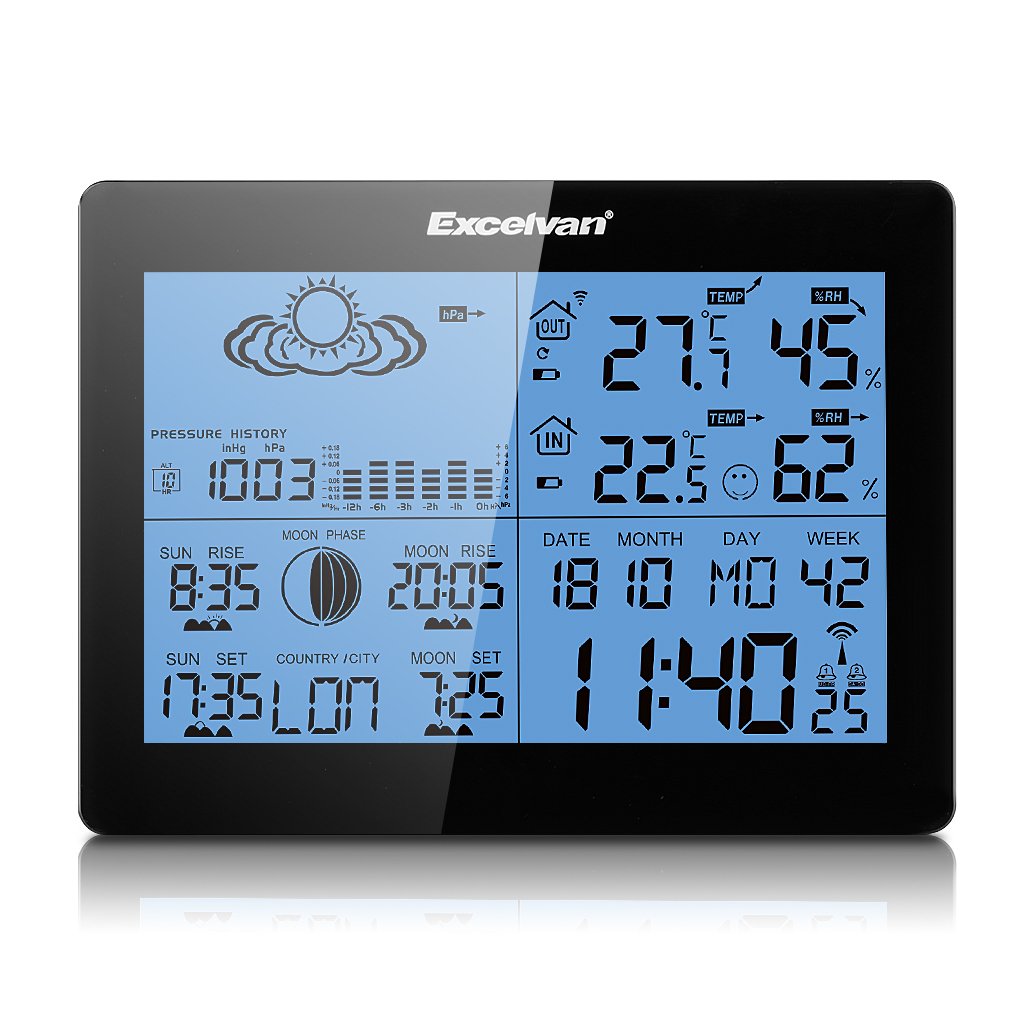
Image 2.1: The Excelvan AOK-5019TC Weather Station main unit displaying various weather parameters and time, alongside its wireless remote sensor.
3. సెటప్
3.1 బ్యాటరీ ఇన్స్టాలేషన్
- ప్రధాన యూనిట్: Open the battery compartment cover on the back of the main unit. Insert 2 x AA 1.5V batteries (not included), ensuring correct polarity (+/-). Close the cover.
- రిమోట్ సెన్సార్: Open the battery compartment cover on the back of the remote sensor. Insert 2 x AAA 1.5V batteries (not included), ensuring correct polarity (+/-). Close the cover.

చిత్రం 3.1: వెనుక view of the weather station main unit with the battery compartment open, showing where to insert 2 x AA batteries.
3.2 సెన్సార్ ప్లేస్మెంట్
Place the wireless remote sensor outdoors in a shaded, dry location, protected from direct sunlight and rain. Ensure it is within 50 meters (164 feet) of the main unit for optimal signal reception. Avoid placing it near large metal objects or electrical appliances that may interfere with the signal.
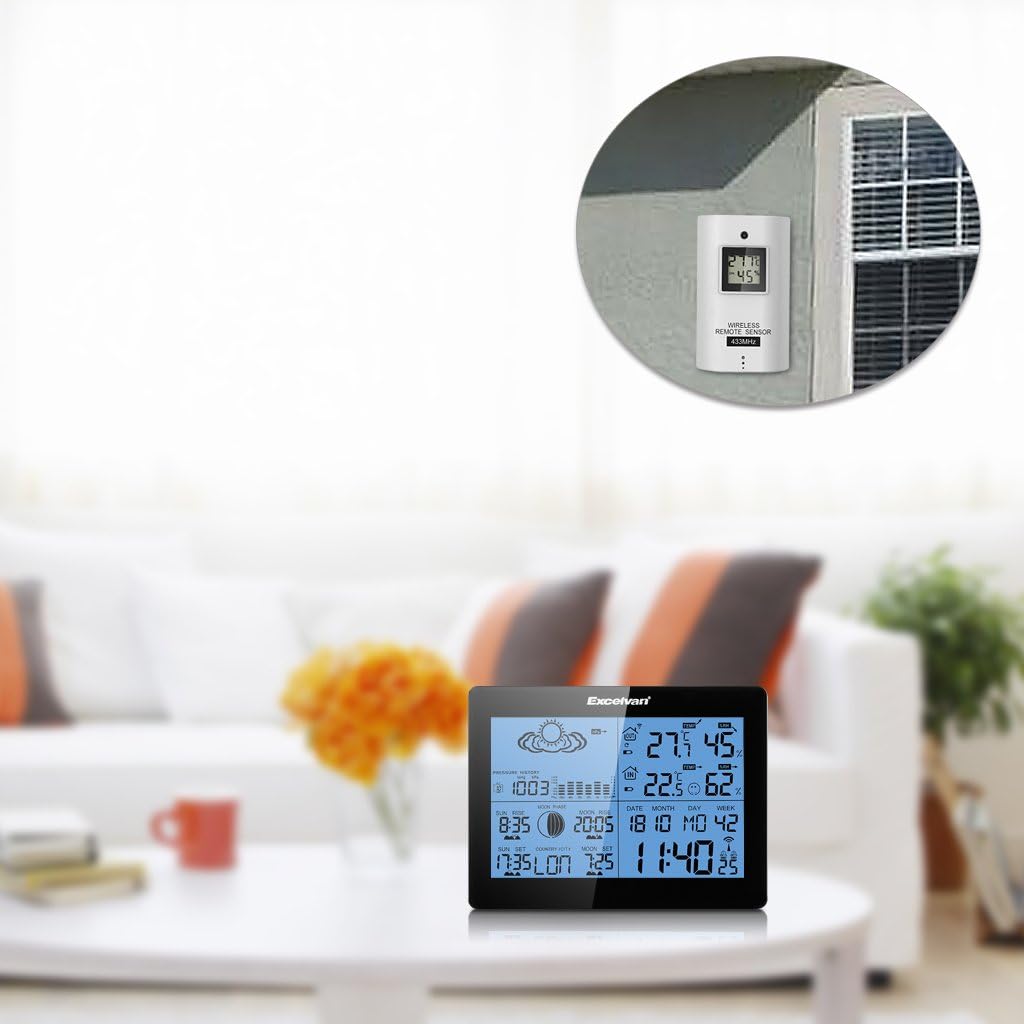
Image 3.2: The weather station main unit displayed indoors, with the remote sensor shown mounted on an exterior wall, illustrating typical placement.
3.3 ప్రారంభ సమకాలీకరణ
After inserting batteries, the main unit will automatically search for the remote sensor signal and the DCF77 radio signal for time synchronization. This process may take several minutes. Ensure both units are close to each other during initial setup. Once connected, the outdoor temperature and humidity will appear on the main unit, and the time will be set automatically.

Image 3.3: The wireless remote sensor, which transmits outdoor temperature and humidity data to the main weather station unit.
4. ఆపరేటింగ్ సూచనలు
4.1 బటన్ విధులు
The main unit features six control buttons on the back and one on the top:
- DIRECTIONS: Press to cycle through display modes (e.g., time, alarm). Press and hold to enter setting mode.
- +: In setting mode, increases values. In normal mode, switches between ℃/℉ or 12/24 hour format.
- -: In setting mode, decreases values. In normal mode, views min/max temperature/humidity.
- చరిత్ర: Displays the 12-hour barometric pressure history.
- ఛానల్: Switches between outdoor sensor channels (if multiple sensors are used).
- స్నూజ్ / లైట్: On the top of the unit. Press to activate backlight. When alarm sounds, press to activate snooze function.

Image 4.1: The back of the weather station, highlighting the MODE, +, -, HISTORY, and CHANNEL buttons.

Image 4.2: A close-up of the weather station's top, showing the SNOOZE/LIGHT button.
4.2 Time and Date Settings
The weather station automatically synchronizes time via the DCF77 radio signal. If manual adjustment is needed:
- నొక్కండి మరియు పట్టుకోండి మోడ్ టైమ్ డిస్ప్లే మెరిసే వరకు బటన్.
- ఉపయోగించండి + or - గంటను సర్దుబాటు చేయడానికి బటన్లను నొక్కి, ఆపై నొక్కండి మోడ్ నిర్ధారించి నిమిషాలకు తరలించడానికి.
- Repeat for minutes, year, month, day, and language for the weekday display.
- నొక్కండి మోడ్ సెట్టింగ్ మోడ్ నుండి నిష్క్రమించడానికి.
4.3 అలారం సెట్టింగ్లు
- నొక్కండి మోడ్ button repeatedly until "AL1" or "AL2" is displayed.
- నొక్కండి మరియు పట్టుకోండి మోడ్ అలారం గంట మోగే వరకు బటన్.
- ఉపయోగించండి + or - కావలసిన అలారం గంటను సెట్ చేయడానికి బటన్లను నొక్కి, ఆపై నొక్కండి మోడ్.
- నిమిషాలు పునరావృతం చేయండి.
- నొక్కండి మోడ్ to activate/deactivate the alarm and exit setting mode.
4.4 Weather Forecast Interpretation
The weather station provides a forecast based on barometric pressure changes. The icons represent:
- సన్నీ
- Partially Sunny
- మేఘావృతం
- వర్షపు
- తుఫాను
Note that weather forecasts are predictions and may not always be 100% accurate, especially for localized conditions.

చిత్రం 4.3: వివరణాత్మక view of the weather station's display, showing weather forecast icons, indoor/outdoor temperature and humidity, time, date, and moon phase.
5. నిర్వహణ
5.1 బ్యాటరీ భర్తీ
When the low battery indicator appears on the display, replace the batteries in the main unit or remote sensor as soon as possible. Always replace all batteries in a unit at the same time with new ones of the same type. Do not mix old and new batteries.
5.2 శుభ్రపరచడం
Wipe the weather station and sensor with a soft, damp వస్త్రం. రాపిడి క్లీనర్లు లేదా ద్రావకాలను ఉపయోగించవద్దు, ఎందుకంటే ఇవి డిస్ప్లే లేదా సిని దెబ్బతీస్తాయి.asing. Ensure no moisture enters the battery compartments or other openings.
5.3 పర్యావరణ పరిగణనలు
For optimal performance and longevity, avoid exposing the main unit to extreme temperatures, direct sunlight, or high humidity. The remote sensor is designed for outdoor use but should be protected from direct rain and snow to prevent water ingress and damage.
6. ట్రబుల్షూటింగ్
| సమస్య | సాధ్యమైన కారణం | పరిష్కారం |
|---|---|---|
| బయటి ఉష్ణోగ్రత/తేమ రీడింగ్ లేదు | సెన్సార్ పరిధి దాటిపోయింది, తక్కువ సెన్సార్ బ్యాటరీ, జోక్యం. | Move sensor closer to main unit. Replace sensor batteries. Avoid placing near electronic devices. Press CHANNEL button to re-sync. |
| Incorrect time display / Time not synchronizing | Weak DCF77 signal, interference, incorrect time zone setting. | Move main unit to a location with better signal reception (e.g., near a window). Ensure correct time zone is set manually. Allow up to 24 hours for initial synchronization. |
| సరికాని వాతావరణ సూచన | Forecasts are based on barometric pressure trends, which can be localized and not always precise. Altitude setting may be incorrect. | Understand that forecasts are indicative. Ensure the altitude setting is correct for your location to improve barometric pressure accuracy. |
| ప్రదర్శన మసకగా లేదా ఖాళీగా ఉంది | Low main unit battery. | Replace main unit batteries. |
| బటన్లు స్పందించడం లేదు | తాత్కాలిక సాఫ్ట్వేర్ లోపం. | యూనిట్ను రీసెట్ చేయడానికి బ్యాటరీలను తీసివేసి తిరిగి చొప్పించండి. |
7. స్పెసిఫికేషన్లు
- బ్రాండ్: EXCELVAN
- మోడల్: AOK-5019TC
- పవర్ సోర్స్ (ప్రధాన యూనిట్): 2 x AA 1.5V బ్యాటరీలు (చేర్చబడలేదు)
- పవర్ సోర్స్ (సెన్సార్): 2 x AAA 1.5V బ్యాటరీలు (చేర్చబడలేదు)
- ఇండోర్ ఉష్ణోగ్రత పరిధి: 0℃ నుండి +50℃ (32℉ నుండి 122℉)
- బాహ్య ఉష్ణోగ్రత పరిధి: -20℃ నుండి +60℃ (-4℉ నుండి 140℉)
- తేమ పరిధి: 20% నుండి 95% RH
- వైర్లెస్ ఫ్రీక్వెన్సీ: 433MHz
- వైర్లెస్ పరిధి: బహిరంగ ప్రదేశంలో 50 మీటర్లు (164 అడుగులు) వరకు
- ప్రదర్శన రకం: LCD, LED backlight
- బరువు: 291 Grams (main unit)
- రంగు: నలుపు
- GTIN: 723120327726
- ASIN: B017YWQ8FC
8. వారంటీ మరియు మద్దతు
వారంటీ సమాచారం లేదా సాంకేతిక మద్దతు కోసం, దయచేసి కొనుగోలు సమయంలో అందించిన డాక్యుమెంటేషన్ను చూడండి లేదా మీ రిటైలర్ను సంప్రదించండి. కొనుగోలు రుజువుగా మీ కొనుగోలు రసీదును ఉంచండి.