
1. ముఖ్యమైన భద్రతా సమాచారం
- వెంటిలేషన్: Ensure adequate ventilation around the projector. Do not block ventilation openings. Overheating can cause damage.
- విద్యుత్ సరఫరా: Use only the specified power adapter. Disconnect power during thunderstorms or when unused for long periods.
- తేమ: Do not expose the projector to rain, moisture, or liquids.
- శుభ్రపరచడం: Clean the projector with a soft, dry cloth. Avoid abrasive cleaners.
- లెన్స్ కేర్: Handle the lens with care. Clean gently with a lens cleaning cloth.
- ప్లేస్మెంట్: Place the projector on a stable, level surface. Avoid direct sunlight or heat sources.
- కంటి రక్షణ: l ఉన్నప్పుడు ప్రొజెక్టర్ లెన్స్లోకి నేరుగా చూడకండిamp ఆన్లో ఉంది.
2. ఉత్పత్తి ముగిసిందిview
2.1. Projector Dimensions
The Excelvan EHD02 projector has compact dimensions, making it portable. The approximate dimensions are 152mm (width) x 220mm (depth) x 76mm (height).
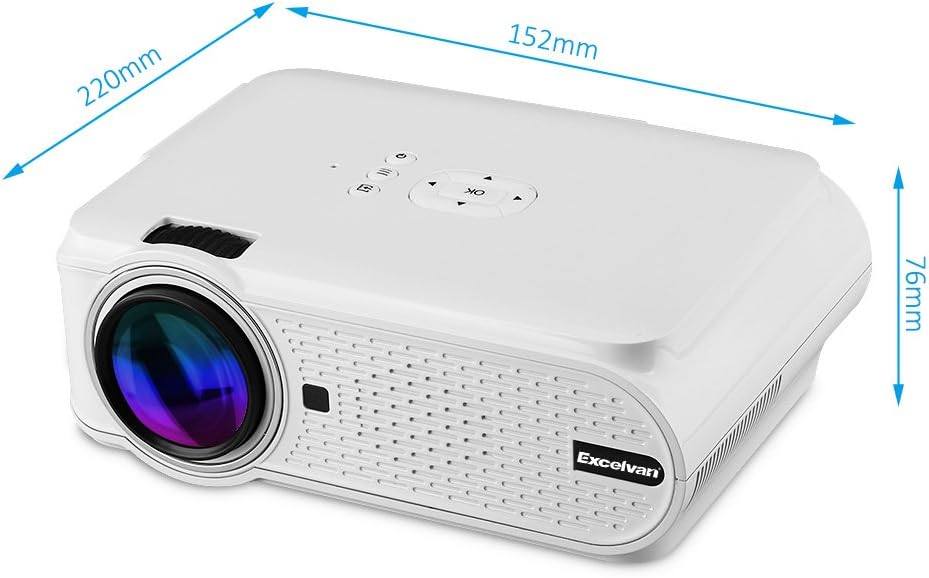
Figure 1: Excelvan EHD02 Mini Projector with labeled dimensions.
2.2. Projector Components and Interfaces
Familiarize yourself with the various ports and controls on your projector for proper setup and operation.

Figure 2: Top controls and rear panel interfaces of the Excelvan EHD02 Projector.
- Top Controls: OK button, Up/Down/Left/Right navigation, Back, Menu, Power.
- Rear Interfaces: VGA port, USB port, Power plug, AV input, 3.5mm Audio port, IR receiver, HDMI port, Keystone adjustment, SD Card slot, TV antenna input.
3. సెటప్
3.1. ప్లేస్మెంట్
Position the projector on a flat, stable surface. The projection distance determines the image size. For optimal viewing, ensure the projector is centered with the screen or projection surface.
- ప్రొజెక్షన్ దూరం: 1.2 to 3.8 meters (approximately 3.9 to 12.5 feet).
- చిత్ర పరిమాణం: 37 to 130 inches (diagonal).
- ప్రొజెక్షన్ పద్ధతులు: ముందు, వెనుక మరియు సీలింగ్ ప్రొజెక్షన్కు మద్దతు ఇస్తుంది.
3.2. పవర్ కనెక్షన్
- ప్రొజెక్టర్ యొక్క పవర్ ఇన్పుట్కు పవర్ కార్డ్ను కనెక్ట్ చేయండి.
- పవర్ కార్డ్ యొక్క మరొక చివరను తగిన ఎలక్ట్రికల్ అవుట్లెట్లోకి ప్లగ్ చేయండి.
- పవర్ ఇండికేటర్ లైట్ ప్రకాశిస్తుంది.

Figure 3: Power cord and remote control for the projector.
3.3. ఇన్పుట్ సోర్స్లను కనెక్ట్ చేయడం
ప్రొజెక్టర్ బహుళ ఇన్పుట్ మూలాలకు మద్దతు ఇస్తుంది:
- HDMI: Connect to devices like laptops, Blu-ray players, or gaming consoles using an HDMI cable.
- USB: మీడియాను ప్లే చేయడానికి USB ఫ్లాష్ డ్రైవ్ను చొప్పించండి. fileనేరుగా లు.
- SD కార్డ్: Insert an SD card to play media files.
- యొక్క: Use the provided AV cable to connect to older devices with composite video output.
- వీజీఏ: Connect to computers using a VGA cable.
- TV: Connect a TV antenna for analog TV reception.
- 3.5 మిమీ ఆడియో: బాహ్య స్పీకర్లు లేదా హెడ్ఫోన్లను కనెక్ట్ చేయండి.
3.4. ఫోకస్ మరియు కీస్టోన్ కరెక్షన్
- ఫోకస్ సర్దుబాటు: Rotate the focus ring on the projector lens until the image appears sharp and clear.
- కీస్టోన్ దిద్దుబాటు: If the projected image appears trapezoidal (wider at the top or bottom), use the keystone adjustment dial (typically on the side or rear) to correct the image shape. The projector supports ±12° vertical manual keystone correction.
4. ఆపరేటింగ్ సూచనలు
4.1. పవర్ చేయడం ఆన్/ఆఫ్
- పవర్ ఆన్: Press the Power button on the projector or the remote control.
- పవర్ ఆఫ్: Press the Power button again. The projector will go into standby mode.
4.2. Menu Navigation and Input Selection
- Use the navigation buttons (Up, Down, Left, Right) and the OK button on the projector or remote to navigate through the on-screen menu.
- Press the "Input" or "Source" button (if available on remote, or navigate through menu) to select your desired input source (HDMI, USB, SD, AV, VGA, TV).
4.3. స్మార్ట్ఫోన్ కనెక్షన్
Connecting smartphones requires specific cables:
- iPhone/iPad: Requires an original Apple composite AV cable.
- Android ఫోన్: Requires an MHL cable, and the phone must support MHL (Mobile High-Definition Link).
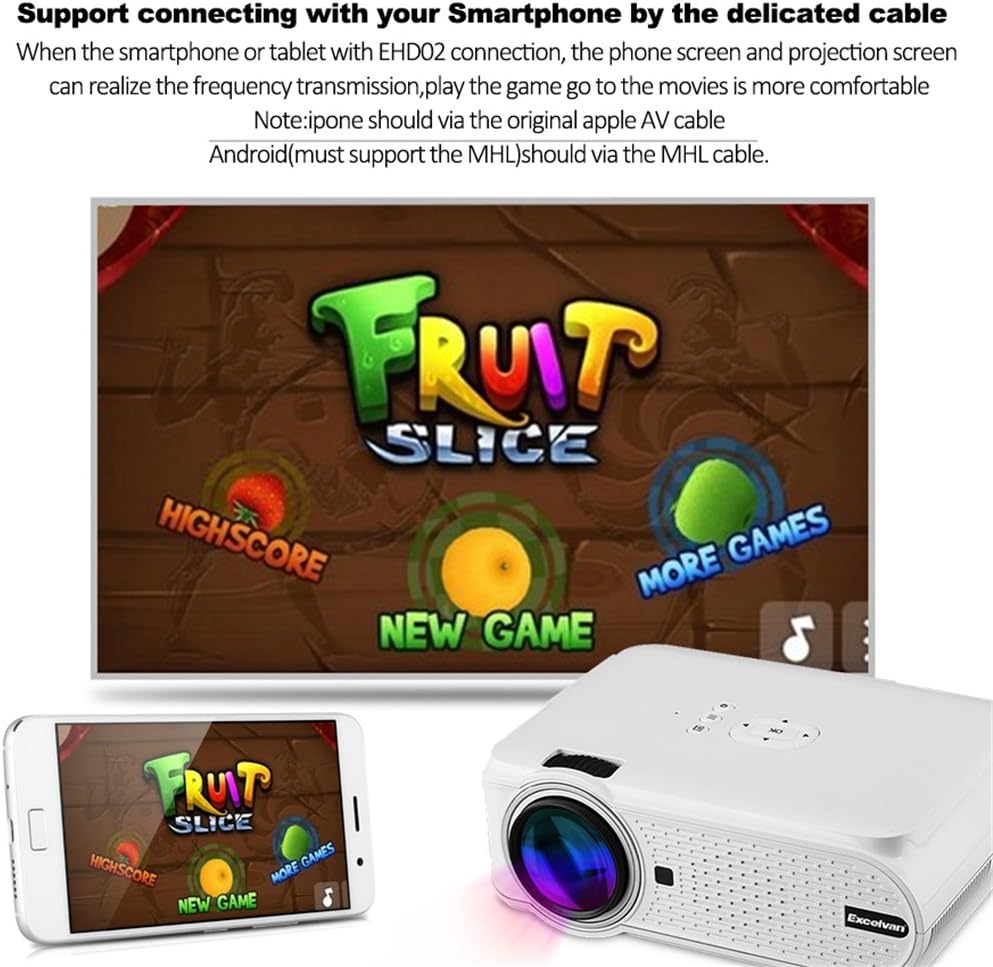
చిత్రం 4: ఉదాample of smartphone connection for content projection.
4.4. 3D ప్లేబ్యాక్
The Excelvan EHD02 projector supports red-blue 3D content only. To view 3D కంటెంట్:
- Obtain red-blue 3D source content.
- Use red-blue 3D glasses for viewing.
5. నిర్వహణ
- లెన్స్ క్లీనింగ్: Use a soft, lint-free cloth specifically designed for optical lenses to gently wipe the projector lens. Avoid touching the lens with bare hands.
- దుమ్ము తొలగింపు: Periodically clean the projector's exterior with a soft, dry cloth. Ensure ventilation openings are free from dust and obstructions to prevent overheating.
- నిల్వ: ఎక్కువసేపు ఉపయోగంలో లేనప్పుడు, ప్రొజెక్టర్ను చల్లని, పొడి ప్రదేశంలో, దుమ్ము నుండి రక్షించబడిన ప్రదేశంలో నిల్వ చేయండి.
6. ట్రబుల్షూటింగ్
| సమస్య | సాధ్యమైన కారణం | పరిష్కారం |
|---|---|---|
| చిత్రం ఏదీ ప్రొజెక్ట్ చేయబడలేదు |
|
|
| చిత్రం అస్పష్టంగా ఉంది |
|
|
| చిత్రం ట్రాపెజోయిడల్ గా ఉంది |
|
|
| శబ్దం లేదు |
|
|
| రిమోట్ కంట్రోల్ పనిచేయడం లేదు |
|
|
| Projector is noisy or hot |
|
|
7. స్పెసిఫికేషన్లు
| ఫీచర్ | వివరాలు |
|---|---|
| మోడల్ | Excelvan EHD02 |
| ప్రదర్శన రకం | TFT- Single LCD Panel + LED Technology |
| స్థానిక రిజల్యూషన్ | 800 x 480 పిక్సెల్లు |
| మద్దతు ఉన్న రిజల్యూషన్ | Up to 1080p (1920 x 1080) |
| ప్రకాశం | 1000 ల్యూమెన్స్ |
| ప్రొజెక్షన్ లెన్స్ | F=126mm, Manual Focus |
| కాంట్రాస్ట్ రేషియో | 1000:1 |
| కారక నిష్పత్తి | 4:3 / 16:9 |
| అంతర్నిర్మిత స్పీకర్ | 4Ω 2W |
| LED L.amp జీవితం | 20,000 గంటలు |
| ప్రదర్శించదగిన రంగులు | 1.67 Million Colors (Full Color) |
| మెనూ భాషలు | English, Spanish, French, German, Portuguese, Italian, Chinese, etc. |
| ప్రొజెక్షన్ పద్ధతులు | ముందు, వెనుక, సీలింగ్ |
| ఇంటర్ఫేస్లు | 1x VGA, 1x USB, 1x SD, 1x HDMI, 1x 3.5mm Audio, 1x AV, 1x TV |
| చిత్ర పరిమాణం (వికర్ణం) | 37 - 130 అంగుళాలు |
| ప్రొజెక్షన్ దూరం | 1.2 - 3.8 మీటర్లు |
| స్క్రీన్ సర్దుబాటు | Horizontal and Vertical Flip; Image Zoom |
| కీస్టోన్ దిద్దుబాటు | ±12° Vertical (Manual) |
| కొలతలు (L x W x H) | 220mm x 152mm x 76mm |
| బరువు | 1.44 కిలోలు |
8. వారంటీ మరియు మద్దతు
The Excelvan EHD02 Mini Portable LED Projector comes with a 2 సంవత్సరాల వారంటీ కొనుగోలు చేసిన తేదీ నుండి.
For technical support, warranty claims, or further assistance, please contact your retailer or the Excelvan customer service department. Please have your model number (EHD02) and purchase information ready when contacting support.