
1. పరిచయం
ధన్యవాదాలు, ధన్యవాదాలు.asing the ipega PG-9057 Wireless Game Controller. This manual provides detailed instructions for setting up, operating, and maintaining your device. Please read this manual carefully before use to ensure optimal performance and longevity of your controller.
2. ఉత్పత్తి లక్షణాలు
- వైర్లెస్ కనెక్టివిటీ: Enjoy gaming freedom with wireless connection technology.
- బహుళ-ప్లాట్ఫారమ్ అనుకూలత: Supports Android devices (smartphones, tablets, TV boxes) and Windows PCs.
- High Durability Buttons: Equipped with high-quality, durable buttons for extended gaming sessions.
- ఖచ్చితత్వ నియంత్రణలు: Features a D-pad with pressure sensitivity and a 360-degree joystick with no dead zone for accurate input.
- ఎర్గోనామిక్ డిజైన్: Designed for comfortable grip and prolonged use.
- ఇంటిగ్రేటెడ్ ఫోన్ హోల్డర్: Conveniently mount your smartphone for mobile gaming.
3. ప్యాకేజీ విషయాలు
అన్బాక్సింగ్ తర్వాత ప్యాకేజీ కంటెంట్లను తనిఖీ చేయండి:
- ipega PG-9057 వైర్లెస్ గేమ్ కంట్రోలర్
- USB ఛార్జింగ్ కేబుల్
- User Manual (Japanese version included)
4. సెటప్
4.1. కంట్రోలర్ను ఛార్జ్ చేయడం
Before first use, fully charge the controller using the provided USB cable. Connect the small end of the USB cable to the controller's charging port and the other end to a USB power source (e.g., PC, USB wall adapter).
4.2. Device Compatibility Overview
The ipega PG-9057 controller supports various devices and connection methods as shown below:

This image displays the ipega PG-9057 Wireless Game Controller, highlighting its compatibility with various devices including smartphones, tablets, personal computers, and VR headsets.
4.3. Connection Methods and System Environment
The controller offers multiple connection options depending on your device and operating system. Refer to the table below for detailed compatibility.

This table outlines the system requirements and connection methods for the ipega PG-9057 controller, detailing compatibility with Android smartphones, tablets, and TV boxes via Bluetooth 4.0 or USB, and PCs via USB.
4.3.1. Bluetooth Connection (Android Devices)
- కంట్రోలర్ ఛార్జ్ చేయబడిందని నిర్ధారించుకోండి.
- నొక్కండి మరియు పట్టుకోండి హోమ్ బటన్ మరియు A button simultaneously until the indicator light flashes rapidly. This puts the controller into pairing mode.
- మీ Android పరికరంలో, బ్లూటూత్ సెట్టింగ్లకు వెళ్లి బ్లూటూత్ను ఆన్ చేయండి.
- కోసం వెతకండి available devices and select "ipega PG-9057" (or similar name) from the list.
- జత చేసిన తర్వాత, కంట్రోలర్పై ఉన్న ఇండికేటర్ లైట్ ఘనంగా మారుతుంది.
4.3.2. USB Wired Connection (Windows PC / Android Devices)
- Connect the controller to your Windows PC or Android device using the USB cable.
- The device should automatically recognize the controller. No special drivers are usually required for basic functionality.
5. ఆపరేటింగ్ సూచనలు
5.1. ప్రాథమిక నియంత్రణలు
The ipega PG-9057 features standard gamepad controls for intuitive gaming.

ఒక వివరణాత్మక view of the ipega PG-9057 controller's D-pad, joystick, and A/B/X/Y buttons, illustrating their high sensitivity and precise input capabilities.
- డి-ప్యాడ్: For directional input, offering pressure sensitivity.
- ఎడమ/కుడి జాయ్స్టిక్లు: 360-degree movement with no dead zone for precise control.
- A/B/X/Y బటన్లు: Standard action buttons with zero delay response.
- L1/R1, L2/R2 Triggers: Shoulder buttons and triggers for various in-game actions.
- ఎంచుకోండి/ప్రారంభించండి బటన్లు: For in-game menu navigation and actions.
- హోమ్ బటన్: To power on/off the controller or return to the main menu.
5.2. Using with a Smartphone
The controller includes an integrated holder for smartphones, allowing for a portable gaming experience.
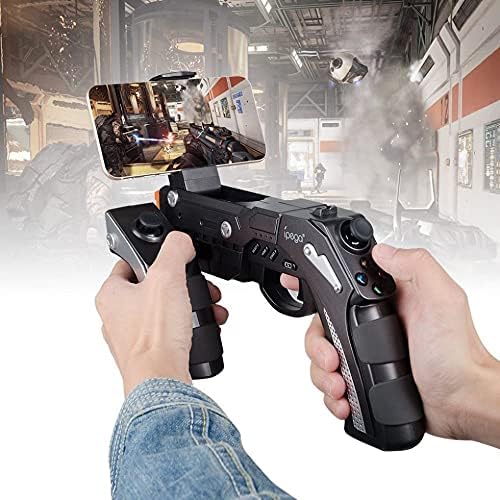
A user is shown holding the ipega PG-9057 Wireless Game Controller with a smartphone securely attached, actively engaged in mobile gaming.
- Extend the phone holder located on the top of the controller.
- Carefully place your smartphone into the holder, ensuring it is securely gripped.
- Connect the controller to your smartphone via Bluetooth as described in Section 4.3.1.
- Launch your desired game and configure controller settings if necessary.
6. నిర్వహణ
To ensure the longevity and optimal performance of your ipega PG-9057 controller, follow these maintenance guidelines:
- శుభ్రపరచడం: Use a soft, dry cloth to wipe the surface of the controller. Do not use harsh chemicals or abrasive cleaners.
- నిల్వ: నియంత్రికను ప్రత్యక్ష సూర్యకాంతి మరియు తీవ్రమైన ఉష్ణోగ్రతలకు దూరంగా చల్లని, పొడి ప్రదేశంలో నిల్వ చేయండి.
- చుక్కలను నివారించండి: Protect the controller from drops and impacts, as this can damage internal components.
- ఛార్జింగ్: Do not overcharge the battery. Disconnect the charging cable once the controller is fully charged.

The ipega PG-9057 Wireless Game Controller is shown, emphasizing its construction from high-quality, durable ABS material.
7. ట్రబుల్షూటింగ్
If you encounter issues with your controller, please refer to the following common solutions:
- కంట్రోలర్ కనెక్ట్ కావడం లేదు:
- కంట్రోలర్ పూర్తిగా ఛార్జ్ అయ్యిందని నిర్ధారించుకోండి.
- Verify that Bluetooth is enabled on your device and the controller is in pairing mode.
- కంట్రోలర్ మరియు మీ పరికరం రెండింటినీ పునఃప్రారంభించి ప్రయత్నించండి.
- If using USB, ensure the cable is securely connected and try a different USB port.
- బటన్లు లేదా జాయ్స్టిక్లు స్పందించకపోవడం:
- Check if the controller is properly connected to your device.
- Restart the controller and reconnect.
- మీరు ఆడుతున్న ఆట బాహ్య కంట్రోలర్లకు మద్దతు ఇస్తుందని నిర్ధారించుకోండి.
- లాగ్ లేదా ఇన్పుట్ ఆలస్యం:
- Ensure there are no obstructions or excessive distance between the controller and your device.
- ఇతర వైర్లెస్ పరికరాల నుండి జోక్యాన్ని తగ్గించండి.
- For critical gaming, consider using a wired USB connection if supported by your device.
8. స్పెసిఫికేషన్లు
| స్పెసిఫికేషన్ | విలువ |
|---|---|
| బ్రాండ్ | ipega |
| మోడల్ | PG-9057 |
| అనుకూల పరికరాలు | ఆండ్రాయిడ్, విండోస్ |
| కంట్రోలర్ రకం | గేమ్ ప్యాడ్ |
| కనెక్షన్ టెక్నాలజీ | వైర్లెస్ |
| ఫీచర్లు | వైర్లెస్ |
| అనుకూల అంశాలు | ఆండ్రాయిడ్, విండోస్ |
| కనెక్షన్ పద్ధతి | వైర్లెస్ |
| ప్రత్యేక లక్షణాలు | వైర్లెస్ |
| హార్డ్వేర్ ప్లాట్ఫారమ్ | సెట్-టాప్ బాక్స్ |
| శక్తి మూలం | బ్యాటరీ ఆధారితమైనది |
| Number of Package Items | 1 |
| UPC | 602747571722 |
| ASIN | B018TSBFE4 |
| GTIN | 602747571722 |
9. వారంటీ మరియు మద్దతు
For warranty information and customer support, please refer to the documentation provided with your purchase or visit the official ipega webసైట్. ఏవైనా వారంటీ క్లెయిమ్ల కోసం మీ కొనుగోలు రుజువును ఉంచుకోండి.