
1. పరిచయం
The Perixx PERIDUO-712B is a compact wireless keyboard and mouse combo designed for efficiency and convenience. This set includes a space-saving mini keyboard and a 3-button optical mouse, ideal for various environments such as home, office, or travel. It features a stable 2.4 GHz wireless connection and plug-and-play setup for immediate use.

Image 1.1: The Perixx PERIDUO-712B Wireless Mini Keyboard and Mouse Set, showcasing its compact design and included nano receiver.
ప్యాకేజీ విషయాలు:
- 1 x వైర్లెస్ కీబోర్డ్
- 1 x వైర్లెస్ మౌస్
- 1 x USB నానో రిసీవర్
- 1 x యూజర్ మాన్యువల్ (ఈ పత్రం)
2. ప్రారంభించడం (సెటప్)
Follow these steps to set up your Perixx PERIDUO-712B wireless keyboard and mouse set.
2.1 బ్యాటరీ ఇన్స్టాలేషన్
- కీబోర్డ్: Locate the battery compartment on the underside of the keyboard. Insert two (2) AA alkaline batteries (not included), ensuring correct polarity.
- మౌస్: Locate the battery compartment on the underside of the mouse. Insert one (1) AA alkaline battery (not included), ensuring correct polarity.
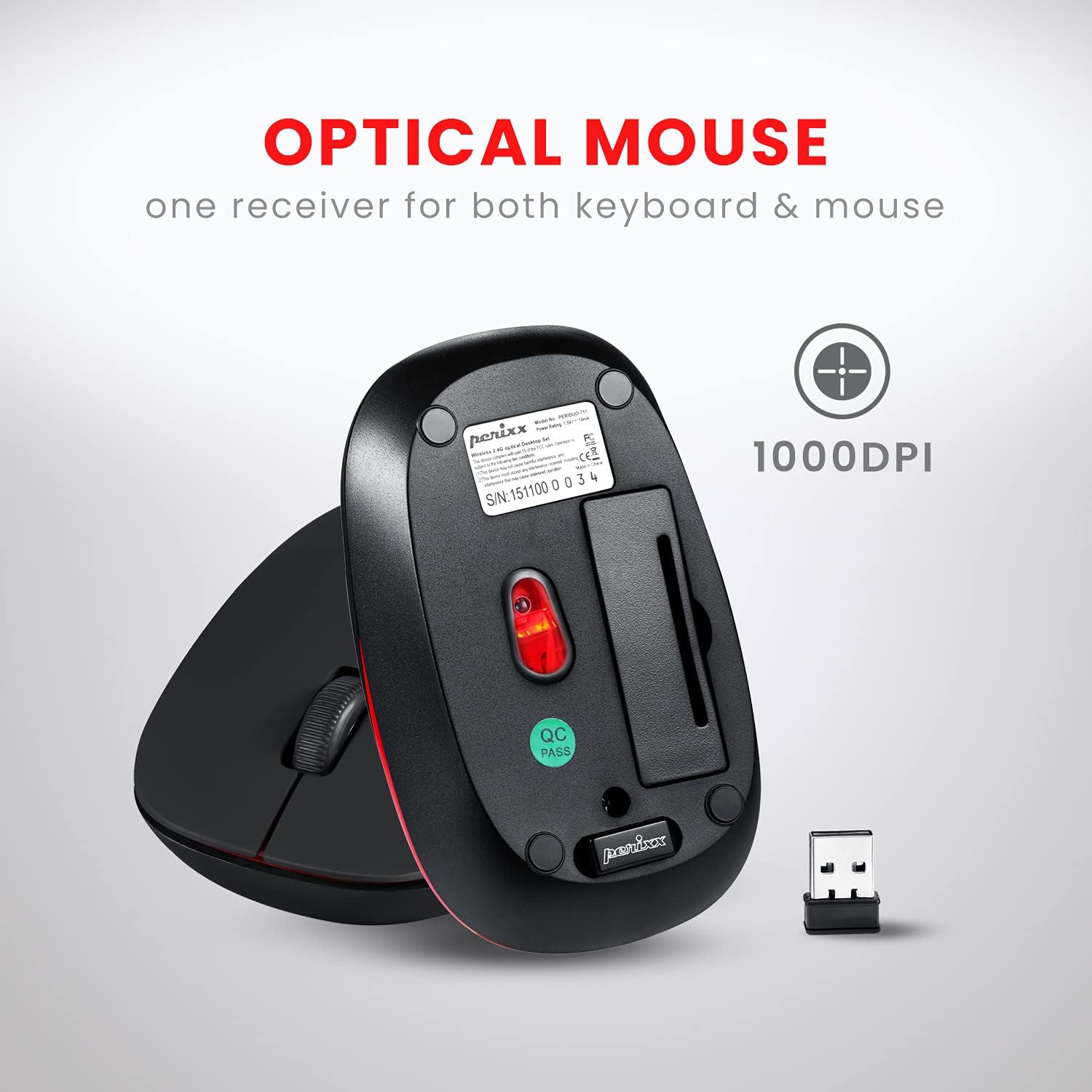
Image 2.1: Underside of the mouse, indicating the battery compartment and the storage slot for the USB nano receiver.
2.2 రిసీవర్ను కనెక్ట్ చేస్తోంది
The USB nano receiver connects both the keyboard and mouse to your computer.
- Remove the USB nano receiver from its storage slot on the underside of the mouse.
- USB నానో రిసీవర్ను మీ కంప్యూటర్లో అందుబాటులో ఉన్న USB పోర్ట్లోకి ప్లగ్ చేయండి.
- Your computer will automatically detect and install the necessary drivers. No additional software is required.
- The keyboard and mouse are now ready for use.
3. ఆపరేటింగ్ సూచనలు
3.1 కీబోర్డును ఉపయోగించడం
The keyboard features a low-profile design with membrane switches for comfortable and quiet typing. It has a standard US English QWERTY layout.

Image 3.1: Detailed diagram illustrating the keyboard layout, including standard keys and function key assignments.
Multimedia Function Keys (Fn + F1-F12):
The keyboard includes 12 integrated multimedia hotkeys for quick access to various functions. To activate these functions, press and hold the Fn key, then press the corresponding F-కీ (F1-F12).
- Fn + Esc: మీడియా ప్లేయర్
- Fn+F1: మునుపటి ట్రాక్
- Fn+F2: ప్లే/పాజ్ చేయండి
- Fn+F3: తదుపరి ట్రాక్
- Fn+F4: మ్యూట్ చేయండి
- Fn+F5: వాల్యూమ్ డౌన్
- Fn+F6: వాల్యూమ్ అప్
- Fn+F7: హోమ్
- Fn+F8: శోధన
- Fn+F9: ఇమెయిల్
- Fn+F10: కాలిక్యులేటర్
- Fn+F11: ఇష్టమైనవి
- Fn+F12: నా కంప్యూటర్

Image 3.2: Visual guide to the multimedia function keys and their corresponding actions.
3.2 మౌస్ ఉపయోగించడం
The 3-button optical mouse provides precise tracking and a comfortable grip with its soft rubber coating. It operates at 1000 DPI.
- ఎడమ క్లిక్ చేయండి: ప్రామాణిక ఎంపిక మరియు క్రియాశీలత.
- కుడి క్లిక్ చేయండి: సందర్భ మెను యాక్సెస్.
- స్క్రోల్ వీల్: Scroll documents and web పేజీలు. మిడిల్-క్లిక్ కార్యాచరణ కోసం కూడా నొక్కవచ్చు.

Image 3.3: The Perixx mouse, highlighting its ergonomic design, nano receiver, 3-button functionality, 30 ft operating range, and 75g weight.
4. సంరక్షణ మరియు నిర్వహణ
- శుభ్రపరచడం: కీబోర్డ్ మరియు మౌస్ను శుభ్రం చేయడానికి మృదువైన, పొడి వస్త్రాన్ని ఉపయోగించండి. మొండి ధూళి కోసం, కొద్దిగా dampen గుడ్డను నీటితో లేదా తేలికపాటి శుభ్రపరిచే ద్రావణంతో తుడవండి. కఠినమైన రసాయనాలు లేదా రాపిడి పదార్థాలను నివారించండి.
- బ్యాటరీ భర్తీ: Replace batteries when performance degrades. Always use fresh alkaline batteries of the specified type (AA).
- నిల్వ: When not in use for extended periods, remove batteries to prevent leakage. Store the USB nano receiver in its dedicated slot on the mouse to prevent loss.
- పర్యావరణం: Avoid exposing the devices to extreme temperatures, direct sunlight, or excessive moisture.
5. ట్రబుల్షూటింగ్
If you encounter issues with your PERIDUO-712B set, refer to the following common solutions:
| సమస్య | పరిష్కారం |
|---|---|
| కీబోర్డ్ లేదా మౌస్ స్పందించడం లేదు |
|
| అడపాదడపా కనెక్షన్ లేదా లాగ్ |
|
| మౌస్ ట్రాకింగ్ సమస్యలు |
|
| Caps Lock indicator light behaves erratically |
|
6. సాంకేతిక లక్షణాలు

Image 6.1: Technical drawing showing precise dimensions of the keyboard and mouse.
| ఫీచర్ | వివరాలు |
|---|---|
| మోడల్ | PERIDUO-712B |
| కనెక్టివిటీ | 2.4 GHz వైర్లెస్ |
| ఆపరేటింగ్ రేంజ్ | 30 అడుగుల (10 మీ) వరకు |
| కీబోర్డ్ కొలతలు | 11.46 × 5.43 × 0.77 అంగుళాలు (291 x 138 x 19.5 మిమీ) |
| కీబోర్డ్ బరువు | 0.78 పౌండ్లు (సుమారు 354గ్రా) |
| కీబోర్డ్ లేఅవుట్ | US English QWERTY, 84 keys |
| మౌస్ కొలతలు | 4.09 × 2.44 × 1.33 అంగుళాలు (104 x 62 x 34 మిమీ) |
| మౌస్ బరువు | సుమారు 75గ్రా |
| మౌస్ DPI | 1000 DPI |
| శక్తి మూలం | Keyboard: 2 x AA batteries; Mouse: 1 x AA battery (not included) |
| అనుకూల OS | Windows 7, 8, 10, 11 (and older versions like XP, Vista) |
7. వారంటీ మరియు మద్దతు
7.1 వారంటీ సమాచారం
The Perixx PERIDUO-712B Wireless Mini Keyboard and Mouse Set is backed by a 12 నెలల పరిమిత వారంటీ. This warranty covers manufacturing defects from the date of purchase. Please retain your proof of purchase for warranty claims.
7.2 కస్టమర్ మద్దతు
For technical assistance, warranty claims, or general inquiries, please visit the official Perixx website or contact their customer support directly. Information regarding spare USB receivers can also be found on the Perixx website or Amazon.
తయారీదారు: పెరిక్స్ కంప్యూటర్ GmbH
మరింత సమాచారం కోసం, సందర్శించండి: Perixx Store on Amazon